This screen takes a spreadsheet of bookings you already have somewhere else and turns them into Prostay reservations. It is a migration tool, used once when you move in and occasionally afterwards when a group arrives as a list rather than as bookings. Everything it creates is an ordinary reservation afterwards, editable and cancellable like any other.
Nothing is created until you have seen every row on screen and pressed Submit Import. Uploading a file is safe; it fills a table and nothing more.
The template, and the column it is missing
Download Template gives you a CSV with thirty-seven columns and two example rows. Match your export to it and most of the work is done.
It does not matter what the values look like, only that lines sharing a booking share a value. Your old system's own reference is the obvious thing to use. Once the column exists every line needs a value in it: a line left blank is skipped without a word, so a file that imports fewer bookings than you expected is worth checking for gaps in that column first.
The columns that are read
The template carries thirty-seven columns because it came from a system that had that many. Prostay reads twelve of them, and the rest are carried along and ignored. There is no harm in leaving them in.
| Column | What it becomes |
|---|---|
| Rsv No | The grouping key. Not part of the reservation itself. Add it yourself; the template omits it. |
| Reservation Name | The booking source, such as Booking.com. Despite the name, this is not a person. |
| Guest Name | The guest, written surname first: Hart, Amelia Ms. The title is dropped. |
| Arrival, Departure | Check-in and check-out, as DD/MM/YY. |
| Nights | Checked against the two dates. A mismatch is flagged rather than corrected. |
| Room Type | The accommodation type's abbreviation, exactly as your property spells it. This is the column that most often stops an import. |
| Room Rate | The money on the row. Commas and decimals are handled. |
| Qty | How many rooms of that type this line is for. Blank counts as one. |
| Adult, Child, Infant | Occupancy. At least one adult or one child is required. |
| Comp Adult, Comp Child | Occupancy on a complimentary room, which is a row with a rate of zero and one of these filled in. |
| Flight Arrival Number, Flight Departure Number | Carried onto the reservation as they are. |
How lines become reservations
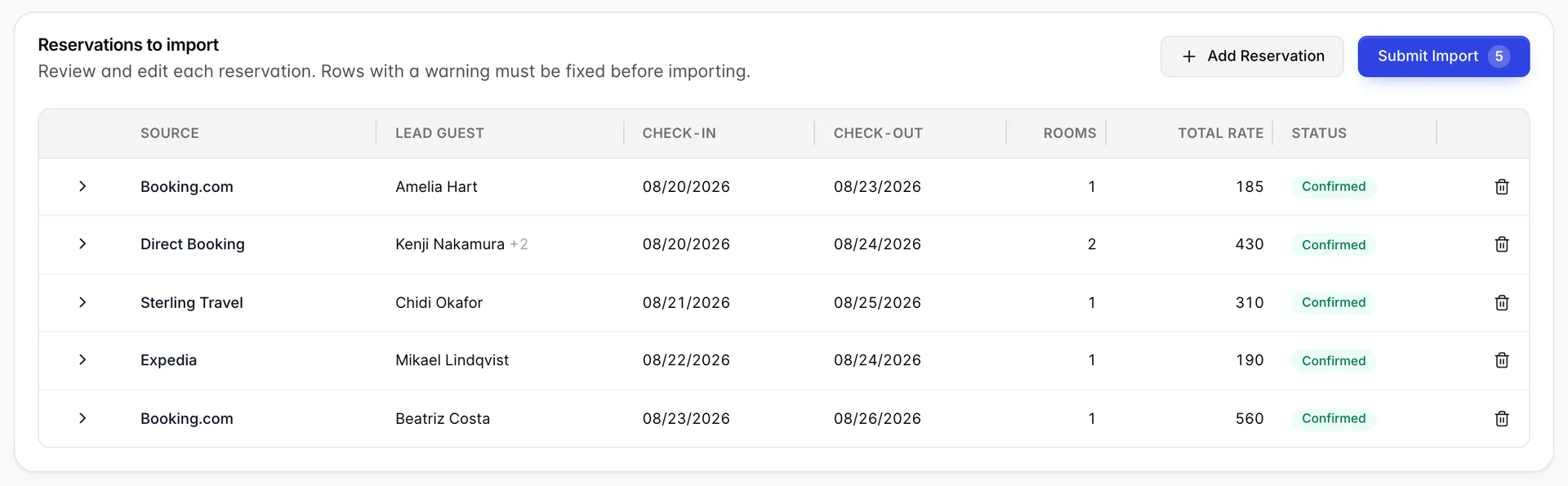
A reservation is every line sharing an Rsv No. Within that group, a line with a rate on it adds a room, and a line without one adds a guest to the reservation. That is how a family of three in two rooms is described: three lines, one number.
The same seven lines with the Rsv No column deleted, which is exactly what the shipped template gives you, produce this instead.
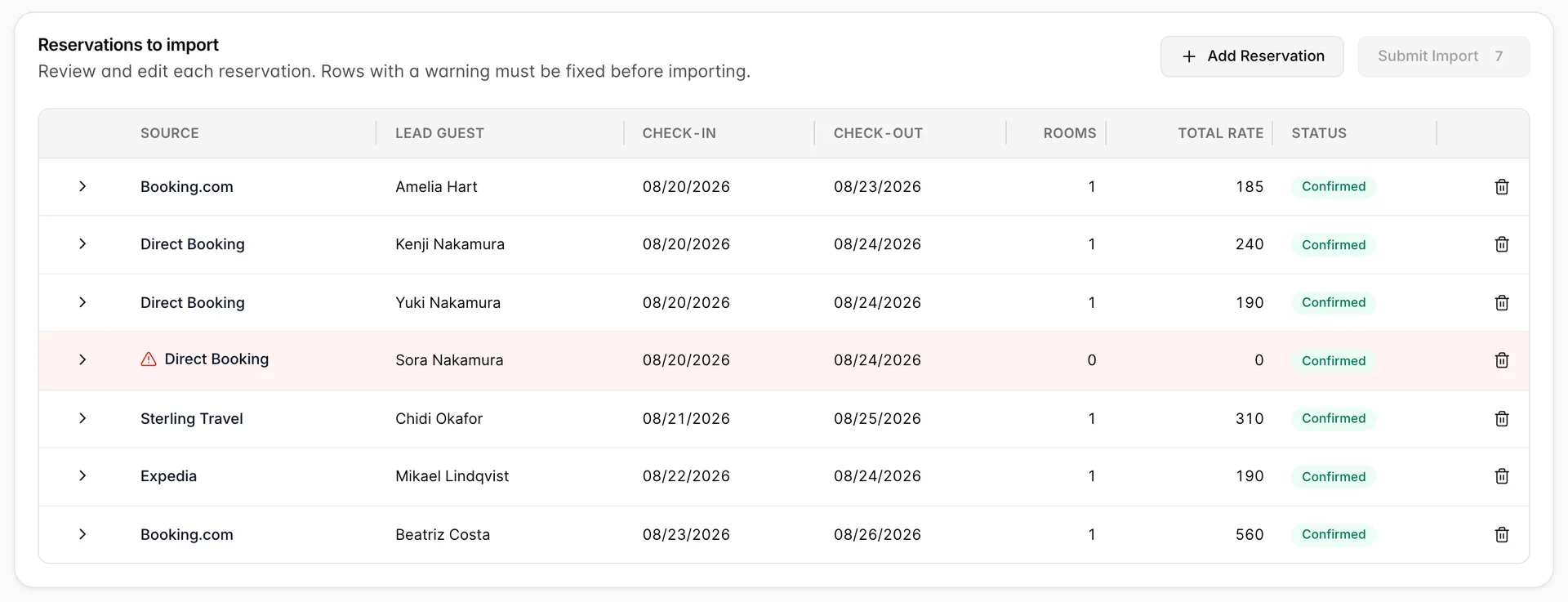
The row with no rooms is the one to notice. It cannot be imported, and while it is on screen Submit Import is unavailable, so one missing column stops the entire file rather than the line it affected.
Reviewing what was parsed
Press Import CSV, drop the file in and press Import. The drawer closes and the table fills.
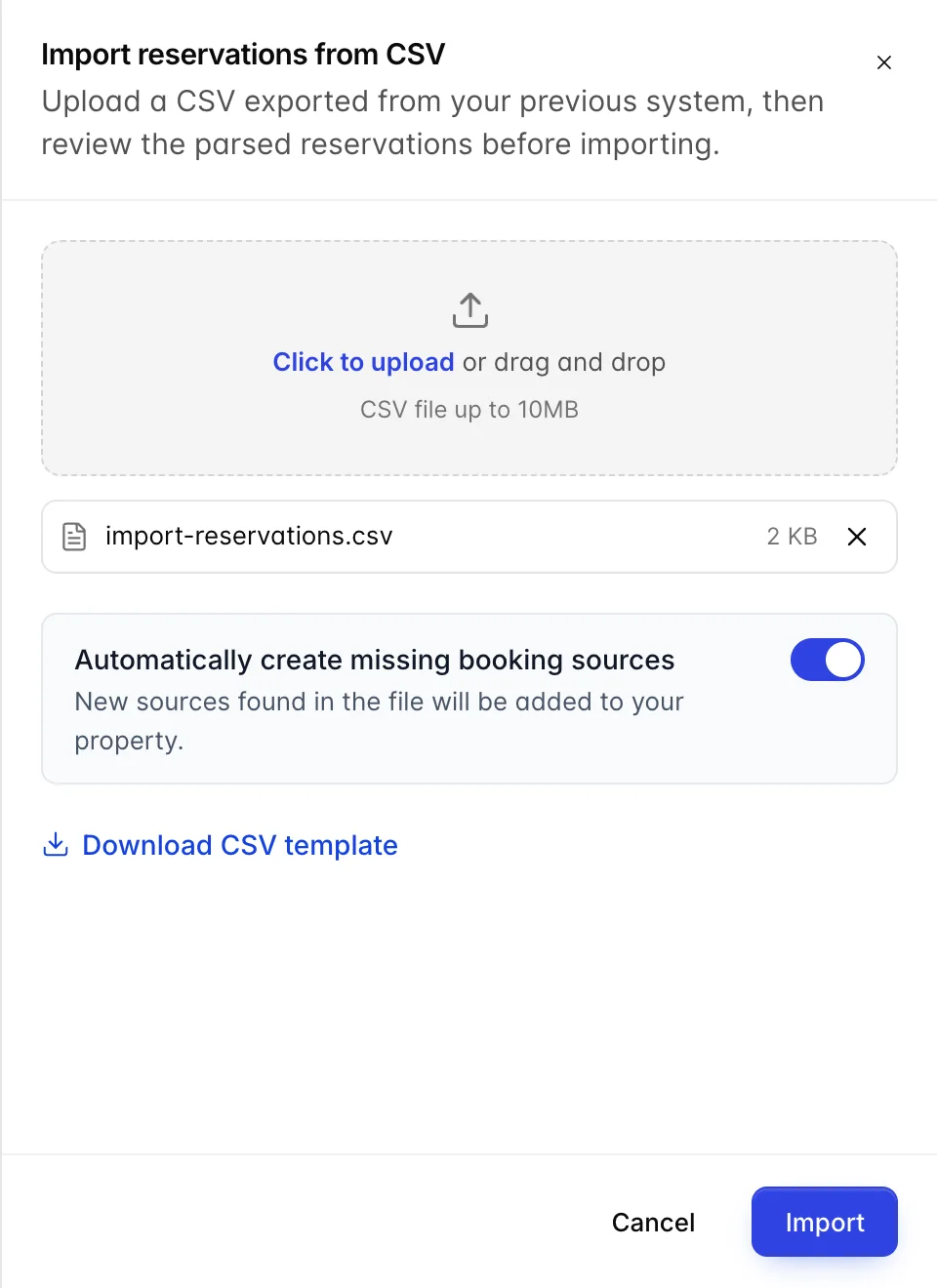
Automatically create missing booking sources decides what happens when the file names a source you do not have. With it on, the source is created as part of the import. A source named in the file that your property does not have yet is shown in the reservation's source picker with (new) after it, so you can see what is about to be created before you agree to it.
As the table fills, a message says how many reservations came out of how many lines: green across the top of the screen if every row is clean, red above the table if any is not. Reading it is worth the two seconds. If the count of reservations equals the count of lines in a file you know contains a two-room booking, the grouping column is missing.
Fixing a flagged row
Rows the screen cannot accept are marked, and the reasons are listed on the row. The commonest by a distance is a room type: the file says DBL and your property calls it STDD.
Press the arrow at the start of a row to open its editor. Everything is editable here, and edits stay in the browser until you submit, so nothing is at risk while you work.
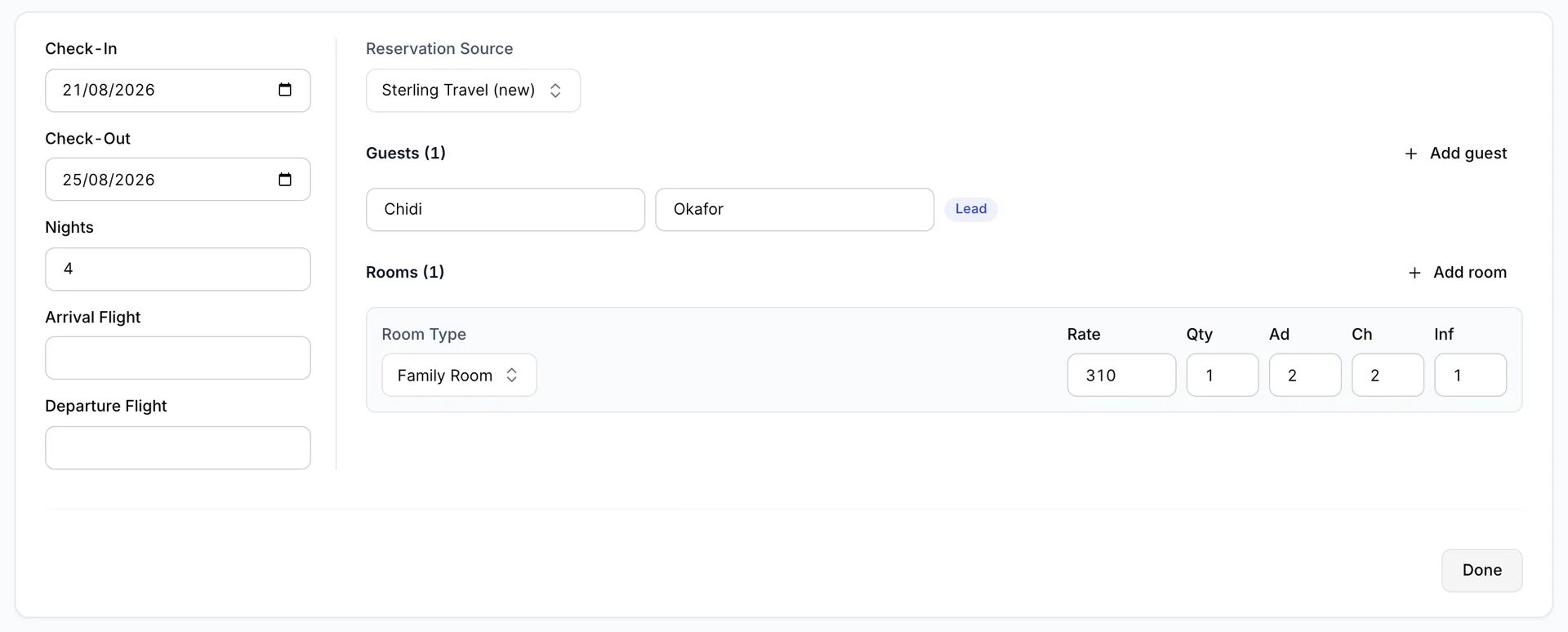
- Room Type is a dropdown of your property's accommodation types. Choosing the right one clears the error immediately.
- Reservation Source lists your booking sources. A source that came from the file and does not exist yet appears with (new) after it.
- Guests and Rooms both have an add button, so a booking the file described badly can be repaired here rather than in the spreadsheet. Exactly one guest carries the Lead marker.
- Nights is checked against the dates. Correct whichever of the three is wrong.
If a great many rows are flagged for the same reason, it is quicker to fix the spreadsheet and upload it again. A second upload replaces the table rather than adding to it.
Submitting, and partial imports
Submit Import becomes available once no row is flagged. It sends every reservation in the table at once.
The server applies one more set of rules that the browser cannot, and occupancy is the one you will meet: an accommodation type has a maximum number of adults and children, and a file that puts four adults in a twin room passes every check on this screen and is refused on arrival. When that happens the import is partial. Everything acceptable is created, the refusals are not, and a message names each one by row and by guest.

When everything is accepted the table empties and a confirmation appears. The reservations are in the calendar and the reservation list from that moment.
What Total Rate is telling you
Total Rate on each row is the sum of the Room Rate values of that reservation's rooms. It does not multiply by nights, it does not multiply by quantity, and it does not add tax or anything else. A three-night booking at 185 a night shows 185, and a two-room booking of 240 and 190 shows 430.
Treat it as a way of telling rows apart rather than as the value of the booking. Whether the number in your file is a nightly rate or a stay total depends on the system it came out of, and this screen does not ask.
Who can do this
The screen is gated on Individual reservations management., in the Reservations group of the role editor, which is the same permission as creating a reservation by hand. That is deliberate: an import creates reservations in bulk, so it is not a lesser right than creating one. Without it the screen says so and offers nothing. With view rights but not create, the screen opens and the buttons that would write are unavailable.
Where to go next
- Accommodation types, rooms and amenities, for the abbreviations your file has to match.
- The booking sources list, for what the auto-create switch adds to.
- Creating a reservation, for the one-at-a-time way.
- Who did what, and when, if you need to see afterwards which staff member ran an import.