A property that sells to guests abroad often wants to quote in their money rather than its own. Prostay supports that, and the important thing to understand before you start is that it does not work by conversion. You type a price in each currency, and that typed price is what the guest is charged. If you were expecting the system to take your dollar rate and divide it by an exchange rate every night, read the rest of this page before you open the grid.
What multi-currency actually does
With multi-currency on, a booking can be quoted and taken in one of your supported currencies. Every accommodation type then needs a price in that currency for the dates being sold, set on the same interval that carries the base price. There is no separate foreign rate table, and no separate screen.
Nothing about it is automatic. A currency added in settings does not price anything by itself, and an interval created before the currency was added has no price in it.
Where the currency list comes from
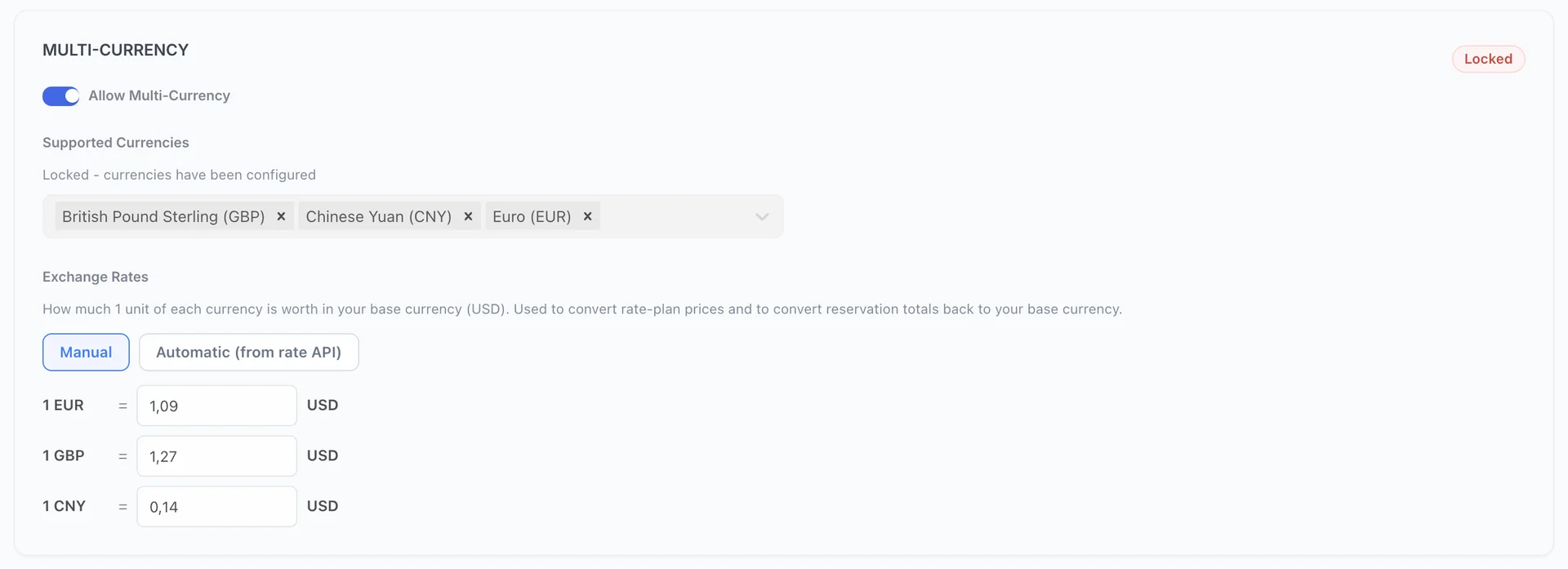
The card lives in Settings, under General System Settings, and it holds three things:
| Setting | What it decides |
|---|---|
| Allow Multi-Currency | Whether any of this exists. With it off, no foreign price grid appears anywhere in Rates and Availability. |
| Supported Currencies | Which currencies you sell in besides your own. Each one adds a grid to every interval you price from then on. |
| Exchange Rates | What one unit of each currency is worth in your own. Used for reporting and for add-ons, not for the room price. |
Your own currency, the one everything is reported in, is Application Currency higher up the same page. It cannot appear in the supported list, because it is not a foreign currency: it is the one the seven day boxes on an interval are already in.
Two decisions you cannot take back
The currency list locks too. While it is empty the page warns that once the list is saved, the supported currencies cannot be changed. After the first save the card is greyed, carries a Locked badge, and reads Locked - currencies have been configured. The three in the screenshot above are settled for good.
So the list is worth thinking about once rather than growing by accident. Add the currencies you genuinely intend to sell in. Every one you add is a grid of seven numbers on every interval of every accommodation type, forever.
What the exchange rates are for
This is the part that surprises people. The exchange rates do not price rooms. A room sells at the number you typed in that currency's grid, and if the rate moves the room's foreign price does not.
What the rates are used for:
- Converting a booking back to your own currency. A stay sold in euros still has to land in your reporting and on your folio in your own currency, and the rate is what does that.
- Add-ons without a fixed foreign price. An add-on priced only in your own currency is converted at the rate when it is sold in another one. Give it a fixed price per currency instead and that price is used verbatim, the same way room prices work.
The rates can be kept by hand or pulled from a rate service. Manual means you type them and they stay until you change them. Automatic (from rate API) updates them on the schedule you choose, shows when they were last updated, and offers an Update now button. In automatic mode a single currency can still be pinned with Override, which marks it Pinned and leaves the rest updating.
Foreign prices on an interval
Open any interval on Base Rates and look below the seven day boxes. There is a collapsed line.

It starts closed on every visit, including on an interval that already has foreign prices saved, so a closed section tells you nothing about whether the work has been done. Open it.
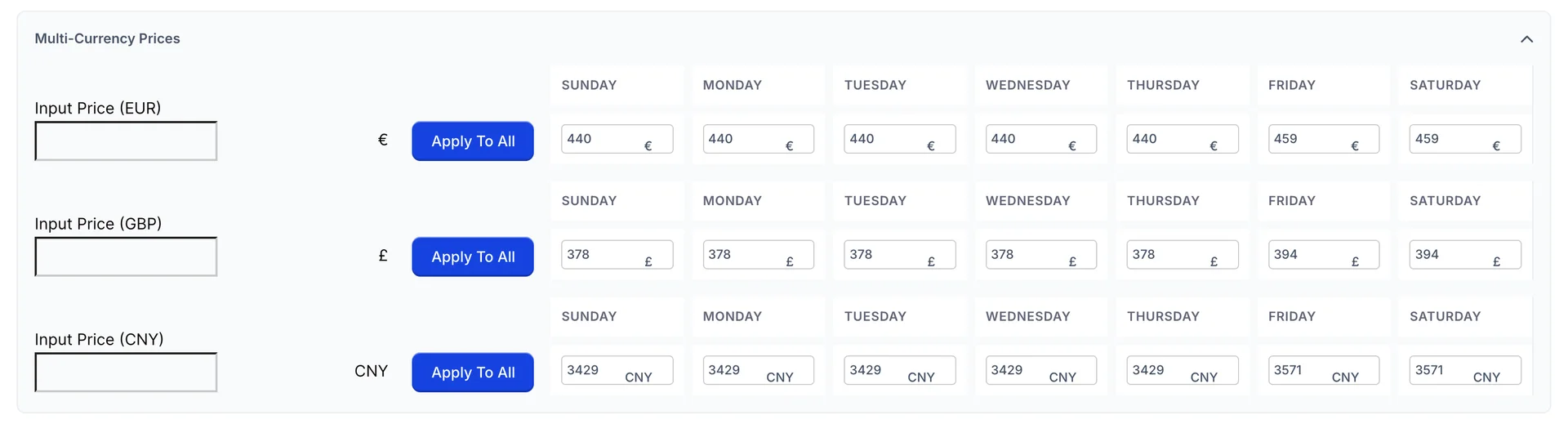
Each supported currency gets the same arrangement as the base currency above it: an Input Price box with Apply To All beside it, and seven day boxes from Sunday to Saturday. The button fills that currency's seven days with the figure in its own box, and touches nothing else.
Extra guests in each currency
If the interval charges for additional adults or children, the per person card gets its own foreign section, headed Multi-Currency Per Person Pricing and collapsed in the same way. Inside there is one block per currency, with the same rows the base currency block has.

The Save button beside a row is a fill button, exactly as it is in the base currency block: it copies that row's figure across its seven days. The interval itself is saved by the button at the bottom of the page.
Blank grids and zero prices
The base currency grid is protected. You cannot save an interval with a zero in any of its seven days. None of that protection extends to the foreign grids, and the two ways of leaving one incomplete behave very differently.
| What you left behind | What the guest gets |
|---|---|
| The section never opened, so the currency has no price at all. | The accommodation type is not offered for those dates when the booking is being quoted in that currency. It simply does not appear. |
| The section opened and left at zero. | The type is offered, at nothing. A zero is a price as far as the system is concerned. |
What a guest ends up paying
When a booking is quoted in a foreign currency, the nightly price is the figure from that currency's grid, used as it stands. It is not the base price converted, and it is not checked against the exchange rate, so a euro grid left at last year's numbers will keep selling at last year's numbers.
A booking is in one currency from beginning to end. Once a room is in the basket the currency is locked for that reservation, which stops a folio ending up with dollars on one line and euros on the next. The totals are converted back to your own currency behind the scenes for reporting, using the exchange rates.
Where foreign prices do not appear
- The Base Rates list. The rows show dates, stay rules and priced days. No prices at all, in any currency.
- The availability matrix. Its rate row is in your own currency only. There is no way to see a euro price there, and no way to override one for a single date. See the availability matrix.
- The occupancy grid. No prices of any kind. See the occupancy grid.
Rate plans carry their own foreign prices, set the same way on their own pricing intervals, and covered in pricing intervals on rate plans.