The folio is the guest's bill. Every charge the stay has picked up and every payment taken against it, listed in the order they happened, with a running balance underneath. When somebody rings the desk to ask what a number on their card statement was for, this is the screen that answers it.
What a folio is
A folio is a container for transactions, not a document. It is not produced at check-out and it is not the invoice. The invoice is printed from a folio, and one folio can produce several invoices over a long stay. The folio itself exists from the moment the booking does, and it keeps filling up until the guest leaves.
Two rules make everything else on this screen make sense:
- A folio only ever grows. Nothing is edited and nothing is deleted. A mistake is corrected by adding a line that cancels it out: a void, a credit or an adjustment. The history of what happened stays intact. That is a legal requirement in most places and an audit requirement everywhere.
- One booking can carry more than one folio. The usual reason is that somebody else is paying part of the bill: the company settles the room and the tax, the guest settles their own bar tab. Two folios, one stay.
The tab
Open any booking and click Folio. There is no count badge on this tab, unlike Rooms or Guest, a folio with nothing on it and a folio with forty lines look identical until you open it.
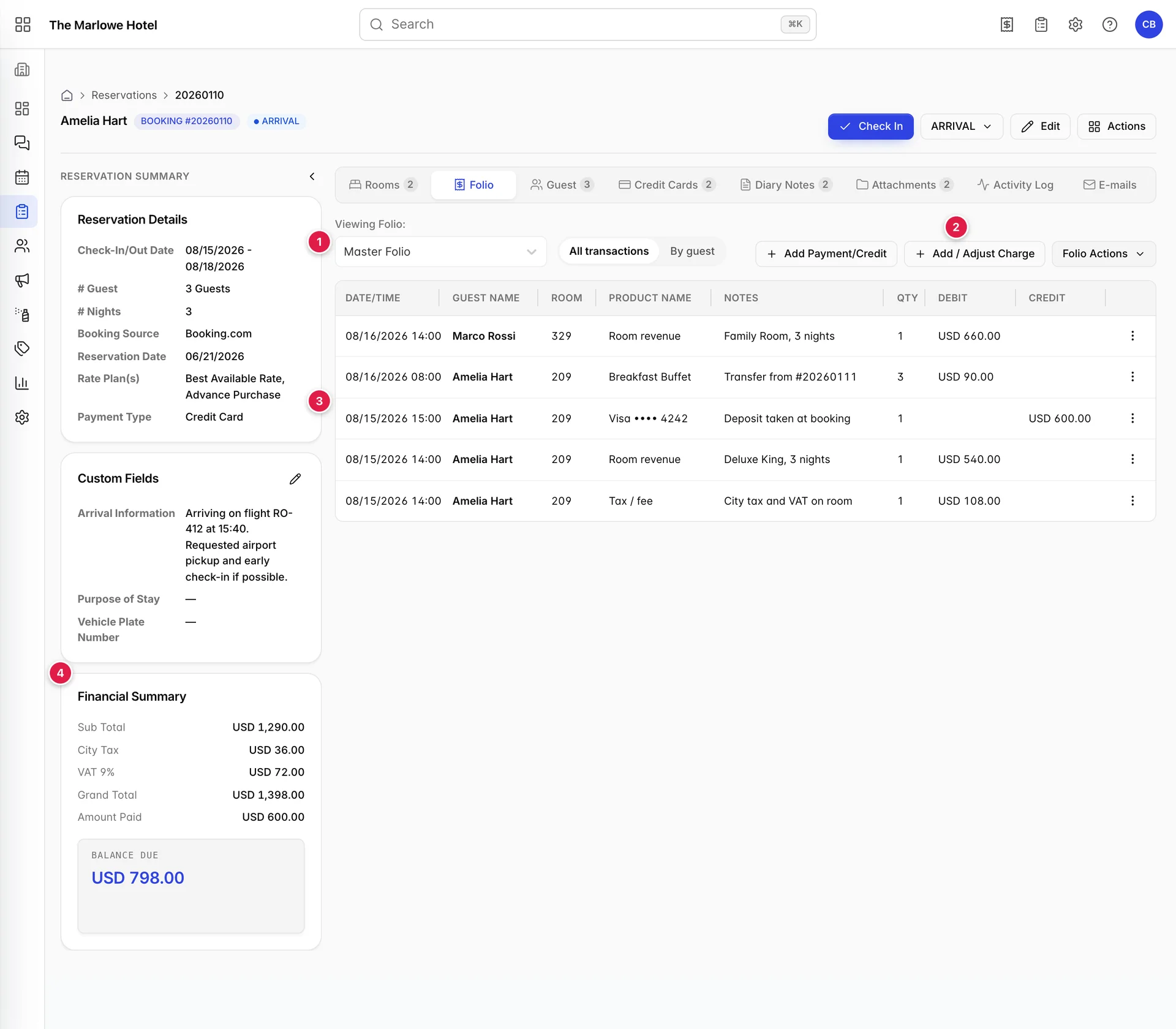
- Which folio you are looking at. Plus a switch between the flat list and the by-guest breakdown.
- The three ways to add to it. Payments and credits, charges and adjustments, and the folio-level actions.
- The transactions. Newest first.
- The totals. In the rail, where they stay visible from every other tab.
This is the widest tab on the reservation page. The chevron at the top of the summary rail collapses it and gives the table about 350 extra pixels, which is the difference between reading the Notes column and guessing at it.
The toolbar

- Viewing Folio. Which of the booking's folios the table below is showing. One at a time, never all of them at once.
- All transactions / By guest. The same lines, either in one flat list or grouped under the person they belong to.
- Add Payment/Credit. Money coming in, or coming back out, a payment, a credit or a refund.
- Add / Adjust Charge. Money owed. Items from the catalogue, taxes and fees, extra room revenue, and corrections to a line that is already there.
- Folio Actions. Things that act on the folio as a whole rather than on one line: transferring postings, and separating shares on a booking that several people are splitting.
All three buttons are covered in Posting charges, payments and refunds. If you cannot see them at all, your user is restricted on this booking. See Things that catch people out.
Choosing which folio to look at
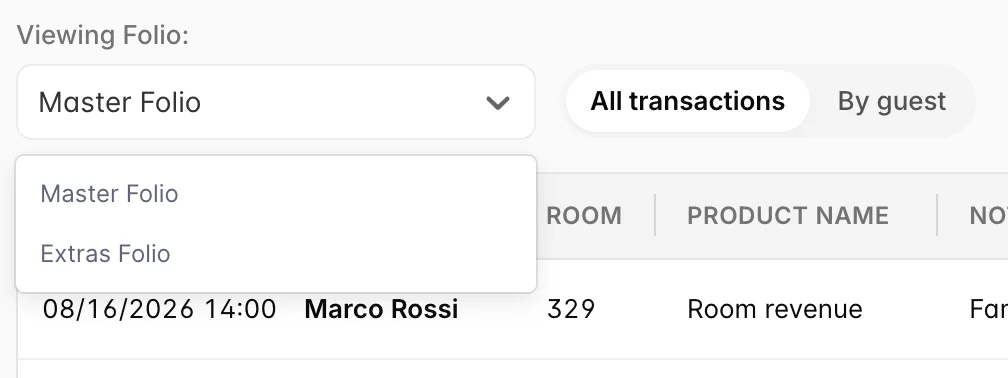
Which folios exist, and what lands on each by default, is set up per property rather than per booking. A folio configuration can be tied to particular booking sources and particular payment types, so a booking that arrives from an OTA can be routed to a different folio from a walk-in without anybody choosing.
The one on the list marked as the default is what opens first. If a charge you expected is not in the table, check the dropdown before you post it again: on a booking with two folios, half the bill is always one click away.

A second folio starts empty and stays empty until something is posted straight onto it or moved onto it from the master. It is not broken and it does not need creating: it is a bill nobody has put anything on.
The transaction table
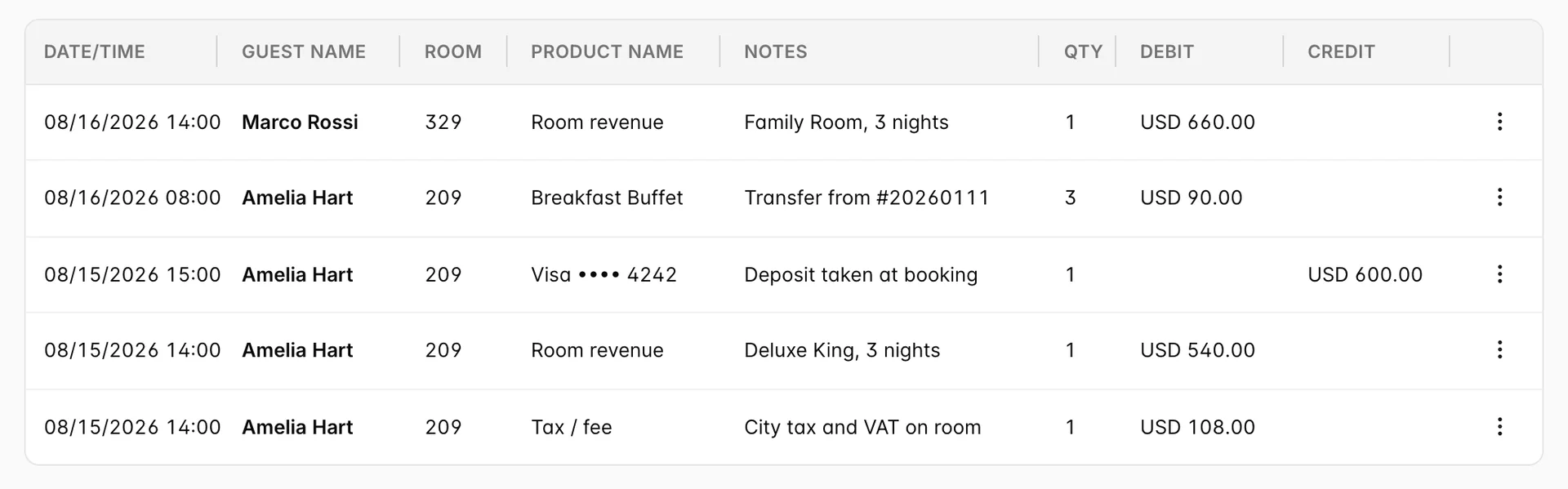
Rows are sorted newest first and every column can be clicked to sort by it. Sorting is for reading only; it changes nothing about the folio.
| Column | What it holds |
|---|---|
| DATE/TIME | When the line was posted, not what it is for. A three-night room charge posted on arrival is dated the day of arrival, and the room rate for the last night carries the same timestamp as the first. |
| GUEST NAME | Who the line is assigned to. On a single-guest booking this is the same name on every row. On a shared booking it is what the By guest view groups by, and what decides whose invoice the line appears on. |
| ROOM | The room number the charge came from. Blank on charges that are not tied to a room, such as a payment taken at the desk. |
| PRODUCT NAME | What the line is. Catalogue items show their own name; room revenue, taxes and fees show what kind of line they are; a payment shows the payment method, so a card payment reads as the card type and last four digits. |
| NOTES | Free text, typed when the line was posted or written by the system. This is where a transfer records where it came from, and where the reason for an odd-looking charge should be. |
| QTY | How many. Meaningful on catalogue items and credits; always 1 on room revenue, taxes and payments, whatever the amount. |
| DEBIT | Money the guest owes. Room revenue, taxes and fees, items, point-of-sale postings and refunds. |
| CREDIT | Money the guest has handed over or been given back off the bill. Payments and credits. |
Debit and credit
Every line lands in exactly one of the two money columns, and which one it lands in is fixed by the kind of transaction it is. Nothing on the folio is ever negative, a reduction is a line in the opposite column, not a minus sign.
| Kind of line | Column | What it is |
|---|---|---|
| Room revenue | DEBIT | The nightly rate. Posted per room, per stay. |
| Tax / fee | DEBIT | City tax, VAT, resort fees. Posted separately from the room so the rate stays readable. |
| Item | DEBIT | Anything from the product catalogue: breakfast, parking, a spa treatment. An item included in the rate posts at zero and says so. |
| Point of sale | DEBIT | A charge sent over from the restaurant or bar and billed to the room. |
| Refund | DEBIT | Money given back to the guest. It is a debit because it increases what they owe again, you have handed cash back, so the bill goes up. |
| Payment | CREDIT | Money received. Card, cash, bank transfer, deposit at booking. |
| Credit | CREDIT | Money taken off the bill without anybody paying it, a goodwill gesture, a compensation, a discount applied after the fact. |
What you can do to one line
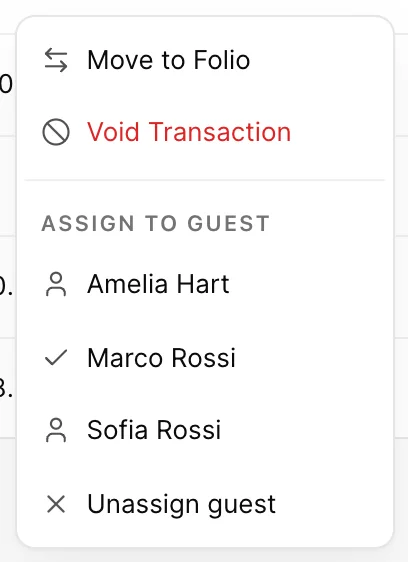
| Item | What it does |
|---|---|
| Move to Folio | Sends the line to one of the booking's other folios. The charge is unchanged; only which bill it sits on changes. |
| Void Transaction | Cancels the line. It disappears from the table and stops counting towards the balance, but it is not deleted, the record of it stays behind the scenes. |
| View Receipt | Only on point-of-sale lines. Opens the original till receipt, itemised, so you can tell a guest exactly what the USD 84 in the restaurant was. |
| Assign to guest | Only on bookings with more than one guest. Moves the line to another guest's name, which is what decides whose invoice it lands on. A tick marks who it belongs to now, and Unassign guest takes it off everybody. |
Moving and voiding are covered in full, including what happens to the totals, in Posting charges, payments and refunds.
The By guest view
Switch the toolbar to By guest and the same transactions are dealt out into one panel per person, each with its own totals.
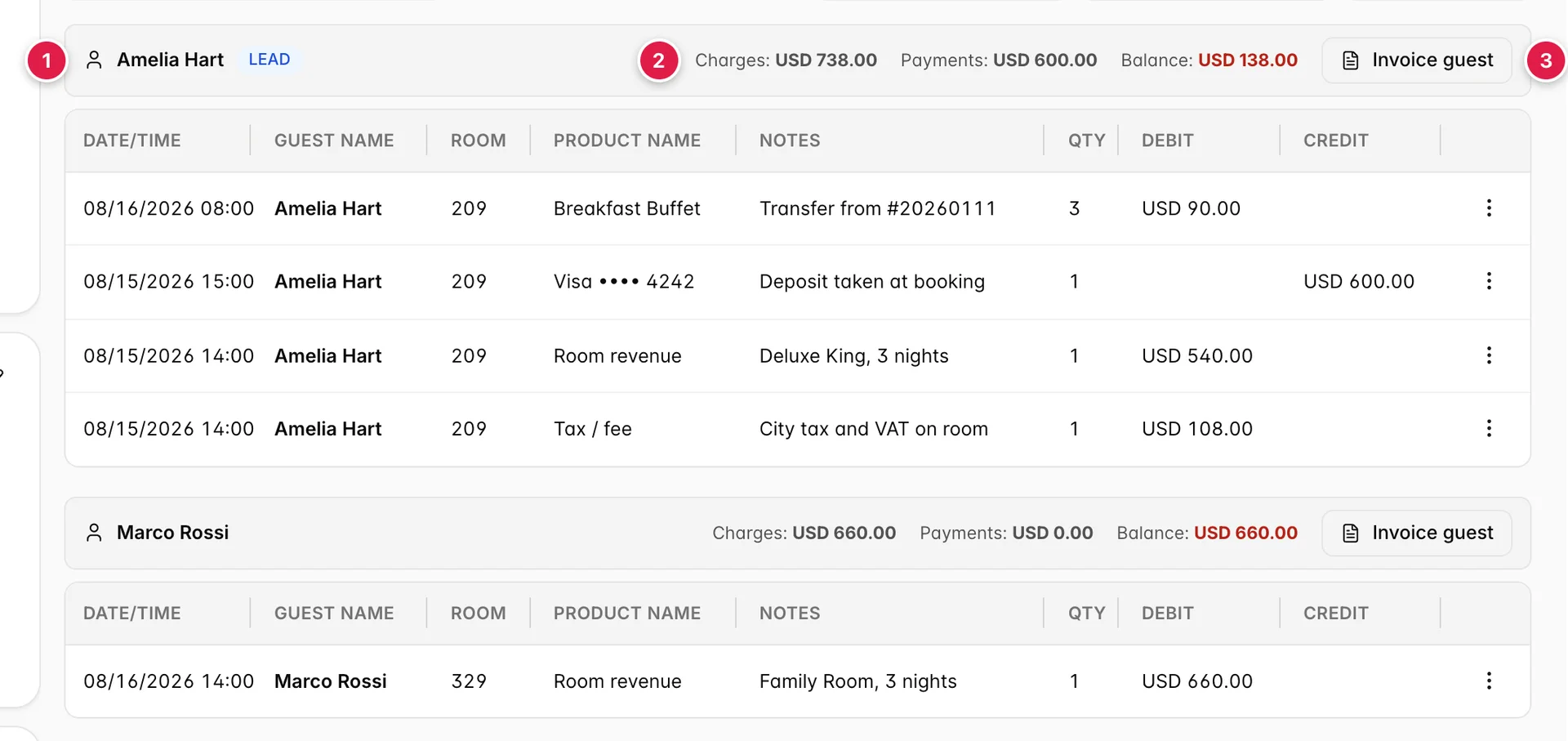
- Who the group is for. The person the lines are assigned to, with a LEAD badge on whoever made the booking.
- That person's totals. Charges, payments and the balance between them, counting only the lines in this group. The balance turns red while it is above zero.
- Invoice guest. Produces an invoice for this person's lines alone, rather than for the whole folio.
Lines that are not assigned to anybody collect in a final group called Unassigned, which sits after all the named ones. If a guest's group is missing entirely, none of their lines have been assigned to them, use Assign to guest on the rows in question and the group appears.
The groups add up to the folio. Two guests at USD 738.00 and USD 660.00 of charges is the USD 1,398.00 grand total in the rail; the view splits the money up, it does not change it.
How the balance is worked out
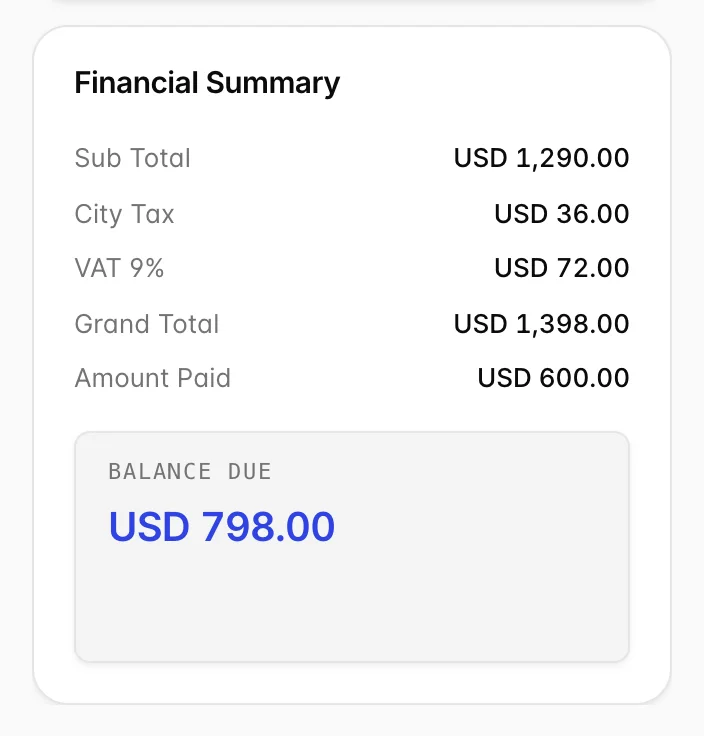
| Row | What it is |
|---|---|
| Sub Total | Every charge before tax. Room revenue plus items. |
| Each tax, on its own line | One row per tax that applies, named as it is named in your tax setup. Listing them separately is what lets a guest see why the total is more than the rate they were quoted. |
| Grand Total | Sub total plus the taxes. What the stay costs. |
| Amount Paid | Everything received so far, across all folios on the booking. |
| Balance Due | Grand total minus amount paid. What is still owed. |
Things that catch people out
| What you see | Why |
|---|---|
| No buttons on the toolbar at all | Your user is on the booking's restricted list. Restricted users can read the folio but cannot post to it, and the three-dot menus disappear with the buttons. An administrator manages the list from the booking's Actions dialog. |
| A charge you posted is not in the table | Almost always the wrong folio is selected. Check the Viewing Folio dropdown first, then check whether somebody has moved or voided the line, the Activity Log tab records both. |
| A line vanished and the balance changed | It was voided. Voided lines are hidden from the table by design, so the bill you show a guest is the bill they owe. The Activity Log is where you find out who voided it and when. |
| An item priced at "0 (Included)" | The item is bundled into the room rate. It appears on the folio so the guest can see they received it, at zero, because they have already paid for it inside the rate. |
| Room revenue for three nights on one line | Normal. The rate is posted for the stay rather than per night, so a three-night stay is one line at three nights' value, dated when it was posted. The Rooms tab is where you see the nightly breakdown. |
| A line marked Pending approval | An adjustment has been raised against that charge and is waiting for somebody with approver rights to sign it off. The amount does not count towards the balance until it is approved. |