This is the longest settings screen in Prostay and the one with the widest blast radius. Four sections, one Save Changes button at the top, and decisions here that show up on a guest's invoice, in a channel's availability feed and in the arithmetic that converts a euro rate into your accounting currency. Two of them cannot be undone once used.
Format preferences
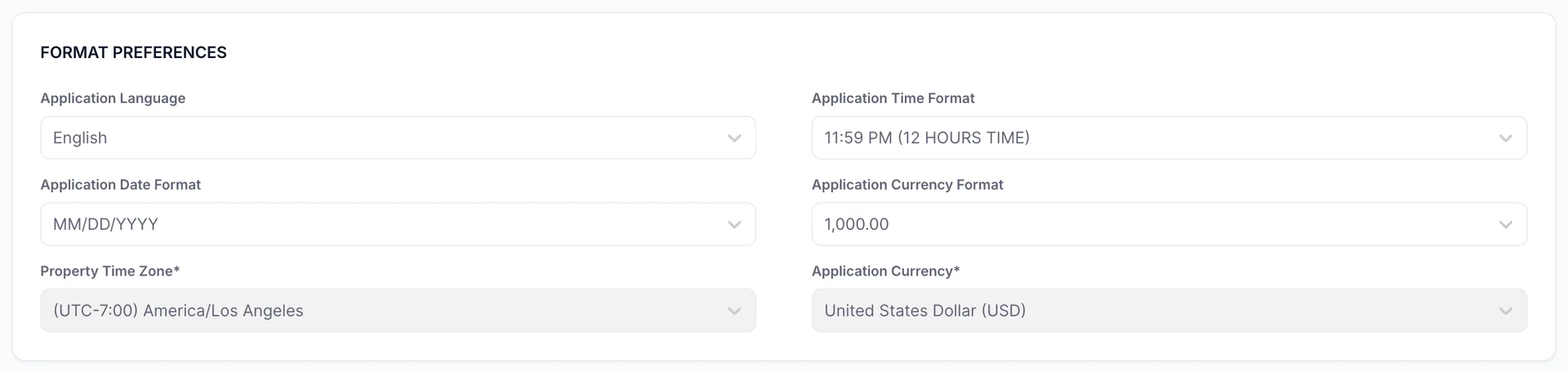
These are presentation, with one exception. Language, date format, time format and number format change how things are written and nothing about what they mean. Get them wrong and nobody is harmed, they are just annoyed.
Property Time Zone is the exception, and it is marked required for a reason. It is the zone every date in the product is anchored to. A property in Los Angeles set to a European zone will show tonight's arrivals under tomorrow's date for most of the working day, and every report that groups by date will be wrong at the edges. Set it once, correctly, when the property is created.
Application Currency is your accounting currency. It is what the folio totals in, what invoices are issued in, and the base every other currency is measured against. Changing it later does not reprice anything, which means the numbers stay the same and the symbol in front of them changes. Do not treat it as a way to switch currency.
Currency, and why it locks
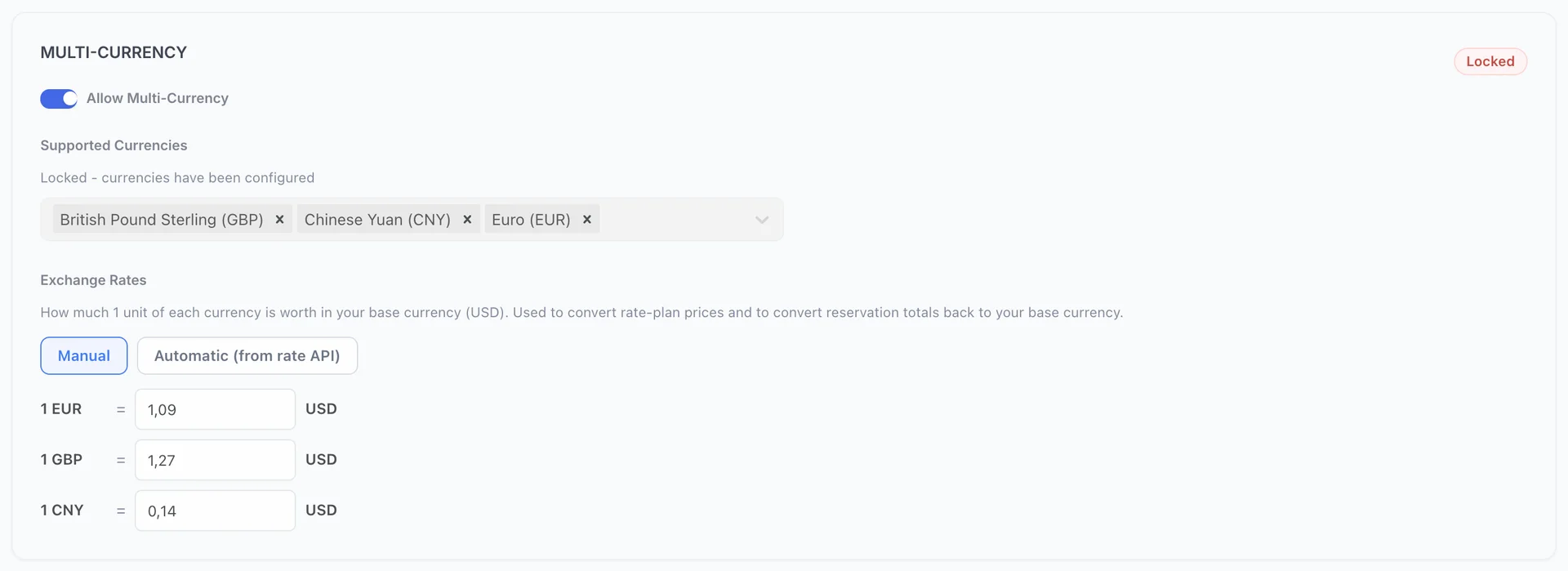
Allow Multi-Currency lets you quote and take payment in currencies other than your accounting one. The currencies you pick under Supported Currencies become the options offered wherever a price is set, most visibly in rate plans and in the rate editor on a reservation.
Your accounting currency never appears in this list. It is the base, so offering it as a foreign currency against itself would be meaningless.
Exchange rates, manual or automatic
Each rate answers one question: how much of your base currency is one unit of this currency worth. With USD as the base, an EUR rate of 1.09 means one euro is worth 1.09 dollars. Prostay uses these both ways, to derive a foreign price from a base price and to roll a foreign reservation total back into the folio currency.
Manual means staff type the rates and they stay put until somebody changes them, which is what most properties want: a rate that does not move mid-stay is easier to explain to a guest than one that does. Automatic (from rate API) pulls rates from a provider on a chosen frequency, hourly through weekly, and shows when it last succeeded. In automatic mode you can still pin an individual currency, which holds that one rate steady while the rest keep updating. A pinned currency shows as Pinned with an Override value of its own.
Rates only apply to conversions made after they are set. Reservations already priced keep the rate they were priced at, which is the behaviour you want and the reason a mid-season rate change does not produce a wave of corrections.
Automation preferences
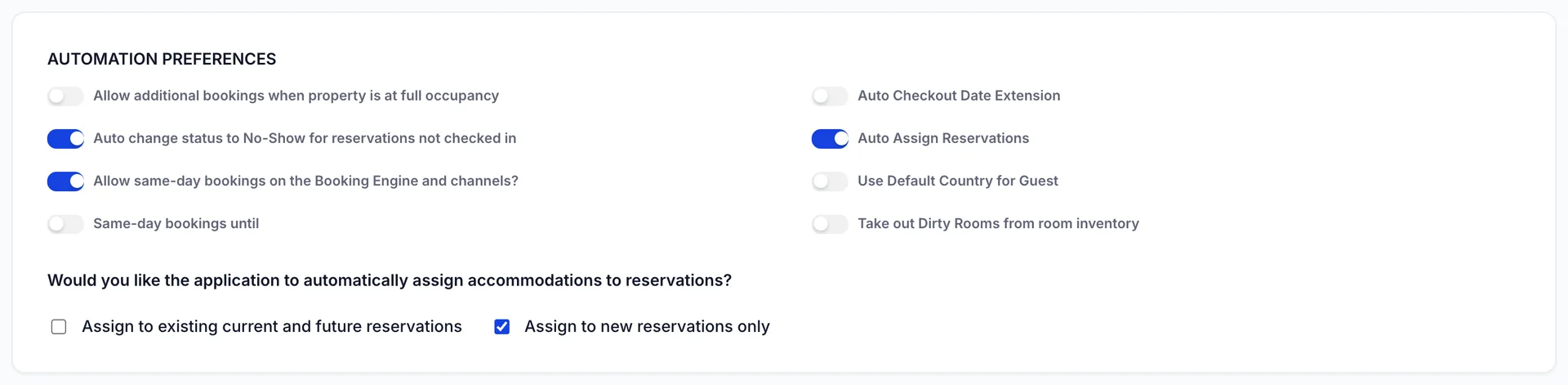
This section is where the property decides what happens without anybody clicking. The two worth thinking hardest about are the first two.
Allow additional bookings when property is at full occupancy permits deliberate overselling. Properties that do this do it knowingly, on the arithmetic that a predictable share of bookings will not arrive. If you are not running that calculation, leave it off, because with it on the availability figures stop being a limit and become a suggestion.
The setting that automatically moves a reservation nobody checked in to No-Show is the one that keeps the arrivals list honest. Off, yesterday's non-arrivals sit as Confirmed until somebody notices, and the no-show fees in your cancellation policies never get considered because nothing flags them.
Same-day selling is two switches, not one. Allow same-day bookings on the Booking Engine and channels? decides whether today is sellable online at all. Same-day bookings until, the switch below it, reveals a time field, and that cut-off is the point in the day after which today stops being sellable, which is how you avoid a 23:40 booking for a room nobody is at the desk to hand over.
The two are independent, and nothing stops you from setting a combination that means nothing. A cut-off time with same-day bookings switched off does not restrict anything, because there is nothing to restrict. Same-day bookings on with no cut-off sells today right up to midnight. If you want a cut-off, both switches need to be on.
Auto Assign Reservations allocates specific rooms rather than leaving bookings at room-type level, and the two checkboxes below it decide the scope: apply it to existing current and future reservations, or to new reservations only. New reservations only is the safer choice, because the other option will re-plan allocations that somebody may have made deliberately.
Miscellaneous preferences
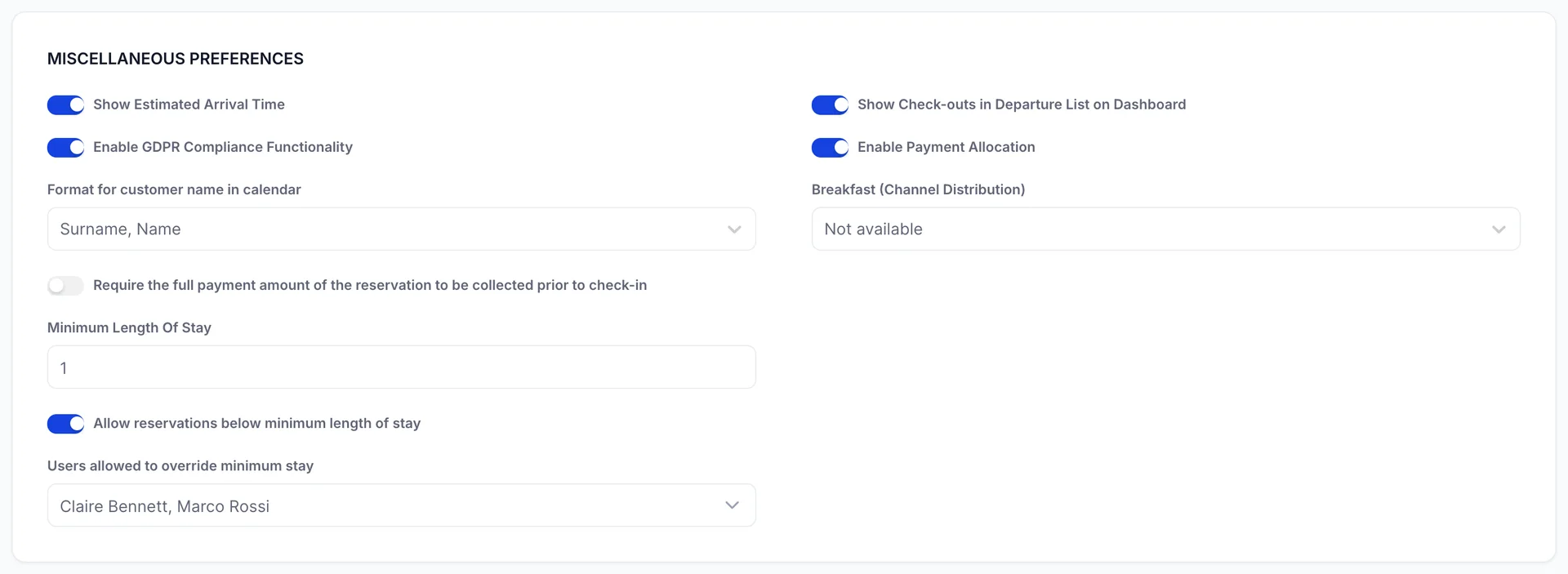
Enable GDPR Compliance Functionality turns on the data-protection handling. If you take a single booking from an EU resident, this belongs on, and it belongs on before the booking rather than after the data request.
Format for customer name in calendar chooses between Surname, Name and Name Surname on calendar tiles. Surname first is easier to scan when you are looking for one booking among two hundred, which is what the calendar is for.
Enable Payment Allocation governs whether payments are applied against specific charges rather than against the balance as a whole. Properties that issue itemised invoices generally want it; properties that settle one total at check-out generally do not.
Show Check-outs in Departure List on Dashboard and Show Estimated Arrival Time are both display preferences for the front desk, and both are the kind of thing worth asking the desk about rather than deciding for them.
Minimum length of stay
Minimum Length Of Stay is a property-wide floor on the length of a booking, and unlike most of this section it visibly bites: the reservation form pushes the check-out date out to meet it, so a one-night booking simply cannot be typed when the minimum is two.
It is a blunt instrument. A property-wide minimum applies every night of the year, including the midweek nights you would happily sell for one night. If your minimum varies by season or by rate, set it in the rate intervals instead, where it can differ by date, and leave this at one.
Allow reservations below minimum length of stay opens a picker of users who may break the rule. This is the front-desk manager exception: the floor holds for everybody except the two or three people you trust to judge when it should not. Keep that list short, or the floor is not a floor.
Common pitfalls
- Choosing currencies before you need them. The list locks after the first save and cannot be shortened from this screen. Three currencies you trade in beats six you might.
- Setting the time zone late. Every date already recorded was interpreted in the old zone. Fix it on day one, not in month three.
- Treating Application Currency as a currency switch. Changing it does not convert anything. It relabels.
- Leaving auto no-show off. Yesterday's non-arrivals stay Confirmed, the arrivals list stops being trustworthy, and no-show charges are never even considered.
- Using the property-wide minimum stay for a seasonal rule. It applies every night of the year. Seasonal minimums belong on the rate interval.
- Saving from the top button and assuming everything took. One button saves all four sections, so a stray change three sections away goes with it. Read the page before you save, not after.