This screen holds every charge you add to a bill that is not the room itself or something a guest bought. Sales tax, city tax, service charge, resort fee. There are only five or six of them at most properties, but each one carries four decisions, and three of those decisions change the arithmetic rather than the wording. This article is mostly about those three.
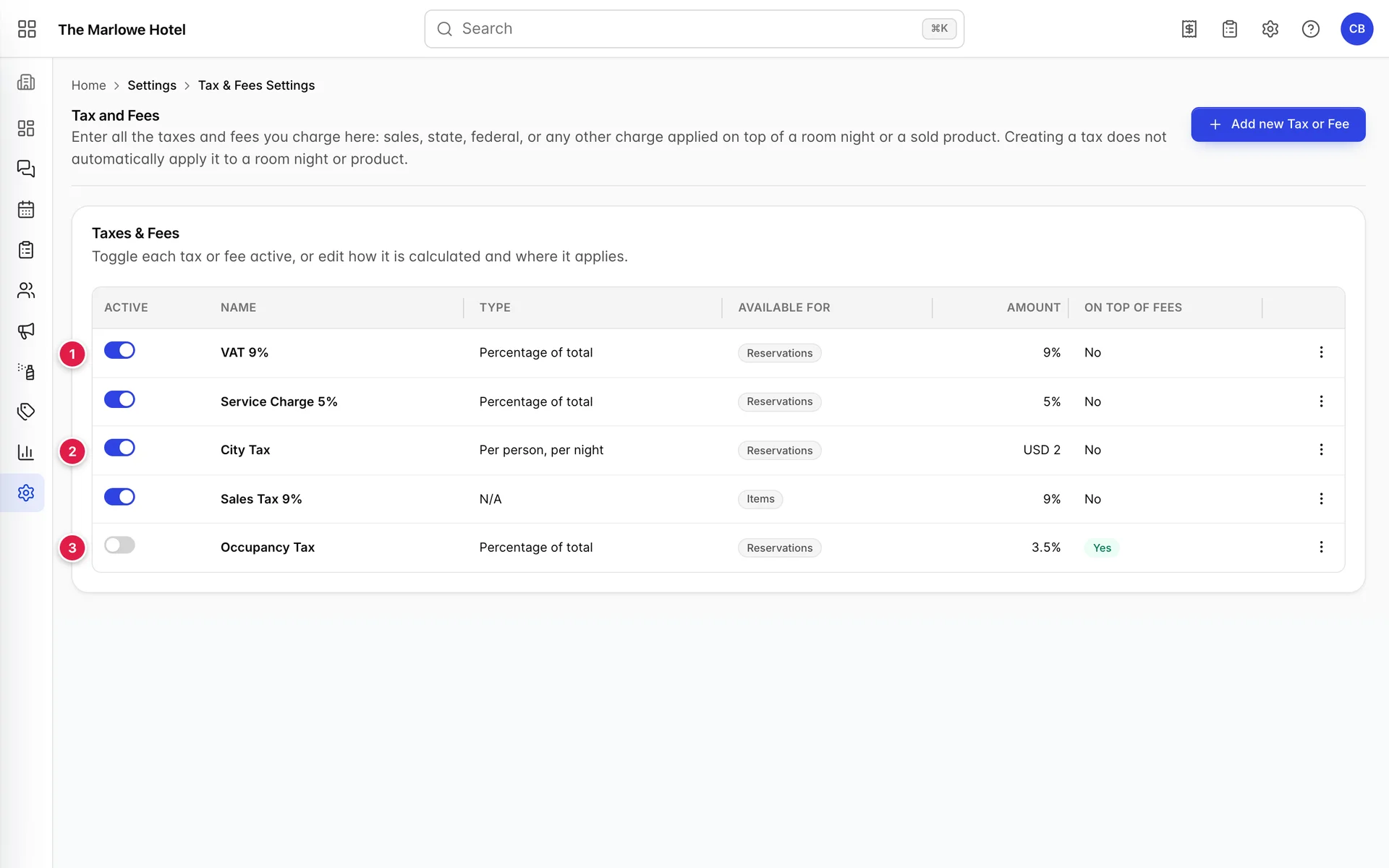
- The Active switch. Not a draft flag. This is the on button for the charge, and it takes effect on the next quote.
- The Type column. How the amount is multiplied. Six possibilities, covered below.
- A row switched off. Occupancy Tax exists, is fully configured, and is on no bill anywhere.
The list is the live set
The description at the top of the screen says that creating a tax does not automatically apply it. Take that with some salt. There is no second step where you attach a charge to a rate or to a room type: when Prostay prices a reservation it reads this list, keeps everything that is Active and exclusive, and adds a line for each one. The switch on the left of each row is the whole of the opt-in.
If Add new Tax or Fee is not on your screen and no row offers Edit, your role does not include the permission for it. An administrator can add it from Users in System Settings, under Integrations › Taxes & fees. Reading the list is a separate right from changing it, which is the usual arrangement for a screen that decides what guests are charged.
Items or reservations
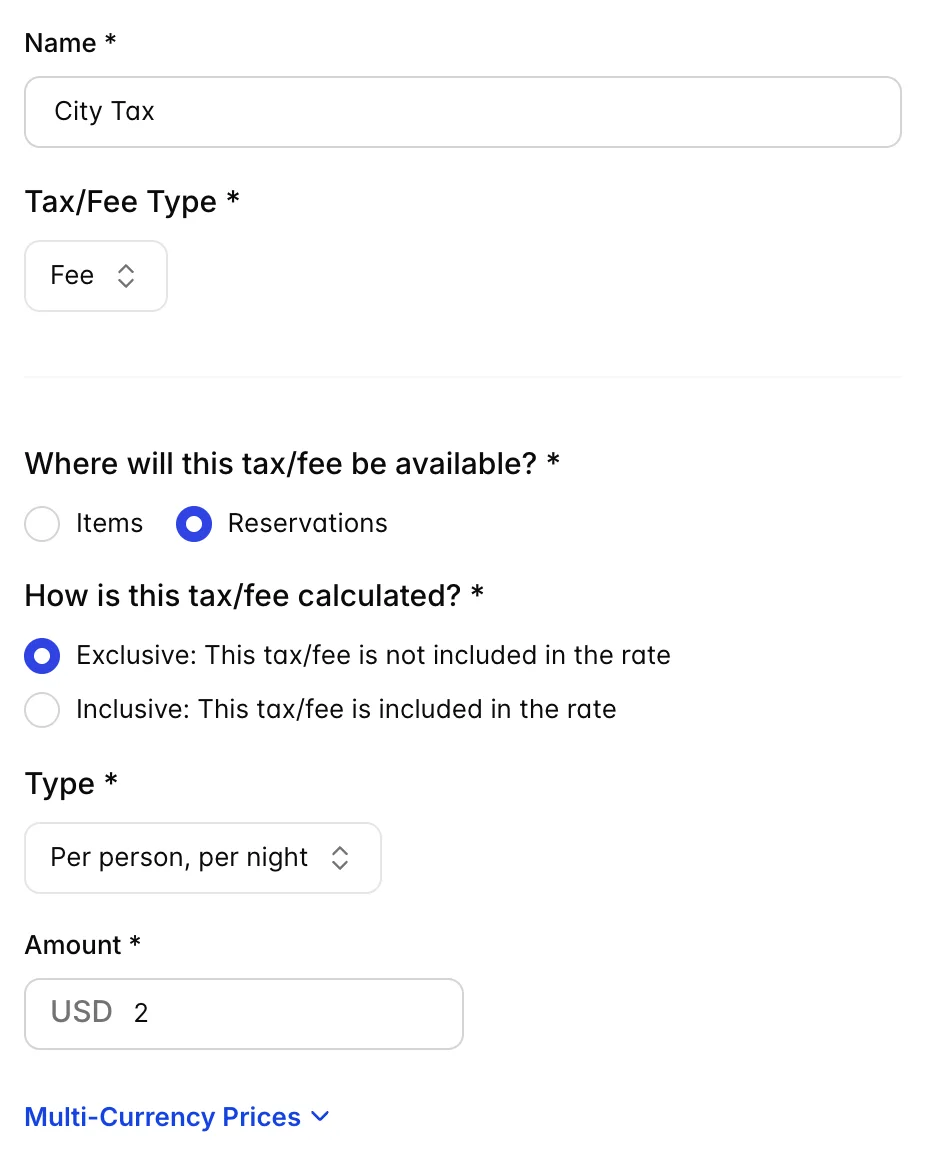
The first decision in the drawer, and the one that decides which of the two completely separate calculations your charge goes through.
| Setting | What it does |
|---|---|
| Reservations | The charge is calculated against the room subtotal, the nights and the guests. All six calculation types are available. This is where VAT, city tax and a resort fee belong. |
| Items | The charge is calculated against the add-ons and the things sold to the folio, never against the room. The Type dropdown disappears, because an item tax is always a percentage. |
Two consequences of choosing Items are worth knowing before you choose it. The first is that the Type column in the list reads N/A for the row from then on, which is correct rather than broken. The second is that on the folio, every active exclusive item tax is added together into one combined percentage and applied to each charge, so a 9 percent sales tax alongside a 4 percent local tax bills as 13 percent on a single line rather than as two. Adding a second item tax silently raises the rate on every quick charge in the building.
Exclusive or inclusive
Exclusive means the charge is added on top of the rate. Inclusive means it is already inside the rate you quote.
What is easy to miss is how absolute the inclusive setting is. An inclusive charge is filtered out of the quote entirely: no line item, no number, no mention. It does not appear as a "tax included" note, and the guest total does not change by a cent. Marking a charge inclusive is functionally the same as switching it off, with one difference: it still sits there looking configured. If your rates are quoted tax inclusive and you also need the tax broken out on the invoice, this setting is not how you get it.
The six calculation types
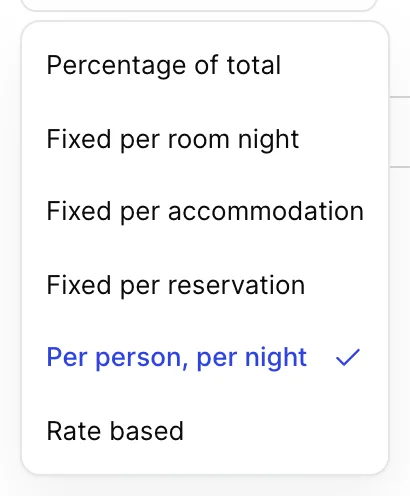
For a reservation charge, Type is the multiplier. The amount you type below it means nothing until this dropdown says what to multiply it by.
| Type | Amount is | Multiplied by |
|---|---|---|
| Percentage of total | A percentage | The room subtotal, before any add-ons. A 9 percent charge on a 720.00 stay is 64.80. |
| Fixed per room night | Money | Every room night in the booking. Two rooms for three nights is six. |
| Fixed per accommodation | Money | The number of rooms, once each, however long the stay. |
| Fixed per reservation | Money | Nothing. Charged once per booking regardless of rooms or nights. |
| Per person, per night | Money | Adults plus children in each room, times that room's nights. The usual shape of a city tax. |
| Rate based | A percentage | The room subtotal, exactly like percentage of total. Reserved for tiered rules that are not implemented yet, so today the two behave identically. |
The per person type is the one that reads the occupancy you entered on the booking rather than the capacity of the room, so a Family Room sold to two adults is charged for two people, not four. Note also that percentage types are applied to the room subtotal only. A percentage charge never touches the add-ons on the same booking, which is what the separate Items setting is for.
Amounts, percentages and other currencies
The Amount field changes shape with the type above it. Choose a percentage type and it is labelled Amount (%) and takes a bare number: 9 means 9 percent. Choose any fixed type and it gains your property currency as a prefix, as the USD on the city tax above, and 2 means two dollars.
A fixed amount charge also gets a Multi-Currency Prices section underneath. Fixed amounts are held in the property's base currency, so when a guest is quoted in another currency Prostay has to convert them. Filling in the multi-currency prices replaces that conversion with a figure you chose, which matters for charges that are legally a round number in their own currency: a two euro city tax should read two euros, not the 1.83 that today's rate produces. Percentage charges never show this section, because a percentage of an already converted subtotal is already in the right currency.
Charged on top of any fees
This question appears only when Tax/Fee Type is Tax, and it is asking whether the tax should be levied on the fees as well as on the room. A service charge of 5 percent followed by a tax charged on top of fees taxes the room plus the service charge; the same tax with the answer set to no taxes the room alone. Fees never carry this question because a fee is not levied on other charges.
Common pitfalls
| Symptom | Cause |
|---|---|
| A tax line reads 0.00 on a booking that clearly owes it | It is configured for Items and the booking has no add-ons. Move it to Reservations. |
| A tax you configured never appears at all | Either the Active switch is off, or it is marked inclusive, which removes it from the quote entirely. |
| A city tax comes out far too high | It is set to a percentage type, so the 2 you entered is 2 percent of the room rather than two dollars a head. |
| The deposit a guest is asked for changed after you added a tax | Deposits can be a percentage of the total including taxes. Which of the two is used is set per policy in Policies. |
| Two item taxes bill as one line | Expected. Item taxes are summed into a single combined rate before being applied. |
| A fixed charge is a strange number on a foreign currency booking | It is being converted from the base currency. Set an explicit figure under Multi-Currency Prices. |