Two things staff do to a reservation are worth a second pair of eyes: put the guest in a different room, and charge them something other than the rate. Both are recorded with a reason, and this is the one screen where they are collected instead of scattered across each reservation's own activity log.
What it collects
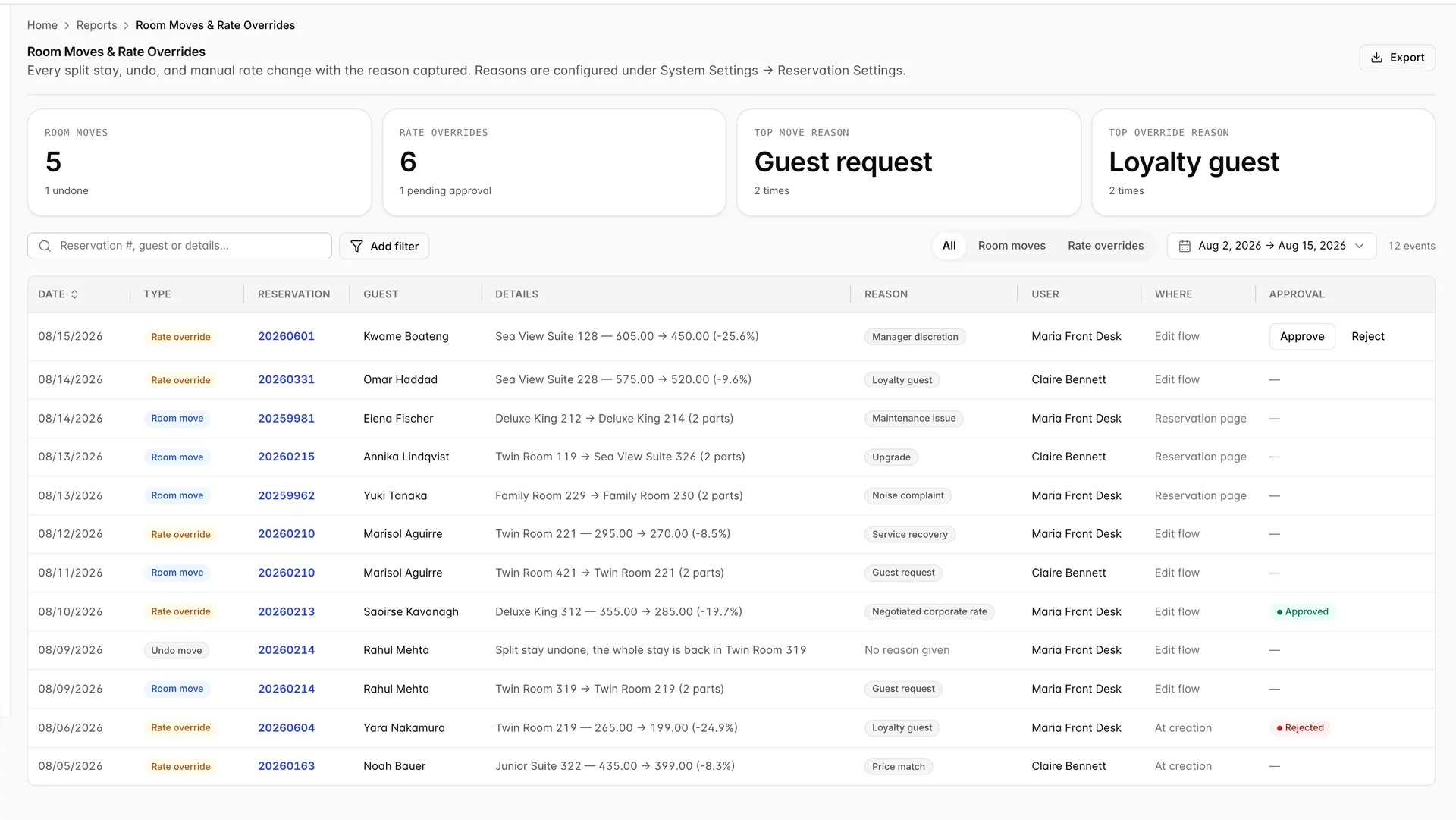
Three kinds of event, and the badge in the Type column tells you which you are looking at.
| Type | What happened |
|---|---|
| Room move | A stay was split across two rooms, or moved wholesale into another one. Raised from the Split Stay dialog. |
| Undo move | Somebody reversed a move and put the whole stay back in one room. |
| Rate override | A nightly rate was typed over by hand, at booking time or afterwards. |
The report opens on the last fourteen days. Everything on it comes from actions staff took in that window, not from the stays those actions affected, so a move made three weeks ago for a guest arriving tomorrow will not be here until you widen the period.
The four tiles

All four count the period, not the property's whole history, and they ignore the search box and the filter chips: change the dates and they move, type in the search box and they do not.
- Room moves counts moves only. Undos are reported underneath it, so five moves with one undone means four stays are still split.
- Rate overrides counts every hand-typed rate, with the number still waiting for a manager underneath.
- Top move reason and Top override reason name the reason picked most often and how many times. This is the number worth watching: a month where Maintenance issue is top is a maintenance problem, and a month where Service recovery is top is a service problem.
The columns
| Column | What it holds |
|---|---|
| Date | When the action was taken, not when the stay is. Sortable, and the only sortable column. |
| Reservation | A link. Clicking it opens the booking, which is how you check what the row is describing. |
| Details | The move written as one room to another, or the override written as the old price, the new price and the percentage between them. |
| Reason | What the person picked in the dialog, or No reason given where reasons are not compulsory. |
| User | Who did it. |
| Where | Which screen it was done from: At creation, Edit flow or Reservation page. |
| Approval | Only ever filled in for a flagged override. Everything else, moves included, shows a dash. |
Reading the moves

(2 parts) after the rooms means the stay is now two stay lines rather than one: some nights in the first room, the rest in the second. That is what splitting a stay and moving rooms produces, and it is why the folio, the calendar and the housekeeping board all show the guest in two places across the stay.
The Room moves segment includes undos, which is deliberate. An undo on its own says nothing; sitting under the move it reversed, it tells you the move was a mistake, who made it, and how long it stood. An undo never carries a reason, because the dialog that performs it does not ask for one.
Reading the overrides
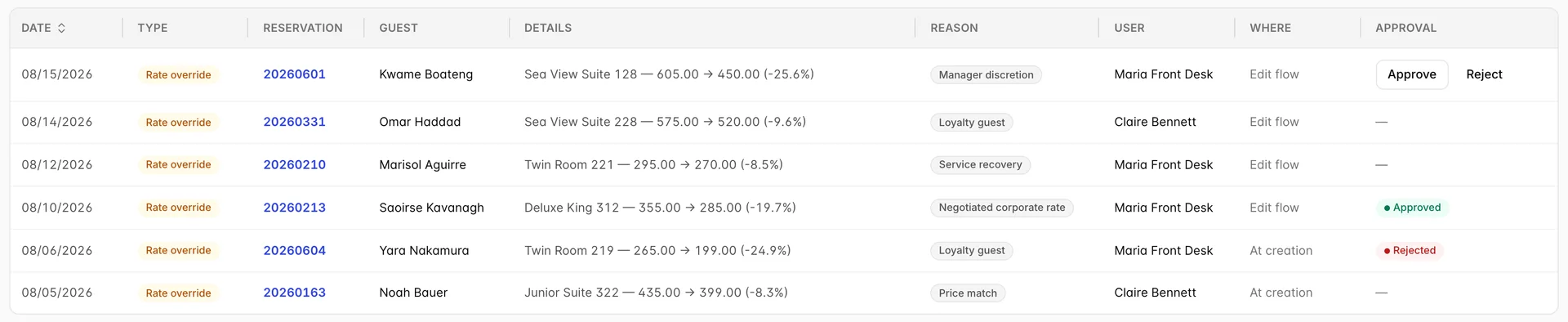
Each row reads as the room and its nightly rate, the rate that was actually charged, and the gap as a percentage. The percentage is the part to read first, because it is what decides whether anybody has to look at the row at all.
Where matters more here than it does on a move. At creation means the price was agreed while the booking was being taken, which is normal commercial work. Edit flow and Reservation page mean somebody changed a price that had already been quoted, and those are the rows worth reading.
Approving and rejecting
If Reservation Settings has an approval threshold, any override that moves the price by more than that percentage arrives here flagged. The rate is still applied and the guest is still quoted it: flagging is not blocking.
The Approval cell then does one of four things.
| Cell | Meaning |
|---|---|
| Approve and Reject buttons | Flagged, undecided, and you hold the Approve rate overrides permission. |
| Pending approval badge | The same row seen by somebody without that permission. |
| Approved or Rejected | Already decided. Hover the badge to see who decided it. |
| A dash | Never flagged, so nobody was ever asked. Every move shows this too. |
Narrowing the list

The split matters when a row you expect is missing. The period and the three-way All / Room moves / Rate overrides control fetch: change either and the report reloads and the tiles move with it. The search box and the filter chips sift what has already arrived, and the tiles ignore them. If the count reads 4 of 12 events, four is what you filtered to and twelve is what the period holds.

Reason and User only offer values that appear in the rows currently loaded, so an empty-looking list means the period has nothing to offer rather than that the property has nothing configured. Approval status is the useful one day to day: set it to Pending approval and the screen becomes a work queue. Each choice becomes a chip, and Clear all beside the chips resets the search box as well.
The search box matches the reservation number, the guest name and the details text, which is how you find every change made to one booking: paste its number in and every move and override on it lines up by date.
Exporting

Both formats take the period and the segmented control with them, so a file exported from the Rate overrides segment contains overrides only. What they do not take is the search box or the filter chips: those are applied in the browser after the rows arrive, and the export is built from the period. Filter to one user on screen and the spreadsheet will still have everybody.
What it will not tell you
- Nothing adds up the money. Each override shows its own gap, and no tile totals what the period gave away.
- No cancelled or shortened stays. This is moves and prices only. A stay that was cut from five nights to two leaves no row here.
- One decision, no history. An approved row shows who approved it, not who asked twice or how long it waited.
- The reason is only as good as the list. If reasons are optional in Reservation Settings, the column fills with No reason given and the two reason tiles stop being worth reading.