Seven of the reports under Finance are flat tables over the same underlying folios. They differ in who they let through and what they show about them: one ages unpaid debt into buckets, one lists the guests who left owing money, one shows every folio with its balance, one breaks the folios down into individual postings, one shows what has been paid, one lists every payment as it was taken, and one shows what was reversed. Pick by the question you are answering rather than by the name, because several of the names overlap.
Which of the seven to open
| Report | Answers | Rows it shows |
|---|---|---|
| Accounts Receivable Aging Report | How old is the money we are owed | Stays that have ended with a balance left on the folio |
| Checked-out Reservations with Outstanding Balance | Who walked out without settling | Checked-out folios with a balance, split into room and extras |
| Payments & Balances Due Report | Where does every folio stand | Every reservation arriving in the range, paid or not |
| Daily Charges by Item | What was posted, by whom, and when | One row per posting |
| Deposits Ledger Report | Which reservations have money on them | Folios that have taken a payment, by check-out date |
| Transaction Report | What money came in, and how | One row per payment taken, from the desk and from the outlets |
| Void and Refund Report | What was reversed, and why | Voided and refunded transactions |
The Finance Reports hub
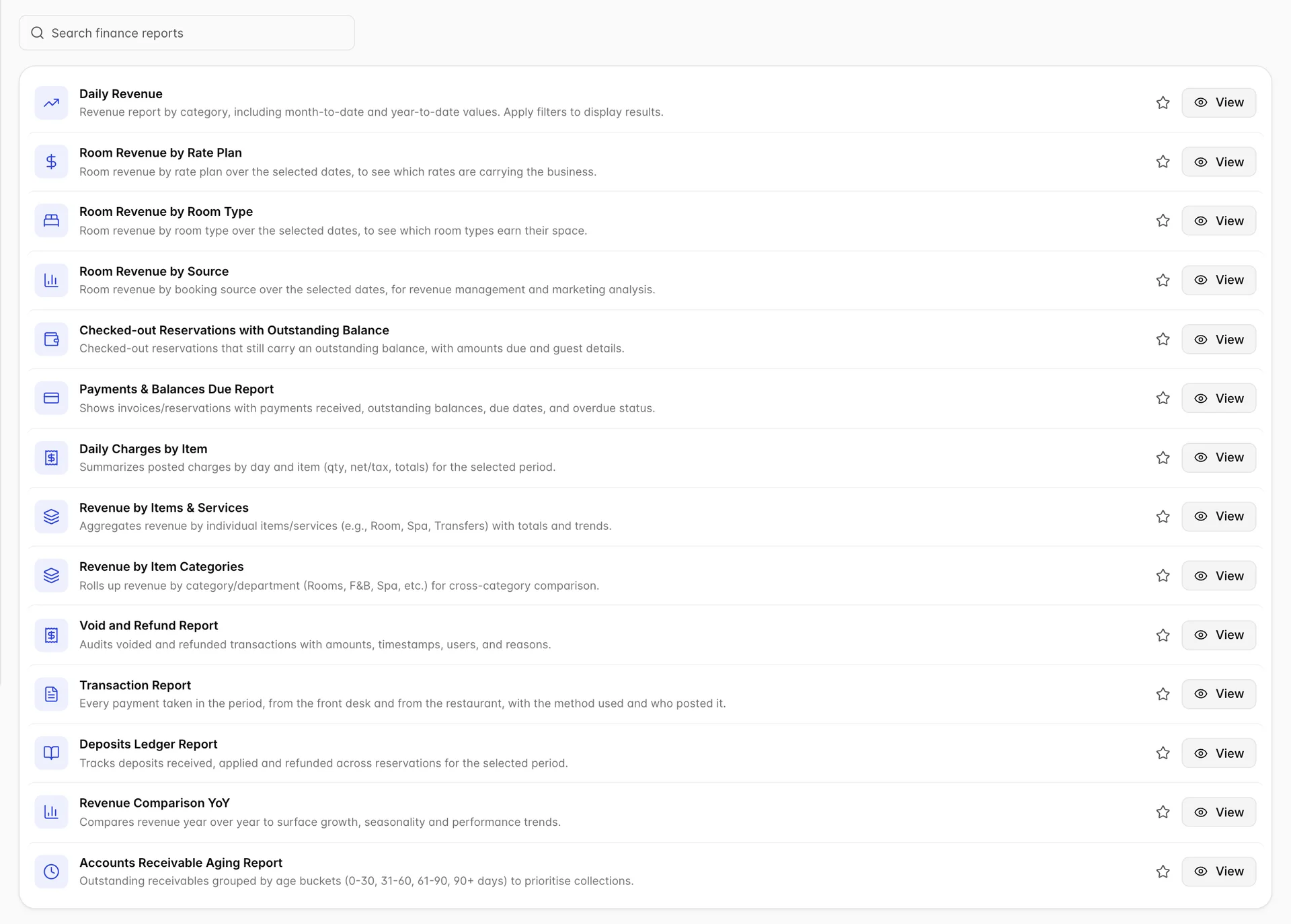
Fourteen reports sit under Finance. Three of them are the room revenue screens, Room Revenue by Rate Plan, Room Revenue by Room Type and Room Revenue by Source, which open outside the finance section and are covered in room revenue by source, type and rate plan. The star on each row adds it to Favorites on the Reports Dashboard, which is the fastest way to keep the two or three you run daily together.
Search filters, print and export

All seven carry the same toolbar. The filter button is labelled Search filters here, where the production and occupancy reports say Filter Report; they behave the same way, opening a panel on the right that applies nothing until you press Save Changes. Each panel remembers its own settings between visits, so a report that looks wrong when you come back to it is usually still filtered from last time.
Every panel has a date range, and every panel means something different by it. Aging and the deposits ledger filter on the departure date, payments and balances filters on the arrival date, and daily charges filters on the posting date. Setting the same fortnight on three of them will not give you three views of the same reservations.
Money you are owed
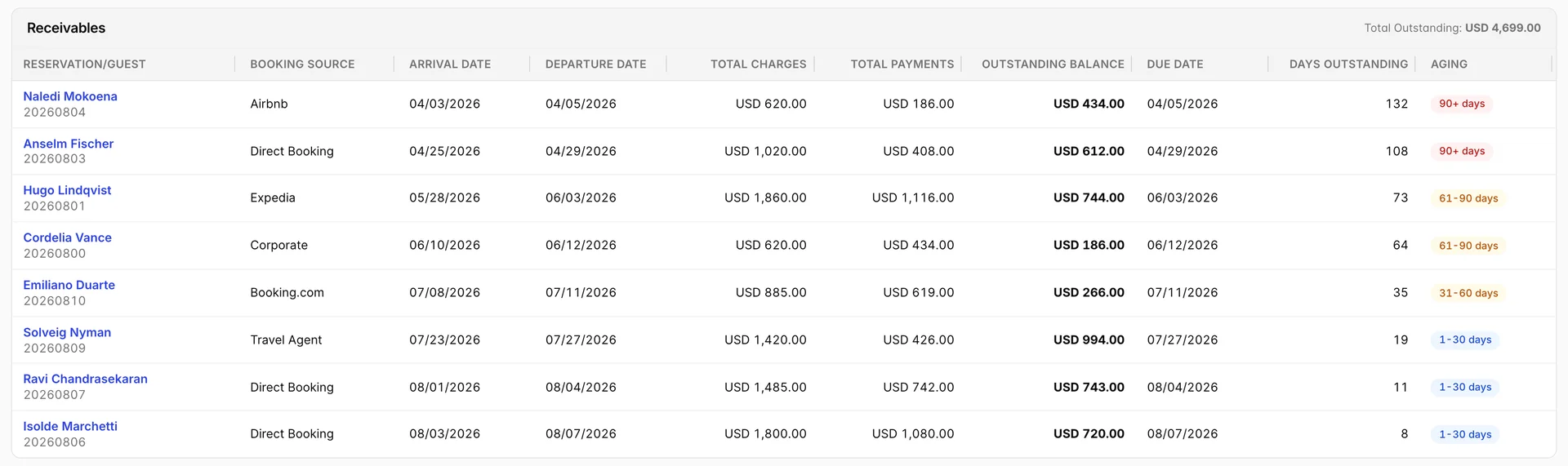
The aging report is the collections list. Payment falls due on departure, so Days Outstanding counts from the day the guest left and Aging turns that count into one of five badges: Current, 1-30 days, 31-60 days, 61-90 days and 90+ days. Rows are sorted oldest first, and the total beside the heading is what the property is owed across everything on screen.
It opens on the last twelve months rather than the current one, which is deliberate: a report that only reaches back a month cannot show a 61-90 or a 90+ bucket at all, so narrowing the range hides exactly the debt you opened the report to find. Outstanding Status narrows to Outstanding only, Fully Paid or Credit Balance, and Include Zero Balances brings settled folios back so you can prove a debt was cleared rather than never existed.
Checked-out Reservations with Outstanding Balance is the same debt from the front desk's angle. It drops the aging arithmetic and adds the split you need for a conversation with the guest: Room Revenue Total, Items / Services, Grand Total and Reservation Balance Due, so you can see whether the unpaid part is the room or the extras. Its filter panel offers only a date range and a guest name, and it reads the reservation status rather than the calendar, so a guest who is due out today but has not been checked out yet does not appear on it.
The whole book: payments and balances due
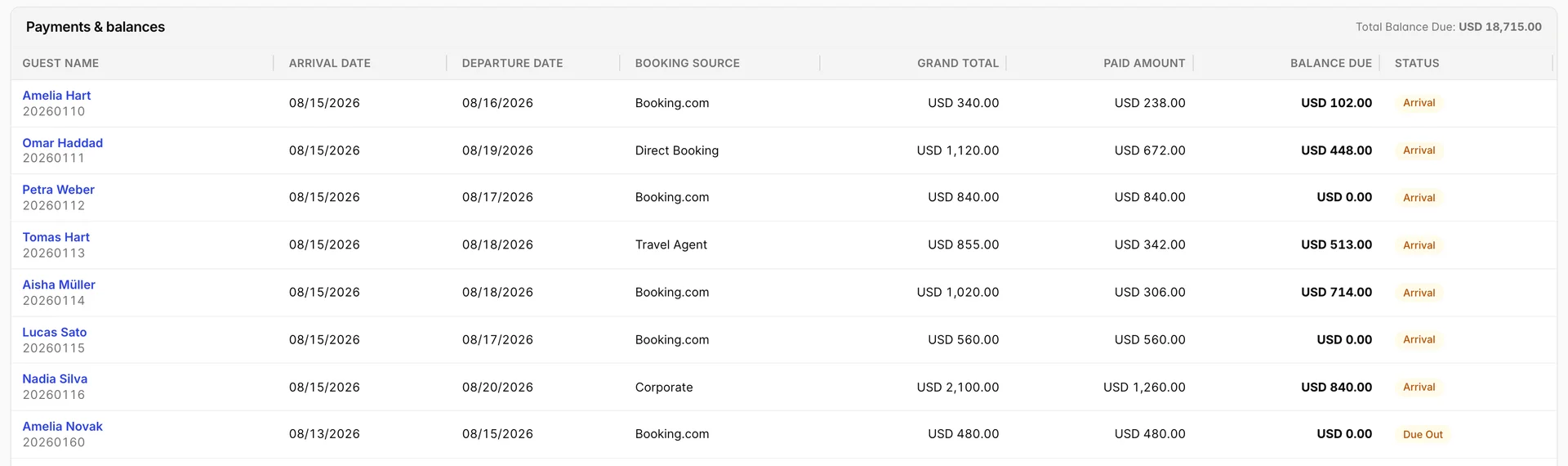
This is the widest of them. It lists every reservation arriving in the range whatever its state, so a folio paid in full sits next to one that has paid nothing, and the Status badge tells them apart. Grand Total minus Paid Amount is Balance Due on every row, and the figure beside the heading is the sum of that column.
Use it before arrivals rather than after departures. Filtering to Arrival and Confirmed for the next few days gives the desk a list of who is walking in with an unpaid balance, which is a much easier conversation at check-in than at check-out. The panel also takes a reservation number, a guest name and a booking source, and the status list carries all eleven reservation statuses.
Every posting: daily charges by item
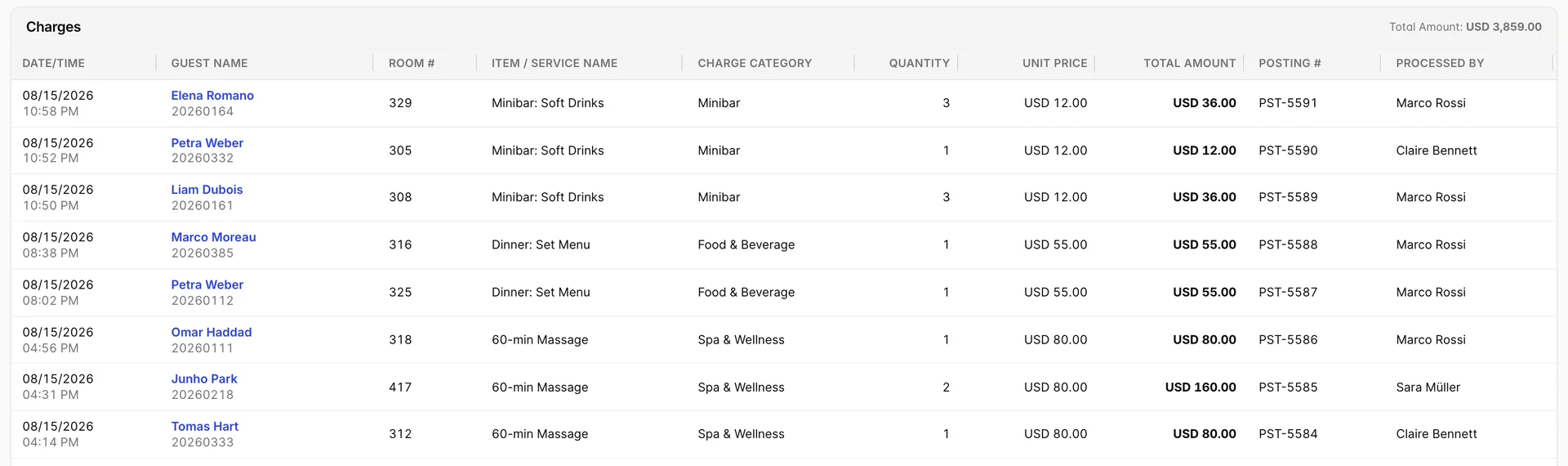
Where the other five report on folios, this one reports on postings: one row per charge, timestamped to the minute, with the item, its category, the quantity and unit price behind the amount, a Posting # and the member of staff who put it on the folio. It is the report to open when a guest disputes a line, and the one to run at handover when a night's takings look wrong.
The filters follow that grain. Charge Category comes from the property's own item categories, Processed by from its user list, and there are free-text boxes for the item name, the reservation number and the posting number. Filtering by category is the quickest way to answer what the restaurant took yesterday without leaving the report.
The deposits ledger
Deposits Ledger Report lists folios that have taken money, keyed on the check-out date, with Room Nights, Room #, Reservation Status, Reservation Paid Amount, Reservation Balance Due and Grand Total. Filter it by status to answer the question it is really for: how much money is sitting against reservations that have not arrived yet.
Read the name loosely. The hub describes it as tracking deposits received, applied and refunded, but the table has no applied or refunded column and no separate deposit figure: it shows what has been paid on the folio in total. A deposit that has since been applied to the stay looks the same here as a payment taken at check-out.
Voids and refunds
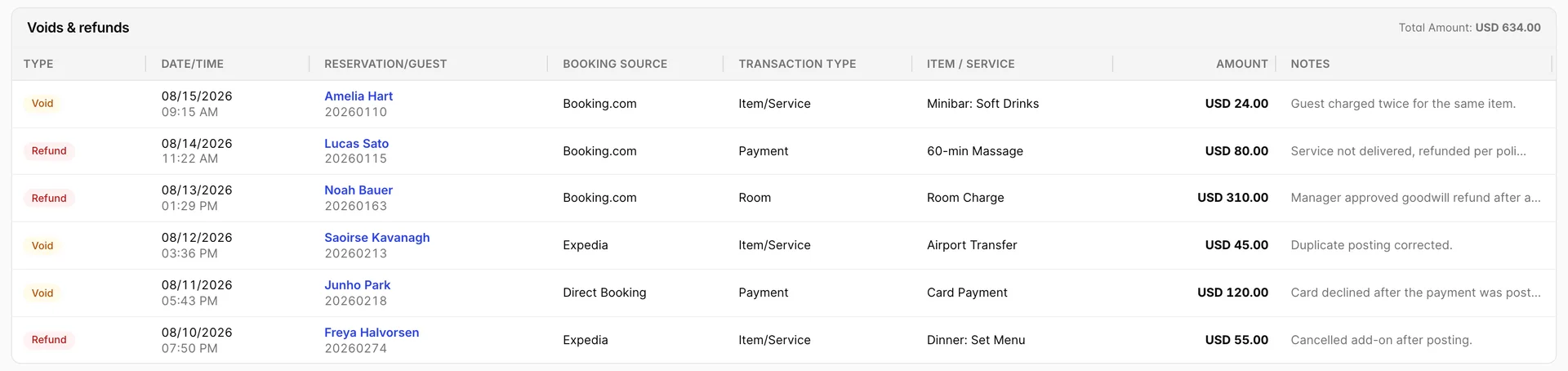
A void cancels a posting that should not have been made; a refund returns money that was taken. The Type badge says which, Transaction Type says what was reversed (Payment, Room or Item/Service), and Notes carries the reason someone typed at the time. The panel filters on both, using Voided and Refunded as its labels.
The notes column is truncated at 40 characters in the table, and the full text is in the cell's tooltip. Since the reason is the whole point of the report, hover a row before drawing conclusions from it.
Every payment taken: the transaction report
The other six reports are organised around folios. This one is organised around money arriving. Every payment taken in the period gets a row, whoever took it and wherever they took it, which makes it the report you reconcile a day's banking against.
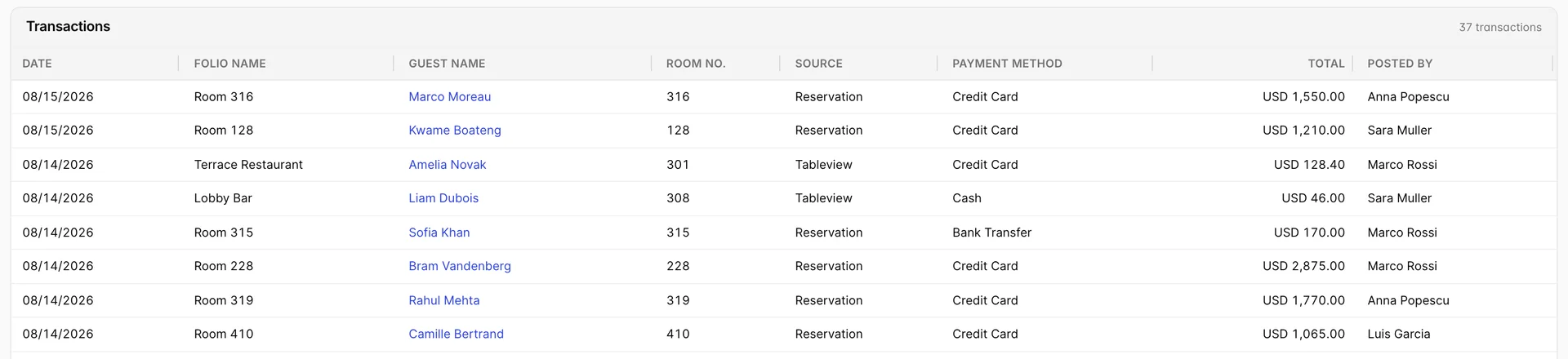
Source is the column that makes it different. Reservation means the payment was taken against a folio at the desk; Tableview means it was taken in an outlet, so the Terrace Restaurant and Lobby Bar rows are restaurant and bar takings sitting in the same list as room payments. No other finance report shows you both.
Folio Name and Room No. read differently on the two kinds of row. A reservation payment names the room; an outlet payment names the outlet in Folio Name and puts the guest's room in Room No., which is how a bar tab charged back to a room appears. Posted By is the member of staff who took it, which is what you use when a figure needs querying with somebody.

The pinned TOTAL at the foot is the number the report exists to produce: everything taken in the period, across both sources and every payment method. It follows the filters, so filtering to Cash gives you what should physically be in the drawers.
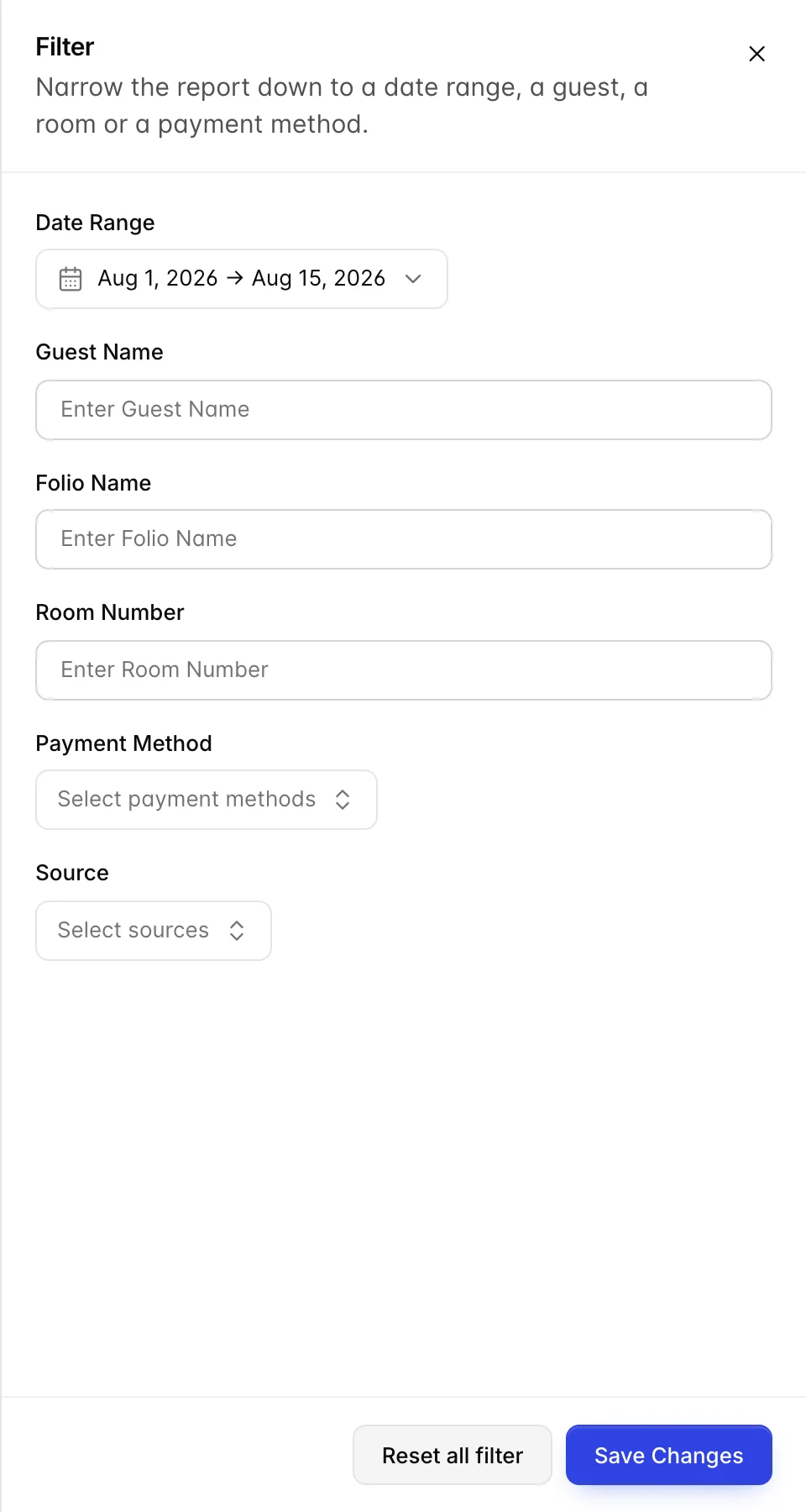
The filter drawer is the one the other six use, with two additions. Payment Method and Source both take several values at once, so you can ask for card payments taken in the outlets and get exactly that. The date range opens on the first of the month to today.
Making them agree
The reports share one set of folios, so figures that describe the same folio match wherever it appears, provided the ranges do. Three identities hold on every row:
- Paid Amount plus Balance Due is Grand Total.
- Room Revenue Total plus Items / Services is Grand Total.
- The postings for a folio on Daily Charges by Item add up to its Items / Services figure on the checked-out report.
When two reports disagree, check the date field before anything else, because they are not filtering on the same one. A folio arriving on the 30th and leaving on the 2nd is in July on one report and August on the next.
What these reports will not do
- No sorting and no paging. Column headings are not clickable, and every matching row renders at once. Narrow with the filter panel rather than scrolling.
- No totals row. Each report puts one summary figure beside the section heading and nothing else: outstanding on aging, balance due on payments and on the checked-out report, the amount posted on charges and reversed on voids.
- No aged credit. The aging buckets only run forwards from the due date. A folio in credit shows as a negative balance under Credit Balance, not as an age.
- Nothing here posts or takes money. These are reports. Charging a folio, taking a payment and issuing a refund all happen on the reservation's folio.