What the waiting list is for
Somebody wants three nights in a Deluxe King and you are full on the middle one. They would still come if something opened up. That is a waiting list entry: a guest you could not sell to today and might be able to sell to tomorrow.
The reason to keep them in Prostay rather than on a notepad is that Prostay rechecks. Every time this page loads it compares each enquiry against your current availability and tells you whether you could take it now. Cancellations happen constantly and nobody notices them one at a time; the waiting list is what turns a cancellation into a phone call.
It is the opposite of a turnaway, which is the note you keep when the guest is gone for good. If they might still stay, they belong here. If they will not, record the turnaway and move on. Nothing links the two, so a guest who ends up unreachable wants an entry closed here and a turnaway written there.
The page
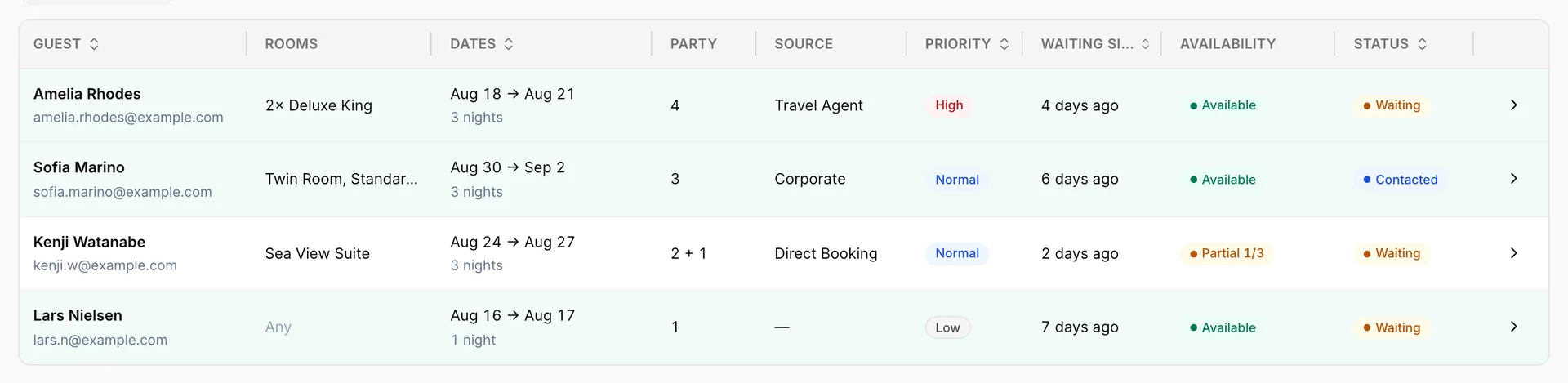
One row is one enquiry. Rooms is what they asked for, which can be more than one and can be Any if they did not mind. Dates shows the stay and the number of nights. Waiting since is how long they have been on the list, and it is the column that tends to prompt action.
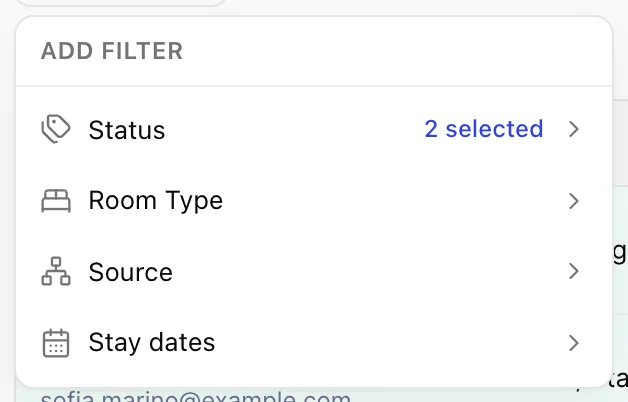
The page opens filtered to the two statuses that need working, Waiting and Contacted, so what you see first is the live list rather than everything that has ever been on it.
Priority is yours to set: Low, Normal or High. It sorts and it colours, and it does nothing else. It is worth using for the handful of enquiries you would genuinely ring at eight in the morning, and worth leaving alone otherwise, because a list where everything is High is a list with no priority at all.
The availability badge
The Availability column is the part of this screen that does real work. It is not stored on the enquiry; Prostay works it out each time you open the page, by taking the room type and the dates the guest asked for and looking at what is free tonight.
Three answers:
Available means every night of the stay has at least one free unit of the type they wanted. You can take this booking now.
Partial means some nights do and some do not, and the badge tells you how many: Partial 1/3 is one night of three. Worth a call, because a guest who wanted three nights will often take two, and because moving one other booking may be all that stands between you and the whole stay.
No availability means none of the nights work. Leave it; the badge will change on its own when something frees up.
An enquiry with no room type recorded cannot be checked, because there is nothing to check against. Those show no verdict, which is a good reason to always record a room type even when the guest says they do not mind.
Inside one enquiry
Clicking a row opens everything the enquiry knows.
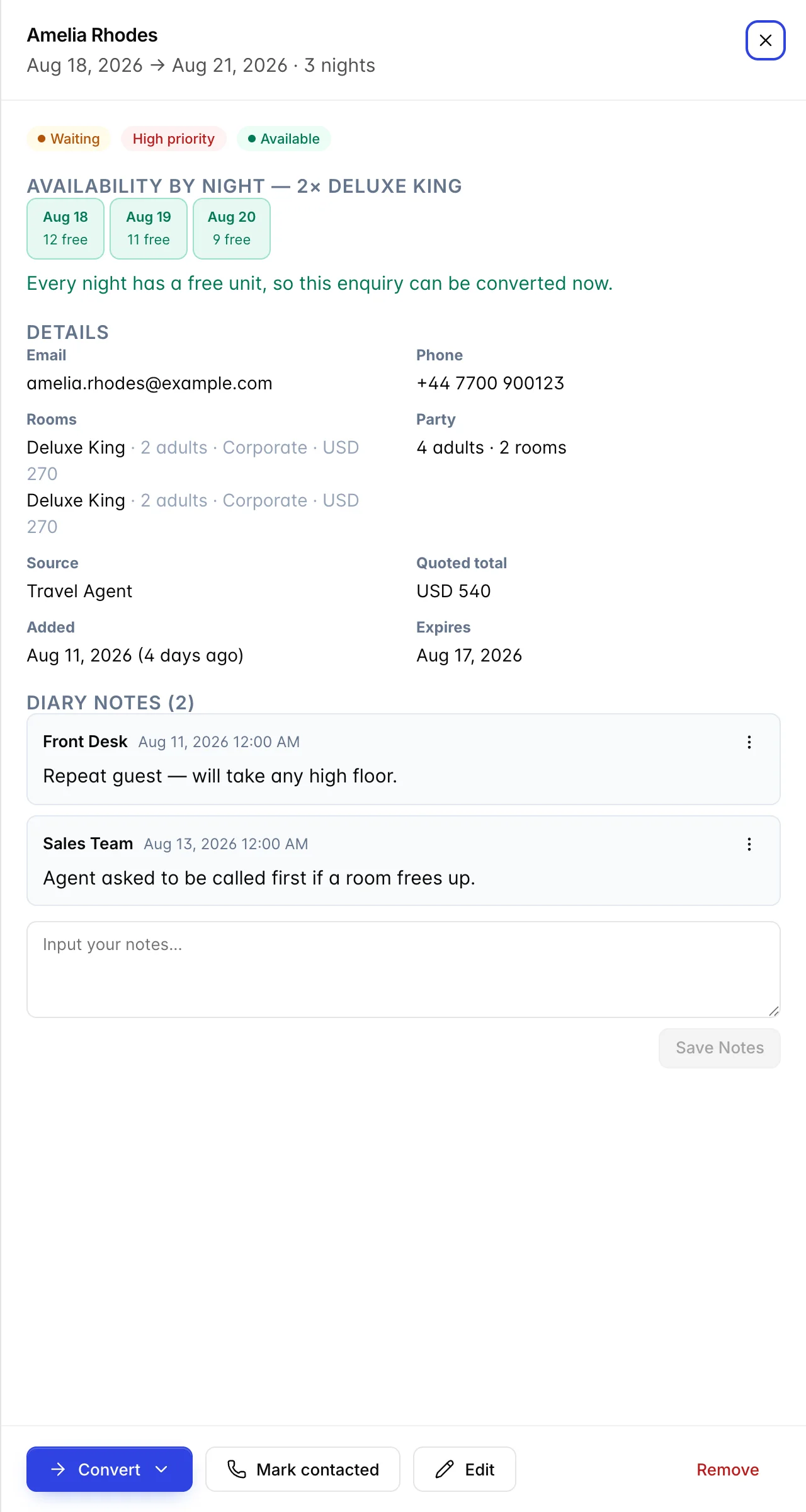
Availability by night at the top is the badge shown properly: one tile per night with the number of free units on each. This is what tells you whether a Partial is nearly there or nowhere near, and it is the thing to look at before you pick up the phone.
Quoted total is the price you told the guest when they enquired. It is stored on the entry and it does not move. If your rates have changed since, it will not match what the same stay would cost today, and that is intentional rather than a fault: it is a record of what was said. Check it against your current rate before you repeat it to anybody.
Expires is the date after which the enquiry stops being worth chasing. Set it to the date the guest's plans become irrelevant, usually their arrival date.
Diary notes are the running record of what has been said. Each one carries who wrote it and when. This is where "agent asked to be called first if a room frees up" lives, and it is the reason the next person to open the entry will handle it the way you would have.
The three ways to convert
Convert on an open enquiry offers three, and they differ in how much they commit you.
Convert to Reservation opens the new reservation screen with the guest, dates, room types and party already filled in from the enquiry. You finish it as you would any booking. This is the one to use when the guest is on the phone saying yes.
Convert to Tentative does the same thing but creates the booking as tentative, so it holds the room while remaining unconfirmed. Use it when the guest has said yes and somebody else has to approve it.
Convert to Courtesy Hold stays on this page and opens the courtesy hold panel prefilled. A hold blocks the room for a short window without creating a booking at all. Use it when you want to keep the room while the guest thinks about it.
All three fill the next screen from the enquiry rather than making you retype it, and all three mark the entry Converted once the booking or hold saves. If you abandon the screen without saving, the entry stays where it was.
The five statuses
Waiting is new and untouched. Contacted means somebody has spoken to the guest, and Mark contacted on the open enquiry is how it gets there. Those two are the live list.
Converted is set for you when the enquiry becomes a booking or a hold. Expired is where an entry goes once its expiry date has passed. Removed is what Remove does: it takes the entry off the working list without deleting it, so the record of the enquiry survives.
A converted entry can be re-opened back to Waiting if the booking falls through, which saves retyping everything the guest told you the first time.
Things that catch people out
The availability badge is about tonight, not about when they enquired. It is recalculated on every load. An entry that said No availability last week may say Available today, and nothing will tell you it changed. Opening the page is the notification.
The quoted price is history, not a live rate. It is what you told them. Look up the current rate before you confirm anything, especially on an enquiry that has been waiting a while.
An enquiry with no room type gets no verdict. Prostay has nothing to check availability against. Record a type even when the guest is flexible; you can always change it.
Expiry does not chase anybody. It moves the entry out of your way once the date passes. It does not email the guest and does not warn you beforehand.
The calendar drawer is the same list, shortened. The Waitinglist button on the calendar opens the same enquiries with the same badges and the same three conversion buttons. Working from either is fine; they are one list. Unallocated bookings and the waitlist covers that side of it.