Room 104 is clean and nobody is in it. Room 105 is dirty and somebody is asleep in it. Both of those are perfectly normal, and neither can be described by one word. Prostay keeps two separate answers about every room because two different teams need two different things from it, and most of the confusion on the housekeeping board comes from reading one of them as though it were the other.
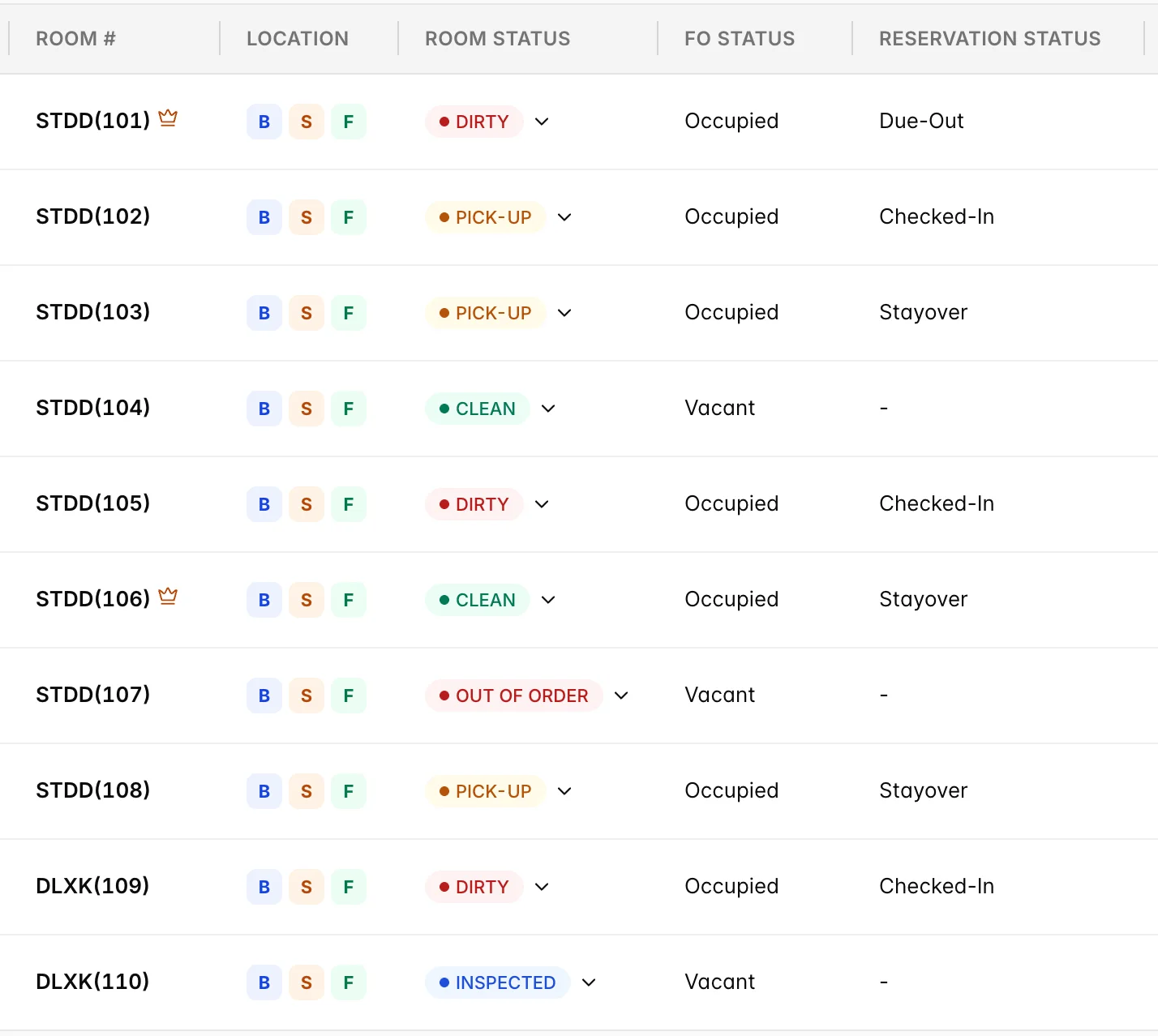
Two questions about the same room
Room Status answers one question: what state is the room physically in. CLEAN, INSPECTED, PICK-UP, DIRTY, OUT OF ORDER, OUT OF SERVICE and AVAILABLE are its seven possible answers, and what each one means is set out in the housekeeping board. Housekeeping owns this answer. It says nothing whatsoever about whether a guest is in the room.
The other two columns are the front desk's answer, split in two. FO Status is the short version and has only two values, Occupied and Vacant: is there a guest in this room tonight. Reservation Status is the long version: where the booking currently in the room has got to, or a dash when no booking is attached to it.
Where each one is shown
| Screen | What it shows you |
|---|---|
| The housekeeping board | All three columns side by side, one row per room. The only place you can see and change the room status for the whole house at once. |
| The room picker on a reservation | Under ASSIGNMENT(s) on the Rooms booked tab, and under Room Assignment when you build a booking, every room of the right type is listed with its housekeeping status printed beneath the room number. |
| The House Status report | The Housekeeping Status card crosses room status against vacant and occupied for the whole property, and Room Summary above it takes out-of-order and out-of-service rooms off your sellable count. |
| Attendant task sheets | Neither status appears as a column, because the sheet is the two of them already combined into work. A due-out room becomes a departure clean; an occupied room that is dirty becomes a stayover clean. See attendants, task sheets and the forecast. |
What moves the room status
| Action | What the room status becomes |
|---|---|
| The night audit | DIRTY on every occupied room. Vacant rooms and blocked rooms are left as they are. |
| Checking a guest out | DIRTY, unless the room is out of order or out of service, in which case the block is left alone and only the front-office side moves. |
| An attendant finishing a task | CLEAN, for a departure or stayover clean. Finishing a turndown task deliberately leaves the room status alone. |
| The status dropdown, or the bulk bar | Whatever you pick. Nothing sets INSPECTED automatically, so a room only reaches it because somebody chose it. |
| Reversing a check-in | Whatever you choose in the dialog's Room Status field. The dialog asks because only you know whether the guest got through the door. |
| Resolving a work order that took the room out of order | DIRTY. The room comes back into the cleaning list rather than straight back into inventory, which is right: it has had an engineer in it. |
Checking a guest in is not on that list, and its absence is the single most useful fact in this article. Check-in does not touch the room status. A room that was dirty at four in the afternoon is still dirty after the guest has been checked into it, and the only sign anything is wrong is the guest coming back down to reception.
What moves the front-office side
| Action | FO Status | Reservation Status |
|---|---|---|
| A booking is given this room for tonight | Vacant | Arrival |
| Check In | Occupied | Checked-In |
| Check Out, or Check-out early | Vacant | A dash. The booking keeps its own Checked-Out status, but it is no longer in the room. |
| Reverse Check-in, keeping the room | Vacant | Back to Arrival, because the guest is expected again. |
| Marking a booking CANCELED, NO-SHOW or SKIPPED | Unchanged. Nobody was in the room, so nothing about it moves. | A dash. The room stops being held and goes back on the market. |
| Picking any other status from the reservation's status menu | Unchanged, unless you pick CHECKED-IN or CHECKED-OUT, which do exactly what the buttons do | Whichever of the eleven you pick |
The eleven reservation statuses sort into three groups, and the group matters more than the individual value. Reserved, Confirmed, Arrival and Tentative are all before arrival, and the room should be vacant. Checked-In, Due-Out and Stayover all mean the guest is in the building, which is why Prostay offers Check Out on all three. Checked-Out, No-Show, Canceled and Skipped all mean nobody is coming, and the room is released back to the front desk as soon as you set one of them.
What the night audit does to each
The rollover is the one moment the two answers move together. Every occupied room goes back to DIRTY, because somebody slept in it, while the front-office side is untouched: a guest staying four nights is still occupied in the morning. That is why the board at seven in the morning is a wall of red with almost nobody having left yet. What the rollover changes and what it leaves alone is set out in full in discrepancies, guest service and the night rollover.
Reading the two together
| Combination | What it means |
|---|---|
| CLEAN and Occupied | Serviced today with the guest still in house. The normal state of a stayover from mid-morning onwards. |
| DIRTY and Occupied | Normal at breakfast, a question by mid-afternoon. Check the Service column before chasing it: a room on do not disturb is dirty because nobody was allowed in. |
| DIRTY and Vacant | A departure waiting to be turned around. This is the queue the front desk is really asking about when somebody is standing in reception. |
| INSPECTED and Vacant with Arrival | Ready and spoken for. Nothing to do except keep it that way. |
| CLEAN and Vacant with a dash | Ready and unsold. This is what the front desk can give to a walk-in tonight. |
| PICK-UP and Vacant with Arrival | The one to act on. Somebody is arriving into a room that needs a second visit, and it will not fix itself. |
| Any status with Occupied and Checked-Out | Something has not caught up. The booking has ended but the room still believes it has a guest, so it cannot be sold. |
There is a third voice in this conversation, and it appears only when housekeeping opens a door and finds something the front desk did not predict. Reporting that raises a Skip or a Sleep in the Discrepancy column, which is a disagreement between the FO Status column and what an attendant saw, not between the two statuses in this article. It is covered in discrepancies, guest service and the night rollover.
Asking the board for one combination
Reading combinations down 120 rows is not a plan. Press Search filters above the table and the drawer offers the three columns as three separate lists, so you can ask for a room status, a front-office status, a reservation status, or any mixture of the three.
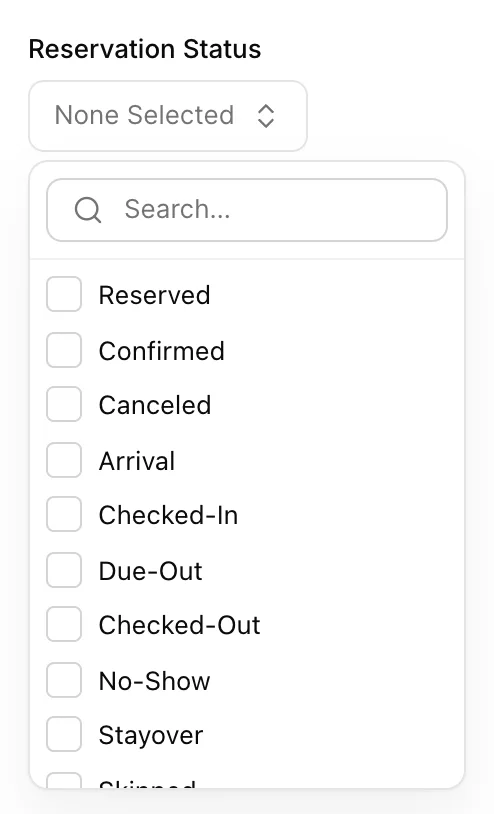
Ticking values inside one list widens the answer, and adding a second list narrows it. Dirty and Pick-up together give you every room that needs work; adding Vacant to that cuts it down to the rooms you could sell tonight if they were done. The button then reads 2 filters applied, and Clear active filters beside it puts the whole house back.
The rooms somebody is walking into
Filter Reservation Status to Arrival and you get the list that decides how this evening goes: rooms with a guest booked into them tonight who has not arrived yet.
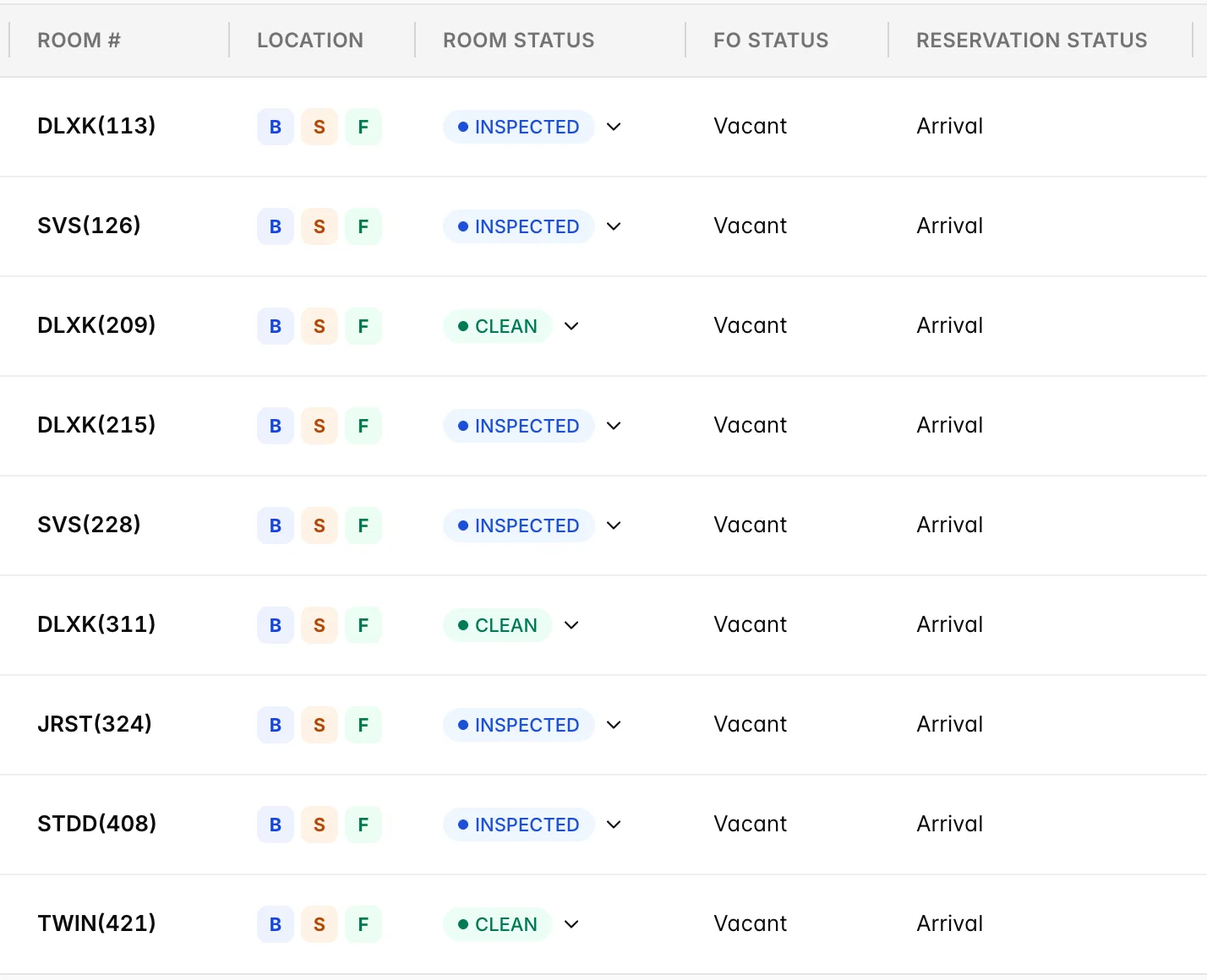
Every row here is Vacant, which is what Arrival means: the booking is attached to the room but the guest has not walked in. The column worth scanning is the room status on the left. Nine rooms all reading INSPECTED or CLEAN is a quiet evening. One reading DIRTY at four in the afternoon is the room that will have somebody waiting in reception for it, and it is worth handing to an attendant by name rather than leaving on a sheet.
The turnaround list
The mirror image is Room Status Dirty with FO Status Vacant: rooms nobody is in, that nobody can be put in.
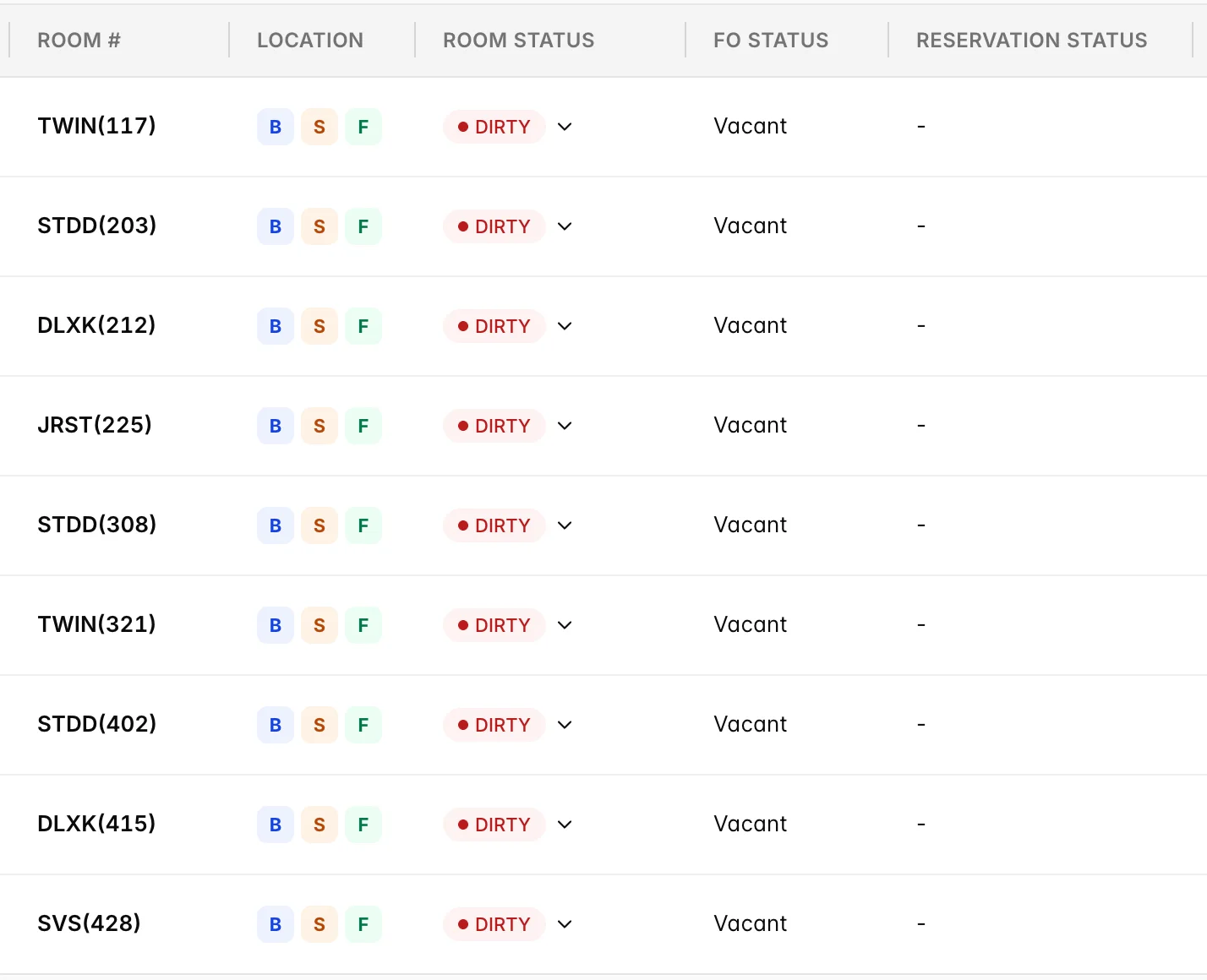
Every one of these shows a dash under Reservation Status, which means no booking is attached to them at all. Nobody is being held up by them tonight, and that is exactly why they are worth doing first: each one is a room you could still sell today, and every hour it stays dirty is an hour it is not on the market. A room on this list that also carried Arrival would be a different kind of urgent, and it would be in the previous list rather than this one.
The whole house on one card
The board answers room by room. When the question is about the property rather than a room, the Housekeeping Status card on the House Status report crosses the two answers against each other and counts every room in the building.
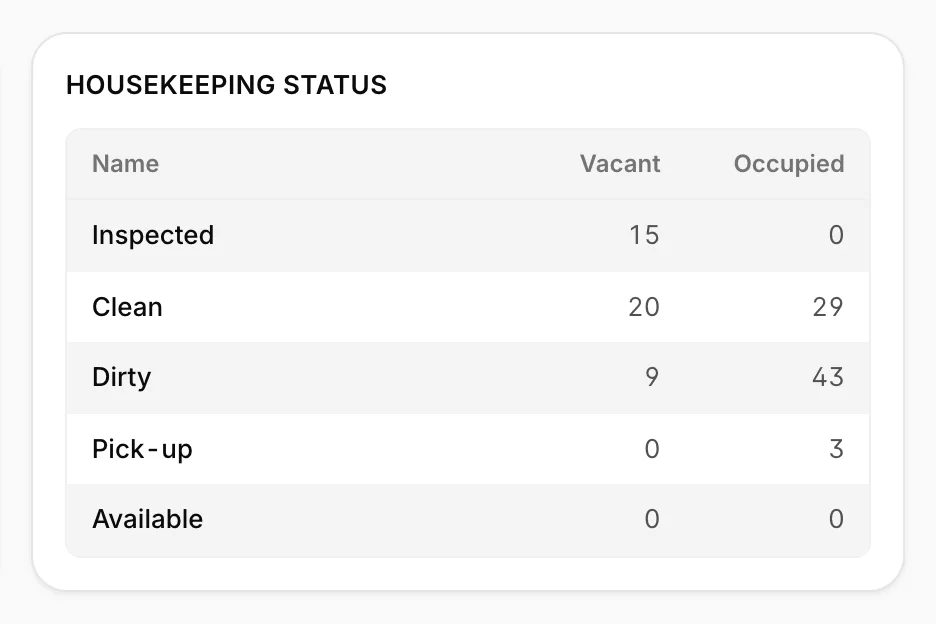
Read the Vacant column downwards and you have your sellable position: 15 inspected and 20 clean rooms are ready now, and the 9 dirty ones are the work between you and 44 empty rooms. Read the Occupied column and you have the size of the morning: 43 dirty rooms with guests in them, 3 needing a second visit. The card only shows for today and past dates, because nobody can know what state a room will be in next Tuesday.
Things that catch people out
- Nothing stops a check-in into a dirty room. Prostay checks that today falls inside the stay and that the booking has not already been checked in. It does not look at the room status, and there is no warning. The room status column on the arrivals is the check, and it is a human one.
- Cleaning a room does not free it, and freeing a room does not clean it. Setting a room clean while the guest is still in house leaves it occupied and unsellable. Checking a guest out of a room nobody has touched leaves it dirty and unsellable. Both halves have to happen.
- A dash is not the same as vacant. The dash in the Reservation Status column means no booking is attached to the room at all. A room can be vacant and still carry Arrival, which is a room you must not give to anybody else.
- Due-out and stayover both mean occupied. They are not stages of leaving. A due-out room has somebody in it until they are checked out, and it stays out of your sellable count until then.
- The room status column can be missing entirely. It is gated on Housekeeping status management., while FO Status and Reservation Status are shown to everybody. A colleague describing a board with no coloured badges is not looking at a broken screen, they are looking at a role without that permission.
- The bulk bar will not touch a blocked room. Selecting a floor and setting it clean skips any room that is out of order or out of service, and names the rooms it skipped. That is protection, not a failure.