What a house account is
Somebody is spending money at your property and has no room. A dive school running a course for people staying down the road. An agency that settles once a month. A wedding party using the function room. A walk-in who opens a bar tab on Saturday afternoon.
A house account is where those charges go. It behaves like a bill: charges go on it, payments come off it, and at the end somebody settles it and gets an invoice. What it does not do is take a room. It consumes no inventory, appears in no occupancy figure, and changes nothing about what you have left to sell.
That last part is the point. The old way of handling a non-resident spender is to book them into a pretend room so there is a folio to post to, and every pretend room quietly corrupts your occupancy, your availability and every report built on either. A house account is the same bill without the pretend room.
House account or reservation folio
The question answers itself: if the person has a reservation, use their folio. Charges belong with the stay they were incurred on, and the folio does things a house account does not, like splitting a bill between the guest and a company, or routing charges to another room.
Open a house account when there is no reservation to post to, and when there is not going to be one. Everything about the account, including what it looks like on the screen, assumes that: there is no arrival, no departure, no room, and nothing that turns it into a booking later.
Turning it on, and who can see it
Two things have to be true before House Accounts appears under Reservations in the menu.
The first is the property switch. House accounts is one of the four switches on Billing Features, and with it off the whole feature is hidden for everybody.
The second is the permission. House accounts have their own group of six under Reservations in Users, Roles and Permissions, and they are worth granting separately rather than as a block:
| Permission | What it allows |
|---|---|
| List house accounts | See the list at all. Without this or the next one, the screen is a locked panel. |
| Open an account and its ledger | Read one account and everything posted to it. |
| Open a new house account | The New account button. Everyone at the desk rarely needs this. |
| Post charges to an account, reopen it | Adding charges, and reopening an account that was already closed. |
| Settle and close an account, issuing an invoice number | Closing. Marked sensitive, because the invoice number it issues is a number in your books. |
| View the house-account postings report | The postings report, which is separate from seeing the accounts themselves. |
Taking money is not in that list. Recording a payment on a house account uses the same permission as recording one on a folio, on the reasoning that it is the same act: a cashier taking money is a cashier taking money, whoever it is from.
The list
Reservations then House Accounts opens the register. Every account your property has, with what each one owes.
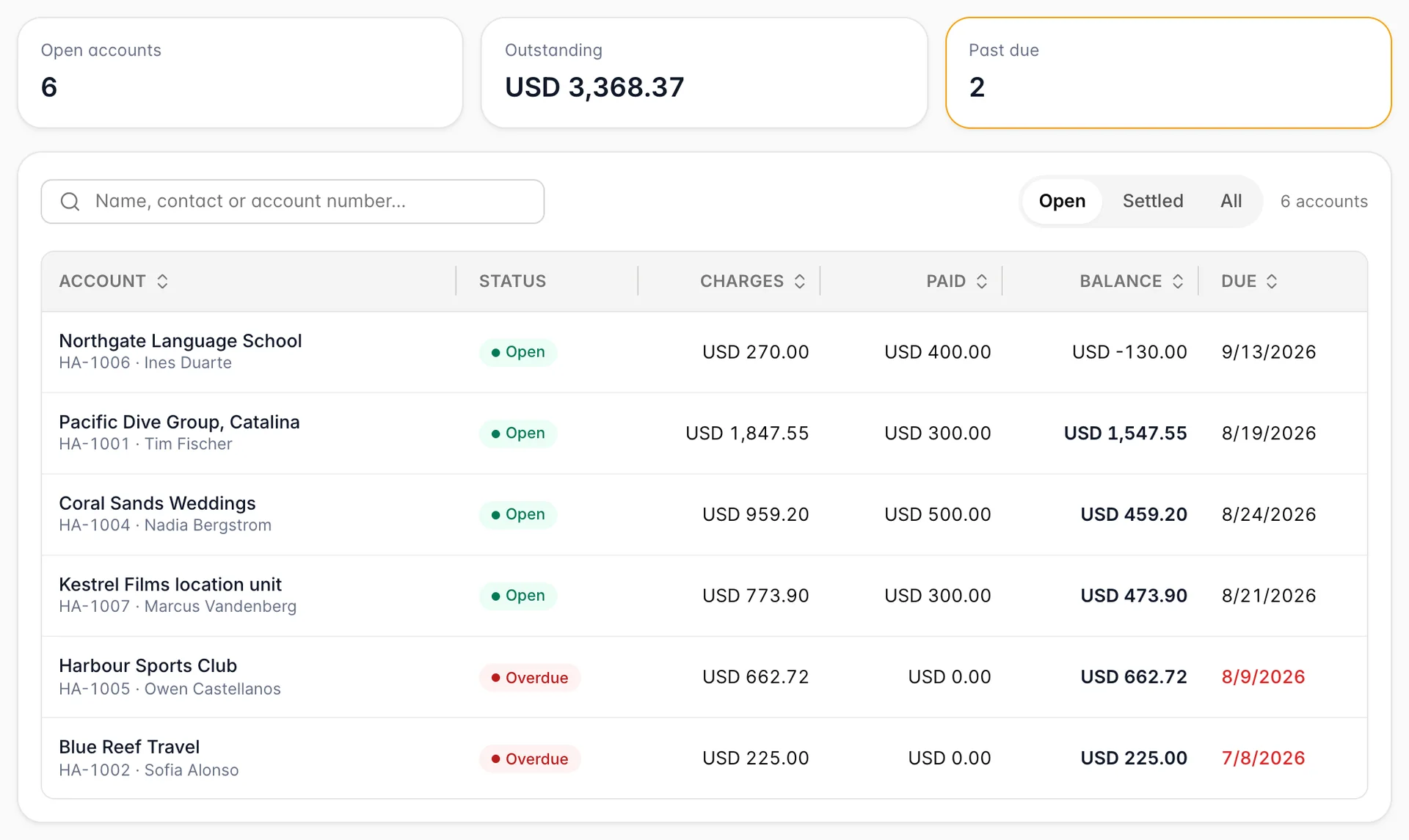
The three tiles are the summary a duty manager wants: Open accounts is how many are still running, Outstanding is what those accounts owe you between them, and Past due is how many have gone past the date you said you would be paid. That last tile turns amber when it is not zero, and it is the one to look at first.
Underneath, one row is one account. Two columns repay a second look.
Status has three values, not two. Open means the account is running. Settled means it has been closed and given an invoice number. Overdue is not a state anybody sets: it is an open account that still owes money on a day later than its Due date, worked out fresh every time the screen loads. Pay it, or move the due date, and it goes back to Open by itself.
Balance shows in bold when money is owed and can go negative. A negative balance is not an error, it is credit: you are holding more of their money than they have spent, which is the normal state of an account that took a deposit before the charges arrived.
The search box looks in the account name, the contact, the company, the email address and the account number, so HA-1004 finds an account as readily as a surname does. The Open / Settled / All control beside it decides which accounts the search runs over; the list opens on Open, which is why an account somebody settled last week appears to have vanished.
Opening an account
New account opens a panel of eight fields, of which exactly one is required.
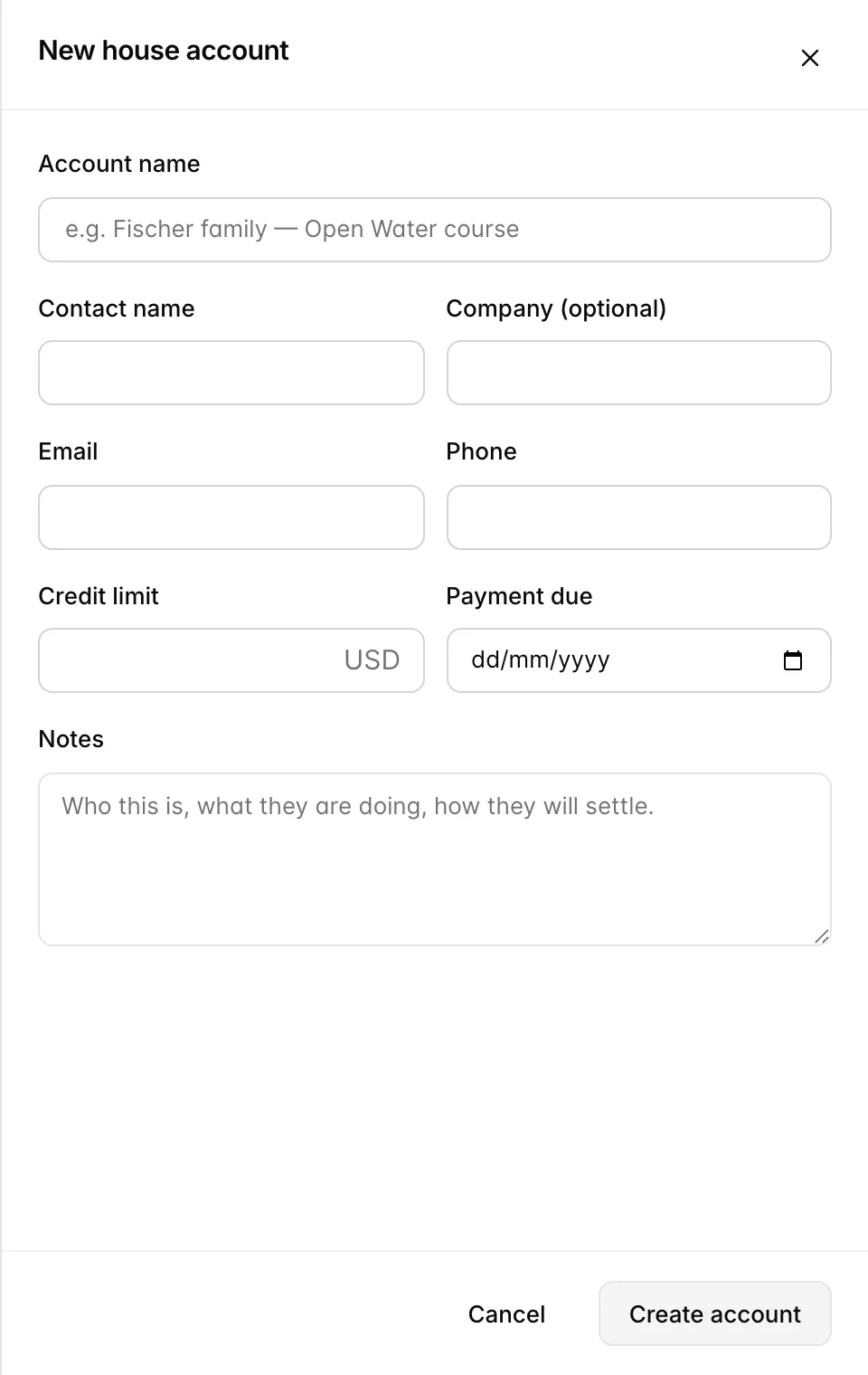
Account name is the required one, and it is worth spending ten seconds on. It is what the account is called everywhere afterwards: on this list, on the postings report, on the invoice. Name it after the thing being billed rather than the person standing in front of you, because the person changes and the thing does not. The account number, HA-1001 and upwards, is issued for you when you save.
Credit limit is advice, not a barrier. Nothing stops a charge that takes the account past it. What happens instead is that the account page grows a warning banner saying the balance is above the limit, which is there for whoever looks at the account next. If you need a hard stop, this is not it.
Payment due is the field that makes the register worth reading. It drives the Overdue badge, the Past due tile, and every bucket on the aged balances panel of the postings report. An account with no due date is never overdue and never ages, no matter how long it sits there.
Notes is free text on the account, shown at the foot of the account page. It is the right place for the arrangement: who these people are, what they are doing, and how they intend to pay. Whoever picks the account up in three weeks will be glad of it.
Saving takes you straight into the new account, ready to post charges and take money. Everything on the panel except the account number can be changed later.
Things that catch people out
A settled account has not gone anywhere. The list opens on Open. Switch to Settled or All to find it, and it can be reopened if it was closed too early.
The credit limit will not stop anybody. It raises a banner on the account and nothing else. Treat it as a note to your colleagues rather than as a control.
No due date means never overdue. Leaving it blank is reasonable for a tab that will be settled within the hour, and a bad idea for an agency, because the account will never appear in the Past due tile or in anything aged, however long it runs.
Nobody is watching these for you. There is no reminder, no automatic email and no escalation. A house account is a note that somebody owes you money, and it is worth deciding who opens this screen and how often before you have thirty of them.