A reservation is a contract for one or more rooms. The Rooms tab is where those rooms are listed, one per row, and it is the only place you can change which physical room a guest is walking into without rebuilding the booking.
The count on the tab is the number of rows. A two-room family booking reads Rooms 2 and is still one reservation, with one folio and one balance.
The tab
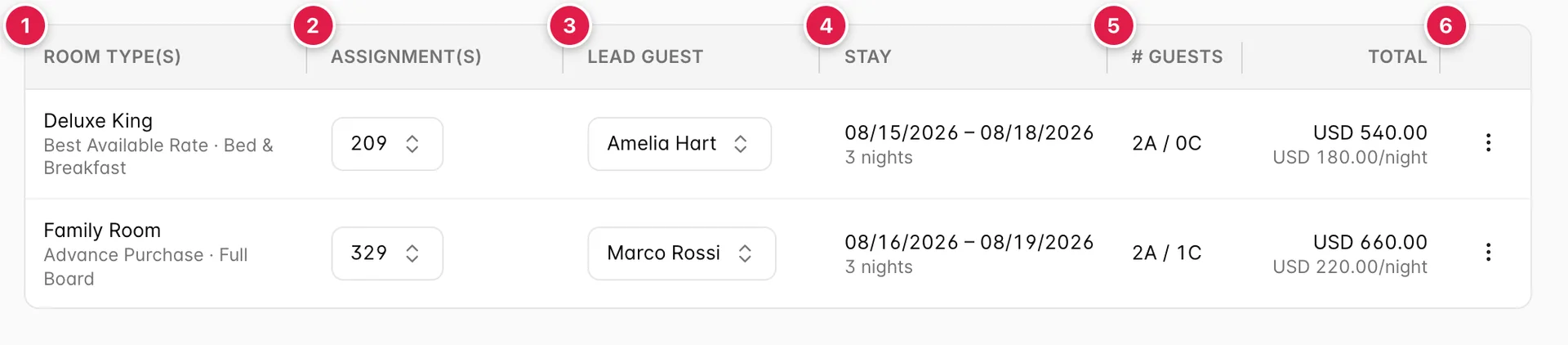
- What was booked. Room type, rate plan and board basis.
- Which room they are actually in. Editable, here, in place.
- Whose name the room is under. Also editable in place.
- The dates for this room. Not necessarily the booking's dates.
- How many people are in it. Adults and children.
- What this room costs. For the whole stay, and per night.
Notice that the two rows in the screenshot have different dates. One booking can hold rooms with different arrival and departure days, a family where the grandparents arrive a day later is one reservation, not two. The dates in the header of the reservation page are the outer edges of all the rooms; these are the real ones.
The columns
| Column | What it holds |
|---|---|
| ROOM TYPE(s) | The type that was sold, with the rate plan and board basis underneath. Read-only: changing the type is restructuring the booking, which is what Split Stay / Room Move is for. |
| ASSIGNMENT(s) | The physical room. A dropdown, not a label, see Assigning a room. Empty and reading Auto-assign means no room has been picked yet. |
| LEAD GUEST | Which of the booking's guests this room is under. Also a dropdown. |
| STAY | This room's arrival and departure, with the night count underneath. Shown in your property's date format, so a property set to DD/MM/YYYY sees the day first. |
| # GUESTS | Occupancy as 2A / 1C, two adults and one child. This is what the rate was priced on, so it is not the same thing as the number of names on the Guest tab. |
| TOTAL | What this room costs for its whole stay, with an average per night below it. Room only: items, taxes and fees are on the folio, not here. |
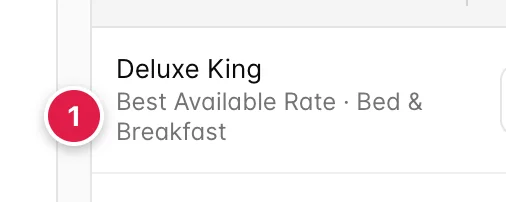
The second line matters more than it looks. Two rooms on the same booking can be on different rate plans and different board bases, that is normal on a channel booking, where each room is sold separately, and it is why the guest asking "is breakfast included?" can have a different answer for each room they are in.
Assigning a room
Booking a room type and assigning a room number are two different events. A guest books a Deluxe King; which Deluxe King they get is decided later, sometimes not until they are standing at the desk. The ASSIGNMENT(s) dropdown is where that decision is recorded.
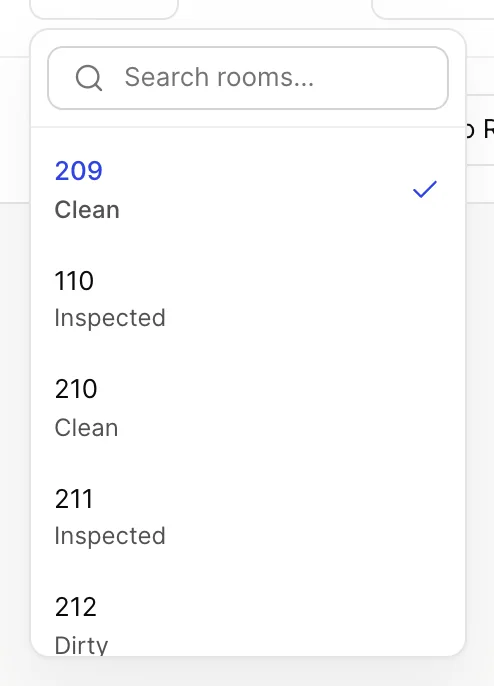
Two things are true of every room on that list, and they are the reason you can pick from it without checking anything else:
- It is the type that was booked. The list never offers you a Twin when a Deluxe King was sold. Putting the guest in a different type is a room move, not an assignment, and it goes through Split Stay / Room Move so the rate follows the change.
- It is free for these dates. Rooms already sold for any night of this stay are not offered.
The grey line under each number is the housekeeping status, Clean, Inspected, Dirty, Pick-up. It is live, not a snapshot from this morning. On a same-day arrival it is the difference between a room the guest can walk into and a room somebody has to service first, so it is worth reading before you pick the lowest number on the list.
Pick a room and it saves immediately. There is no Save button on this tab; the change is written when the dropdown closes and the page reloads behind it. If it fails, the dropdown snaps back to the room it had before and an error appears, the assignment is never left in a state where the screen and the database disagree.
Changing the lead guest
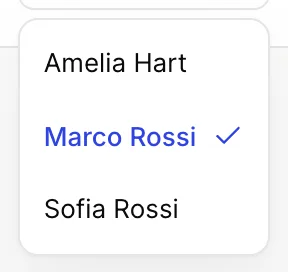
The lead guest is the person the room is held under: the name on the key card, the name housekeeping and the desk see against that room, and the name that comes up when somebody rings down from it. It is per room, not per booking, which is the point, on a two-room family booking, each room can be under the adult who is actually sleeping in it.
The list is every guest on the reservation. If the person you want is not on it, add them on the Guest tab first; this dropdown will not create anybody.
Like the assignment, it saves as soon as you choose. Changing it does not move any charges, a line already posted to a guest stays with that guest until somebody reassigns it on the folio.
Dates, occupancy and money
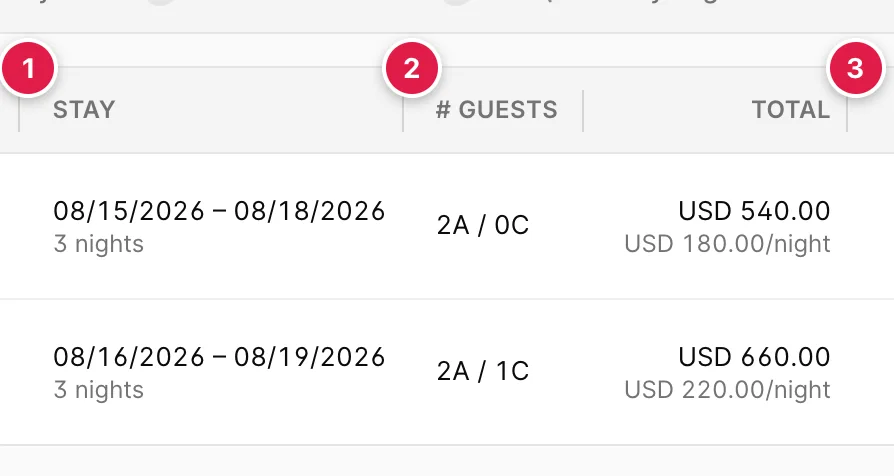
- The dates for this room. Nights are counted between the two dates, so 16 to 19 August is three nights, not four. Changing them is done from Edit in the reservation header, not here.
- Adults and children. What the room was priced for. A child counts against occupancy limits and often against the rate, which is why it is recorded separately rather than as a head count.
- The room's own total. Everything below it in the rail, taxes, items, the balance, is the whole booking; this figure is this room.
The row menu
The three dots at the end of each row hold everything that changes the shape of the booking rather than a value on it. What is in the menu depends on where the booking came from.
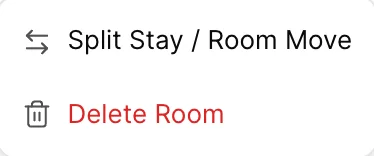
| Item | What it does | When it appears |
|---|---|---|
| Split Stay / Room Move | Breaks the stay into parts so the guest can change room, room type or rate part-way through. Covered in Splitting a stay and moving rooms. | Stays of two nights or more, on bookings that did not come from a channel, at properties where split stays are switched on. |
| Undo Split Stay | Merges the parts back into one, in the first part's room, at the sum of the parts' charges. | Only on a row that is already part of a split. |
| Delete Room | Takes the room off the booking entirely. | Always. |

This is not a permission problem and it is not a bug. A booking that arrived from Booking.com, Expedia or a GDS is owned by that channel: its shape lives there, and a change made here would not sync back. Prostay hides the restructuring actions rather than let you make a change that would silently disagree with the channel. To move a channel guest to a different room type, change it on the channel, or cancel and rebook direct.
Deleting a room
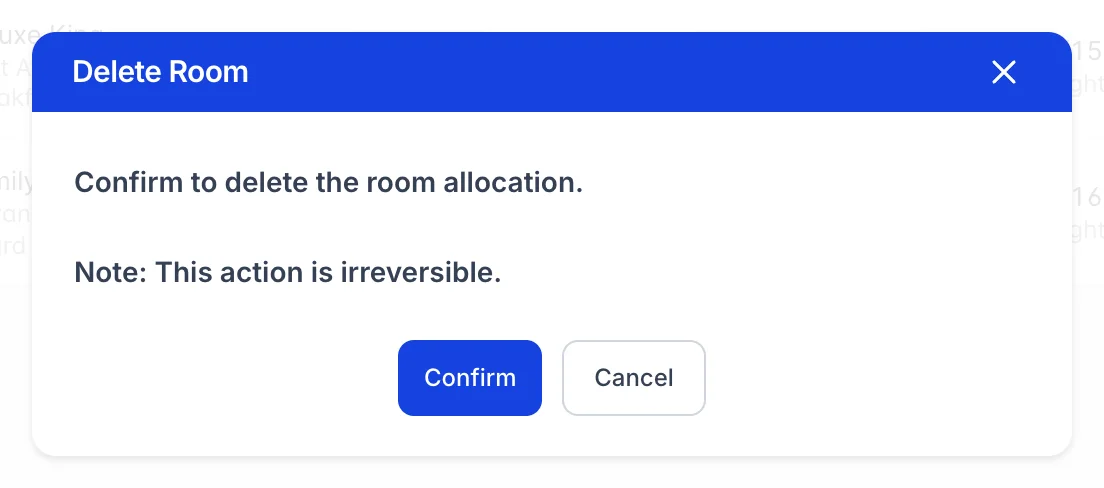
Deleting a room removes the row, frees the room on the calendar, and takes that room's charges off the folio. The booking's total and balance drop accordingly. The dialog says the action is irreversible and it means it: there is no restore, and putting the room back is a new room on the booking at whatever rate applies today.
Two things worth knowing before you click Confirm:
- Payments are not removed. Only the room's charges go. If the guest had already paid for the room you have just deleted, the booking is now in credit, and that shows as a negative balance until somebody refunds it.
- Deleting the last room does not cancel the booking. You are left with a reservation that has no rooms on it. If the guest is not coming, cancel the reservation from the header instead, that records a reason and leaves an auditable trail. On a booking that came from a channel, cancel it in the channel's extranet rather than here: cancelling in Prostay does not reach the channel, so the guest keeps a live confirmation and the commission still stands.
Things that catch people out
| What you see | Why |
|---|---|
| The room you want is not in the assignment list | Either it is a different room type from the one that was booked, or it is sold for at least one night of this stay. Both are deliberate. The calendar is the fastest way to see which of the two it is. |
| No dropdowns and no three-dot menus | Your user is on the booking's restricted list. Restricted users can read this tab but cannot change anything on it. An administrator manages the list from the booking's Actions dialog. |
| Split Stay / Room Move is missing | Most often the booking came from a channel. Otherwise: the stay is a single night, the row is already part of a split, or split stays are switched off for the property in System Settings. |
| The row totals do not add up to the balance | They are not meant to. These are room charges only. Taxes, fees and anything from the catalogue are on the folio, and the balance is what is left after payments. |
| Two rows for what the guest calls one room | The stay has been split. Each part is its own row, labelled Segment 1, Segment 2 and so on, with a note saying which room it moves to. |