What a split stay is
A guest booked five nights. On the third morning the shower fails, or a suite comes free, or the party next door will not go to bed. You need the guest in a different room for the rest of the stay, and you need the booking to still be one booking: one confirmation number, one folio, one balance.
That is a split stay. Prostay cuts the room line into parts, gives each part its own room, its own room type if you want one, and its own price. The guest keeps their reservation number and never sees a second booking. Housekeeping sees both rooms. The folio bills the nights at whatever each part was worth.
Opening the dialog
Open the booking, go to the Rooms tab, and pick Split Stay / Room Move from the three-dot menu at the end of the room's row. The same item is in the reservation's Actions menu, under Update; the difference is that the row menu starts you on that row, while Actions makes you pick a room first.
If the item is not there, one of four things is true:
- The booking came from a channel. Bookings from an OTA or a GDS cannot be split. The channel owns the shape of that stay and a change made here would not sync back to it.
- The stay is one night. There is no mid-point to move on.
- The row is already part of a split. Those rows offer Undo Split Stay instead.
- Your property has split stays switched off. An administrator controls this in System Settings › Reservation Settings › Allow split stays (room moves).
The dialog
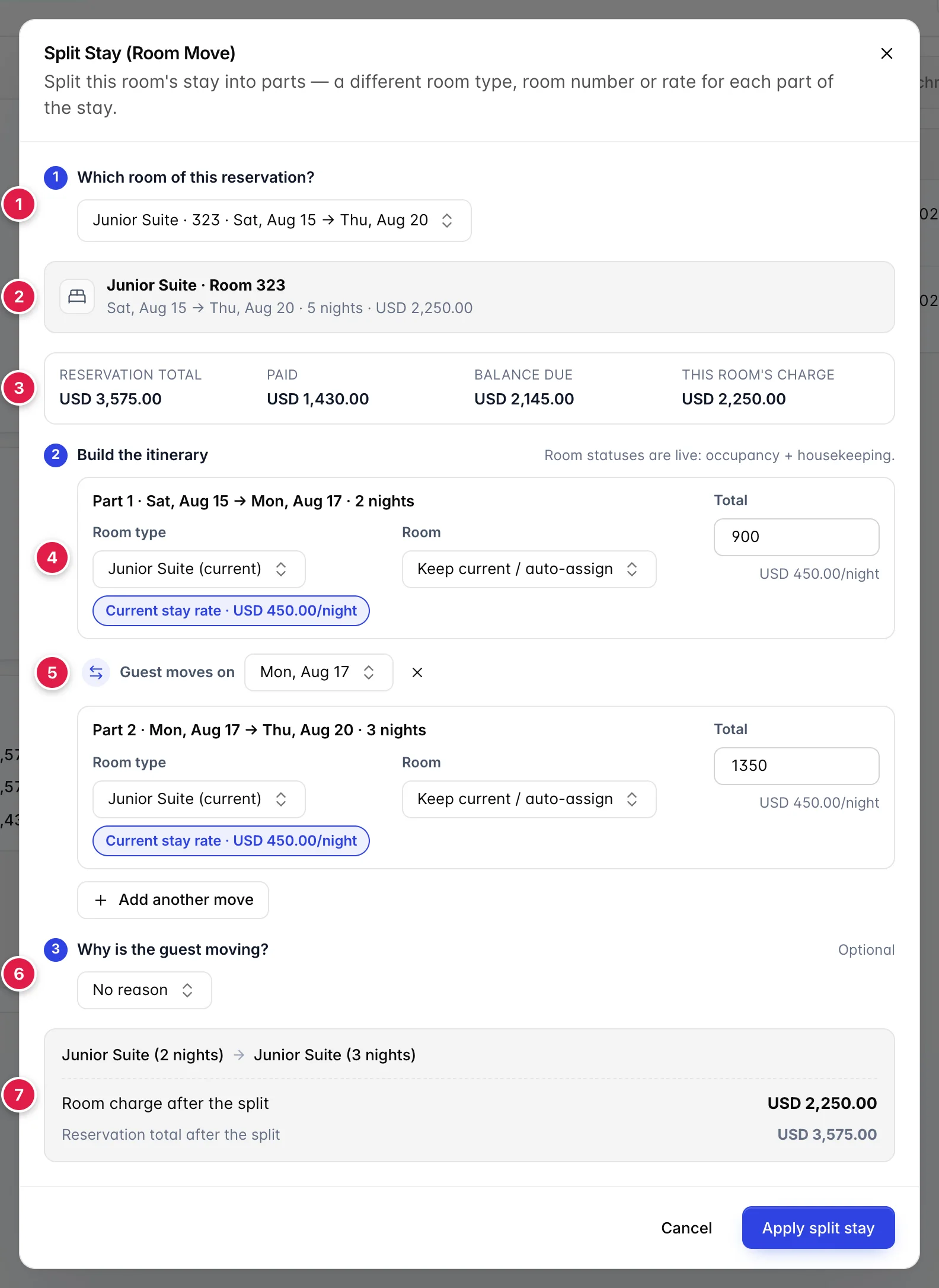
- Which room of the booking you are splitting. Only on bookings with more than one room.
- What that room is today. Type, number, dates, nights and charge, before you touch anything.
- The money around it. The reservation's total, what has been paid, and what is outstanding.
- One card per part of the stay. Two to begin with.
- The boundary between two parts. The morning the guest changes rooms.
- Why they are moving. Optional at most properties, compulsory at some.
- What all of it adds up to. Recalculated as you type.
Nothing in this dialog is saved until you press Apply split stay. You can open it, take it apart, and close it again without changing the booking.
Which room you are splitting
A booking with one room skips this step entirely and the dialog starts at the itinerary. A booking with several rooms asks first, because everything below is about one room line.
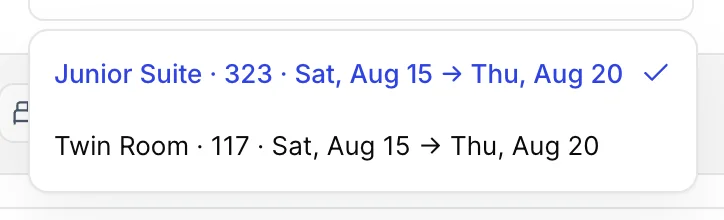
Each option names the room type, the room number if one is assigned, and that room's own dates. Rooms that cannot be split are listed but greyed out, with the reason after the dates, already split or too short, so you are not left wondering why the room you came for is missing.
Switching rooms here throws away any itinerary you have built and starts again from the new room's dates.
What the room is worth now
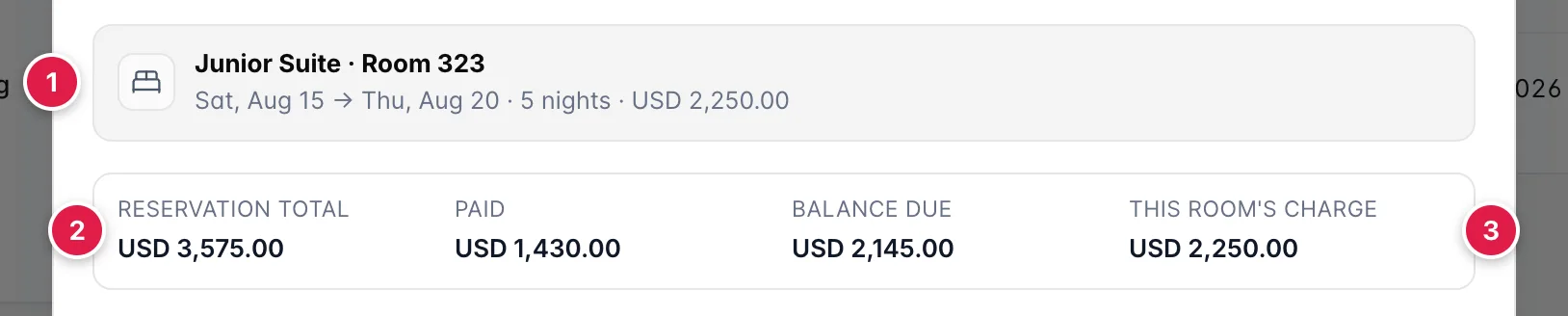
- The room as it stands. Type and number, the dates, the number of nights, and what those nights are being charged at in total.
- The reservation's figures. Total, paid and outstanding for the whole booking, including its other rooms, its taxes and anything from the catalogue.
- This room's share of that. The figure the split can change. Everything else on the strip moves only because this one did.
This strip is here so you can see the consequence before you cause it. A guest who has already paid in full and is being moved into a more expensive room will owe money afterwards, and it is better to know that while the dialog is open than to find out at checkout.
Building the itinerary
The dialog opens with the stay already cut in half: two parts, both in the current room type, split at the middle night, each priced at its share of what the stay costs today. A five-night stay opens as two nights and three. That is a starting point, not a suggestion, change any of it.

- Which part this is, and when. Its dates and nights, worked out from the move dates either side of it.
- Room type and room. What the guest is in for this part. (current) marks the type the booking was sold as.
- A shortcut to a price. One chip per rate Prostay can work out for these dates and this type.
- What this part costs. For the whole part, with the nightly average underneath.
Add another move cuts the longest remaining part in two, giving you a third part and a second move date. There is no ceiling on this beyond arithmetic: every part needs at least one night, so a five-night stay can have at most five parts. When none of the parts is longer than a night the button goes flat and says so.
The × beside a move date removes that move and merges the two parts either side of it back into one. The earlier part's room and type win.
The move date

Guest moves on is the morning the guest changes rooms: the last night in the old room is the night before this date, and the first night in the new room is this date. Sliding it later makes the first part longer and the second part shorter, night for night.
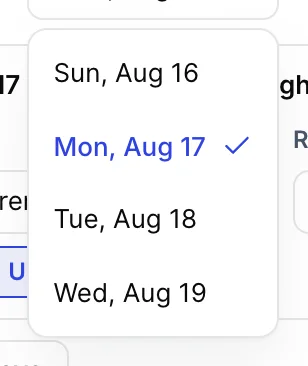
The list is bounded by the parts either side, so you cannot squeeze a part down to nothing, and you cannot push a move past the one after it. On a five-night stay with a single move there are four possible dates. Add a second move and the first one's list shortens, because the second move now needs room too.
Choosing rooms
Each part has a Room type and a Room. The type list holds every type available for those dates, plus the type the booking was sold as, which is always offered even when nothing of that type is free, you may be moving the guest out of it.
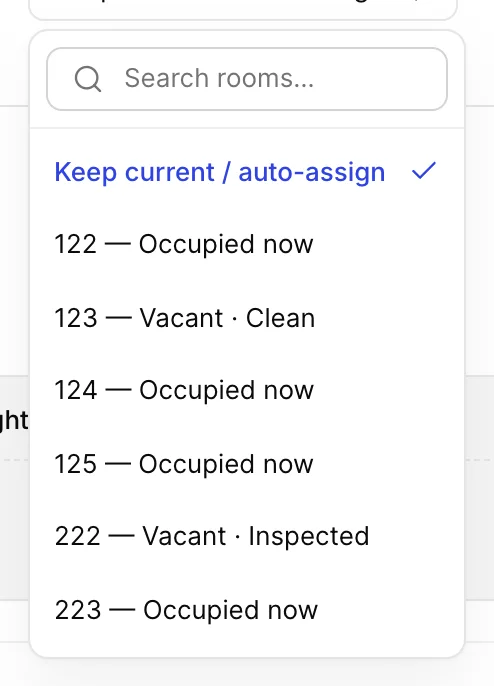
Every room of the chosen type is listed with its current state, so you can tell a room that is free and clean from one that needs a housekeeper before the guest can walk in:
| What the option says | What it means |
|---|---|
| Keep current / auto-assign | Do not pin a room. On a part that stays in the booked type this leaves the guest where they are; on a part that changes type it assigns a room at check-in. |
| Auto-assign at check-in | The same option, worded for a part whose type differs from the one that was booked. Prostay will pick a room of the new type nearer the day. |
| Occupied now | Somebody is in it tonight. That does not stop you: the part you are placing may start days later. It is a warning, not a block. |
| Vacant · Clean, Inspected, Pick-up, Dirty | Nobody is in it, and this is its housekeeping state. Dirty means somebody has to service it before the guest arrives. |
Rooms that are out of order or out of service are not listed at all. The room pinned to the part before this one is also hidden, because moving a guest from a room into the same room is not a move, and if you pin the same room on both sides some other way, the dialog says Same room on both sides and refuses to apply.
Prices
Every part carries a Total for that part, not a nightly rate. The nightly figure underneath is the total divided by the nights, shown so you can sanity-check what you typed.
The chips above it fill the total in for you:
| Chip | What it fills in |
|---|---|
| Current stay rate | This part's share of what the room is being charged today. Nothing changes hands: split a stay using only this chip on every part and the guest pays exactly what they were going to pay. |
| <Room type> rate | What that room type sells for on those dates, at today's rates. Appears once you choose a type other than the booked one, and only if a rate comes back for those dates. |
Or ignore both and type a figure. A part you type into stays typed: changing dates or types afterwards will not overwrite it.
The reason
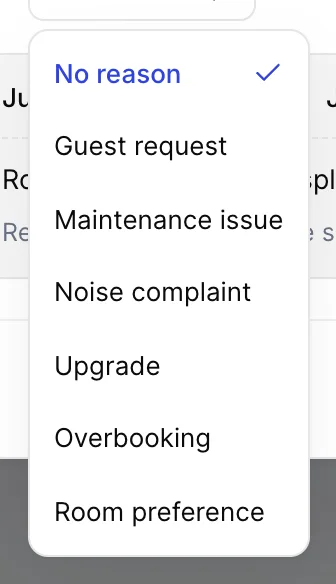
The list comes from your property's reservation settings, so what you see may differ from the screenshot. Whoever maintains that list can also make a reason compulsory, in which case the placeholder reads Select a reason (required). There is no No reason option, and Apply split stay stays dead until you pick one. If your property has not configured any reasons, the step is not shown at all.
It is worth filling in even when it is optional. The reason is written into the reservation's activity log beside the move and it feeds the room-moves figure on the dashboard, which is the only way anybody later finds out that eleven guests moved last month and nine of them were the same failing air conditioning unit.
Checking it before you apply

- The itinerary in one line. Each part as room type, room and nights, in order.
- What the room charge becomes. The old figure struck through, the new one beside it, and the difference. No chip means the split costs the guest nothing.
- What the reservation becomes. The booking's total with this room's new charge in place of its old one.
Apply split stay stays greyed out until the itinerary makes sense. It is waiting for one of these:
- every part has a room type;
- every part has a total that is a number and is not negative;
- no two consecutive parts are pinned to the same room;
- a reason, if your property requires one.
When a room is not free
Pinning a room does not check that room's diary, that happens when you apply. If the room is taken for any night of the part you gave it, nothing is saved and the dialog tells you what is in the way.

The message names the room and the booking in the way, so you can decide whether to pick a different room, move the boundary, or go and talk to the other booking. Blocks count as well as bookings: a room that is out of order, held for maintenance or on a courtesy hold across those nights is refused the same way, and the message says which of those it is.
Your itinerary is still on screen, exactly as you left it. Fix the one part and apply again.
What it looks like afterwards
Applying closes the dialog, reloads the booking, and confirms with Split stay applied. The reservation now has one row per part.
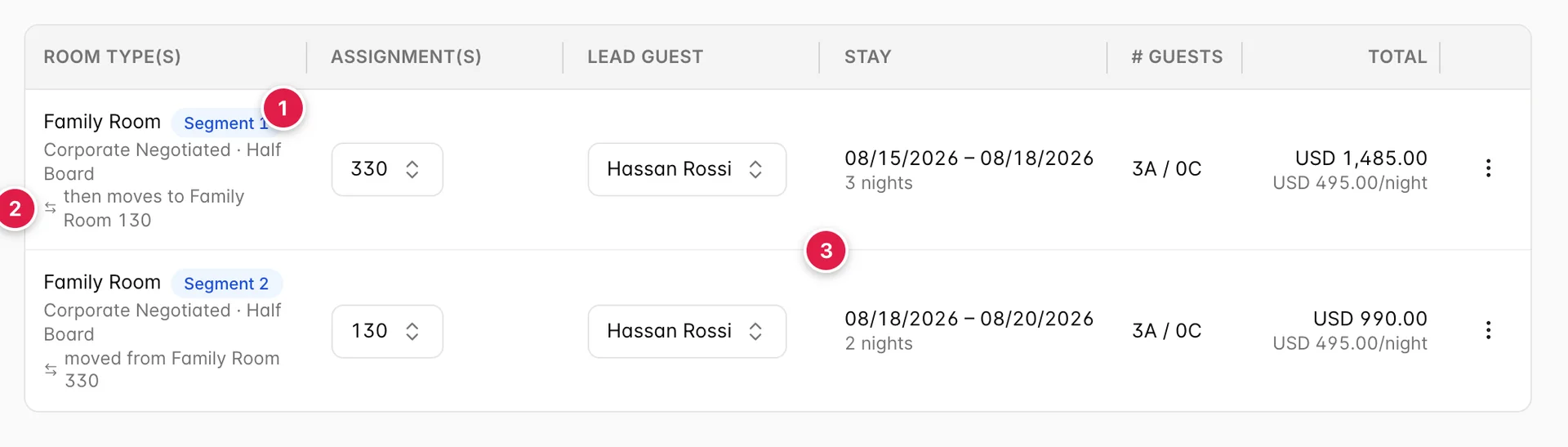
- A badge numbering the part. In the order the guest occupies them.
- Where the guest goes next, or came from. So a row read on its own still makes sense.
- Each part's own dates. They meet on the move date: the first part's departure is the second part's arrival.
The Rooms tab count goes up, because there are more rows. The guest count does not: the same people are staying, and the Guest tab is untouched.
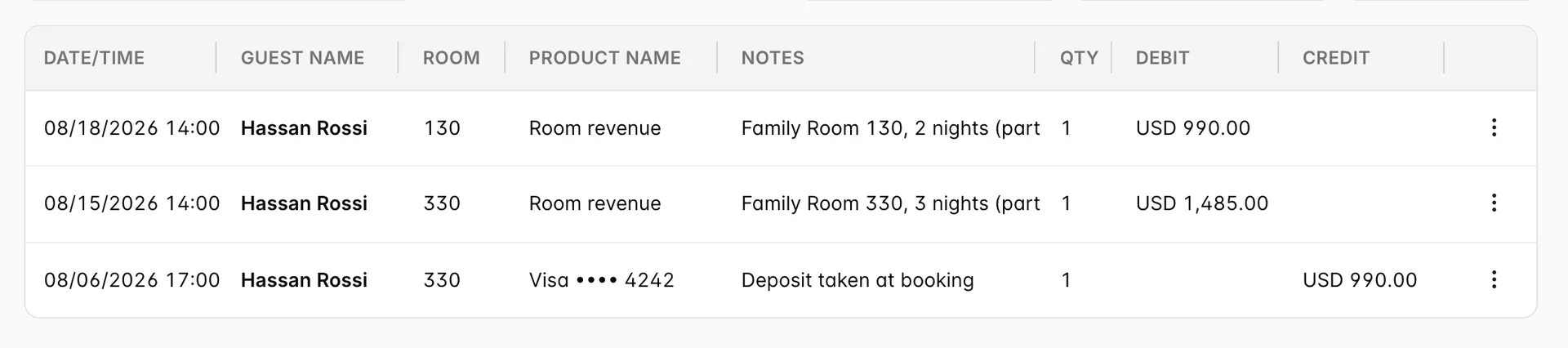
On the folio, the accommodation is re-billed from the new itinerary: each part is charged at what that part was sold for, against the room it is in. How that reads depends on the room revenue breakdown set on the folio the booking bills to, which decides whether accommodation appears as one line a night or as a single figure for the stay.
Payments, add-ons and anything posted by hand are left alone. Room taxes are not: they are worked out from what the rooms cost, so a part you repriced moves them with it. A split that keeps the same money moves nothing at all, which is the other reason to use Current stay rate when you only mean to move a guest.
On the calendar, the guest appears twice: once in each room, for the nights they are in it, with a marker showing the tile is part of a move. Housekeeping sees the first room becoming due for a departure clean on the move date, and the second room needing to be ready for an arrival the same morning.
Undoing a split
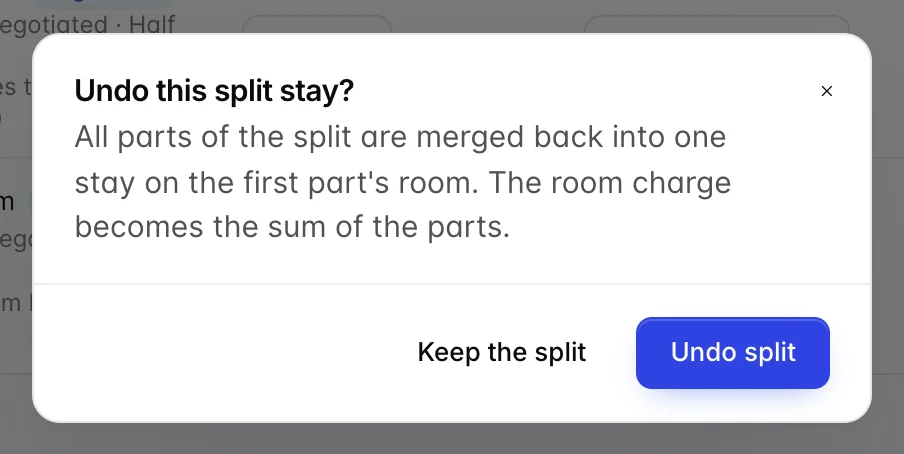
Undo Split Stay, from the row menu on any part or from the reservation's Actions menu, puts the stay back together. It asks first, and the dialog offers you the choice of going ahead or leaving the split alone. The parts become one row again, spanning the full dates, in the first part's room and at the first part's room type. The charge becomes the sum of the parts, and the accommodation on the folio is rebuilt for the single room.
Two things to be clear about before you use it:
- It is not a rollback. The merged stay is the sum of what the parts had become, not what the booking looked like before the split. If you split a stay and repriced a part, undoing keeps the new money.
- The first part's room wins. If the guest has already moved and you undo, the booking says they were in the first room the whole time. Undo is for a move that was recorded in error, not for a move that happened and is being reversed. For that, split the stay again and put the guest back.
Things that catch people out
| What you see | Why |
|---|---|
| Apply split stay is greyed out and nothing looks wrong | Check the totals first: a blank one, or one holding a stray character, is the usual cause. After that, look for two consecutive parts pinned to the same room, and for a reason your property requires. |
| The dialog says Nothing to split | Every room on this booking is either a single night or already part of a split. There is nothing left to cut in two. |
| The totals will not let you type in them | You do not have the Modify prices on existing reservations permission. The move itself is still allowed; the prices come across as they are. |
| A room you can see is empty is refused | Empty tonight is not the same as empty for the part's dates. Something has the room for nights inside the part, even if today is free, and the message says what. |
| The guest's charge went up and nobody meant it to | A part whose room type changed was priced from that type's rate rather than the stay's. Click Current stay rate on that part to put it back, and check the summary reads no difference before applying. |
| The reservation now shows more rooms than the guest booked | Each part of a split is a row, badged with its number in the itinerary. Two badged rows are one room across two stints, not two rooms at once. |