These two reports account for the rooms you could not sell. One covers rooms that were broken, with what the repair cost and who did it; the other covers rooms taken off sale while nothing was broken. Both are histories over a date range rather than pictures of tonight, which is the thing to understand before the numbers make sense.
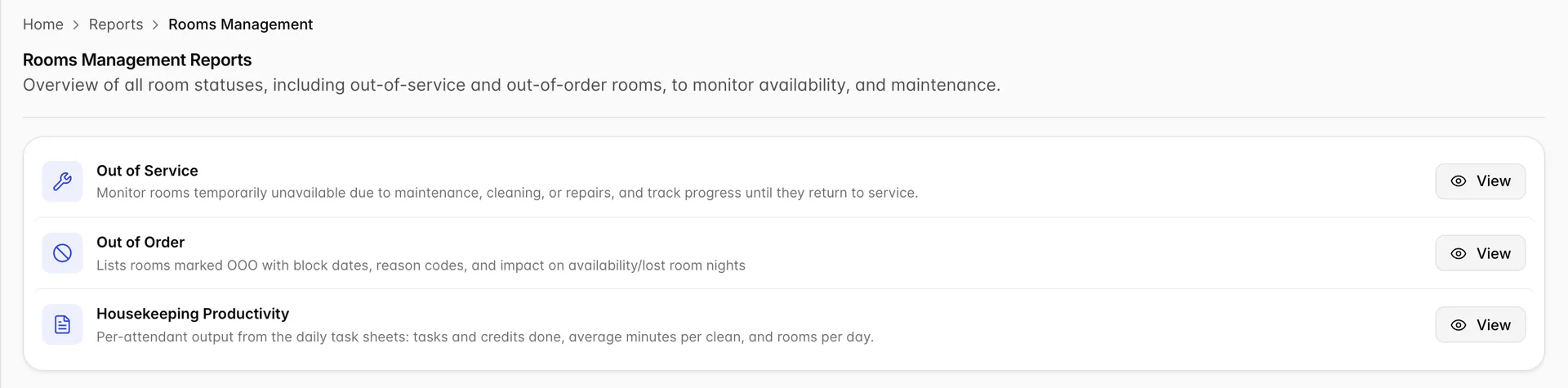
Which of the two you want
The split is the same one you make when you take the room off sale in the first place, and it is covered in full in blocked dates, holds and rooms out of service. In short: out of order means something is broken and there is a repair to pay for; out of service means the room is fine but not sellable yet.
| Report | Covers | Answers |
|---|---|---|
| Out of Order | Rooms with a fault: a leak, a failed air conditioner, an electrical problem | What broke, what it cost, who fixed it and when the room comes back |
| Out of Service | Rooms held back while nothing is broken: a deep clean, a mattress swap, carpet drying | Why the room was held, for how long, and whether the block ran, is still to come or was called off |
The out of order report
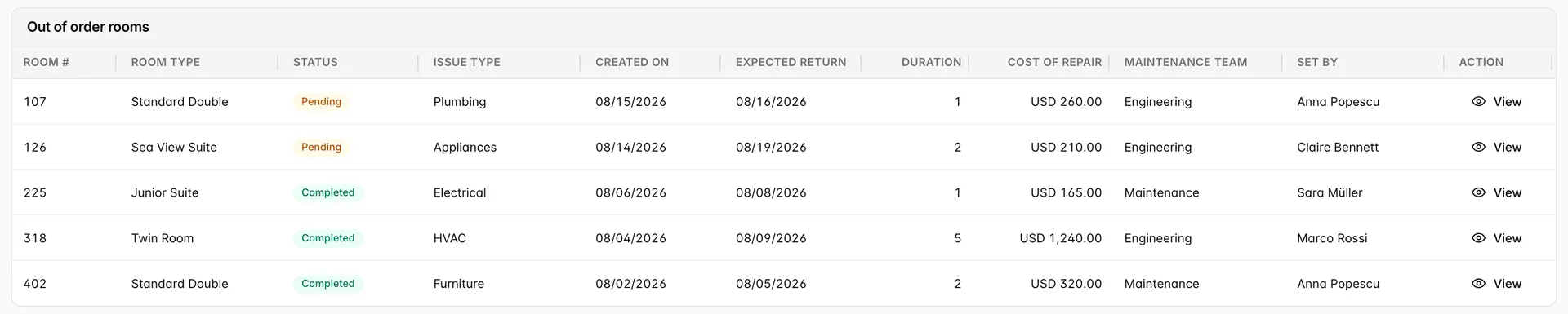
Eleven columns, and the ones worth knowing about are the ones that are easy to misread.
| Column | What it tells you |
|---|---|
| Status | Pending is raised and not started, In Progress is being worked on, Completed is done. Only the first two describe a room you cannot sell. |
| Issue Type | The category the fault was raised under. The list comes from your property settings, which is also what the filter offers. |
| Created On | When the block was raised, not when the room went out. A fault reported on Tuesday for a repair booked on Friday shows Tuesday here. |
| Expected Return | When the room is due back on sale. This is the date to argue with when reception needs the room. |
| Duration | Nights between the start of the block and the expected return. The start date is not one of the columns, so this will not always be expected return less created on. |
| Cost of Repair | What the repair is expected to cost, in the property currency. It is an estimate on the block, not an invoice, and nothing here totals it. |
| Maintenance Team | Who owns the job. Also from your property settings. |
| Set By | The user who raised the block, which is who to ask when the reason is not obvious. |
The out of service report

Nine columns, and two differences from the report above. There is no cost and no maintenance team, because nothing is being repaired. And the status is a lifecycle rather than a work state, with four values:
- Currently OOS: the room is off sale right now.
- Scheduled: the block is booked and has not started.
- Returned to Service: the block ran and the room is back.
- Cancelled: the block was called off, so the room never came off sale.
This report shows Expected Start as well as Expected Return, so its Duration can be checked against the two dates beside it. The Reason column is free text typed when the block was made, and long ones are truncated in the cell.
Filtering either report
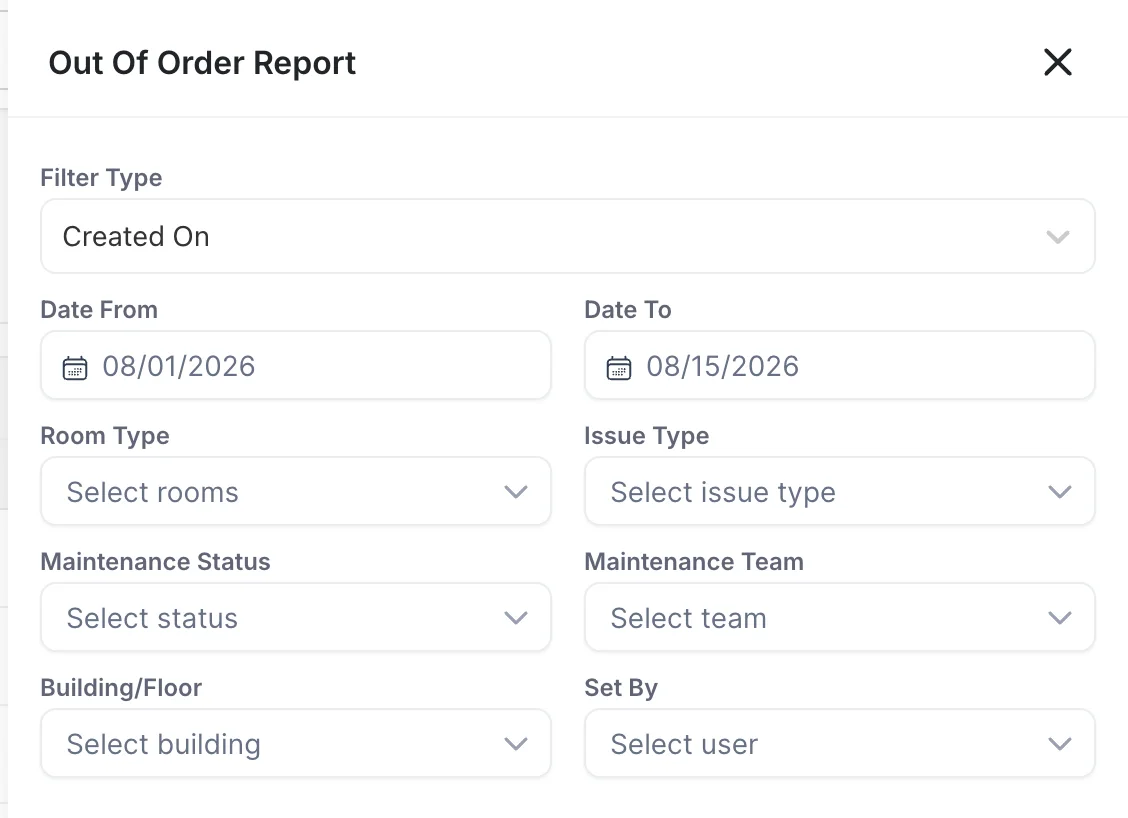
Both reports open on the current month: the first of the month to today, measured on Created On. That default is why a repair raised last month for a room that is still out today does not appear until you widen the range.
Filter Type decides which date the range is measured against, and it changes the answer more than anything else in the panel.
| Filter Type | What the range catches |
|---|---|
| Created On | Blocks raised in the range, whenever they run. This is what you want for "what did we take off sale this month". |
| Expected Start | Blocks due to start in the range, which is the forward-looking view. |
| Expected Return | Blocks due back in the range, which is the list to work from when you are chasing rooms. |
| Date Interval | Blocks that overlap the range at all. A block running from the first to the tenth is caught by a range covering the fifth, which none of the other three would do. |
The rest are multi-selects and stack: room type, issue type, maintenance status, maintenance team, building or floor, and the user who set the block. Out of service swaps issue type, team and status for the four lifecycle statuses above. Nothing applies until you press Save, and Reset all filter puts the panel back to the current month.
Printing and exporting

Both reports carry the toolbar the finance reports use: filters, a printer button, and an export menu. The menu offers Export as PDF and nothing else, so there is no spreadsheet of repair costs to be had from this screen. Print opens the same PDF in a new tab and sends it to the printer, which needs pop-ups allowed for the site. Both act on what is on screen, so the filters you set are the filters in the file.
Why the count here differs from the room summary
This is the thing that costs people ten minutes. The House Status report counts rooms that are out of order or out of service right now. These two reports count blocks over a range, and a block can be finished, or not started, or cancelled.
In the shots above the out of order report lists five repairs this month while House Status says one room is out of order. Both are right. Three of the five are Completed and those rooms are back on sale; one is Pending with a start date two days out, so the room is still sellable tonight; the fifth is room 107, which is the one room House Status counts. The out of service report tells the same story from the other end: five blocks this month, none of them running tonight, which is why the room summary reads zero.
What these reports will not do
- No totals. No row adds up the repair costs or the nights lost, on screen or in the PDF.
- No Excel. The export menu offers PDF only, unlike the revenue and occupancy reports.
- No history of changes. You see the block as it stands now. A repair pushed back twice looks the same as one that was always due on that date.
- Nothing tells you what the room would have earned. The cost column is the repair, not the lost revenue.