The account page
Opening an account from the house accounts list gives you the bill: a summary across the top and the ledger underneath it.
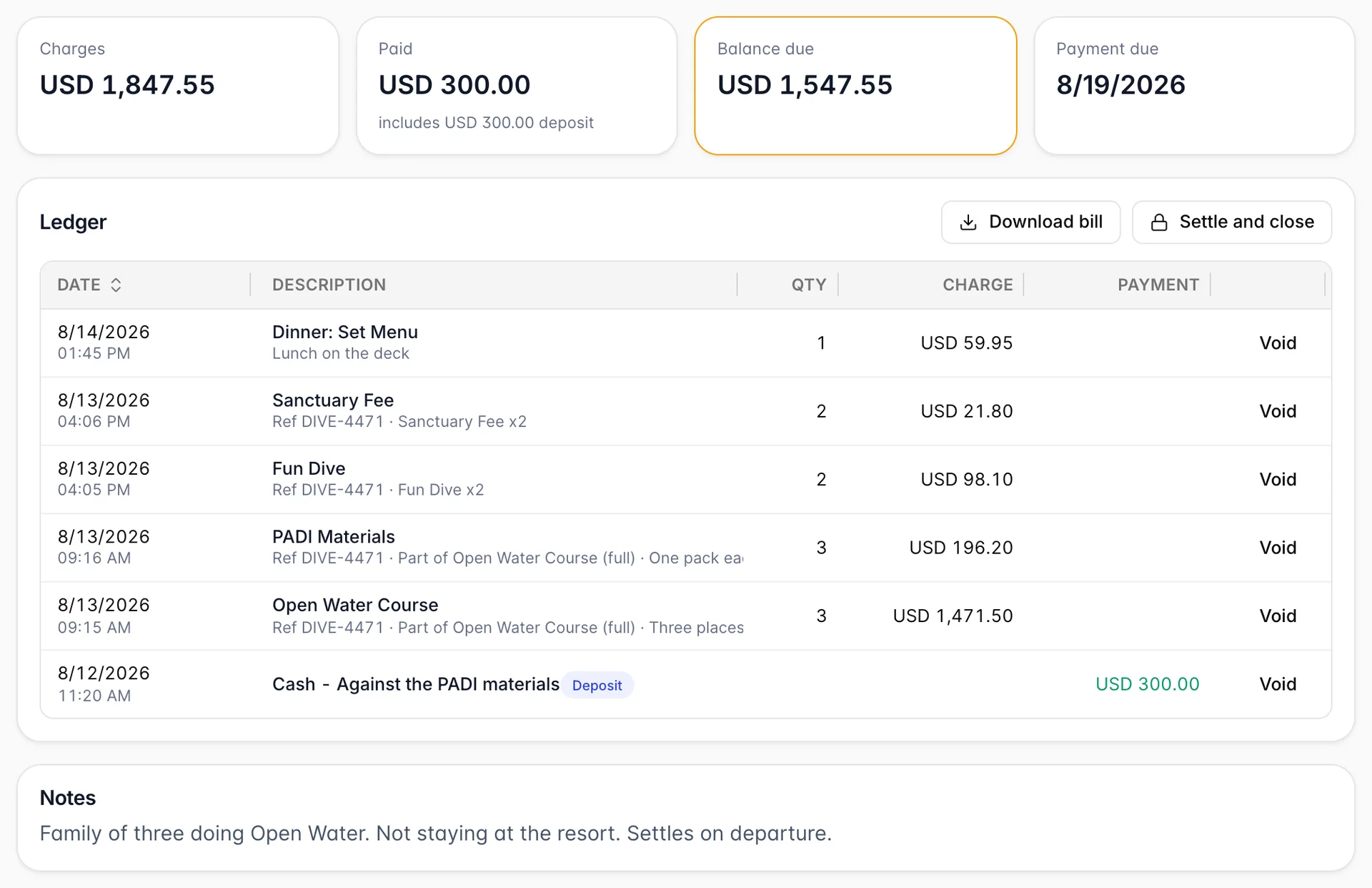
Charges and Paid are exactly what they say, and Balance due is the difference. When the account is in credit that third tile renames itself In credit and shows the amount without a minus sign, so it is the label rather than the number that tells you which way the money is pointing. Payment due only appears if the account has a due date.
If any money was taken as a deposit, the Paid tile says so underneath: includes USD 300.00 deposit. The deposit is already counted in the total above it, not added to it.
The ledger is every line ever posted, newest first. Charges land in the Charge column and payments in Payment, in green, so you can read down one column to see the spending and down the other to see the money. Two habits of the description column are worth knowing:
- A payment is described by how it was taken rather than by the word "payment": Cash, Card (Mastercard), and whatever note the cashier left, after a dash. That is the line somebody reconciling against a till or a card statement has to match.
- Under the name, in smaller text, sits everything the line carries besides its price: Ref and the docket or booking number it was posted against, Part of and the package it came out of, and, on a voided line, Voided and the reason somebody gave.
Posting charges
Post charges opens the same product catalogue the folio posts from, so a dive posted here and a dive posted to a room are the same item at the same price, and they add up together in your revenue reports.
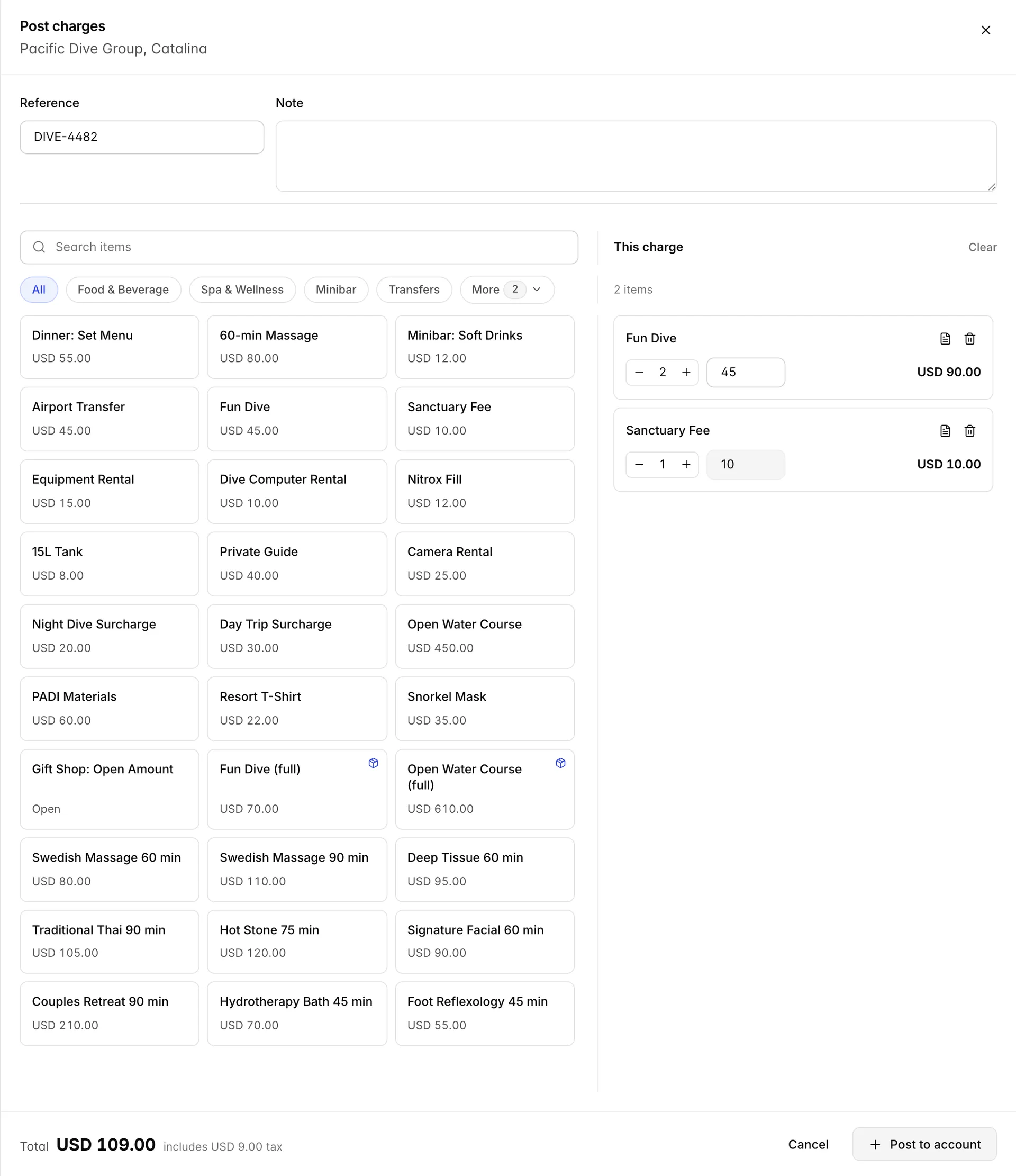
Tap an item to add it, tap it again to raise the quantity, or type the quantity and the price straight into the line if this one is different. The chips above the grid narrow it by category, and the search box looks through everything.
Reference and Note at the top belong to the whole posting, not to one line. Whatever you put in Reference is stamped on every line in that batch and shows up on the ledger afterwards as Ref DIVE-4482. It is the cheapest thing you will ever do for the person who has to work out, five weeks later, which boat trip a charge belonged to.
The total at the foot separates the tax out: USD 109.00, includes USD 9.00 tax. If your prices are tax-inclusive that is the tax inside the number; if they are not, it has been added on. Either way the number beside Total is what goes on the account.
Posting a package posts its parts. One tap on a package puts every component on the ledger as its own line, each marked Part of the package it came from, which is why a single tap can produce three rows. The package price is still what gets charged; the parts are there so the bill explains itself.
Taking a deposit or a payment
Take payment records money coming in.
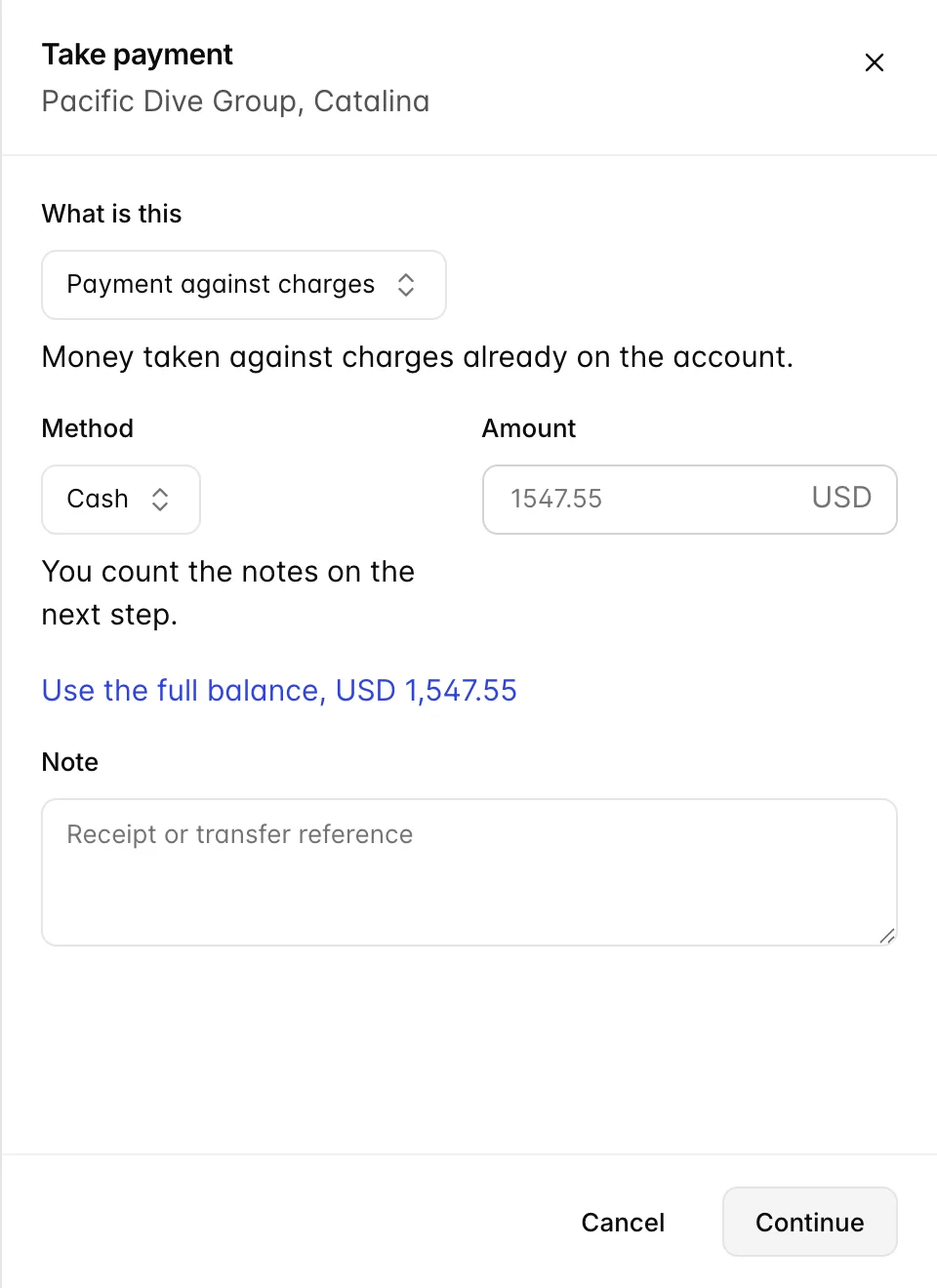
The first field is the one people skip and should not. Payment against charges is money handed over for things already on the account. Deposit taken up front is money taken before those charges exist, which sits on the account as credit until they arrive. Both reduce the balance by the same amount; the difference is that a deposit is labelled as one on the ledger, in the Paid tile and on the invoice, and that is what somebody will want to know when they ask why an account was in credit in June.
Method lists what your property actually accepts, which comes from Payment Options. Cash is always there. Card appears only if a card type has been ticked for payments taken at the desk, bank transfer only if it is switched on, and any custom method you have configured appears by name.
Choosing cash or card adds a second step before anything posts: cash asks what was handed over and works out the change, and card captures the slip. It is the same step the desk uses for a folio, so it needs no separate learning. Every other method records straight away, which is why the button says Continue for some methods and Record payment for others.
Use the full balance under the amount fills in everything owed. It is the fastest correct answer when somebody is paying up, and it is worth using rather than typing the figure, because a balance that ends up a cent out cannot be closed.
Voiding a line
Nothing on a house account is deleted. Void at the end of a ledger line takes it out of the totals and leaves it on the account, struck through, with a Voided badge and the reason you gave next to it.
The reason is required, by the screen and by the server behind it. It is the difference between a ledger that explains itself in six weeks and one that has a hole in it. "Posted to the wrong account" takes four seconds and answers the question nobody will be there to ask.
Voiding is a separate permission from posting, and deliberately so: posting a minibar item is a desk job, and removing revenue is a supervisor's signature. It uses the same permission as voiding a line on a folio.
Settling and closing
Settle and close above the ledger finishes the account. What it does first depends on the balance.
If money is still owed, it opens the payment panel with the outstanding amount already filled in and the button reading Take payment and close. Take the money and the account closes behind it, in one pass.
If nothing is owed, the button reads Close account and asks you to confirm.
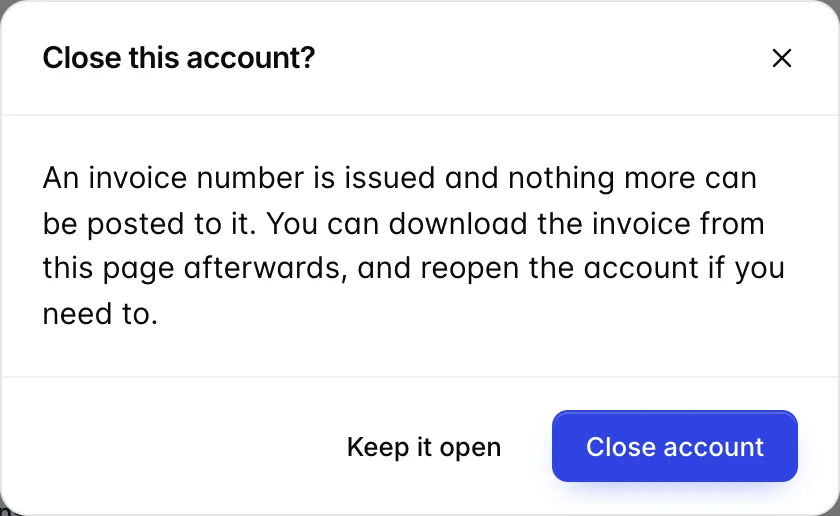
An account can only be closed at a zero balance, and that rule is enforced on the server as well as on the screen: closing an account that still owes money would issue an invoice number against a debt nobody has collected. An account in credit closes fine, because you owe them rather than the other way round.
Closing issues the invoice number, INV- followed by the account number, and stops everything: no more charges, no more payments, no more voids.
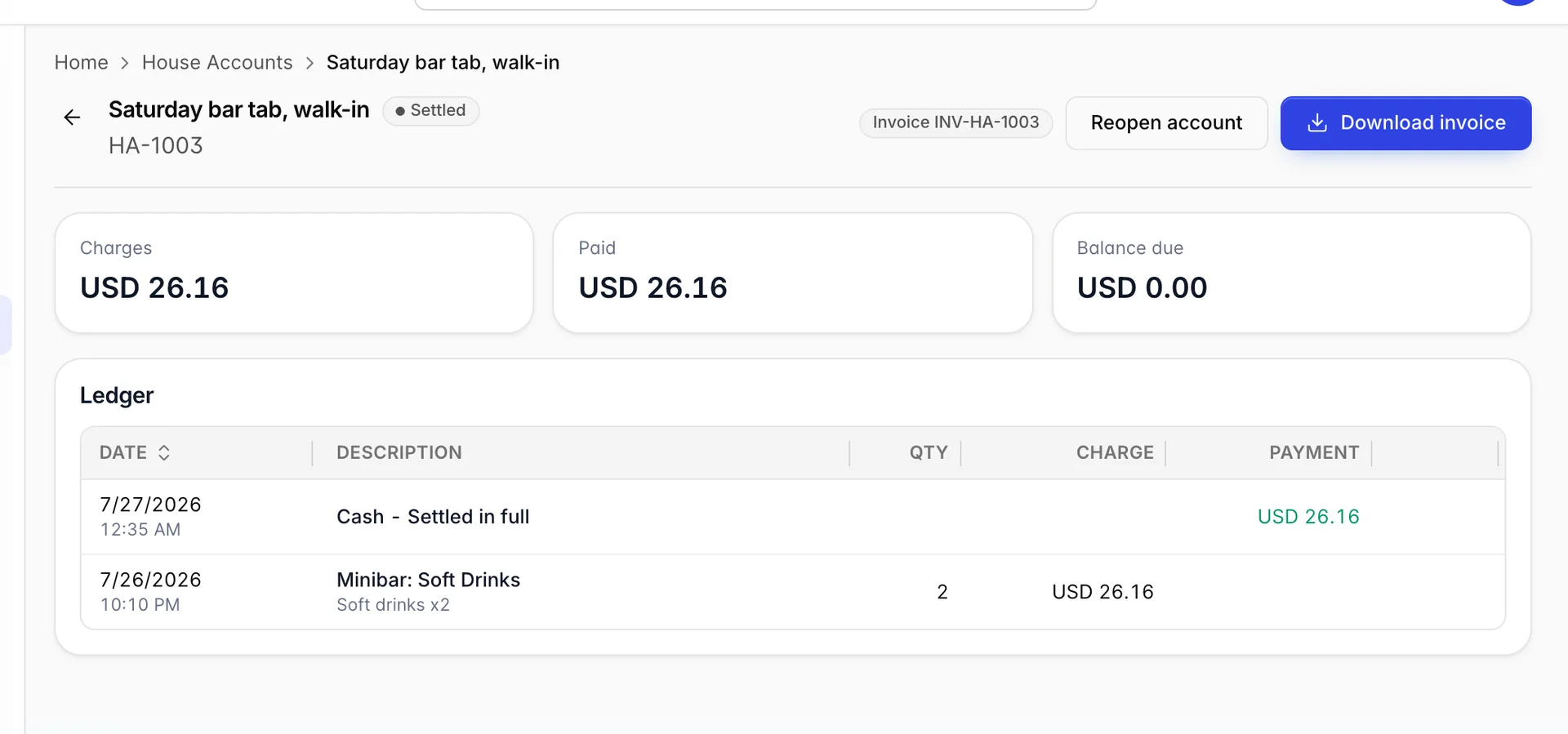
Reopen account is the way back. It puts the account back to open so you can post to it again, and it deliberately keeps the invoice number it already had. If that number went out on a document, issuing a fresh one on the second closing would leave two different bills sharing a number, which is a worse problem than the one you were fixing.
Both download buttons produce the same kind of document off the same renderer as a reservation invoice, so a guest never gets two different-looking bills from you. Before closing it is Download bill and comes out as a proforma; after closing it is Download invoice and carries the invoice number.
Things that catch people out
A settled account refuses everything. Charges, payments and voids are all blocked until it is reopened, and the error says so. If you meant to add one more thing, reopen, post it, and close it again.
A cent will stop you closing. Closing needs the balance at zero, so a payment typed as 1547.50 against a balance of 1547.55 leaves five cents and no Close account button. Use the full balance avoids it entirely.
Voided lines stay visible, and should. They leave the totals immediately, but the row remains with its reason. An account whose ledger has been tidied is an account nobody can audit.
The reference is per posting, not per item. Everything in one batch gets the same reference. Two dockets means two postings.
Posting to a package posts its parts. Expect several rows from one tap, each marked with the package it came from. The price does not double; it is the same charge, itemised.