Five reports sit behind the Daily Reports hub, and they are the same report asked five different questions about dates. Arrivals asks who is coming, Departures who is leaving, In House who is already here, Cancellations what fell out of the book, and No-Show who never turned up. They share a filter panel, a section-per-date layout and a toolbar, all of which are explained in finding a report and using its filters. What follows is what each one is for, and where the columns diverge.
Which report answers which question
The difference between them is the date each one filters on, and that is the whole reason there are five. A reservation arriving on the 15th and leaving on the 20th is on the arrivals report for the 15th, the in-house report every day from the 15th to the 19th, and the departures report for the 20th. Pick the report by the date you care about, not by the guest.
| Report | Filters on | Use it for |
|---|---|---|
| Arrival Overview | Check-in date | The pre-arrival check: rooms to be ready, balances to collect at check-in, VIPs to flag. |
| Departures Overview | Check-out date | The settlement list: who owes money on the way out, and which rooms free up when. |
| In House Report | Nothing. It is whoever is in the building now | Head count for housekeeping, food and beverage covers, and fire roll call. |
| Cancellations Overview | Arrival date or cancellation date, your choice | Lost business, and whether one source or one rate is generating it. |
| No-Show Reservations | Check-in date | Bookings to charge or release, the morning after. |
Arrival Overview
Guests checking in over the range you set, in one section per arrival date. The section heading carries two figures: the number of reservations and the room nights they represent. Room nights is the sum of the Room Nights column below it, so a section of seven reservations worth 20 room nights is telling you those arrivals will occupy 20 room nights of inventory before they leave, not that they are staying 20 nights.
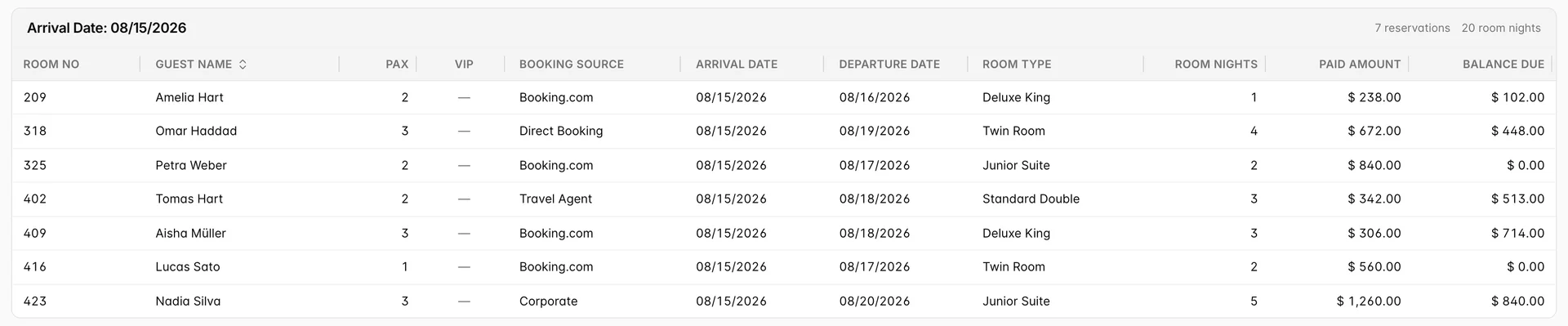
Balance Due is the number the front desk works from. It is the reservation total less what has already been paid, so a row showing zero is a guest who can be handed a key without a payment conversation, and every other row is money to ask for at check-in. PAX is the head count on the booking and appears on this report only, because arrivals is where you find out that the two-person reservation in a Twin Room is actually three people.
Two checkboxes at the foot of the panel change the population rather than the columns. Checked-in Today adds arrivals that have already been checked in, which turns the report from a worklist into a record of the day. Cancellations adds bookings that were cancelled for that arrival date. Leave both off and you get the list of people you are still waiting for.
Departures Overview
Guests checking out over the range, in one section per departure date. This is the report the cashier works from, which is why it carries Payment Method and splits the head count into Adl and Chl rather than a single PAX figure.

Work it as a balance list. A row with a balance and a payment method already on file is a card to charge; a row with a balance and no method is a conversation at the desk before the guest leaves. The VIP badge is worth scanning here for the same reason it is on arrivals: it is the last chance to catch someone before they are gone.
Three checkboxes narrow the list to a stage of the morning. Due Out is the guests who have not left yet, Checked-Out the ones who have, and Early Check-Out Only the ones leaving before the departure date on the booking, which is the set that costs you room nights you had already counted as sold.
In House Report
Everybody in the building, grouped by the date they arrived. There is no date range in this panel and no way to add one, because the report is a statement about now. The oldest section at the top is your longest-staying guests.

This report starts without the two money columns most managers want. Rate Amount and Balance Due are checkboxes in the Display group at the foot of the filter panel, and ticking them adds a column to the right of Paid Amount. They do not filter anything out.
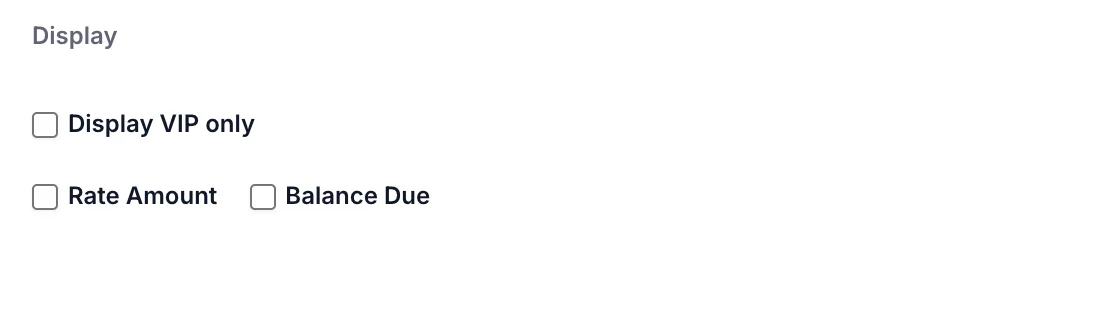
The third one in that group does the opposite. Display VIP only drops every row that is not a VIP, and it is the same control on all five reports. If a report comes back much shorter than you expected, that checkbox is the first thing to check, because the filter panel remembers it between visits.
Cancellations Overview
What fell out of the book, with who cancelled it and when. Two columns exist only here: Cancelled By, which separates guest-initiated cancellations from ones the front desk made, and Cancel Time alongside the date, which matters when a cancellation policy has a cut-off hour.

There is no Balance Due column, and its absence is the point. A cancelled booking has nothing outstanding to collect, so the pair that matters is Rate Amount against Amount Paid: the revenue you lost, and how much of it you are holding as a deposit. A row where the two are equal is a cancellation you have been paid for in full.
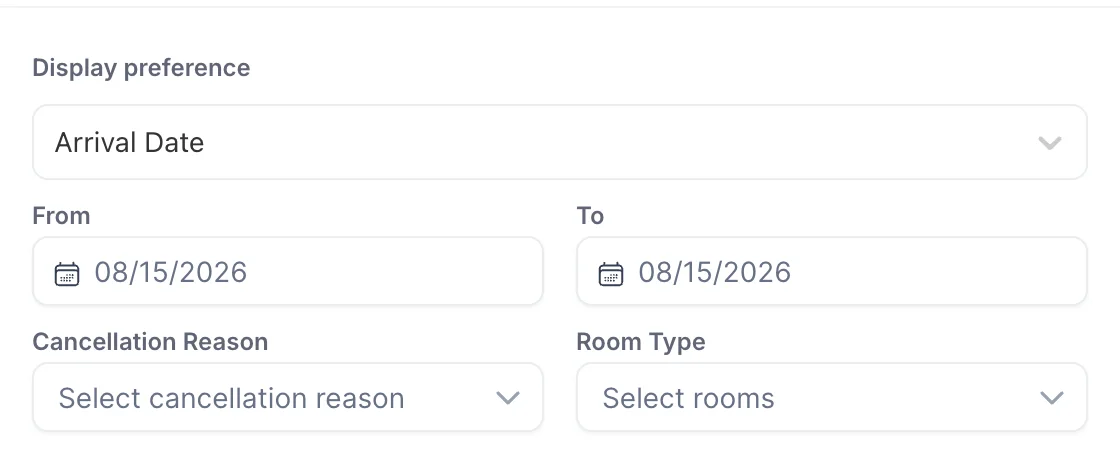
Display preference sits above the date fields and decides which date the range applies to. Arrival Date answers "what have I lost for next week", and Cancellation Date answers "what did we lose today". Set the dates first and the preference second and you will read the wrong report without noticing.
No-Show Reservations
Reservations where the guest did not arrive. One section covering the whole date range rather than one per day, because a no-show list is worked through in a single pass rather than day by day.

Unlike cancellations, this report keeps Balance Due next to Rate Amount and Amount Paid, and the three reconcile: rate less paid is the balance. That is the whole decision on this screen. A row that is paid in full needs nothing from you. A row with a balance is either a no-show fee to charge or a write-off, and the Booking Source column usually decides which, because a channel booking and a direct booking rarely have the same policy.
The filter panel here is the shortest of the five: a date range and a room type, nothing else.
In House Guest Report
A sixth report covers the same guests as In House, but one row per guest instead of one per booking, and it answers a different question: who these people are rather than what they booked. Country, two phone numbers, date of birth and whether they have stayed before are all here, and none of them appear on any of the other five.

Reach for it when you need to contact guests in house, when a police or tourism return needs nationalities and dates of birth, or when you want to know how many of tonight's guests have stayed with you before. The guest name in the first column is a link to the reservation, with the booking number underneath it.
Columns, report by report
Eight columns are common to all five reports and are not worth repeating: Room No, Guest Name, Booking Source, Arrival Date, Departure Date, Room Type, the night count and the amount paid. The last two are not even named consistently: the night count is Room Nights on Arrivals and Nights elsewhere, and the paid figure is Paid Amount on Arrivals, Departures and In House but Amount Paid on Cancellations and No-Show. Same numbers either way. The table below is only where the reports genuinely differ.
| Column | Appears on | What it tells you |
|---|---|---|
| PAX | Arrivals | Total heads on the booking as one number. The other reports split it into Adl and Chl instead. |
| Adl and Chl | Departures, In House, Cancellations, No-Show | Adults and children counted separately, summed across every room on the booking. |
| VIP | Arrivals, Departures, In House | A badge on guests marked VIP on their profile. Absent from Cancellations and No-Show. |
| Payment Method | Departures, In House | The method held against the reservation, which is what tells you whether a balance can be charged without asking. |
| Balance Due | Arrivals, Departures, No-Show, and In House if you tick it | Total less paid. Cancellations omit it because there is nothing left to settle. |
| Rate Amount | Cancellations, No-Show, and In House if you tick it | The value of the booking itself, before anything was paid. |
| Cancelled By, Cancel Date, Cancel Time | Cancellations | Who cancelled and at what hour, which is what a cancellation policy is enforced against. |
| The night count | All five | Check-out date less check-in date. Labelled Room Nights on Arrivals and Nights on the other four. |
There are two ways to sort, and they do different things. Guest Name is the only clickable column heading, and it sorts within one section, so on a report with a section per date you are alphabetising that day and nothing else. The Sort Order control in the filter panel sorts the whole result before it is split into sections, and offers Room no., Guest Name, Room Nights, Paid Amount and Departure Date. Only Arrivals, Departures and In House have it; the Cancellations and No-Show panels have no sort control at all.
What these reports will not do
- A failed report looks like an empty one. If the request fails, the error goes to the browser console and the page shows its empty state, which reads as "no arrivals found". Before you conclude that nothing is arriving, widen the date range: an empty result that changes when you change the filters is real, and one that does not is worth reporting.
- Filters persist and there is no reset. Each report keeps its own filter set between visits, so a room type you selected last week is still selected today. Clearing them is manual, control by control.
- The Print button in the filter panel is the same export. Both panels' Print button and the toolbar's Export call the same endpoint and produce the same file, so there is nothing to choose between them.