Not everything on the calendar is a guest. A room can be held back for the owner, promised to someone for two hours while they decide, taken out of the sale list for a deep clean, or genuinely broken. Prostay has a separate thing for each of those, and although they draw almost the same tile, they are not interchangeable.
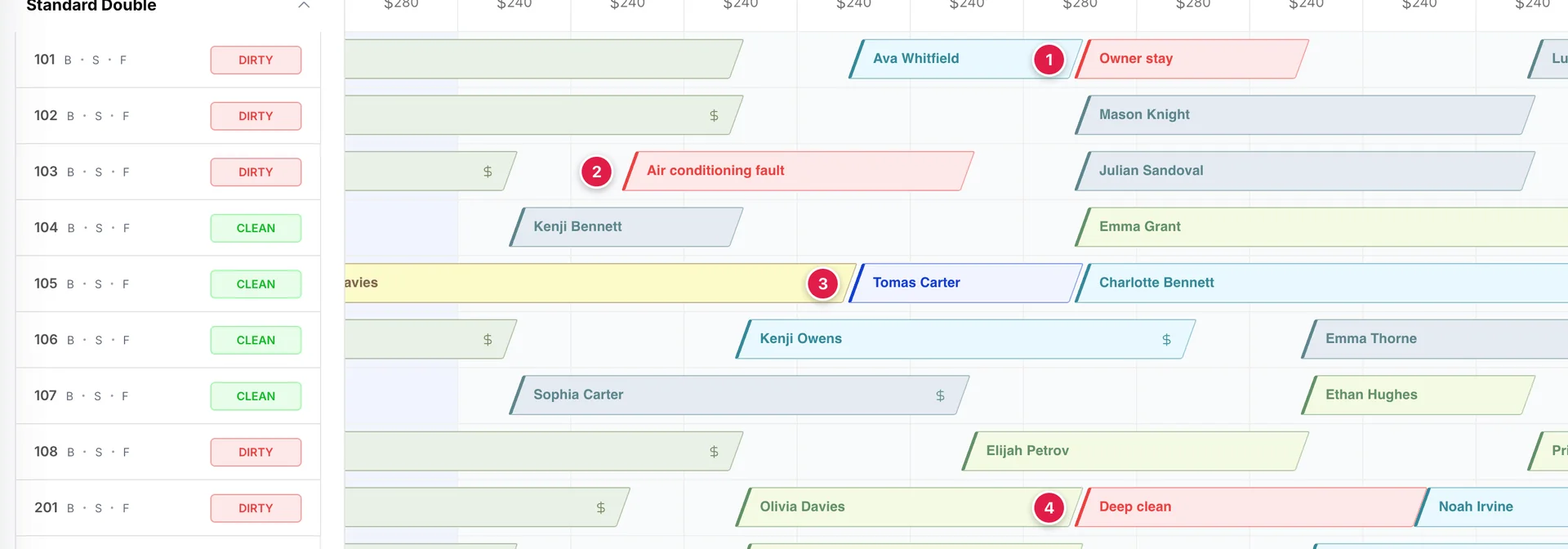
- Blocked dates on room 101, reading Owner stay.
- Out of order on room 103, reading Air conditioning fault.
- A courtesy hold on room 105, reading Tomas Carter. The only one of the four that carries a person's name, and the only one that is blue.
- Out of service on room 201, reading Deep clean.
The four kinds
| Type | Means | Typical reason |
|---|---|---|
| Blocked Dates | The room is perfectly fine. You have chosen not to sell it. | Owner stay, staff accommodation, inventory held back for a group contract you have not signed yet. |
| Courtesy Hold | The room is promised to a named person for a limited time, but no booking exists. | A guest who is checking with their partner and will call back this afternoon. |
| Out of Service | The room needs attention but nothing is broken. It comes back as it is. | Deep clean, carpet drying, odour treatment, a mattress swap. |
| Out of Order | Something is broken. There is a repair, a team, and a cost. | Air conditioning fault, bathroom leak, electrical work. |
Choosing between them
Two questions settle it almost every time.
- Is a specific person waiting on this room? If yes, it is a courtesy hold, and nothing else. A hold carries a name, an email and a length, and it can be turned into a booking in one click. None of the other three can.
- Is there something to fix? If yes, it is out of order, because that is the only one of the four that records the fault, who is fixing it and what it costs, and the only one that shows up on the maintenance side of the system. If nothing needs fixing, the choice is between blocked dates and out of service, and the practical difference is who you are telling.
Blocked dates is a commercial decision: this room is not for sale. Out of service is an operational one: housekeeping needs the room and it will be back shortly. Prostay treats them accordingly. Out of service puts the room into the housekeeping board with an OUT OF SERVICE badge, so the housekeeper sees it on their list; blocked dates does not touch housekeeping at all.
Creating one
All four are created the same two ways. The Create New menu at the top right of the calendar has an entry for each, and clicking an empty night on a room row opens a small menu with the same options plus the two booking types.
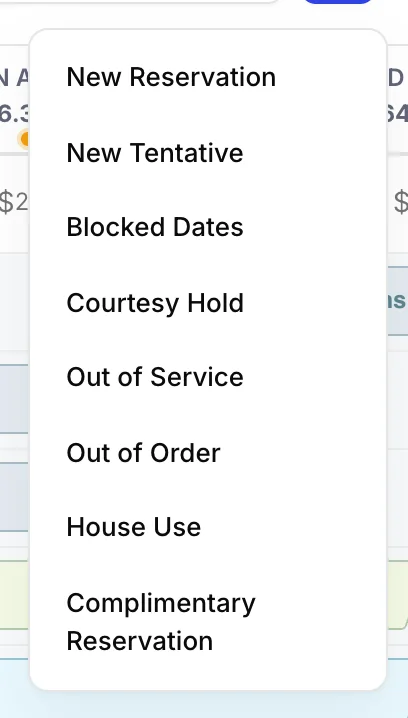
The difference is only convenience. Starting from the menu gives you an empty form and you pick the room and dates yourself; starting from an empty cell fills in the room and the night you clicked. Everything after that is identical.
Blocked dates
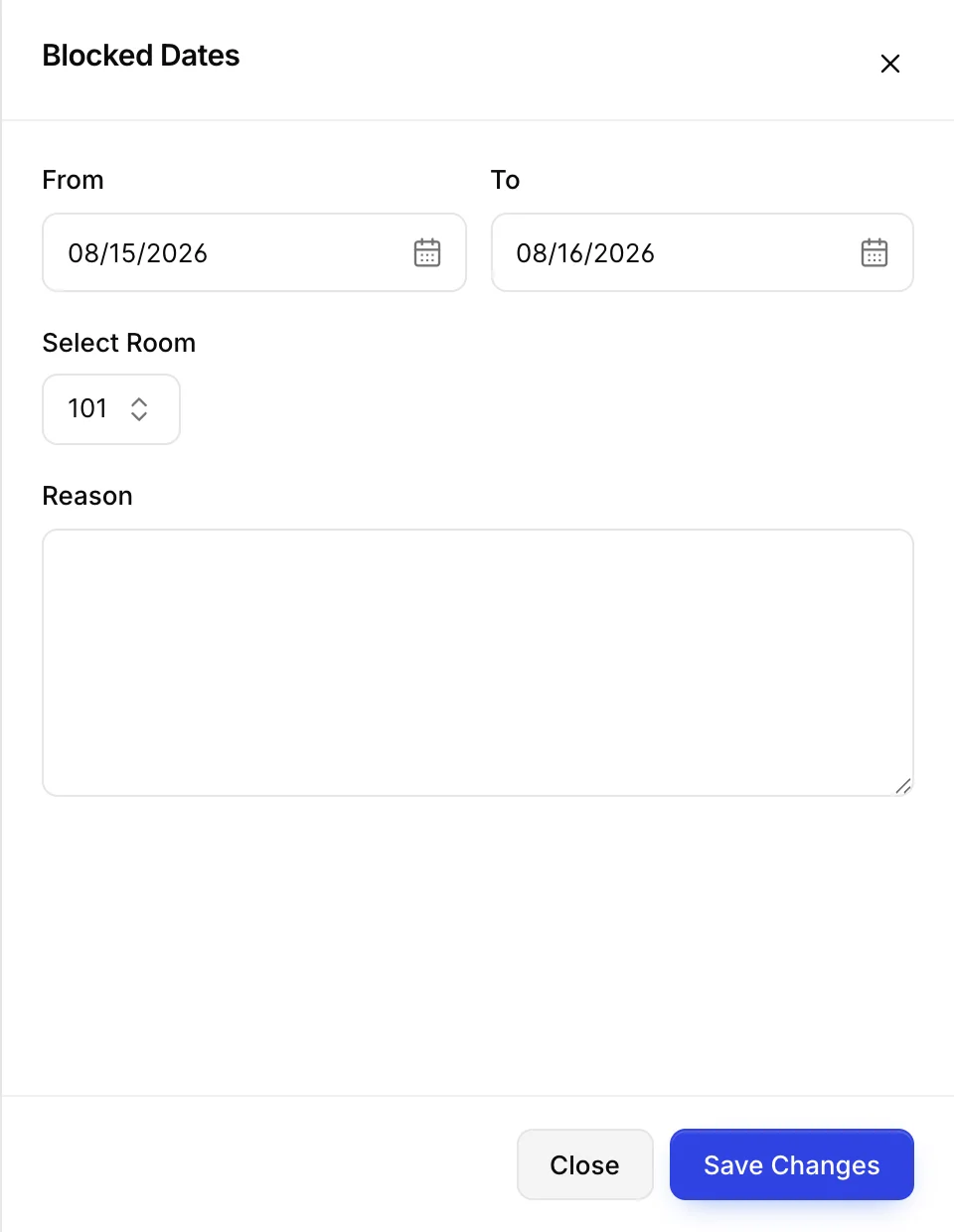
| Field | What to put in it |
|---|---|
| From and To | The nights to block. As everywhere on the calendar, the departure date is not itself blocked: a block from the 14th to the 15th covers one night. |
| Select Room | One room. To block a whole floor you make one block per room, which is tedious and is the main reason people reach for out of service instead. |
| Reason | Free text, and this is what is printed on the tile. Write something a colleague can act on. Owner stay is useful; Blocked is not. |
Prostay refuses to save a block that overlaps an existing booking, a hold, or another block on the same room, and tells you so above the room field. It does not check against out of service or out of order, so it is possible to put a block on a room that is already out of order. Nothing breaks, but you end up with two tiles saying different things about the same night.
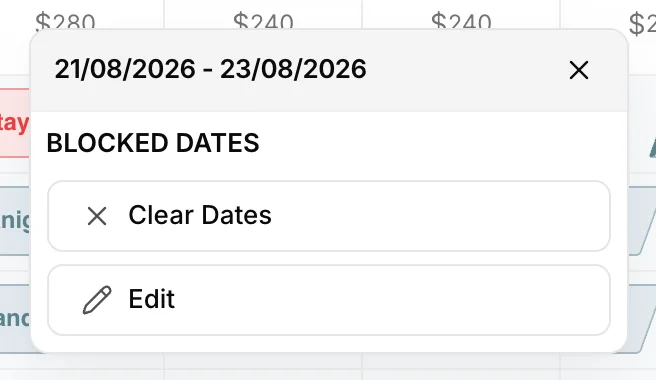
Clicking the tile gives you Clear Dates, which removes the block after a confirmation, and Edit, which reopens the same form. There is nothing else to know about blocked dates, which is rather the point of them.
Courtesy hold
A courtesy hold is the only one of the four with a guest attached, and the only one with a route into a real booking. It is what you use when somebody has asked you to keep a room while they decide.
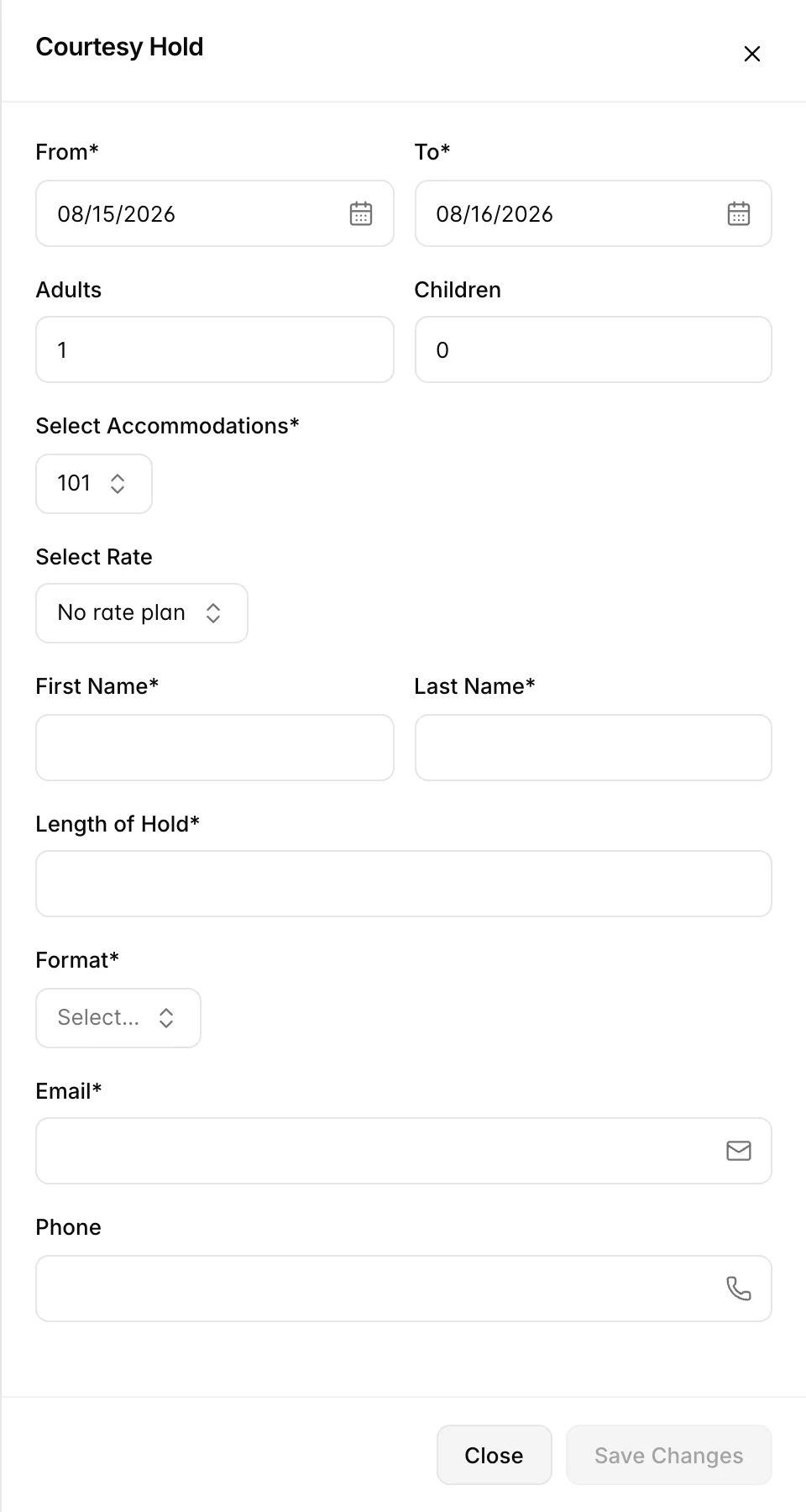
| Field | Required | What to put in it |
|---|---|---|
| From, To | Yes | The nights being held. |
| Adults, Children | See note | Party size. You can leave these alone if you are not quoting a rate, but the moment you pick a rate plan the adult count has to be at least one, because the price depends on it. |
| Select Accommodations | Yes | The room being held. |
| Select Rate | No | The rate plan to quote. Choosing one fetches the price for those dates and party, so the figure you give the guest is the real one. No rate plan holds the room without quoting anything. |
| First Name, Last Name | Yes | Who the room is being held for. This is what appears on the tile. |
| Length of Hold and Format | Yes | How long you promised to hold it: a number, and whether that number means hours or days. See the warning below. |
| Yes | Checked for a valid address. It is what the hold confirmation is sent to. | |
| Phone | No | Worth filling in. You are going to have to chase. |
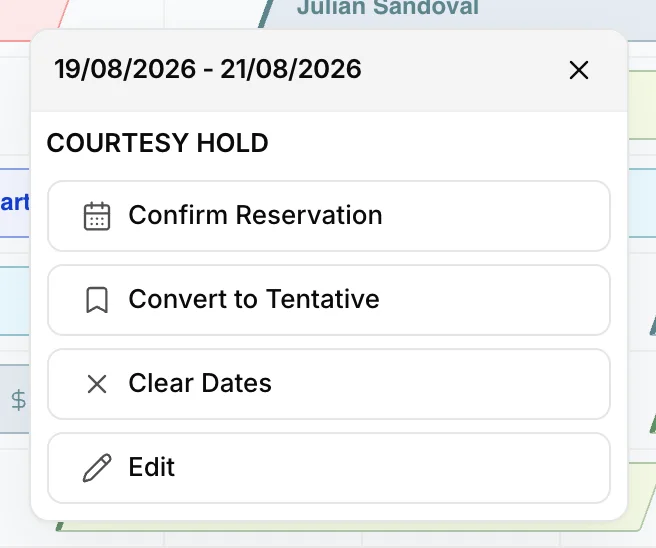
| Action | What it does |
|---|---|
| Confirm Reservation | Turns the hold into a real booking and opens it so you can finish the details. This is the happy ending. |
| Convert to Tentative | Makes it a tentative booking instead, with an expiry date you set. The panel also asks whether to Deduct from room inventory, which decides whether the room stops being sellable through your channels while the tentative stands. |
| Clear Dates | Releases the room. Use this when the guest says no, or when the hold has been sitting there for a week. |
| Edit | Reopens the form to change dates, room or contact details. |
Out of service
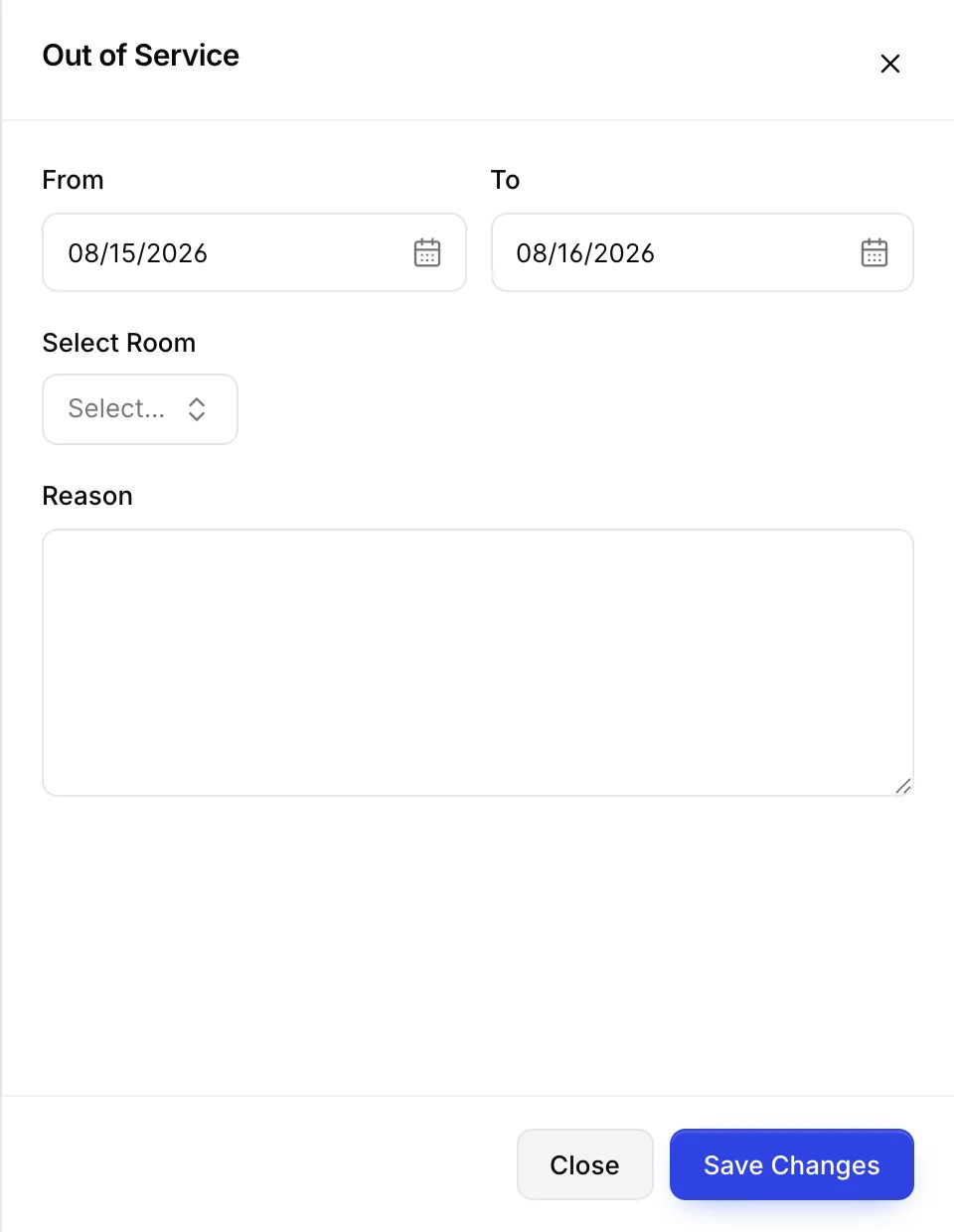
The form asks for the same four things as blocked dates: dates, a room, and a reason that appears on the tile. What differs is everything downstream. An out of service room appears on the housekeeping board with its own badge, it has a dedicated report under Reports, and it cannot be dropped into a housekeeping queue rush.
Unlike blocked dates, this form does not check for overlaps at all. You can put a room out of service on nights that already have a guest in them, and nothing will stop you. Check the row before you save.
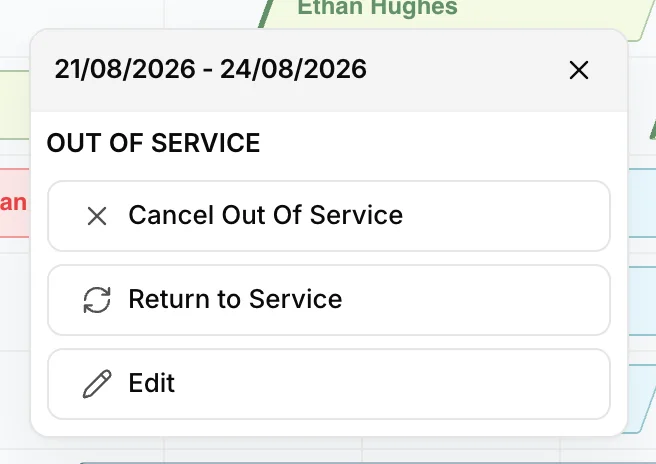
Two of the three actions end the block, and the distinction is intent rather than effect. Return to Service is the normal ending: the work is done and the room is available again. Cancel Out Of Service is for the block that should never have been there, the one you put on the wrong room. Both free the room immediately.
Out of order
Out of order is for a room that is broken. It is the only one of the four that behaves like a work order, and the form is correspondingly longer.
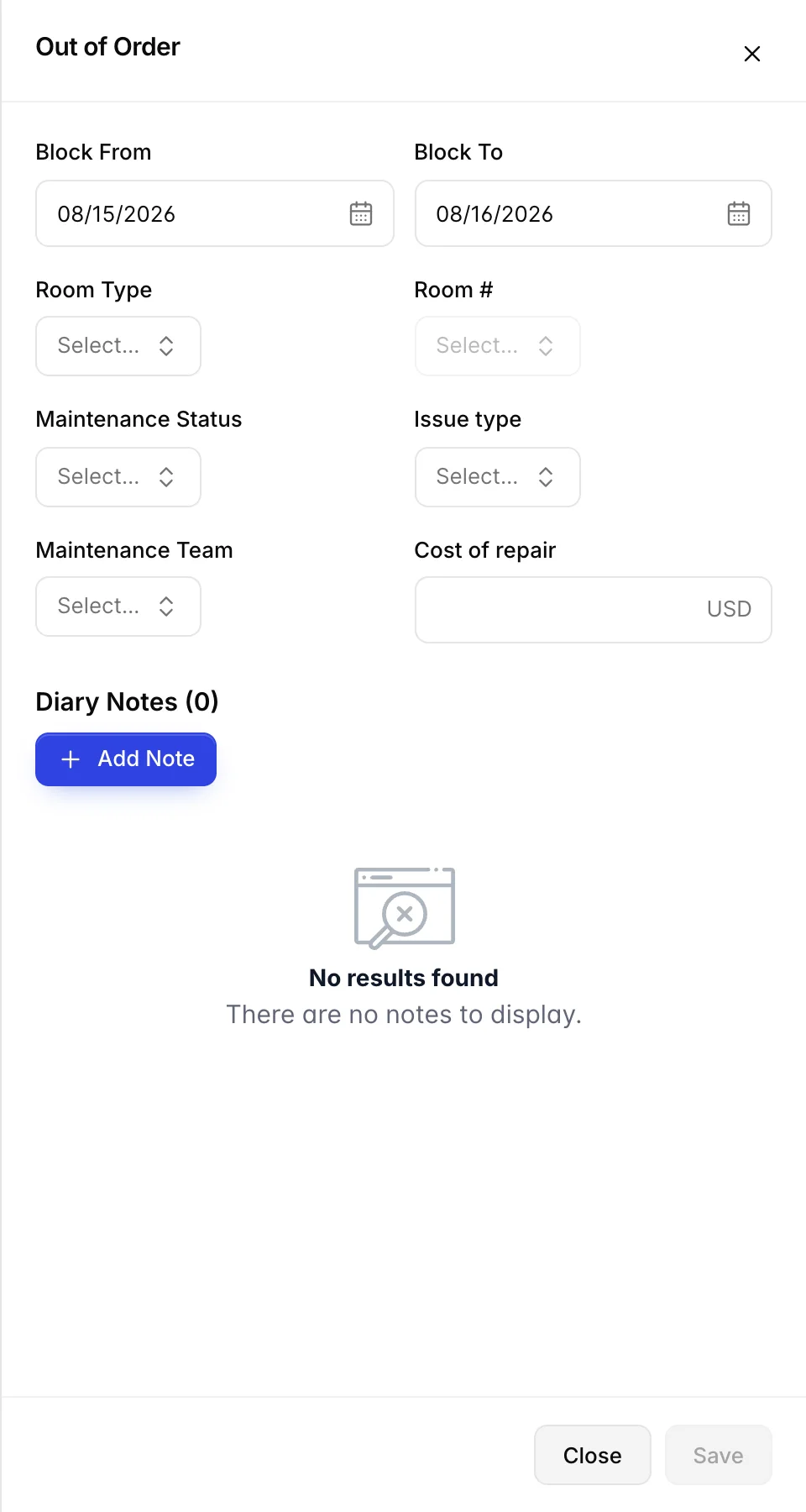
| Field | What to put in it |
|---|---|
| Block From and Block To | When the room went out, and when you expect it back. The second one is an estimate, and you are expected to come back and change it when the estimate turns out to be wrong. |
| Room Type, then Room # | Two steps rather than one: the room list stays disabled until you have picked a type. |
| Maintenance Status | Pending or In Progress. There is no "completed" option here on purpose: a finished repair is not an out of order room, so you end the block rather than marking it done. |
| Issue type | Chosen from your property's list. The list itself is editable from the last entry in the dropdown, so if the fault you have is not there, you can add it rather than picking the nearest match. |
| Maintenance Team | Who is doing the work, from your own list, editable the same way. |
| Cost of repair | What it costs, in your property currency. This is what makes the out of order report worth running: it turns a list of broken rooms into a maintenance spend. |
| Diary Notes | A running log. Notes you add here are held with the form and saved along with it, so add them before you save rather than after. |
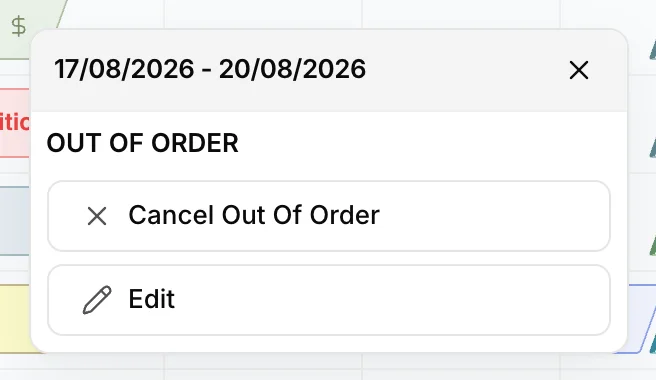
There are only two actions. Cancel Out Of Order ends the block and gives you the room back, and it is what you press when the repair is finished as well as when the block was a mistake. Edit reopens the form, which is where you go to push the expected return date out or add the invoice amount once you know it.
What each one does to your occupancy
The percentage under each date on the calendar is rooms sold divided by rooms you could have sold. Taking a room out of the second number makes the percentage go up, because you are no longer being judged on a room that was never available. Which of these four does that is not consistent, and it is worth knowing:
| Type | Taken out of sellable rooms? | Effect on the percentage |
|---|---|---|
| Blocked Dates | Yes | Occupancy rises slightly. |
| Out of Order | Yes | Occupancy rises slightly. |
| Out of Service | No | Occupancy is unchanged, so the room counts against you as though it were on sale. |
| Courtesy Hold | No | Unchanged. A held room is neither sold nor removed, which is reasonable: it is not a booking yet. |
The practical consequence is that a week of deep cleans quietly depresses your occupancy figure while a week of maintenance does not. If you compare occupancy across periods and one of them contained a lot of out of service time, that is the first thing to check before concluding anything about demand.
Things that catch people out
Blocked, out of service and out of order are all red
There is no way to tell those three apart by colour on the grid, and the legend gives all three the same swatch. The text you type into the reason field is doing all the work, which is a good argument for typing something specific.
Holds do not expire
The length you enter is documentation, not a timer. Left alone, a courtesy hold sits on the calendar indefinitely, quietly making a room unsellable. Blue tiles are the ones to audit at the start of a shift.
Out of service does not check whether the room is occupied
Blocked dates and courtesy holds both refuse to overlap an existing booking. Out of service and out of order do not check, so it is possible to mark a room out of service on a night a guest is in it. Glance at the row before saving.
Editing an out of order block is how you extend it
There is no "extend" action. If the part does not arrive, open the tile, choose Edit, and move Block To. Creating a second block that starts where the first one ends leaves you with two tiles and two repair costs for one fault.
An out of order block records a fault, but it does not tell anybody to go and fix it. That is the job of maintenance and service requests, and a block without a request beside it is a room nobody is working on.