House Status is the handover screen. It puts tonight's occupancy, the movements that get you there, the sellable room count, the money the night is worth and the condition of the rooms on one page, so a duty manager can read the house in a minute without opening six reports. Every figure on it describes the same night.
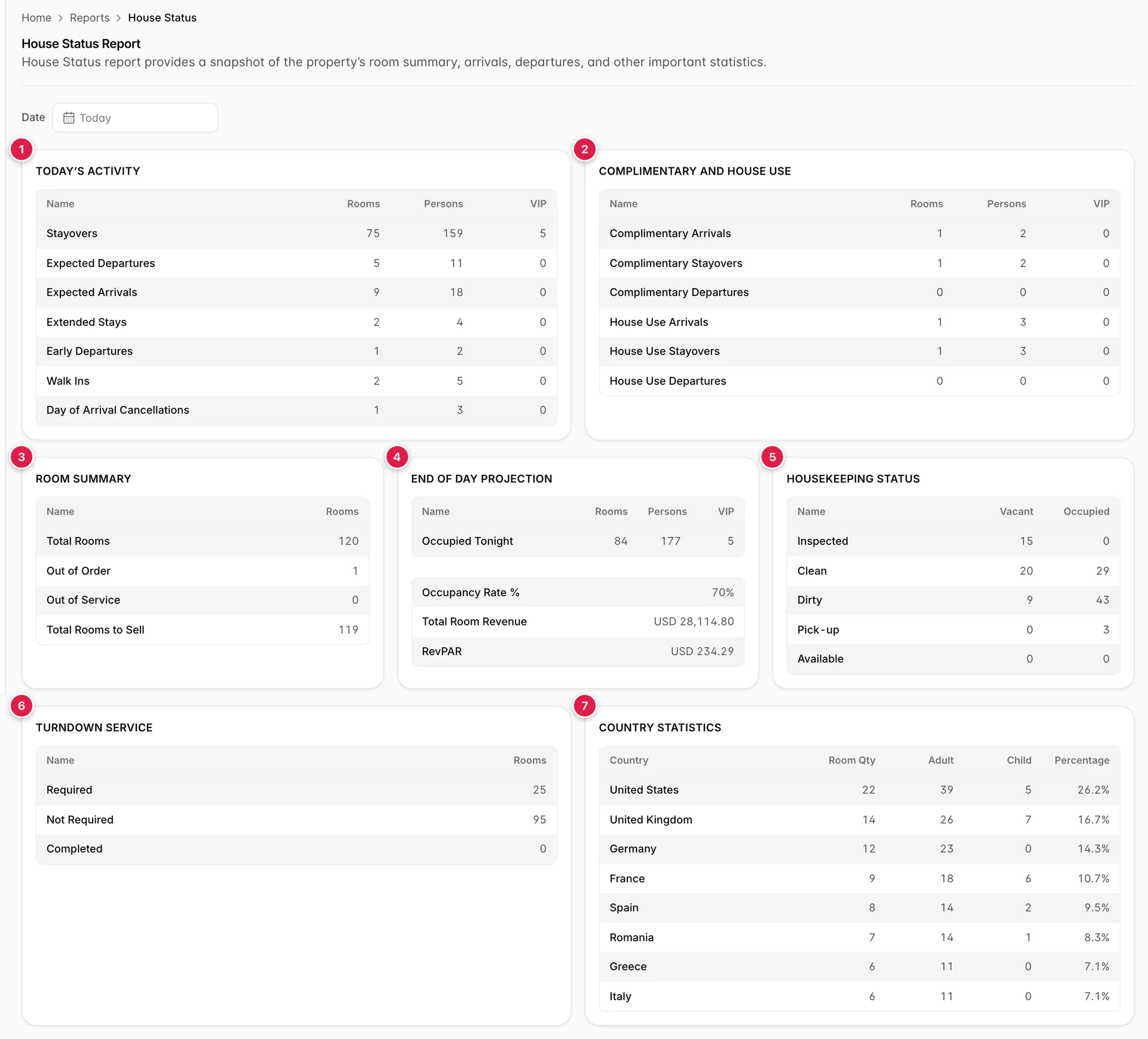
- Today’s Activity: the movements, in rooms, persons and VIPs.
- Complimentary and House Use: the rooms nobody is paying for.
- Room Summary: how many rooms exist and how many can be sold.
- End of Day Projection: where the night lands, and what it earns.
- Housekeeping Status: condition crossed against occupancy.
- Turndown Service: the evening service list.
- Country Statistics: tonight’s house by nationality.
Seven cards, one night
The screen makes six calls behind one spinner, and the cards are only complete when it clears. Four of them count in Rooms, Persons and VIP, and the distinction matters: a room is a key, a person is a body in a bed. Housekeeping rosters and turndown lists are built out of rooms; breakfast covers, lifeboats and allergy notes are built out of persons.
Today’s Activity
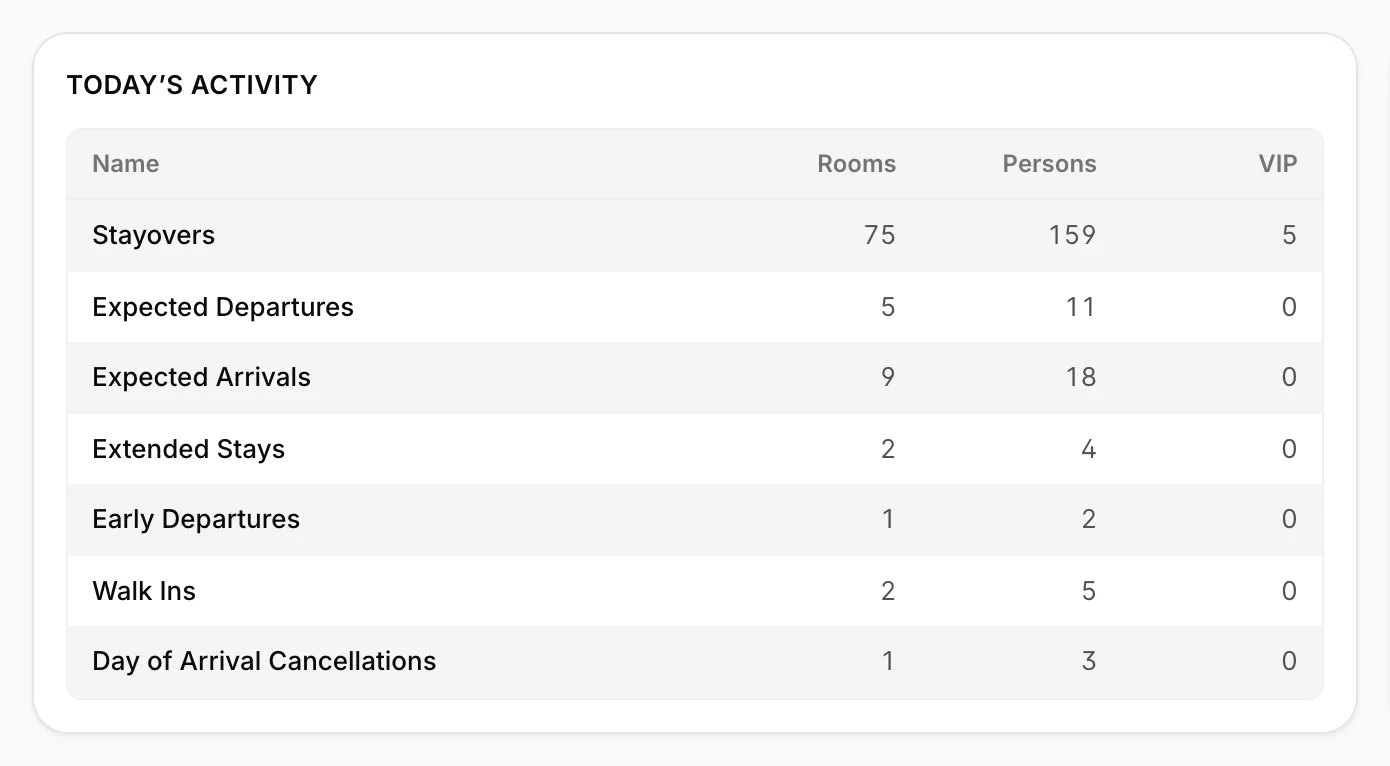
Seven rows, and the first three are the shape of the day. The four underneath are the exceptions worth knowing about before they reach the desk.
| Row | What it counts |
|---|---|
| Stayovers | Rooms occupied tonight by guests who were already in them last night. These need servicing but no key. |
| Expected Departures | Rooms due to check out today. Each one becomes a vacant dirty room, and every one of them is a room housekeeping has to turn before an arrival can have it. |
| Expected Arrivals | Rooms held for guests due in today, whether or not they have walked in yet. |
| Extended Stays | Guests who were due out today and are staying on. The room is unavailable for anybody it had been promised to. |
| Early Departures | Guests leaving before the departure date on the reservation. Nights come off the folio, so the money on the projection moves with them. |
| Walk Ins | Arrivals booked today rather than in advance. A subset of expected arrivals, not an addition to them. |
| Day of Arrival Cancellations | Bookings for tonight cancelled today. These rooms are back in inventory with hours to resell them. |
Complimentary and house use
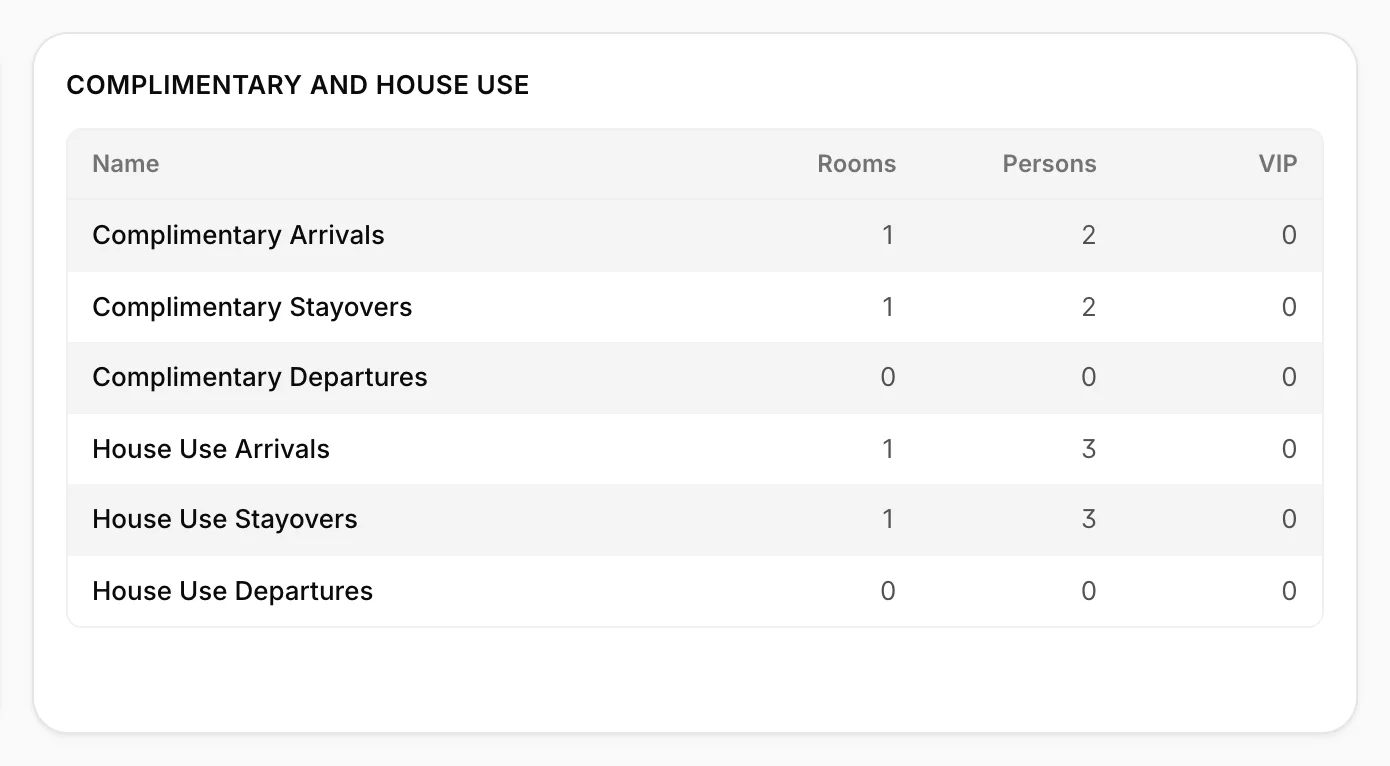
These are the two kinds of unpaid room, split into the same arrivals, stayovers and departures. Complimentary is a guest staying free: a service recovery, an agent inspection, a friend of the owner. House Use is the property using its own room: a duty manager overnight, a room turned into an office, a unit held for a contractor.
Both occupy a room and both fill beds, so they count in the occupancy figures and in housekeeping's workload while earning nothing. That is why they are on their own card: when occupancy is up and ADR is down, this is the first card to look at.
Room summary and the projection
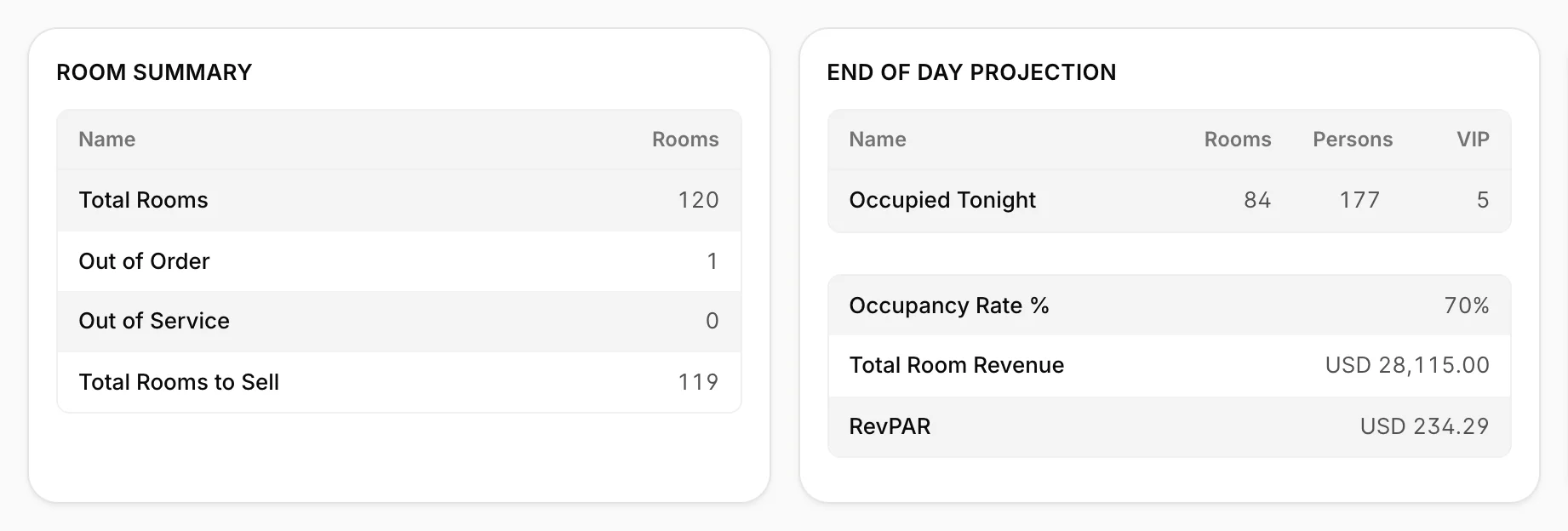
Room Summary is the inventory. Total rooms less the rooms out of order and out of service gives Total Rooms to Sell, which is the number reception can actually sell tonight. Out of order means the room cannot be occupied at all; out of service means it is off sale but habitable. The difference matters at the front desk when the house is full, and it is set on the rooms themselves rather than here.
End of Day Projection is where the night lands. Occupied Tonight is stayovers plus expected arrivals: 75 and 9 make the 84 in the shot, and the persons and VIP columns add up the same way. The three lines under it follow from that count.
| Line | How it is worked out |
|---|---|
| Occupancy Rate % | Occupied tonight over total rooms, not over rooms to sell. An out-of-order room stays in the denominator and drags the figure down, which is deliberate: the room still cost you. |
| Total Room Revenue | What tonight's occupied rooms are worth in accommodation charges. Items, services and anything else posted to a folio are not in it. |
| RevPAR | That revenue spread over every room in the property, sold or not. It is always lower than your average rate, and the gap between them is the empty rooms. |
Housekeeping and turndown
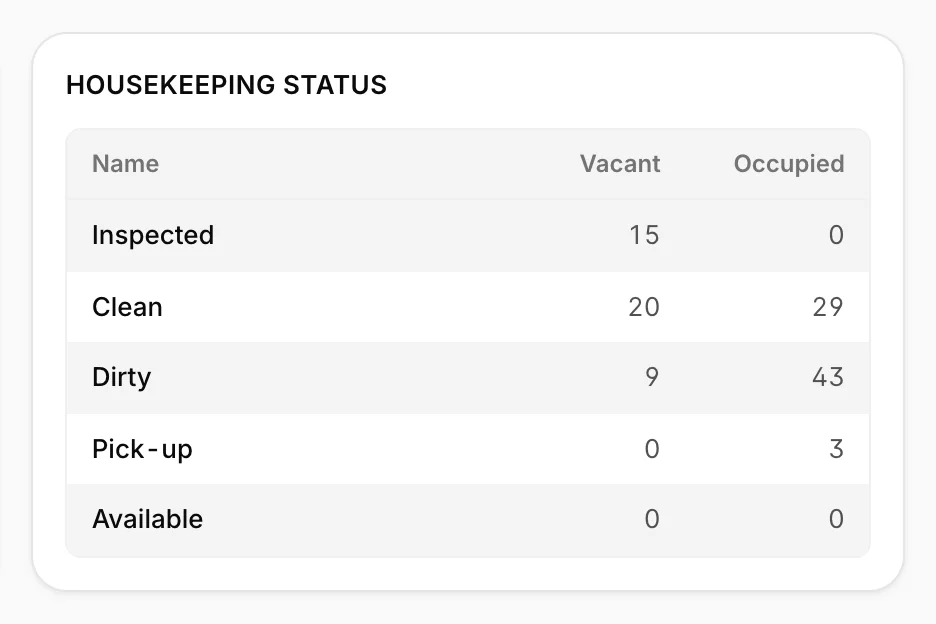
This is the housekeeping board reduced to ten numbers: each condition crossed against whether somebody is in the room. The column you sell from is Vacant, and within it the rooms that can be given to an arriving guest right now are the inspected and clean ones. Vacant and dirty is the turnaround queue, and it is the number to read against expected arrivals: nine rooms arriving against nine vacant dirty rooms is a shift with no slack in it.
Occupied and dirty is the servicing list, and it shrinks through the morning. What each condition means, who sets it and how it moves is in room status against reservation status, and the board itself is covered in the housekeeping board.
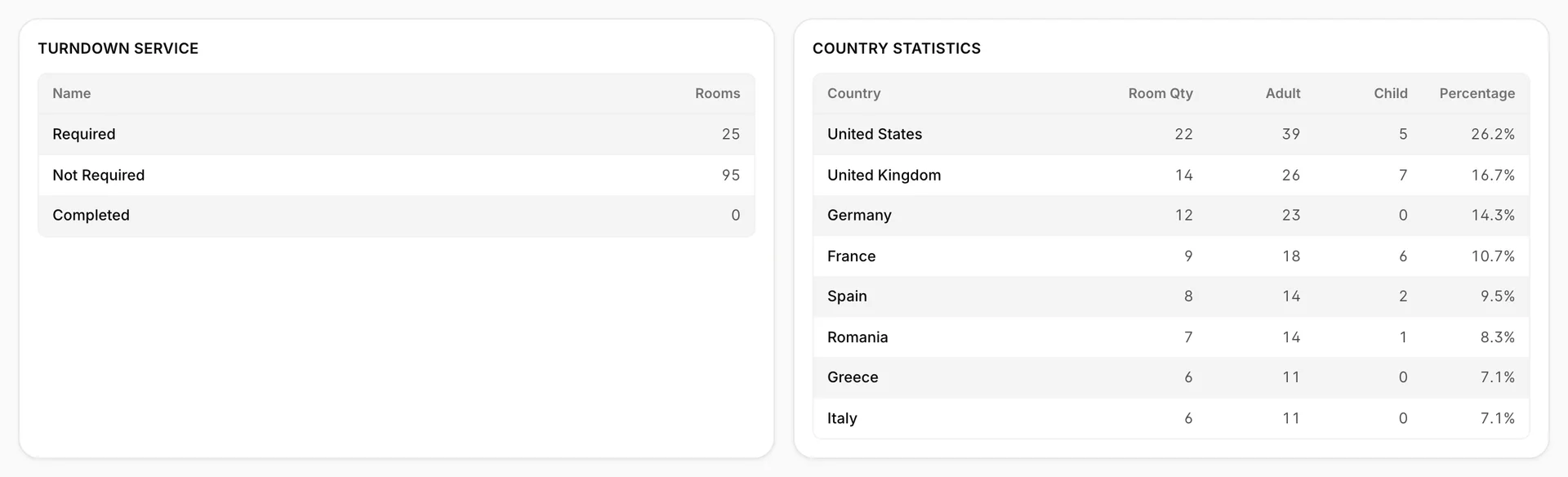
Turndown Service is the evening round. Required and Not Required cover every room in the property, so not required includes every vacant room as well as the occupied ones whose guests have declined the service. Completed counts rooms already done and reads 0 until the evening shift starts working through the list; required less completed is what is left to do.
Country statistics
The same house again, this time by nationality: rooms, adults, children and each country's share of the occupied rooms. The room column adds up to occupied tonight and the two person columns add up to the persons beside it, so the 22 rooms at the top of the shot are 22 of the 84, and the 39 adults and 5 children in them are part of the 177.
It earns its place at handover for the things that are nationality shaped: which newspapers to order, which breakfast to lay out, which language to put on the desk tonight, and whether a group has arrived that needs a translator. If nobody is in the house for the date you have picked, the card shows No in-house guests for the selected date. instead of an empty table.
The date field
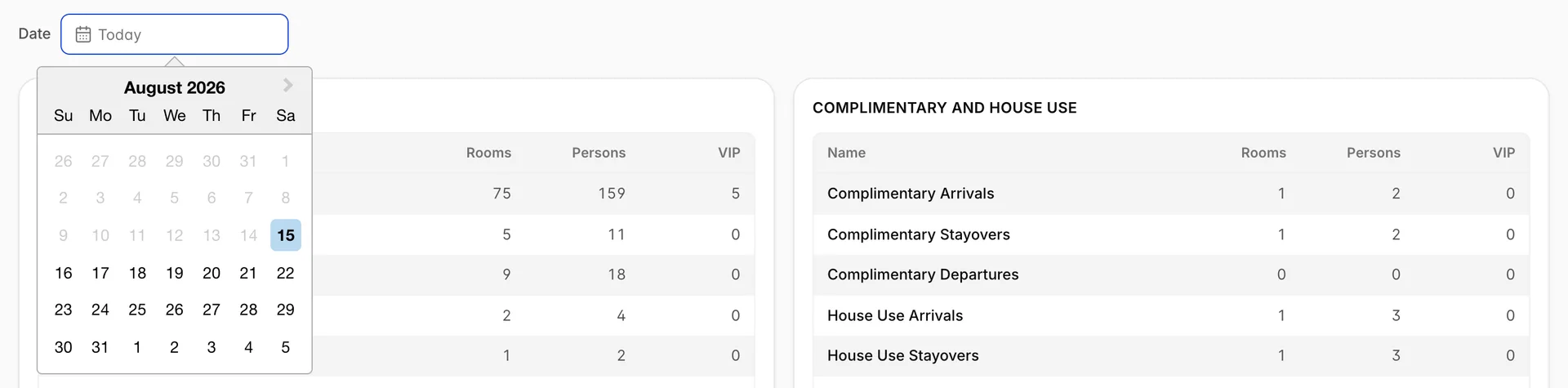
One filter, and it is a single date rather than a range. Leave it empty and the screen reads Today. Pick a date and everything on the page moves to that night; pick one and change your mind and Reset to today appears beside the field to put it back.
Pick a future date and the Housekeeping Status and Turndown Service cards disappear, leaving five. That is correct rather than broken: a room's condition on a night that has not happened is not knowable, and showing today's cleaning state against next Tuesday's arrivals would be worse than showing nothing. The other five cards stay, and on a forward date they read as a forecast built from the reservations on the books, which moves every time somebody books or cancels.
Checking it against the other screens
House Status is the screen people use to sanity check the others, so it is worth knowing which numbers should match what.
| Figure here | Should agree with |
|---|---|
| Occupied Tonight and Occupancy Rate % | The room status card on the dashboard, which counts the same occupied and assigned rooms. |
| Expected Arrivals and Expected Departures | The arrivals and departures tabs of the daily reservation reports, in rooms rather than reservations. |
| Housekeeping Status | The housekeeping board filtered to the same condition. The ten cells here are that board counted. |
| Total Rooms and Total Rooms to Sell | The rooms listed under accommodation types and rooms, less anything out of order or out of service. |
| RevPAR | The same night in occupancy, ADR and RevPAR, which shows the rate and revenue the figure comes from. |
Three sums hold on the screen itself, and they are the quickest way to tell whether you are misreading a card. Stayovers plus expected arrivals is occupied tonight, in all three columns. Total rooms less out of order and out of service is rooms to sell, which is also what the ten housekeeping cells add up to. The country table's rooms and people are the projection's rooms and people, split by passport.
What this screen will not do
- No export, no print. Unlike the rest of Reports, House Status has no export menu and no print button. The figures on it come from reports that do export.
- No past dates. Today and forward only.
- No room type filter. Everything covers the whole property. For a single accommodation type, use the occupancy or availability screens.
- Nothing drills down. No row opens a list, so a count you want the names behind has to be run on the daily reports.
- No VIP list. The VIP column counts, it does not name. Who they are is on the arrivals report and on the guest profiles.