What it answers
The house accounts list answers "what does each account owe". This report answers the two questions that come after: what has been posted across all of them, and how old is the money we are owed.
Postings report at the top of the house accounts screen opens it. It is gated on its own permission, View the house-account postings report, separately from seeing the accounts, so a bookkeeper can be given this and nothing else.
The list
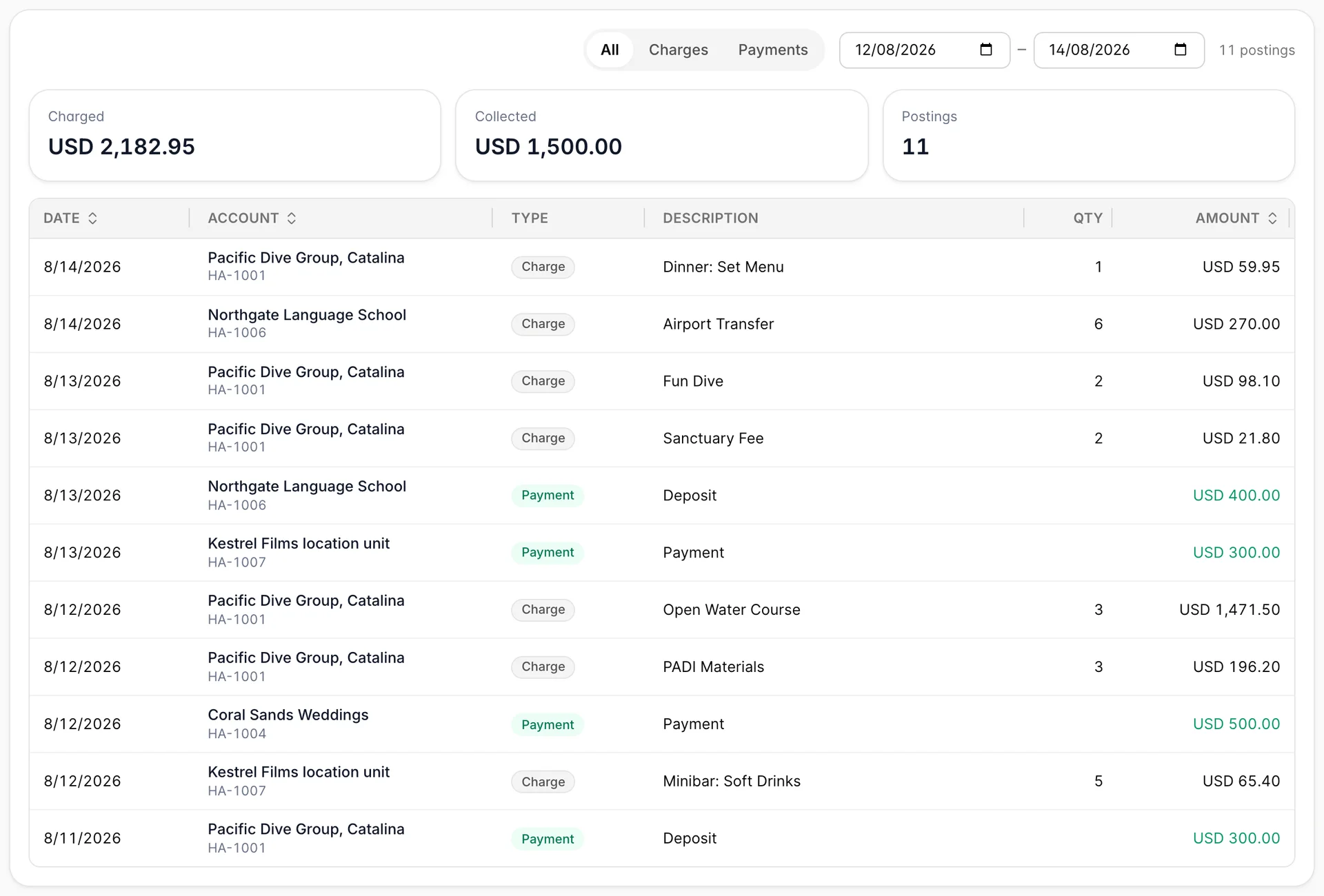
One row is one posting. The account it belongs to is named on every row with its number underneath, so the same description on four different accounts stays tellable apart, and a Charge or Payment badge says which direction the money went. Payments are green, which is the fastest way to read the column.
The report opens on the last thirty days. The two date boxes change that, and the list reloads as soon as you set them. Everything else on the screen is worked out from what the range returned.
All, Charges and Payments filter what the table shows. Payments on a single day is the closest thing this report has to a takings list for house accounts.
Charged and Collected total the charges and the payments over the whole range. Postings counts the rows you can currently see, so it is the one tile that changes when you switch between Charges and Payments. The two money tiles do not.
The account name on each row is a link to the account itself, which is usually the next thing you want after finding a posting that looks wrong. The rest of the row is not clickable, so aim at the name.
Aged balances
Underneath the list sits the part a finance manager opens this page for.

Every open account with money owing is dropped into one of five buckets by how many days have passed since its Payment due date. Not yet due holds the ones whose date has not arrived, and the four after it hold the ones that has: 1 to 30 days, 31 to 60, 61 to 90, and over 90.
Two things about this panel are worth holding on to.
It ignores the date range. That is deliberate and it is the only sensible answer: debt does not belong to the window you happen to be looking at, and an invoice from March is exactly as unpaid whether or not March is in the boxes above.
An account with no due date lands in Not yet due. There is no date for it to be past, so it never ages, however long it has been running. If your oldest debts are not showing up, that is the first thing to check.
Getting it out
Export CSV writes out what you are looking at: the rows the filter has left visible, over the range you set, with the date, account number, account name, charge or payment, description, quantity and amount as columns. The file is named for the range it covers, so a folder of them stays readable.
The aged balances panel is not in the export. If you need those figures elsewhere, they come off this screen by eye.
Things that catch people out
Charged and Collected do not follow the filter. Switch to Payments and the table shows payments while Charged keeps showing the charges for the whole range. Read the tiles as the totals for the range, not for what is on screen.
Voided lines are not here. A voided posting leaves the totals on its account and it leaves this report too, so the report and the accounts agree with each other. If you are looking for something you know was posted, check the account's ledger, where the voided line is still visible with its reason.
This is house accounts only. Nothing posted to a reservation folio appears here, however similar it looks. For charges on stays, use the reservation and revenue reports.
An empty report usually means the range. It opens on the last thirty days, which is the wrong window for an agency that settles quarterly. Widen the dates before concluding nothing was posted.