What a turnaway is
Somebody rang, or emailed, or stood at your desk, and wanted a room. They did not get one. A turnaway is the note you keep about that.
It is worth keeping because the reason varies and the pattern matters. A quiet Tuesday where three people went elsewhere because your rate was above what they expected is a pricing problem. The same Tuesday where three people wanted a twin room and you only had doubles is a very different problem, and no report about the bookings you took will ever show you either one. Bookings tell you what you sold. Turnaways are the only record you have of what you were asked for.
Prostay keeps them deliberately small: who asked, when they wanted to come, what they wanted, and why they did not get it. There is no money on a turnaway, no availability check, and nothing that turns one into a booking later. If the guest might still stay with you, they belong on the waiting list instead, which is a different screen with a different job. A turnaway is closed the moment you write it.
The list
Turnaways in the main menu opens the list. Every turnaway anyone at your property has recorded is here, newest work at the top, with the reason on every row.
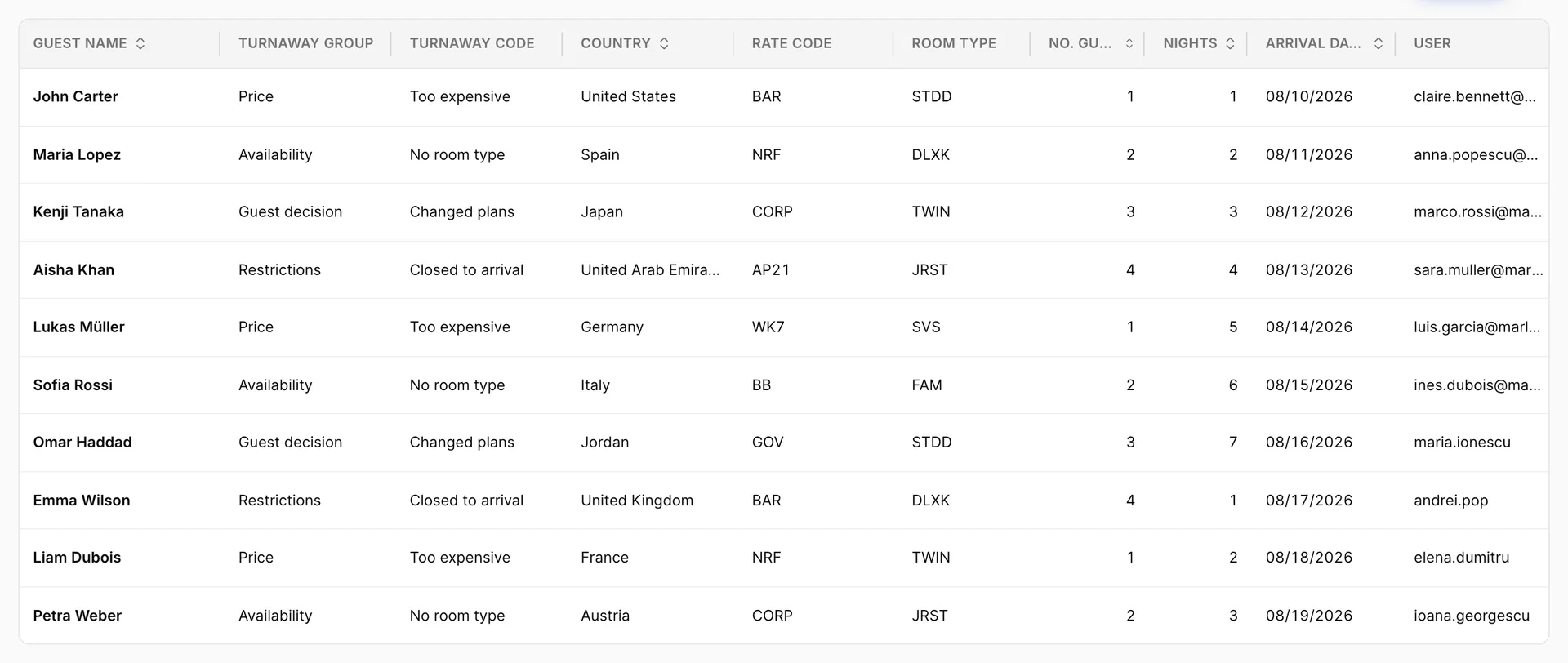
It is a wide table, and the columns that carry the meaning are the first few.
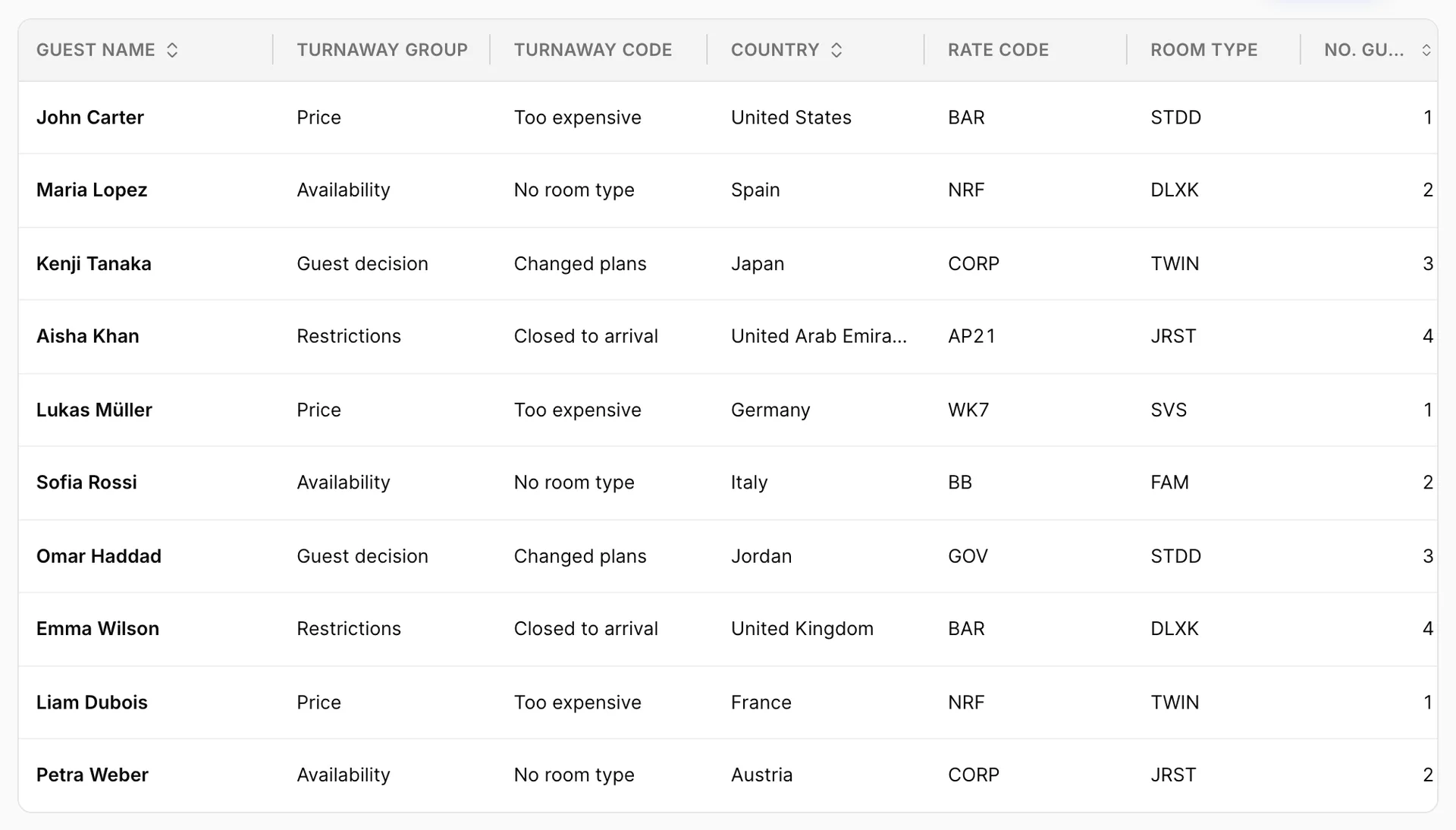
Turnaway Group and Turnaway Code are the pair that answer "why". The group is the broad category, the code is the specific reason inside it, and between them they are the whole point of the record. Everything else on the row describes what was asked for: the Country the enquiry came from, the Rate Code and Room Type they wanted, how many guests, how many nights, and the Arrival Date they had in mind. User, off the right-hand edge above, is whoever recorded it.
Sorting works on guest name, country, guest count, nights and arrival date. Everything else is a filter.
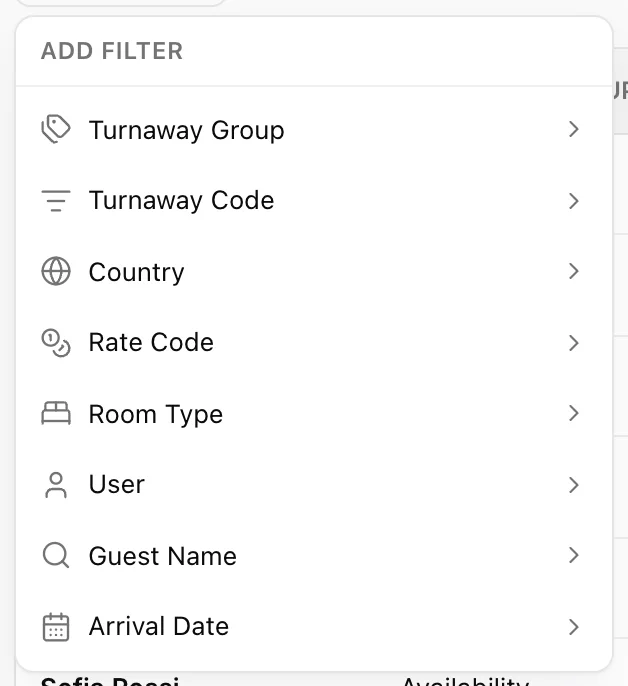
Export in the toolbar gives you the filtered list as a PDF or a spreadsheet, so the filter you set here is the report you take to a meeting. Set the filter first; the export follows it.
Recording one
Add Turnaway opens a panel down the right-hand side.
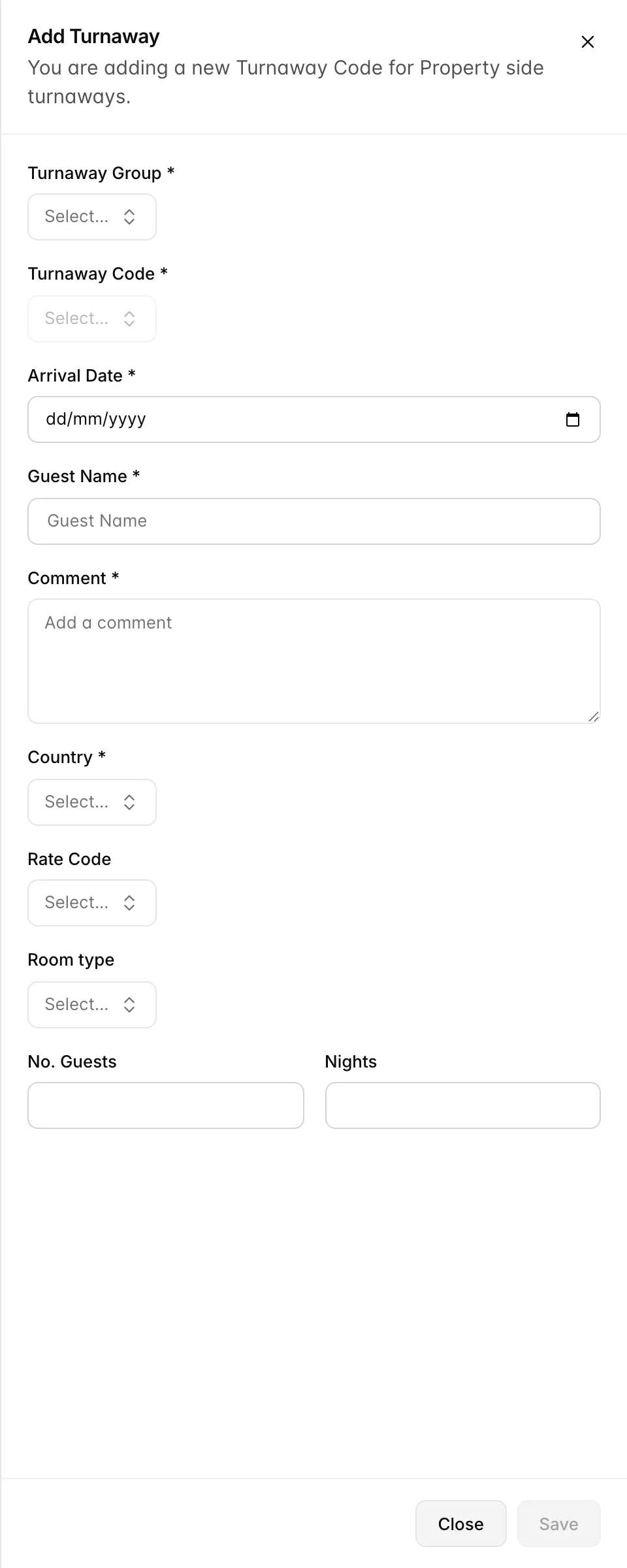
Choose the Turnaway Group before anything else. Turnaway Code stays greyed out until you have, because the codes it offers are the ones belonging to the group you picked.
Six fields are required: the group, the code, the arrival date, the guest's name, the country, and a Comment. The comment being required is a deliberate piece of friction. A code alone tells you a category; a sentence tells the person reading the list in three months what actually happened, and "wanted a connecting pair, we only had two on different floors" is worth more than forty rows of No room type.
Rate Code, Room type, No. Guests and Nights are optional, and they are the fields that make the list useful as a report later. Put them in when you know them.
Recording a turnaway changes nothing else in Prostay. It does not touch availability, does not appear on the calendar, and does not create a guest profile. It is a note.
Groups and codes
The reasons your staff can choose from are yours to define. Turnaway Groups in the menu is where you do it.
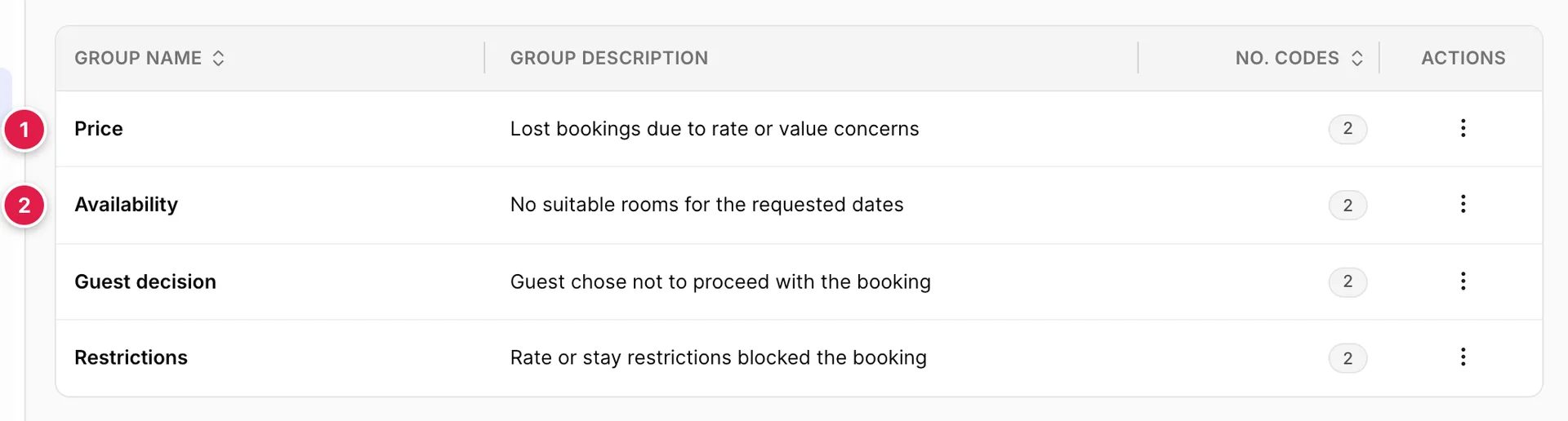
A group is a heading. No. Codes tells you how many reasons live inside it. The groups are what you will group by when you read the list back, so keep them few and keep them distinct: four or five that mean genuinely different things will tell you more than fifteen that overlap.
The three dots on a row let you rename a group, change its description, or open its codes.
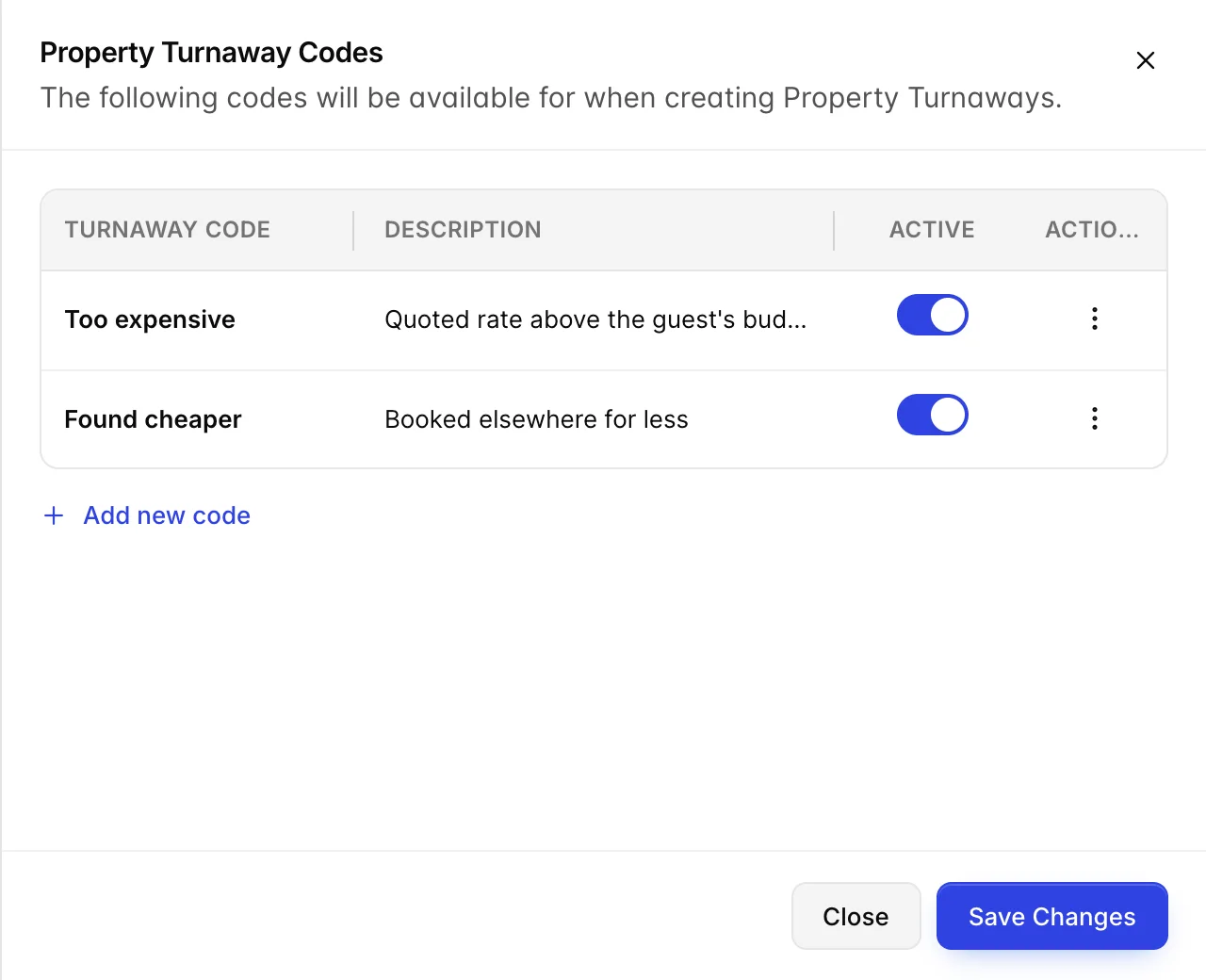
Codes are what appears in the dropdown when somebody records a turnaway, so they should read the way your staff talk. The description is there for the person choosing, and it is worth writing: it is the difference between two codes that sound alike being used consistently and being used at random.
The Active switch is how you retire a code. Switch it off and it stops appearing in the dropdown, while every turnaway already recorded against it keeps its reason. That is almost always what you want. A code you delete takes its meaning out of your history with it, and next year's comparison quietly stops making sense.
Save Changes at the bottom of the panel commits the switches. Add new code adds one to the group you have open.
Reading the list as a report
The list is not labelled as a report and there is no chart on it, but reading it as one is the reason to keep it. Three questions it answers well:
Are we losing people on price or on space? Filter by group. If Price outweighs Availability over a month you were open, your rate is doing the turning away. If it is the other way round, you were full and the answer is a different one.
What should we have more of? Filter by Room Type. A run of turnaways all wanting the same type you only have four of is the clearest argument you will get for changing your mix, and it is an argument nobody can make from booking data, because the people in it never became bookings.
Which dates hurt? Filter by Arrival Date. A cluster on the same handful of nights usually means a restriction you set and forgot: a minimum stay, or a closed-to-arrival that outlived the event it was set for.
All of this depends on your staff recording them, which is the real difficulty. A turnaway is written at the least convenient moment, just after a conversation that did not go well, and there is no prompt to write it. Somewhere in the day where recording them is expected is worth more than any amount of setup on this screen.
Things that catch people out
A turnaway is not a lead. Nothing will remind you about it and there is no way to convert one. If there is any chance the guest would still come, put them on the waiting list, which is built to be worked, and record the turnaway only when they are gone.
The codes dropdown is empty until you choose a group. It is not broken; it is waiting. The same is true when editing.
Arrival date is the date they wanted, not today. It is the field that makes the list worth filtering later, and the one most often filled in with the day the note was written.
The numbers here will not match any revenue report, and should not. A turnaway carries no money at all, by design. If you want a value for the business you turned away, you have to multiply it out yourself from the nights, the rooms and the rate you were quoting, and that figure is an estimate you made rather than anything Prostay is claiming.
Switch codes off rather than deleting them. Deleting rewrites what your history means. Switching off leaves it alone.