Four tabs, and they are not four versions of the same thing. Credit cards are a list of types with permissions attached. Bank transfer and PayPal are a switch and some details. Prostay Pay is a single flag on the property. What connects them is the list of methods a cashier is offered when someone settles a bill, and every one of these tabs contributes to it.
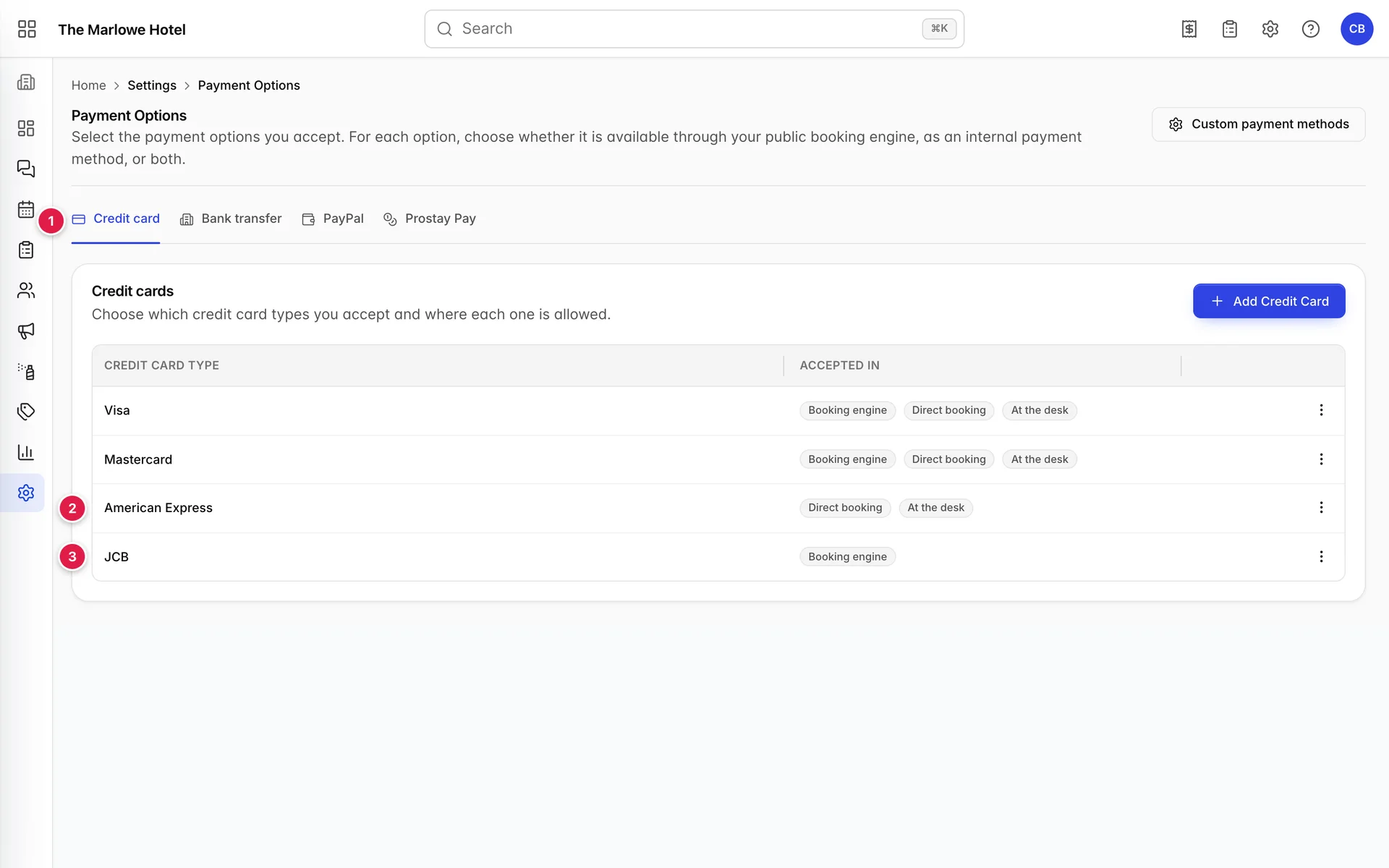
- The tabs. Four independent payment methods, each saved separately with its own Save Changes button.
- American Express, missing one badge. Accepted at the desk and on direct bookings, not offered on the public booking engine.
- JCB, with only one. The opposite: bookable online, and a cashier cannot select it.
Credit cards and the three places they are offered
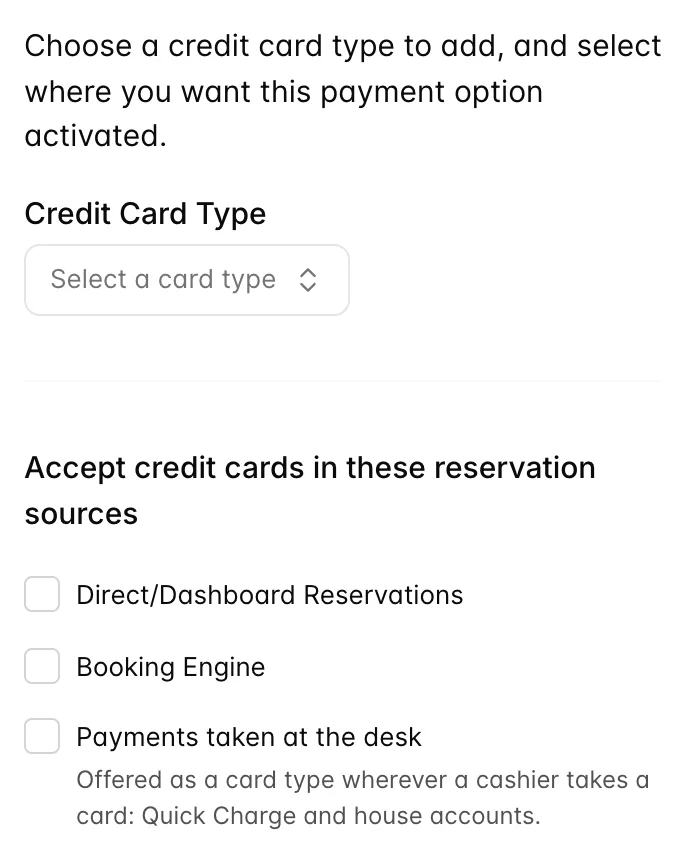
Adding a card type is two decisions: which card, and where it is allowed. The card type list only offers types you have not already added, so a type can appear once.
One permission covers the whole screen. If Add Credit Card is greyed out, the custom methods card is greyed with it, and no row offers Edit or Delete, your role does not include it and you are reading what the property accepts rather than setting it. An administrator can add it from Users in System Settings, under Integrations › Payment options.
| Checkbox | Where it shows up |
|---|---|
| Direct/Dashboard Reservations | The card types offered when a member of staff takes a booking inside Prostay and records a card against it. |
| Booking Engine | The card types a guest can choose at checkout on your public booking pages. Leaving this off does not stop a guest booking, it stops them paying with that card. |
| Payments taken at the desk | Which brands a cashier is offered. It decides whether Card appears at all as a settlement method on house accounts and at spa settlement, and in Quick Charge it decides what the Card type list holds: with no card ticked here that list falls back to a single entry reading Other. |
Bank transfer
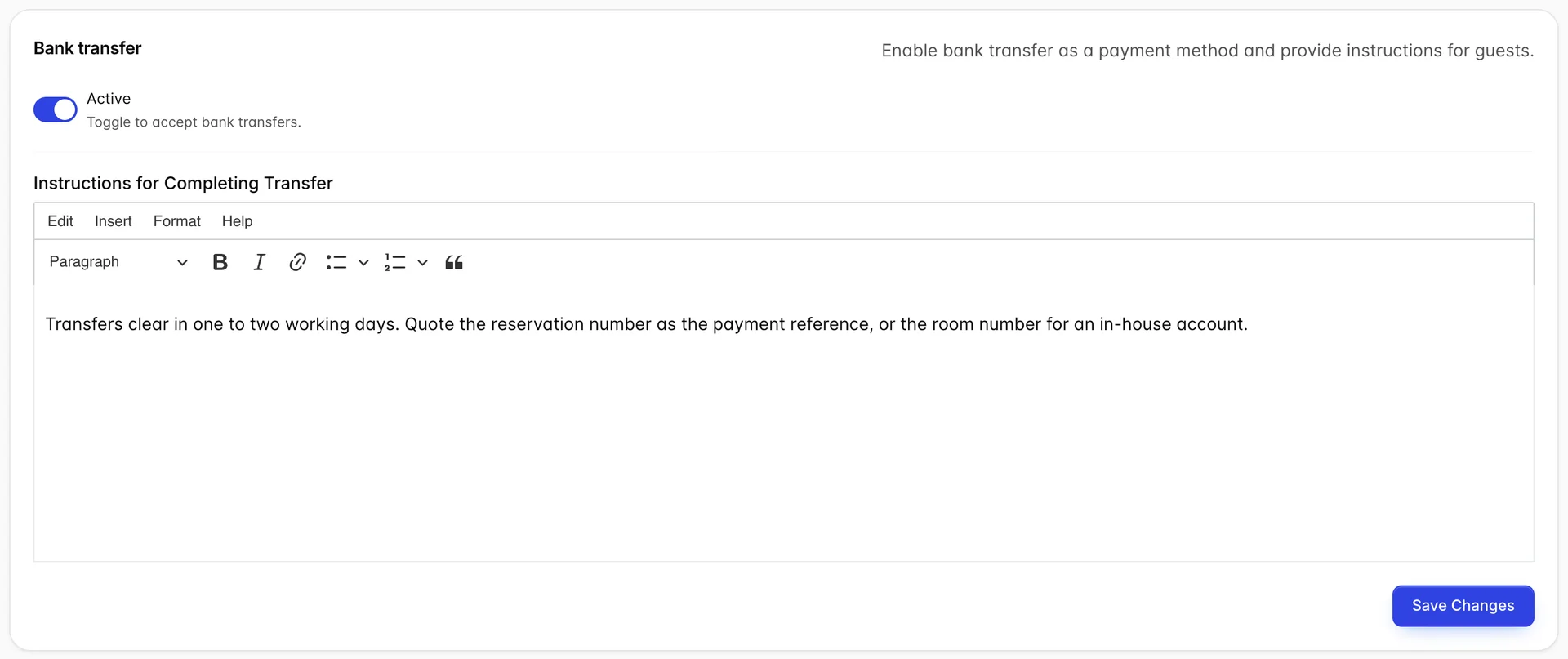
One switch and one block of text. The switch adds Bank transfer to the settlement list. The text is the instructions a guest is given for completing the transfer, and it is worth writing properly: it is the only place you can tell someone what reference to quote, and an unreferenced transfer is a payment nobody can match to a folio.
PayPal and Prostay Pay
Both are switched on here and configured elsewhere. PayPal wants an email address, a client ID and a token from your PayPal account, and once active it can take reservation deposits. Prostay Pay is a single switch that enables card payment through Prostay's own processing inside the booking engine. Neither adds anything to the settlement list at the desk: they are guest-facing payment routes, not cashier ones.
Custom payment methods
Behind the button at the top right, and easy to miss for months. This is where you record the ways your property actually gets paid that Prostay has no built-in concept of: a corporate city ledger, a gift voucher, a tour operator voucher, a bank you settle through once a month.
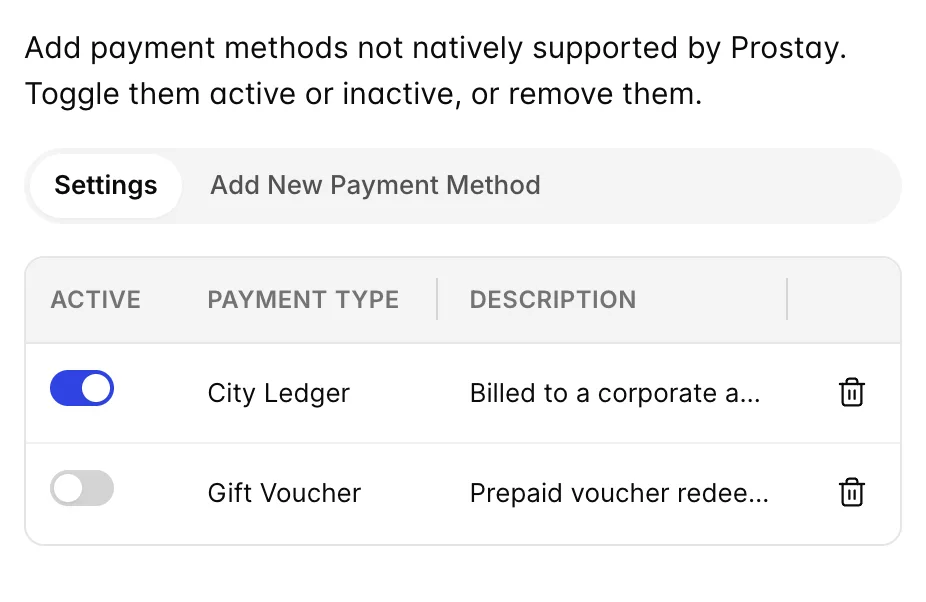
Each one you add and switch on becomes a selectable method wherever money is taken. The description is for your own staff rather than for guests, so use it to say when the method is appropriate: "billed to a corporate account and settled monthly" saves a new receptionist asking.
What the cashier ends up seeing
Everything above converges on one dropdown. When a cashier settles a charge, Prostay builds the list of methods from this screen in a fixed order:
| Entry | Where it comes from |
|---|---|
| Cash | Always first and always present. Cash needs no configuring, so it cannot be switched off. |
| Card | Present if any credit card type has Payments taken at the desk ticked. |
| Bank transfer | Present if the bank transfer tab is active. |
| Your custom methods | One entry per enabled custom method, in the order they were added. |
| Other | Always last. The escape hatch, not a choice: a payment recorded as Other tells a night auditor nothing. |
Cash and card get their own capture steps, note counting for one and an approval code for the other. Everything else is recorded as a straight amount. This is also why the list matters for reconciliation rather than just for convenience: a bank transfer recorded as cash is a drawer that will not balance.
Common pitfalls
| Symptom | Cause |
|---|---|
| Card is missing from the settlement dropdown | No card type has Payments taken at the desk ticked. The dropdown does not care which brands you accept, only that one of them is allowed at the desk. |
| A guest cannot pay with a card you definitely accept | That type is missing the Booking Engine tick. Amex is the usual one, often deliberately. |
| A custom method you added is not offered | Adding it does not enable it. The switch in the Settings segment of the drawer does. |
| Transfers arrive with no reference | The instructions field is empty or does not ask for one. It is the only place a guest is told. |
| A card type will not appear in the Add drawer | It is already in the table. Edit the existing row rather than adding a second. |