An asset is something you bought once and will use for years: the beds, the ovens, the terminals at the front desk. Accounting treats it differently from a case of wine, because you have not spent the money so much as swapped cash for a thing. The register on this screen is where each of those things is listed, and where the product works out how much of it you have used up so far.
What belongs in the register
The test is time, not price. Anything you expect to still be using in a year or more belongs here: furniture, kitchen plant, computers, vehicles, a refurbishment. Anything consumed within the year does not, however expensive it was, and goes on a bill as an ordinary cost instead.
Most properties also set a floor, so that a 90 USD desk fan is not tracked for six years. Whatever floor you pick, apply it consistently: a register that holds twelve real assets is useful, and one that holds four hundred small ones is a chore nobody keeps up.
Reading the register
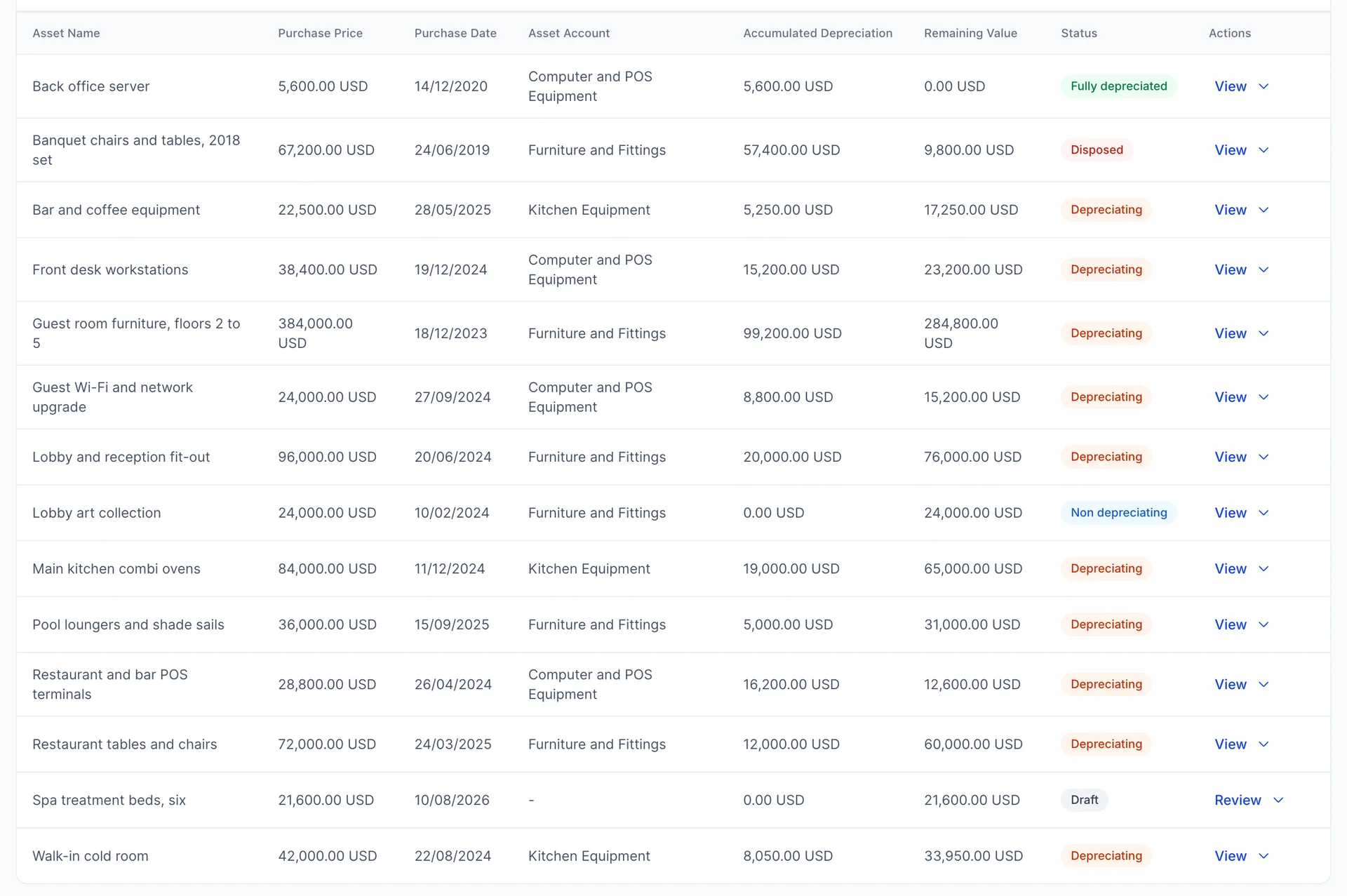
Three of the columns are one piece of arithmetic. Purchase Price is what you paid and never changes. Accumulated Depreciation is how much of that has been written off since the asset went into service, and it grows every month. Remaining Value is the first less the second, and it is what the asset is worth on your books today.
Read the guest room furniture row that way: 384,000.00 USD paid, 99,200.00 USD written off so far, 284,800.00 USD still to write off over the rest of its life. Nothing about that middle figure is a guess. It follows from the method, the life and the start date on the asset, which is why those three fields stop being editable the moment the asset is committed.
Asset Account is the account on your balance sheet the cost sits in. Add up the Purchase Price of every asset pointing at Furniture and Fittings, leaving out the drafts and anything already disposed of, and you have exactly what that account shows in the chart of accounts: 612,000.00 USD here. The register is the detail behind those balances, which is the main reason to keep it honest.
The five statuses
The badge in the last column is not decoration. It says which of five states the asset is in, and three of them follow from the figures rather than being set by hand.
- Draft is an asset typed in and not committed. It is on no account and in no total. Nothing about it is fixed yet.
- Depreciating is the normal state: committed, inside its useful life, writing a little off every month.
- Fully depreciated means the life has run out. The asset is still owned and still listed, worth nothing on the books, and nothing more will be written off it. The back office server in the picture has reached this.
- Non depreciating is an asset held at cost that is never written down. Land and art are the usual cases.
- Disposed is an asset you have sold or scrapped. It stays in the register as history and leaves your balance sheet entirely.
Adding an asset
Add an asset at the top right offers one asset or an import. The single-asset panel opens on the right and asks for a name and a description first.
Spend a moment on both. The name is what you will scan a long register for in three years' time, so "Guest room furniture, floors 2 to 5" beats "Furniture". The description is the right home for a serial number, a plate, a supplier reference or which rooms the thing is actually in.
Depreciation details
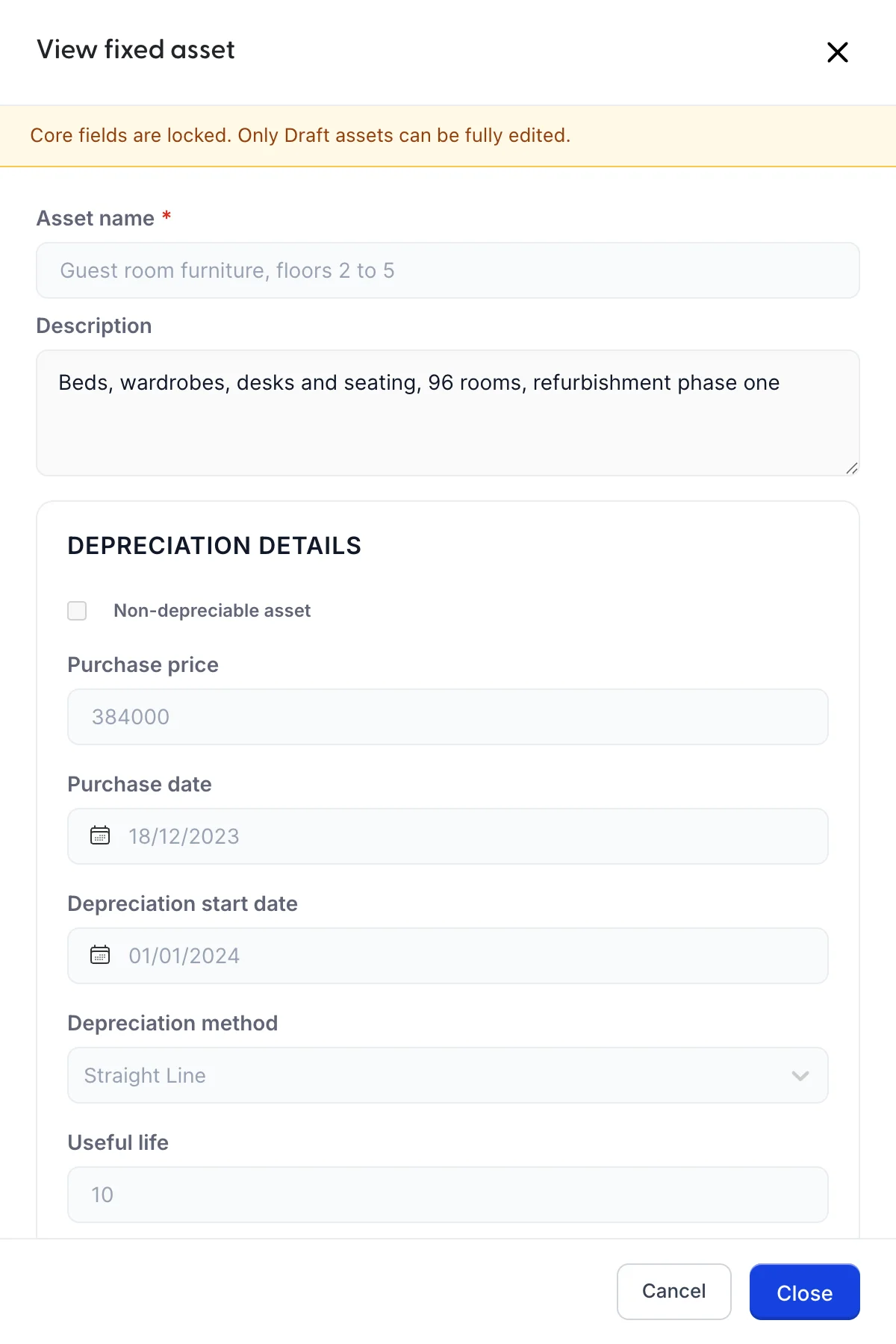
Purchase price and Purchase date are what you paid and when you bought it. Depreciation start date is a different date and often a later one: it is when the asset went into service. Ovens delivered in December and commissioned in January start depreciating in January.
Useful life is in years, and it is a judgement about how long the thing will earn its keep, not how long it will physically last. Computers are usually three or four years, kitchen plant seven to ten, furniture eight to ten, a building fit-out longer. Use whatever your accountant already applies, because consistency across years matters more than the exact figure.
Salvage value is what you expect to get for it at the end of that life. It is subtracted before anything is written off, so an asset bought for 20,000 USD with a salvage value of 2,000 USD writes off 18,000 USD over its life and never falls below 2,000 USD. Most hotel assets are worth nothing at the end and zero is a fair answer.
Depreciation method offers five. Straight line spreads the cost evenly over the life and is what most properties use for most things. The declining balance methods write more off in the early years, which suits things that lose value quickly, such as vehicles and computers. Sum of years digits does the same more gently. Units of production ties the write-down to use rather than time. Pick one per asset and leave it alone: changing method part way is a decision for your accountant, not a tidy-up.
The three accounts
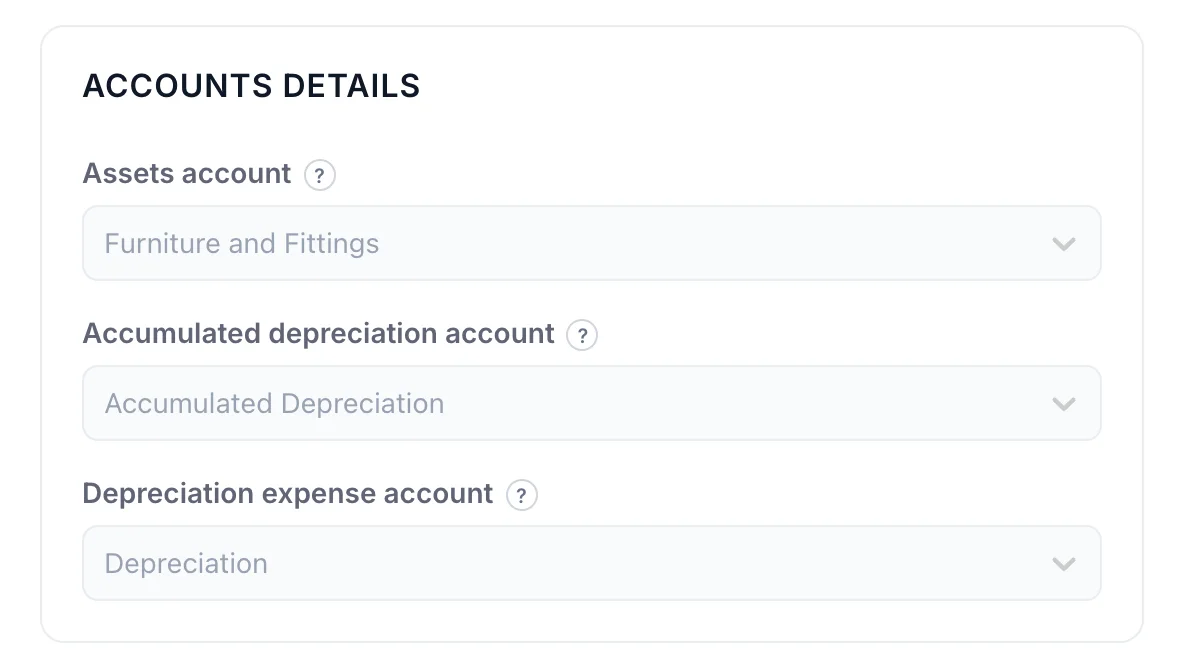
This section is the part that decides what your accounts say, and each picker wants a different kind of account.
Assets account is where the cost sits, and the list offers the Fixed Assets section of your chart. Group similar things together, so all the furniture goes to one account and all the kitchen plant to another. Three or four asset accounts is plenty for a hotel.
Accumulated depreciation account is the running total of everything written off, and it is a negative balance sitting alongside the asset accounts rather than an expense. This is why the balance sheet can show you both what you paid and what is left. The picker only offers accounts whose detail type is Accumulated Depreciation, and one such account for the whole property is the usual arrangement.
Depreciation expense account is where this year's charge goes, and it is a cost like any other. It is the only one of the three that touches your profit and loss.
Drafts, and what locks when you commit
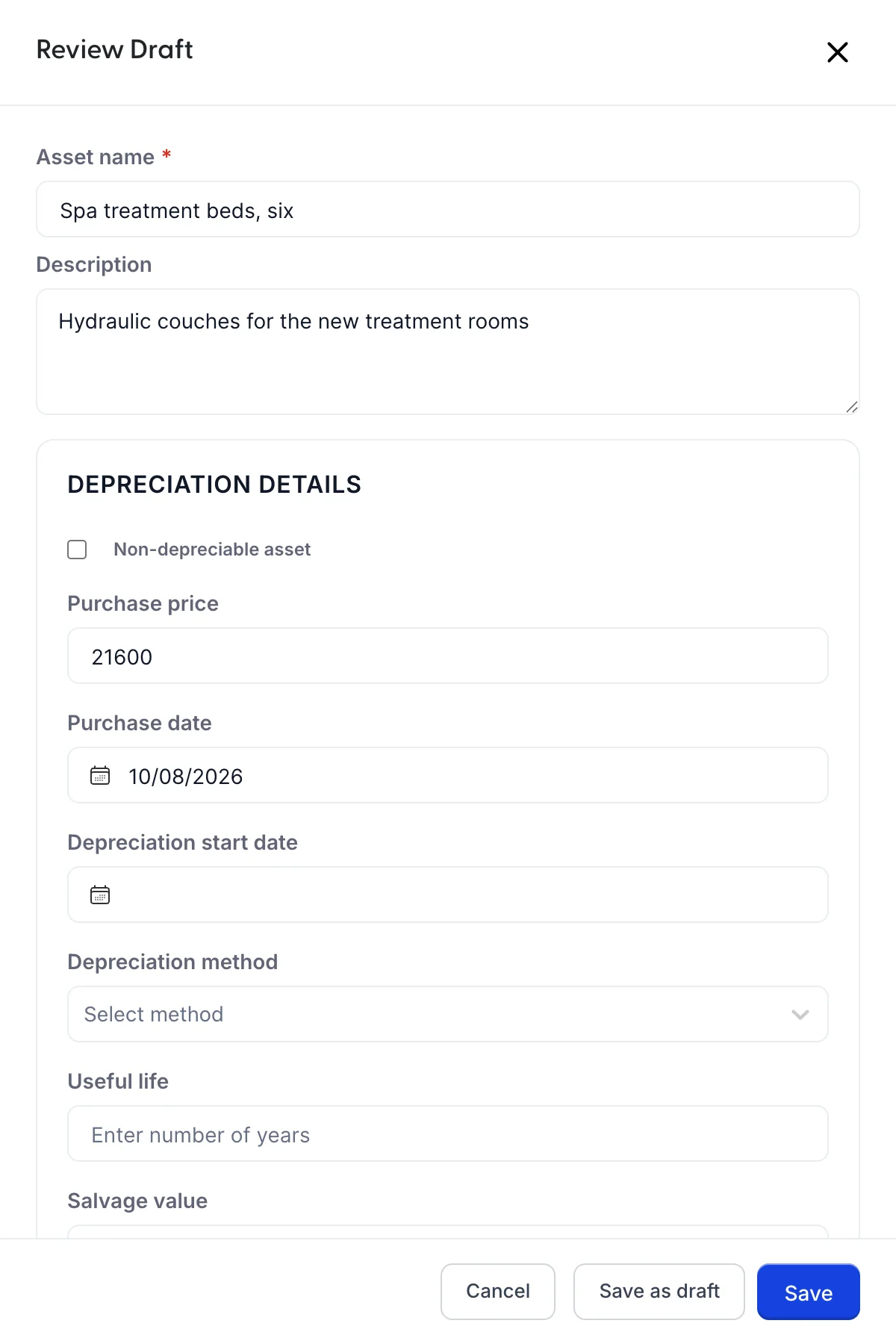
The panel has two save buttons and they do very different things.
Save as draft keeps what you have typed and asks for nothing else. Only the name is required, so a draft is the right place to park an asset while you are still waiting for the invoice or deciding on a useful life. A draft affects no account and appears in no total.
Save commits the asset, and everything the depreciation depends on becomes required at that point: price, start date, method, life and all three accounts. Miss one and the panel says which. A confirmation asks whether you mean to save it as depreciating or non-depreciating, because that choice is the hard one to undo.
After that the panel opens as View fixed asset with a yellow banner and the core fields greyed out. That is deliberate: those figures are what the depreciation was calculated from, and changing them silently would change history. A draft you have not committed yet reopens as Review Draft, fully editable, which is what the Review button on a draft row means.
Finding one asset
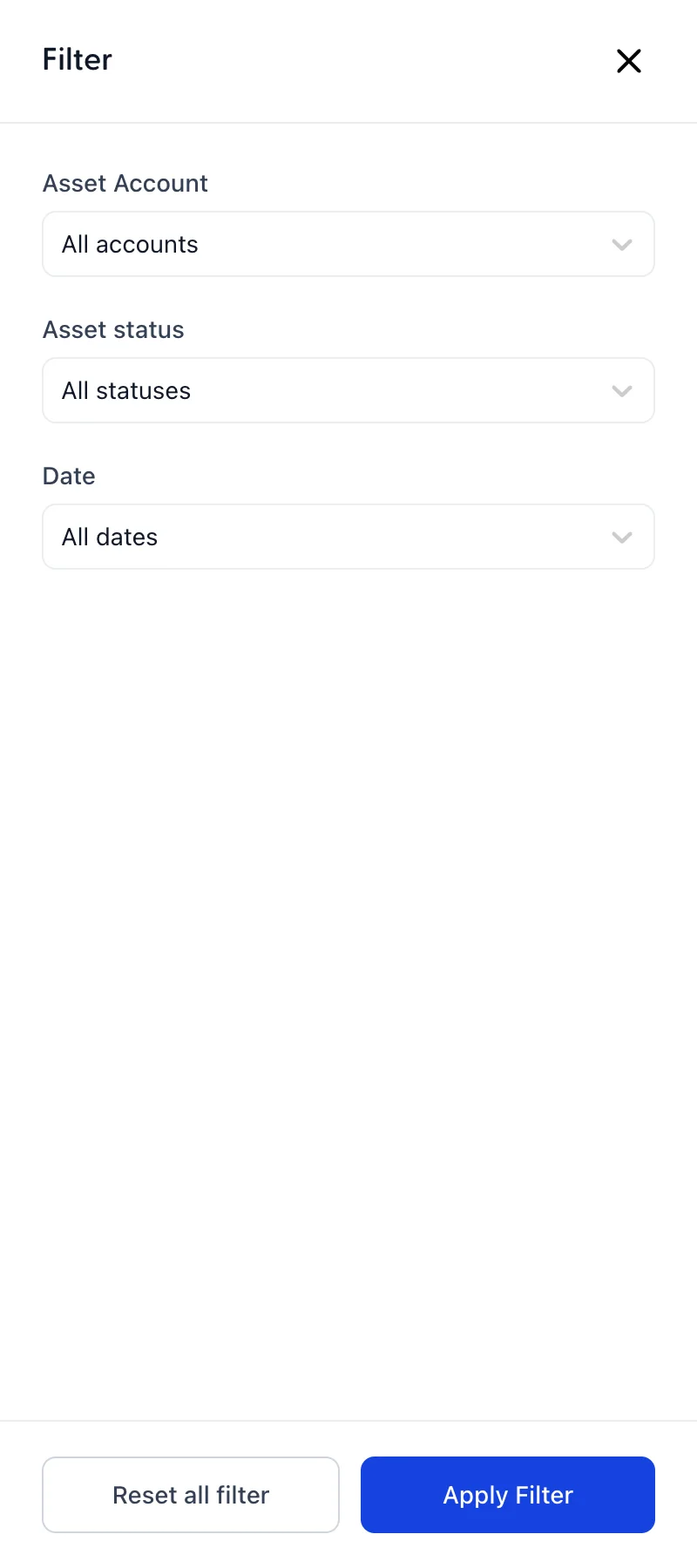
The search box above the table matches on the asset name and on the description, which is the argument for putting the serial number there. Search filters adds three more: the asset account, the status, and a date range that reads the purchase date. They combine, so Kitchen Equipment plus Depreciating plus This year answers a question a search box cannot.
Duplicating and deleting

Duplicate copies the asset as a new draft, which is the quick way to enter six identical treatment beds or a second batch of the same terminals. The copy starts with nothing written off, whatever the age of the asset it came from, and you set its own purchase and start dates before committing it.
Selling or scrapping an asset
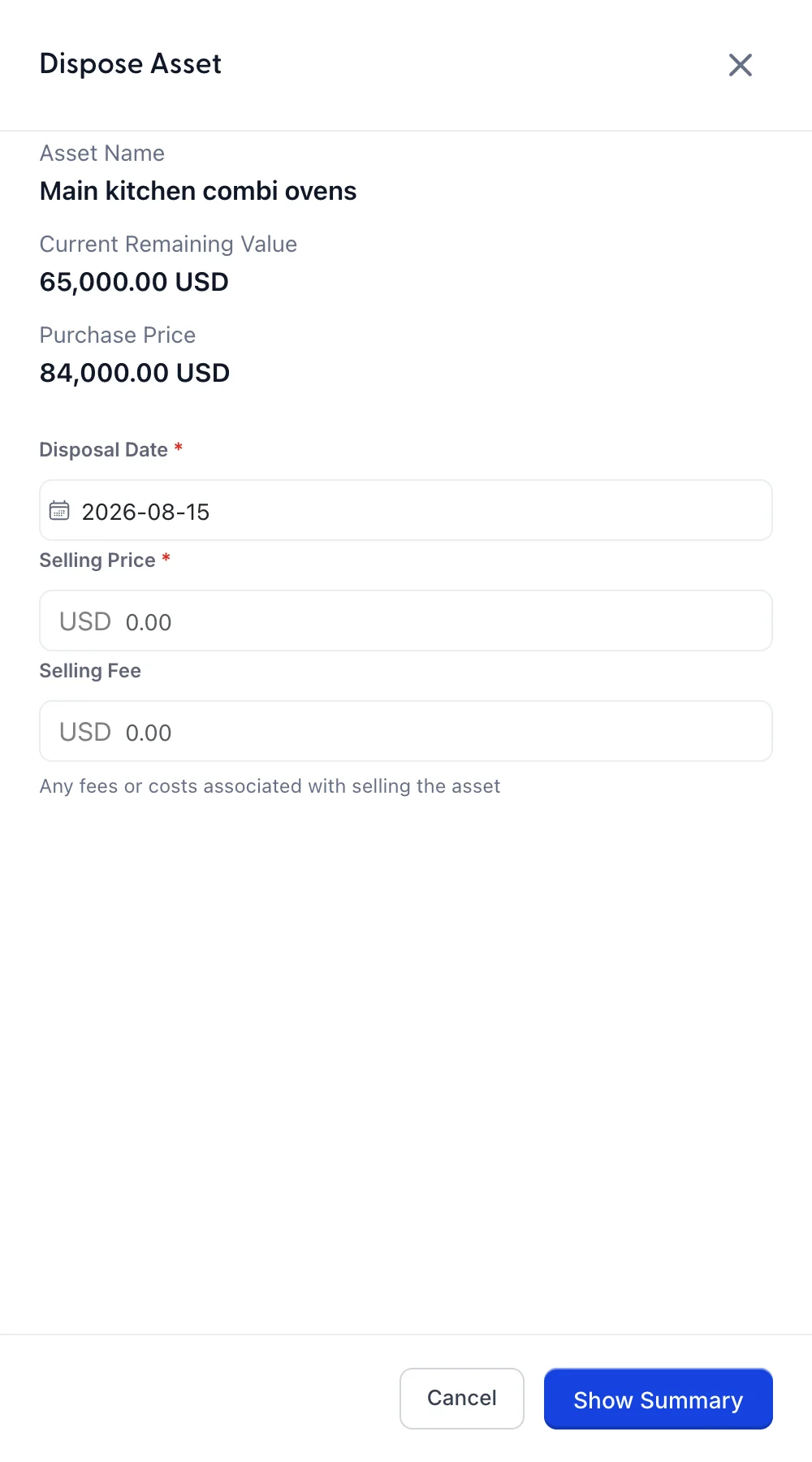
Dispose asks for three things: the date you sold it, what you sold it for and any cost of selling, such as a commission or a removal charge. Scrapping something is a disposal too, with a selling price of zero.
There is a second reason Dispose can be missing, besides the draft and already-sold cases above, and the same goes for Delete on a row and Save template on the bulk screen: your role does not include the permission for it. This one cannot be added from Users in System Settings today, because the register checks for a right the role editor has no setting for, so disposing of an asset is available only to accounts with unrestricted access. If you keep the register and cannot dispose of anything in it, that is the reason, and it is ours to fix rather than yours.
Show Summary then does the arithmetic before anything is committed.
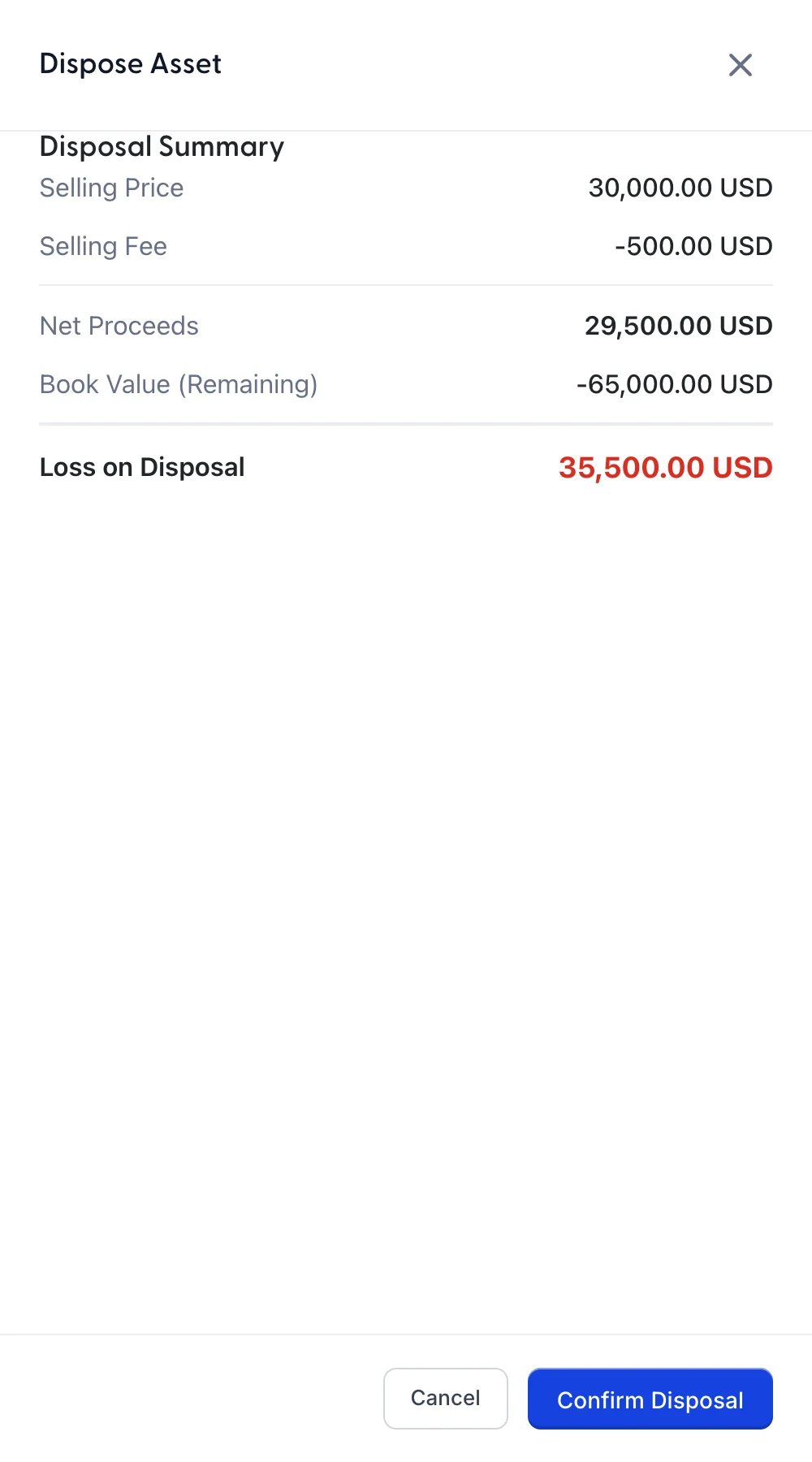
Selling price less selling fee is your net proceeds. Compare that with what the asset was still worth on the books and the difference is a profit or a loss on disposal. In the picture, 29,500.00 USD of proceeds against a book value of 65,000.00 USD is a loss of 35,500.00 USD, even though the ovens sold for a decent price, because barely a year and a half of a seven year life had been written off.
That is worth understanding rather than being surprised by. A loss on disposal usually means the useful life was optimistic, not that you sold badly. Confirm Disposal then marks the asset Disposed and takes both its cost and its accumulated depreciation off your balance sheet.
Adding several at once
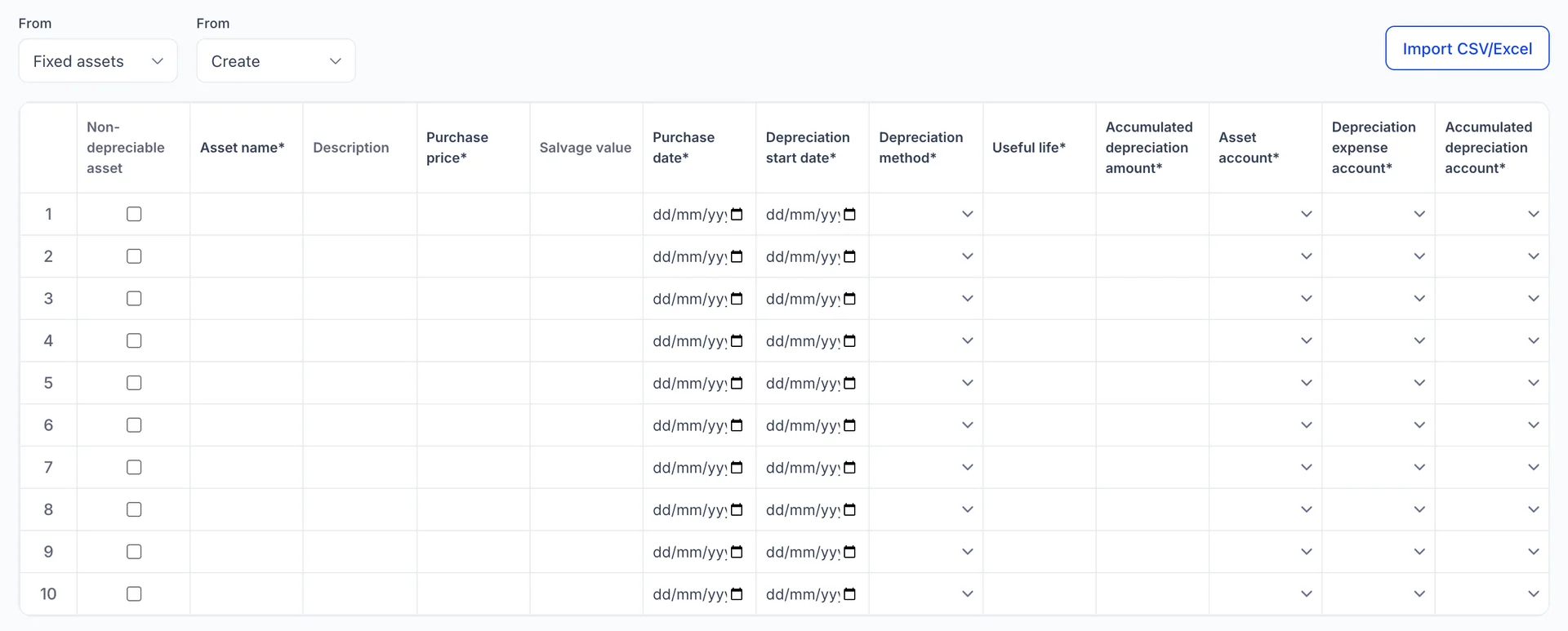
Import assets, the second choice under Add an asset, opens a grid with the same fields as the panel laid out as columns. Type into it, or use Import CSV/Excel to bring in a spreadsheet, which is how most properties get an existing register in on day one.
The one column with no equivalent in the panel is Accumulated depreciation amount. It is there because an asset you are bringing across has usually been depreciating for years already, and this is where you tell the product how much has been written off before today.
Everything saved here arrives as a draft, so nothing lands on your accounts until you have opened each row, checked it and committed it. That is the point of the grid: get the typing done in one pass, review afterwards.
Where to go next
The four balances this register drives are all on the chart of accounts: an account for each group of assets at cost, and the accumulated depreciation sitting against them. If a balance there looks wrong, the answer is in this register, because that is where every one of those figures comes from.