Every cost your hotel incurs arrives here, and the only real decision is which of the six forms records it. Get that right and the rest is the same form each time: a payee, some lines, and a save.
Six forms and one shape
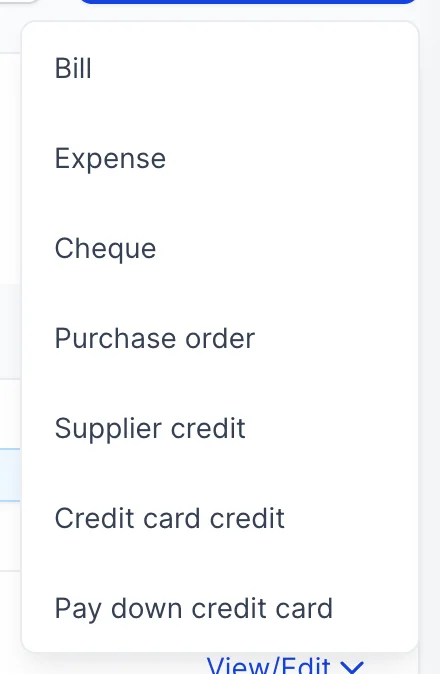
New Transaction on the Expenses screen offers seven things. Six of them are covered here; the seventh, purchase orders, has its own article because an order costs nothing until it becomes a bill.
All six share a supplier picker, two line grids reading from the same chart of accounts and the same product catalogue, the same sales tax treatment, the same attachments, the same numbering and the same save. Learn one and you have learned the others.
The one thing that genuinely differs is what the document does to your books, and there are only three answers. A bill says you owe money and have not paid. An expense or a cheque says the money has already gone. A credit says a supplier owes you.
Which form for which situation
| Form | Use it when, and what it does |
|---|---|
| Bill | An invoice has arrived and you will pay it later. This is the only one of the six that creates something owed: it adds to the supplier's balance, appears on the payables ageing, and stays open until you settle it on Pay Bills. |
| Expense | Money has already left an account and there was never an invoice to hold: a card payment, a direct debit, petty cash. It records the cost and the payment in one go, so nothing is left owing. |
| Cheque | The same as an expense, written on a cheque. The difference is the cheque number, which is how you tie it to the stub and to the bank statement later. |
| Supplier credit | The supplier owes you: a short delivery, an overcharge, a returned case of wine. It reduces what you owe them, and sits waiting until you apply it to a bill on Pay Bills. |
| Credit card credit | A refund landing back on a company card. It reduces the card balance rather than a supplier balance, which is why it asks for a bank account rather than only a payee. |
| Pay down credit card | You have paid the card bill. It moves money from a bank account to the card, and it is not a cost: the costs were recorded when the card was used. |
The top of the form
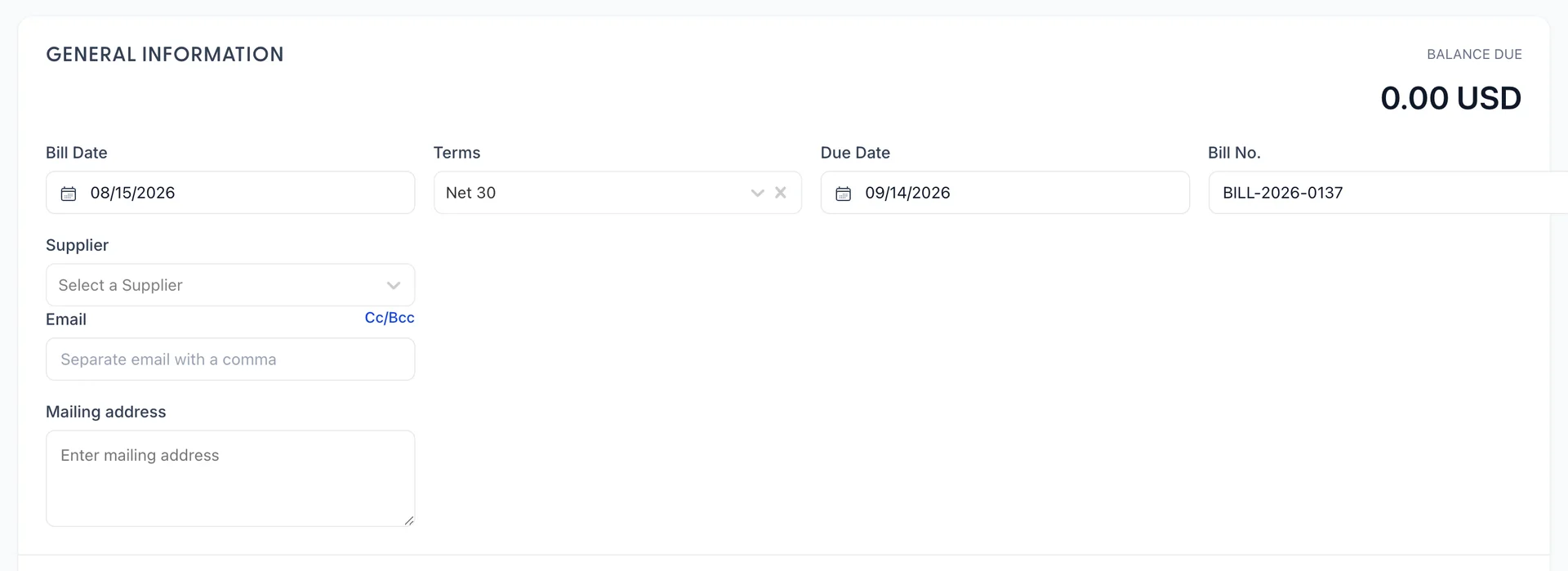
Three of the fields on a bill are worth more explanation than their labels give them.
| Field | What it changes |
|---|---|
| Bill Date | The date the cost belongs to, which is the supplier's invoice date rather than the day you are typing. Change it and the due date moves with it whenever terms are set. |
| Terms | Due on Receipt, Net 15, Net 30 or Net 60. Choosing one recalculates Due Date from the bill date. Leaving it empty leaves the due date thirty days out, which is a guess rather than an agreement. |
| Bill No. | Prefilled with the next number in your own series. Overtype it with the supplier's invoice number if that is what you quote when you ring them, and keep whichever convention you choose consistent. |
Choosing a supplier fills in their email and mailing address from their record, and + Add new supplier at the bottom of the picker opens the supplier panel without losing what you have typed.
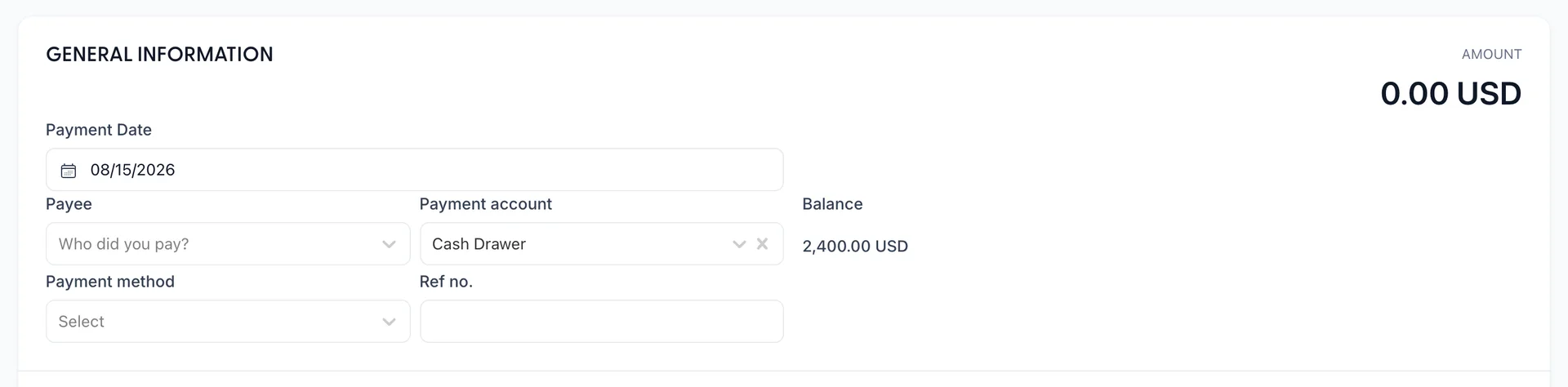
The expense form swaps terms and a due date, which it has no use for, for Payment account and Payment method. The balance under the account is live, and it is there to stop you recording a payment from an account that could not have made it.
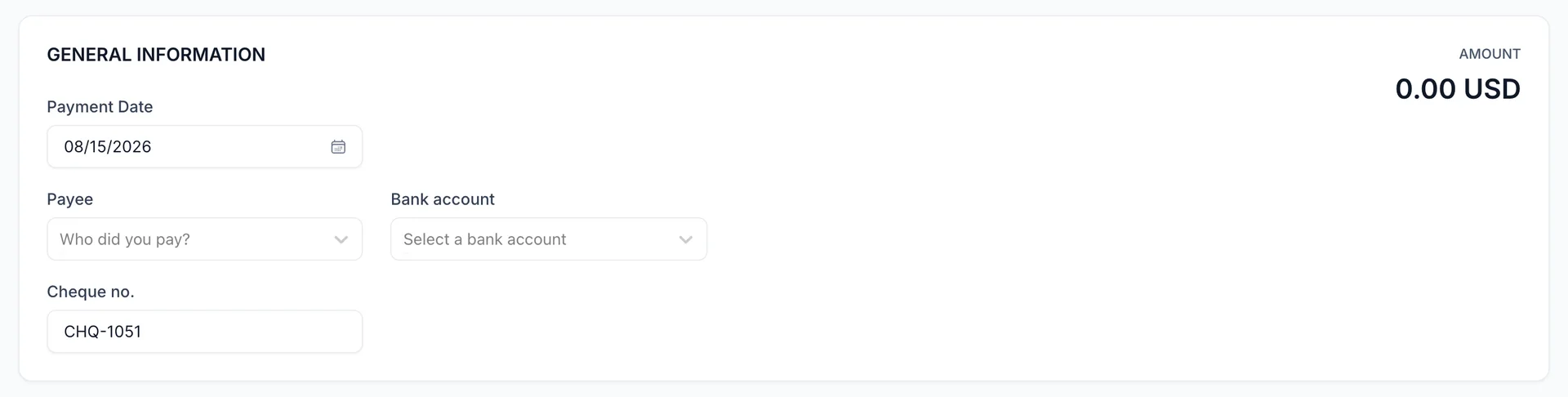
Cheque no. is the next number in the series, taken from the last cheque recorded rather than invented, so the column reads in order when you come to match it against the bank. Overtype it when the book you are writing from has run ahead.
The two line grids
Under the header sit two grids, and the difference between them is the difference between buying a cost and buying a thing.
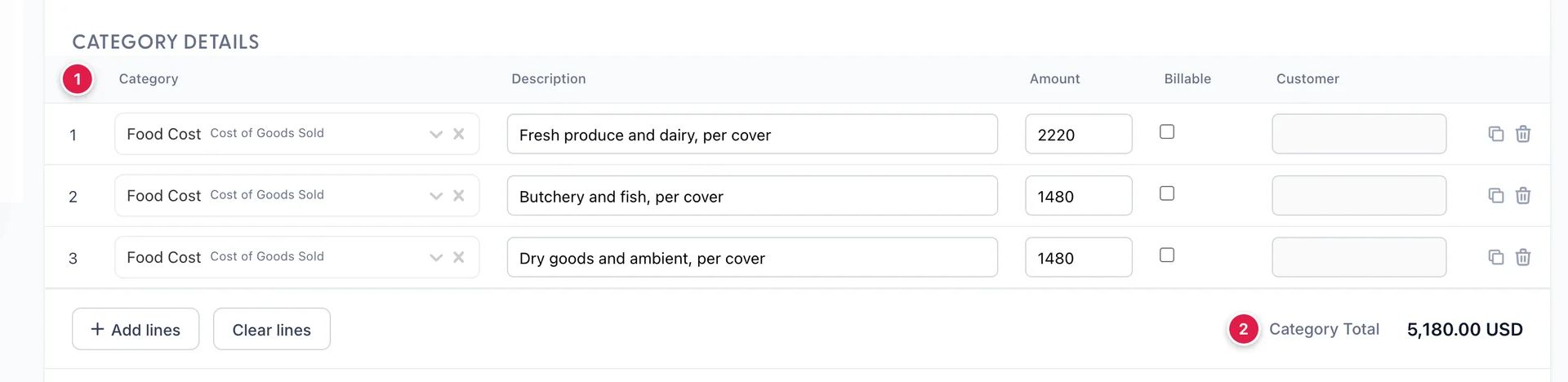
- Category, which is an account from your chart of accounts. This is the field that decides where the cost appears in your profit and loss, and it is the one to slow down over.
- Category Total, the sum of the grid before tax.
One category choice is worth pausing over longer than the rest. Something you will still be using in three years, a vehicle, a refit, a commercial dishwasher, is not a cost of this month: it belongs on an asset account and its cost reaches your profit and loss gradually, as depreciation. Coding it to an expense account instead makes this month look far worse than it was and leaves the item off your books entirely. See fixed assets for what to do with those purchases, and use a category line pointed at the right asset account when you record the bill.

An item line points at something in products and services, brings its cost and its expense account with it, and multiplies a quantity by a rate. Use it for stock you buy repeatedly, because the catalogue keeps the coding consistent no matter who types the invoice. Use a category line for everything else, which for most hotels is most of it: an electricity bill, a repair, a commission statement.
Both grids can hold lines on the same document. Add lines adds four more rows and Clear lines empties the grid, so read which grid the button belongs to before pressing it.
Billable lines and the customer column
Every line, in either grid, has a Billable tick and a Customer picker beside it. Ticking one marks the cost as something to recharge, and naming the customer is what makes it findable again when you raise their invoice.
This is for costs you incur on somebody else's behalf: an event client's hired staging, a corporate account's airport transfers, a wedding's specialist florist. Ticking the box does not create an invoice line by itself, so the cost sits marked until somebody bills it.
Sales tax
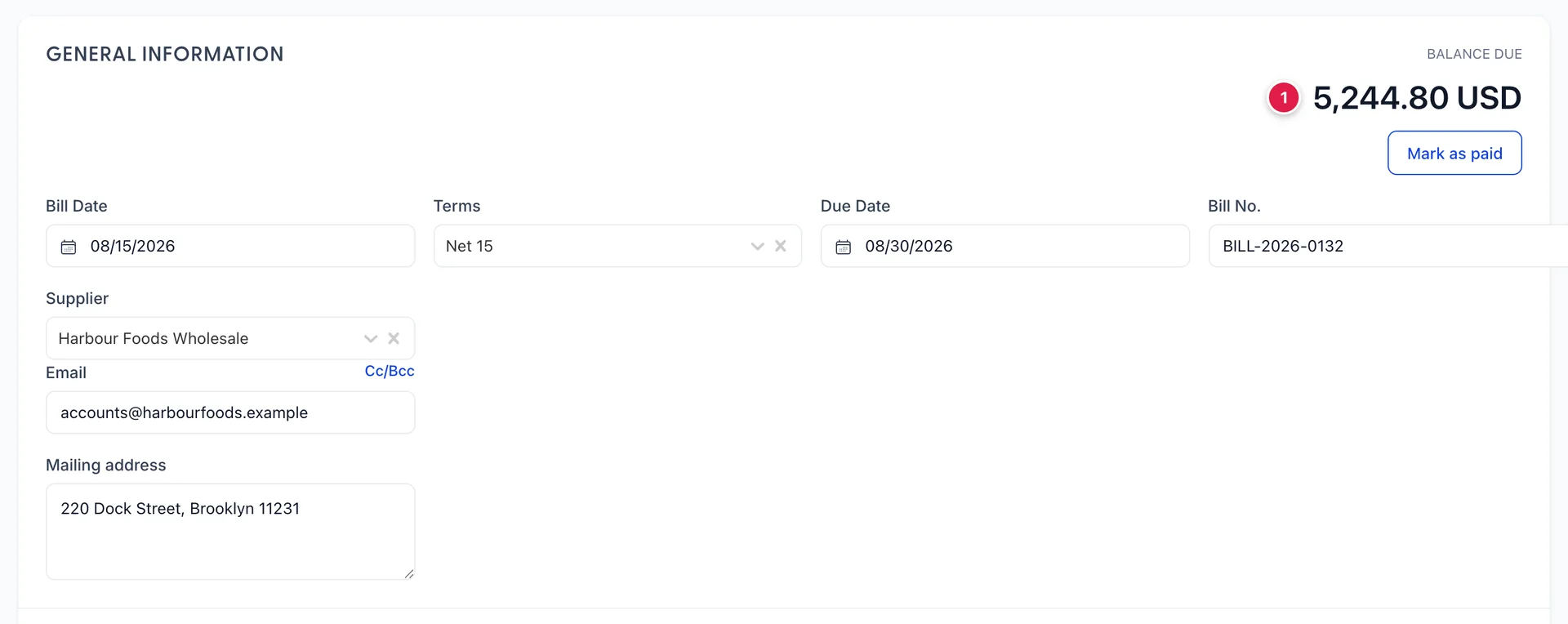
- BALANCE DUE, which is the total of the document less every payment and every credit already applied to it. On a bill of 5,698.00 with a 453.20 credit against it, this reads 5,244.80. It is the figure Pay Bills will offer to settle.
Under the lines the form shows Subtotal, the tax at your property's rate, and Total. Tax is worked out on the lines marked taxable, at the rate set in your accounting tax settings, and it is the same helper the sales side uses, so a purchase and a sale never disagree about what the rate is.
On a bill the total then has payments and credits taken off it to give the balance due. On an expense or a cheque there is nothing to take off, so the total is what left the account.
Pulling in a purchase order
When the supplier you choose on a bill has open purchase orders, the form says so and offers Add from PO. It lists their open orders with number, date, amount and status, and Add copies the order's lines onto the bill.
Do this rather than retyping the lines. It is the only link between an order and a bill, and it is what lets you see, later, that what you were invoiced is what you ordered.
Memo, attachments and saving
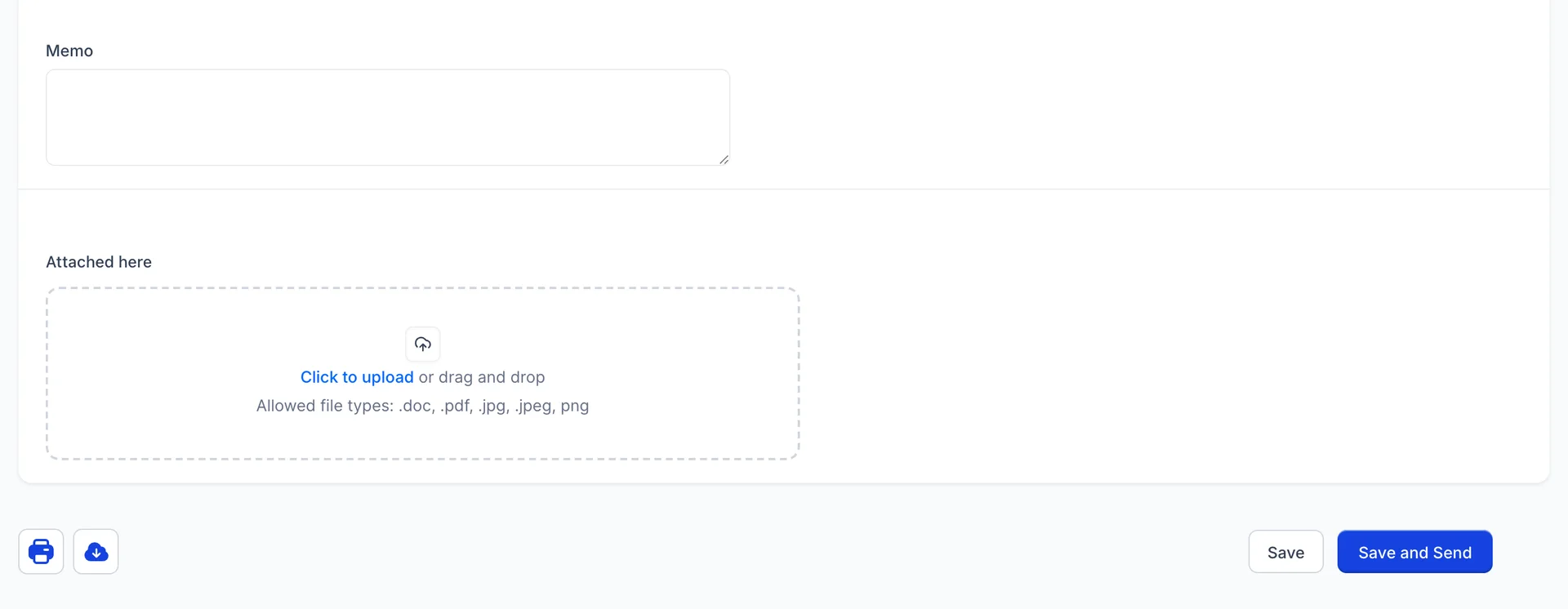
Memo is free text about this document. Anything true of the supplier in general belongs on their record instead, where it will be read again.
Attach the supplier's invoice. It takes .doc, .pdf, .jpg, .jpeg and .png, and several files at once. Three months from now, when somebody asks what the 5,698.00 was for, the attachment is the answer and the memo is a hint.
Save keeps the document and returns to the list. Save and Send keeps it and emails it to the address in the header, which is worth doing on a purchase order and rarely on a bill: the supplier wrote the bill, so they already have it.
On a saved bill that is not yet settled, Mark as paid appears beside the balance. It does not mark anything paid where it stands: it opens Pay Bills with this bill already ticked, so the payment is recorded against a bank account like any other.
Everything lands in Expenses
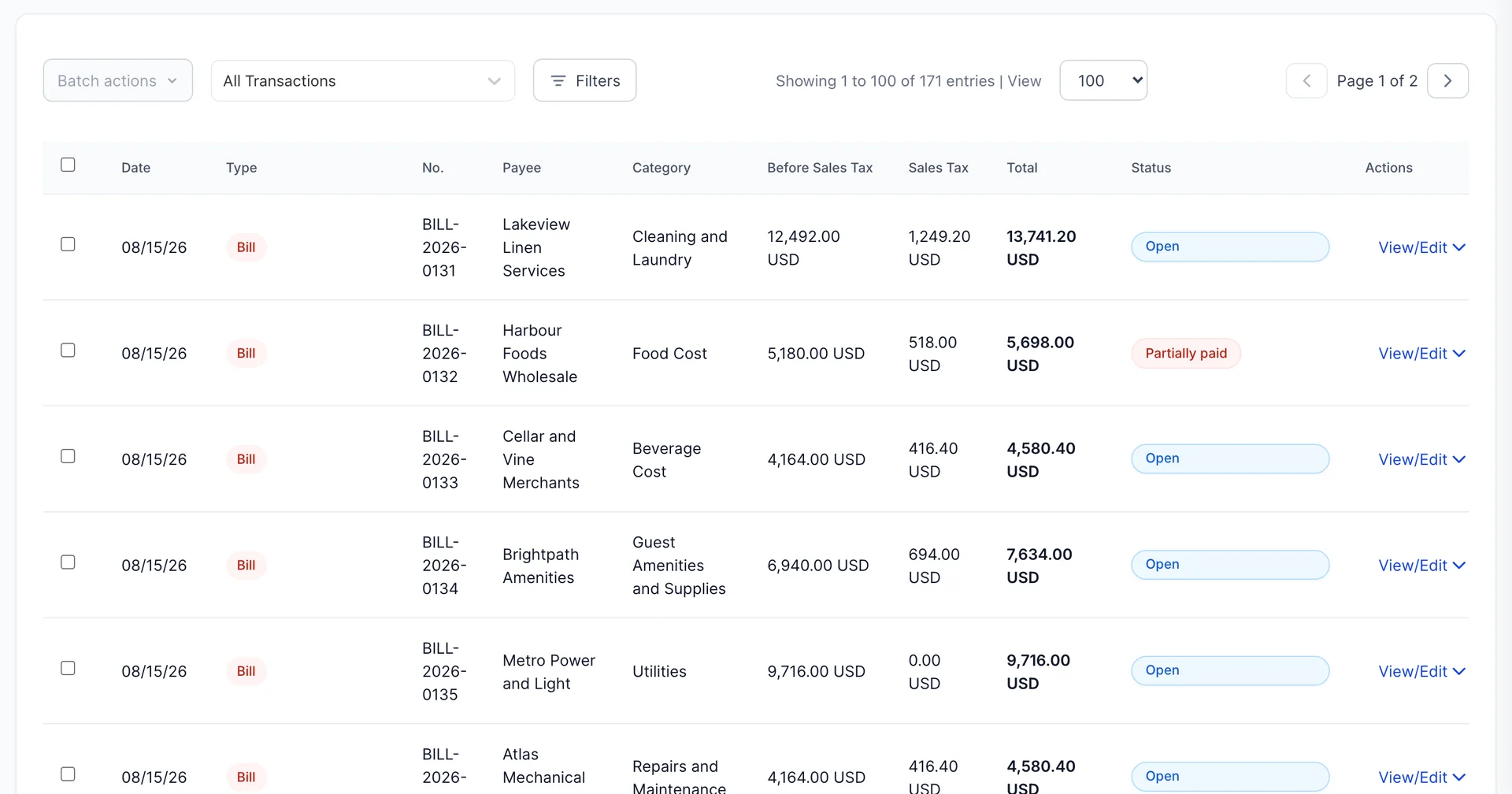
One list holds all seven document types, newest first. The All Transactions dropdown narrows it to one type, and Filters adds status, payee, category and a date range. Between them they answer most of the questions this screen gets asked: what have we spent on laundry this quarter, what is still open with one supplier, what went out on the cards last month.
Three columns are worth naming. Before Sales Tax and Sales Tax split the total, which is what makes the list add up against a supplier statement. Status means what it means everywhere else in the module: Open, Overdue, Partially paid, Paid, Applied for a credit that has been used, and Voided.
Each row's action menu opens, prints, duplicates, voids or deletes the document, and offers Copy to Bill on an order and Apply to Bill on a credit. Batch actions prints or deletes several at once, after you tick them.
Where to go next
A bill raised here is money owed until Pay Bills settles it, and that is also where a supplier credit gets used. Purchase orders is the form this article left out, and suppliers covers the records every one of these forms points at.