Prostay is not one product. It is a front desk system, a channel distribution tool, a direct booking site, a payment processor, a bookkeeping ledger, a spa diary and several more, sharing one sign in, one property record and one set of guests. Most questions that begin with "where is" turn out to be about which of these you are standing in.
The module switcher
The grid button at the top left of every screen opens the list. Whichever entry is in blue is the one you are in now, and clicking another one takes the whole application there.
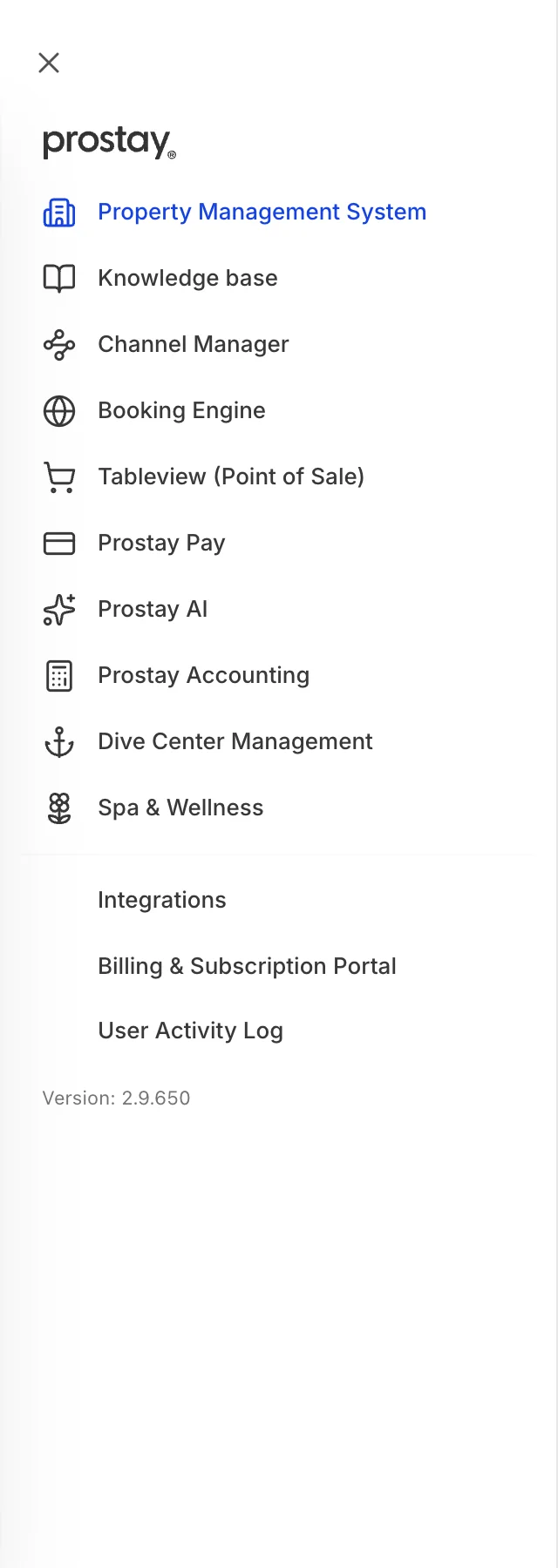
The entries above the line are the products. The three below it are about the account rather than the hotel: what Prostay is connected to, what you are paying for, and who did what.
What each one is for
| Module | What it is for | Start at |
|---|---|---|
| Property Management System | The front desk. Calendar, reservations, guests, rooms, housekeeping, folios, rates and every report about them. The largest part of Prostay by a wide margin. | The dashboard |
| Knowledge base | The shared inbox and the answers your team reuses in it. Guest email arrives here, not in the front desk. | The unified inbox |
| Channel Manager | Your listings on the sites guests book through, and the availability and rates you send them. | How the channel manager fits together |
| Booking Engine | Booking direct on your own website, and the pages a guest sees while doing it. | How guests find and book |
| Tableview (Point of Sale) | The restaurant and bar till, and the tables it sells from. | Not documented yet |
| Prostay Pay | Taking card payments, refunds, payment links and the money that lands in your bank. | How Prostay Pay fits together |
| Prostay AI | The assistant that drafts guest replies and answers from your knowledge base. | Being written |
| Prostay Accounting | The books: chart of accounts, suppliers, bills, expenses and the reports an accountant asks for. Deliberately separate from the front desk. | How Prostay Accounting fits together |
| Dive Center Management | Dive trips, courses and equipment for properties that run one. | Not documented yet |
| Spa & Wellness | Treatments, therapists, rooms and the spa diary, with charges that can reach a guest's folio. | How the spa fits into your hotel |
| Revenue Management | Deciding when to move the rates you have already set up, rather than holding a second set of them. | What Revenue Management does |
| Integrations | Connecting Prostay to software you already use, which today means an accounting package and a card payment account of your own. | What Prostay connects to |
| Billing & Subscription Portal | What you pay Prostay, the card it is charged to and your own invoices from us. | What you are paying Prostay for |
| User Activity Log | A record of who did what in this property, and when. | Not documented yet |
Why your list may be shorter
The list is per property and per subscription, so two people looking at Prostay side by side can see different things.
- Six entries depend on your subscription. The front desk, the shared inbox, the channel manager, the booking engine, the till and Prostay Pay only appear if your plan includes them. If one you expect is missing, that is a question for whoever manages your account rather than a fault.
- Revenue Management is not switched on for most properties. It is documented and it works, but the entry only appears where it has been enabled. Its articles are worth reading before you ask for it.
- Billing and Subscription Portal is hidden on demo accounts, since there is nothing to bill.
- The entries are not permissions. Seeing a module in this list says your property has it, not that your role lets you use every screen in it. Those are separate, and the screens themselves tell you which permission they want.
Four names that trip people up
| What you see | What it actually is |
|---|---|
| Knowledge base in the switcher | Opens the shared inbox, not a library of articles. The knowledge base is one part of it: the saved answers your team pastes into replies. This help centre files the whole thing under Communication. |
| Prostay Nexus | The name of that shared inbox where it appears in settings, for instance on a mailbox marked as used for Nexus. Same thing as the Communication module. |
| Integrations | Three different things share the word. The module in this list, which connects Prostay to outside software. A group of front desk settings screens whose web addresses happen to start with integrations, including taxes, folios and invoicing. And a permission group covering both. The address bar is not a reliable guide to which one you are in. |
| Ocean AI | The former name of Prostay AI. It survives in a few older labels and means the same product. |
Where the settings actually live
Most modules keep their own settings inside themselves: the booking engine's appearance is in the booking engine, the spa's treatments are in the spa. Two sets of settings are shared, and they are the ones people hunt for.
- The property itself. Currency, time zone, date format, address, photographs, taxes, policies and the rest sit in the front desk settings. Every other module reads them, which is why changing the currency is not a front desk decision. Where the settings live maps them.
- The email Prostay sends. The mailbox, the templates guests read and the delivery log are in System Settings, and they cover email sent by every module. How Prostay sends email is the map for that.
Where to go next
- Signing in and finding your way around, for the controls in the top bar and switching property.
- Setting up a new property, if the property is new and the setup checklist is still showing.
- The words Prostay uses, for folio, rate plan, allotment and the rest of the vocabulary.