A guest who has to convert your price in their head before they can judge it is a guest thinking about arithmetic rather than about your hotel. This screen lets them read your prices in their own money. It does not change what you charge, what you are paid, or what lands on the folio.
What a currency here does and does not do
Everything on your booking engine is priced in your property's own currency. A currency you activate here is a display currency: the engine takes your price, divides it by the rate you have set, and shows the result with that currency's code beside it. The reservation, the folio, the invoice and the payment are all still in your currency.
This is why the guest picker says the currency you pay in may differ. You are not quoting a guest a price in euros that you have undertaken to honour in euros. You are showing them roughly what your dollar price comes to, so they can decide. Their card is charged in your currency and their bank does the real conversion at the real rate on the day.
The screen
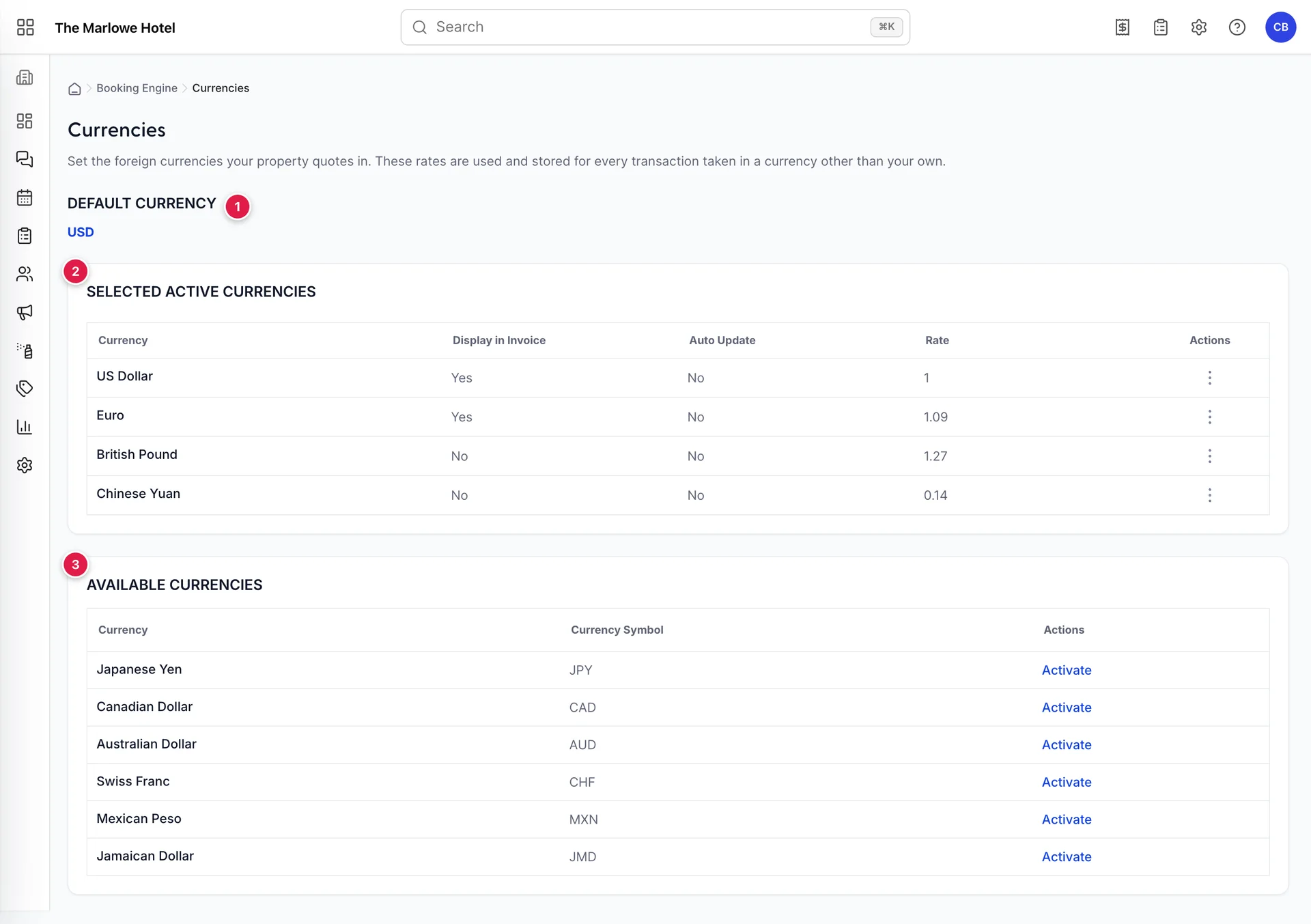
- Default Currency. Which of your active currencies the engine opens in before a guest touches anything.
- Selected Active Currencies. The currencies your engine may quote in, and what each is worth against yours.
- Available Currencies. Everything in the catalogue you have not switched on yet.
There is no Save button on this screen. Every action takes effect immediately: activating a currency, deactivating one, changing the default, and saving a rate in the side panel are all written when you do them.
The default currency
Click the code under Default Currency and you can change it to any currency in your active list. It is what the engine opens in, and it is what a guest sees if they never touch the currency chip in the header, which most of them will not.
In almost every case this should be your own currency. Setting it to a foreign one means every guest, including the local ones who are going to pay you in your own money, starts on a converted figure rounded through a rate you typed. The one case for changing it is a property whose direct traffic is overwhelmingly from a single foreign market, and even then the honest version is usually a separate landing page rather than a different default for everybody.
Selected Active Currencies
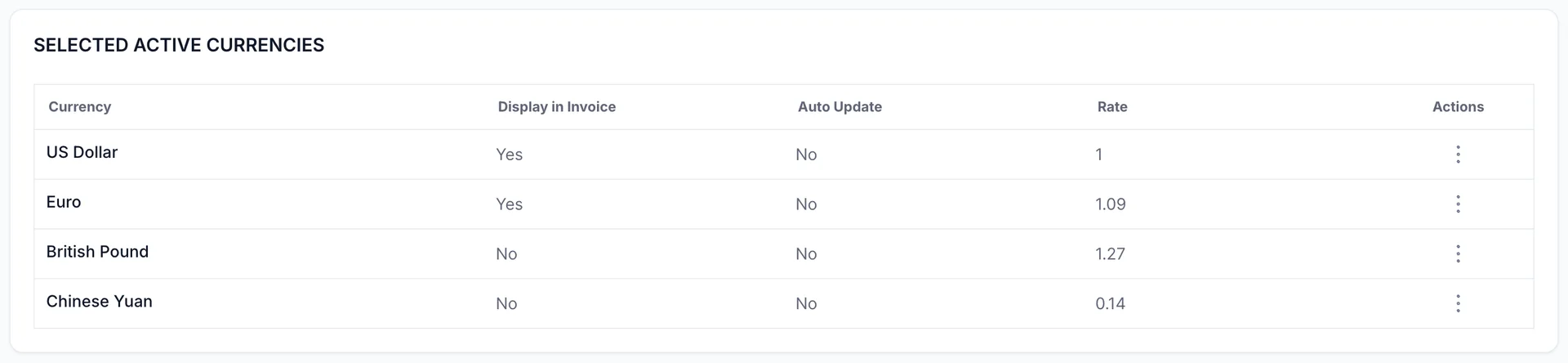
| Column | What it tells you |
|---|---|
| Currency | The currency's name. Your own currency is always in this list and always sits at a rate of 1. |
| Display in Invoice | Yes means an invoice in your currency also carries its total converted into this one, as a courtesy line. It does not change what the invoice demands. |
| Auto Update | Yes means this currency's rate is refreshed from a rate provider rather than typed by you. It can only say Yes if your property is set to automatic exchange rates in System Settings then General, and you have not pinned this particular currency by hand. |
| Rate | What one unit of that currency is worth in yours. For a dollar property, a euro rate of 1.09 means one euro is 1.09 dollars, so a $200 room shows as EUR 183. |
| Actions | A three-dot menu holding Edit and Delete. |
Delete does not delete anything. It deactivates the currency: it drops out of the guest picker and back into Available Currencies with its rate intact, and any reservation already quoted in it is untouched. A currency you have traded in cannot be removed without orphaning those records, which is why the action behaves the way it does rather than the way it is labelled.
Available Currencies
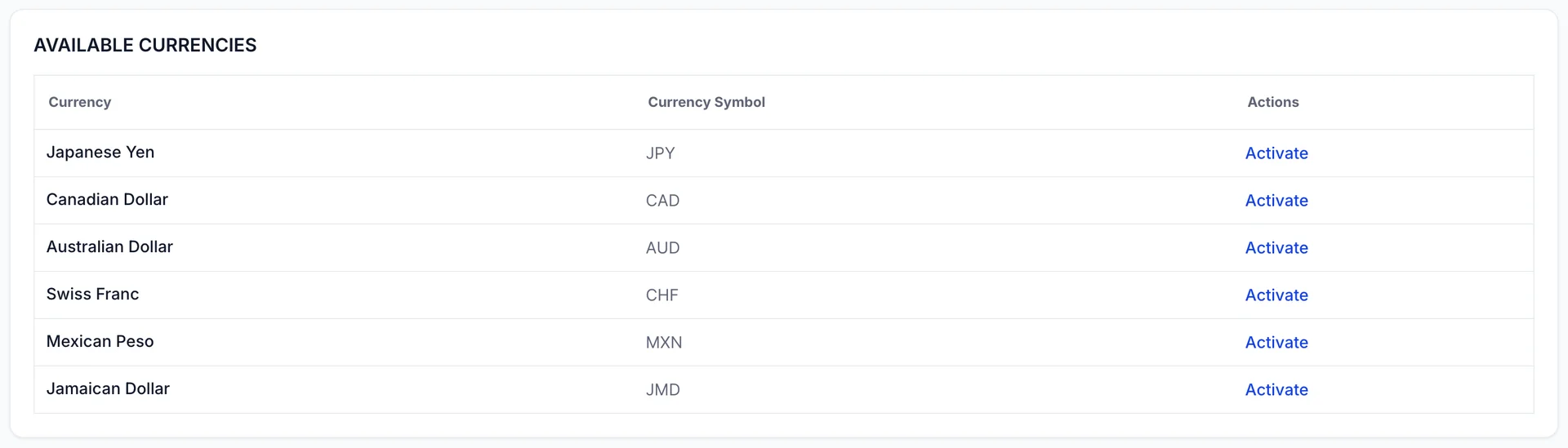
Activate moves a currency into the active list with a starting rate, and it appears in the guest picker straight away. The starting rate is a reasonable figure rather than a live one, so check it before you leave the screen. A currency activated and forgotten at whatever rate it arrived on is worse than one you never offered, because a guest will read the wrong number and believe it.
When this list is empty it means every currency in the catalogue is already active, which is a sign you have switched on more than you need rather than an achievement.
Setting a rate
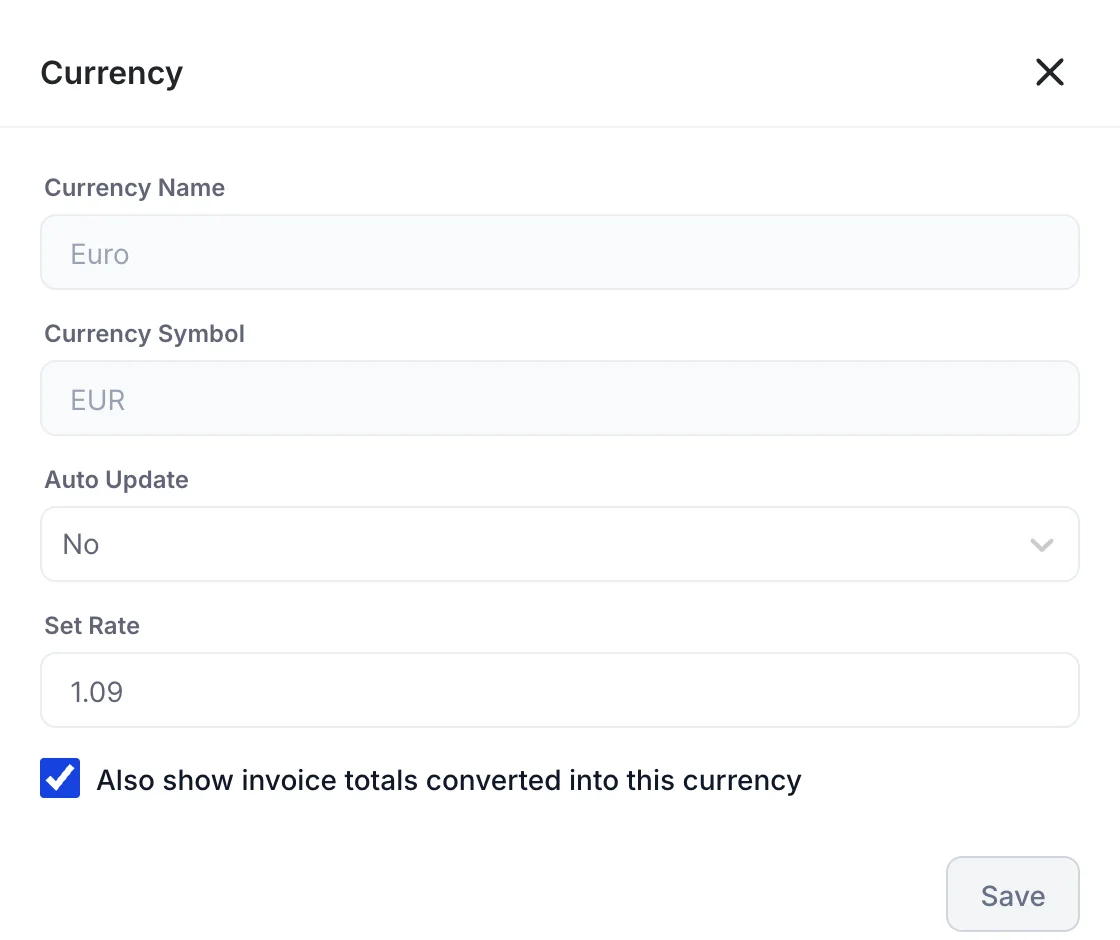
| Field | What it does |
|---|---|
| Currency Name and Currency Symbol | Read only. A currency's name and its three-letter code are its identity, taken from the catalogue, and nothing here is a naming decision. |
| Auto Update | Set to Yes, the rate follows your rate provider and Set Rate stops being yours to keep current. Set to No, the figure you type is pinned and stays there until you change it. This only has an effect if your property is on automatic exchange rates in System Settings then General; on a property that types its rates by hand, every currency is No. |
| Set Rate | What one unit of this currency is worth in yours. Type a decimal with a full stop. |
| Also show invoice totals converted into this currency | Adds a converted total to invoices as a second line. Useful for a corporate guest reclaiming an expense in their own currency, pointless for a currency nobody actually books in. |
Save stays greyed out until something has changed, so if it will not light up, nothing you typed was different from what was already there.
Padding the rate
There is a real commercial decision hiding in Set Rate. Your guest's bank converts at the interbank rate plus its own margin, and your card processor may add one too. If you set your rate at the exact interbank figure, every guest who books in a foreign currency ends up paying a little more than the engine quoted, and a proportion of them will write to you about it.
Properties that handle this well set the rate slightly against themselves: quote the euro a touch stronger than the market, so the guest's actual charge comes in at or under what they were shown. It costs you nothing, because you are still paid your own price in your own currency, and it removes an entire category of post-booking complaint. Setting it the other way, so the quote flatters your price, produces the opposite and is not worth the few extra clicks it buys.
What the guest sees
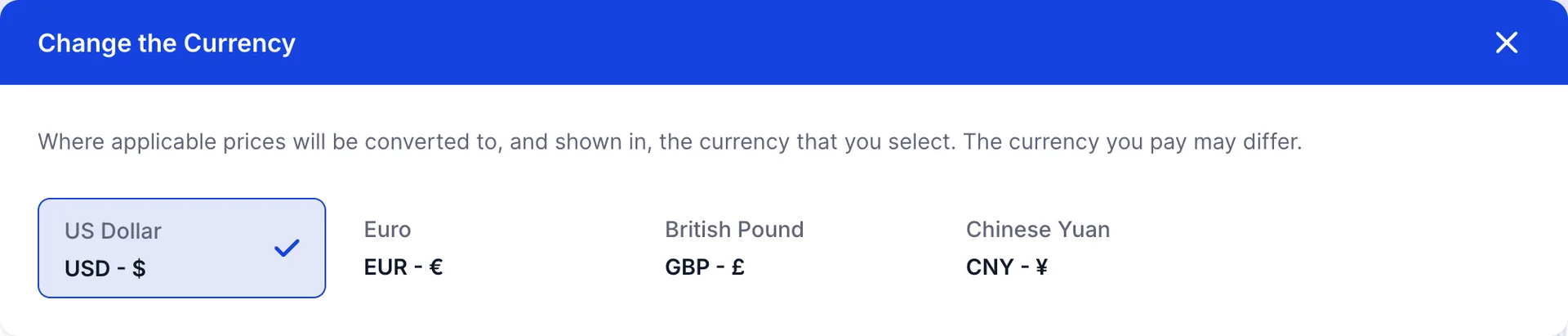
The guest opens this from the currency chip in the engine header. Their choice is remembered in their browser, so a returning guest lands back in the currency they last used. Every price on the engine changes at once: the room cards, the rate rows, the cart, the extras and the total on the payment step.
Which currencies to offer
Offer the currencies your actual guests hold. Look at where your direct bookings and your enquiries come from, not at a map: a property in California taking most of its direct business from Canada and Mexico has no use for the Swiss franc, however international the list looks with it in.
Three or four is usually the right number. Each one is a rate you are now responsible for keeping honest, and a long picker makes a guest hunt for their own currency in a list mostly composed of other people's. If a currency has not been chosen by anybody in six months, deactivate it: it costs you nothing to put back.
None of this changes the currency you are actually paid in. That is the property currency, set once on General system settings, and every figure in your reports and your books stays denominated in it.