Why these three lists exist
When somebody asks for a hot stone massage at four on Saturday, the spa has to answer a question with four parts: is a qualified therapist on shift and free, is a room of the right type free, is the equipment free, and if the room is a borrowed bedroom, is it empty. These screens are where the answers come from. Everything on them exists so that the appointment book can say no to a booking you would not have been able to honour, which is worth far more than a book that says yes to everything.
Therapists are deliberately not the same thing as Prostay users, and not the same thing as housekeeping attendants. Most therapists at a boutique property have no login at all, and the ones who do should not disappear from next month's roster because somebody deactivated their account.
The therapist list
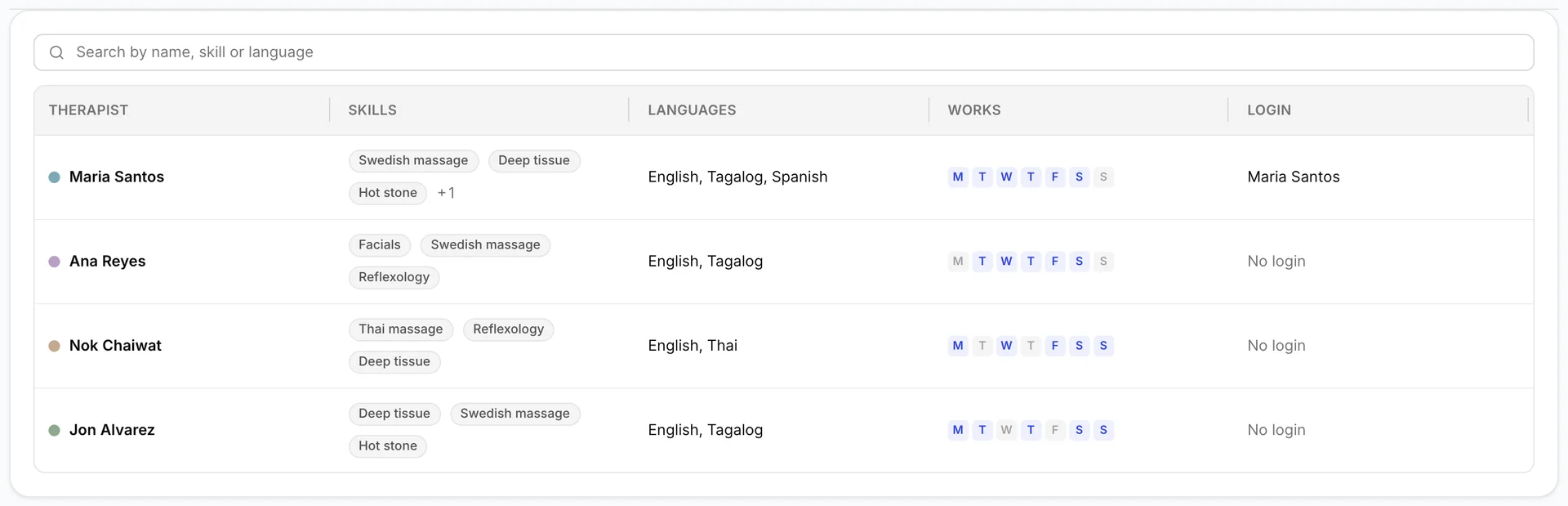
Each row is one person. The coloured dot is theirs on the appointment book, the skill badges show the first three qualifications they hold, and the strip of seven letters is their working week: a highlighted letter is a day they are rostered. The search box above matches names, skills and languages together, so typing "Thai" finds both the therapist who speaks it and the one qualified in it.
The Login column says whether that person can sign in to Prostay. Most will say No login, which is normal and costs nothing: the appointment book works perfectly well for a therapist who never touches a screen, because the receptionist drives it.
A therapist record
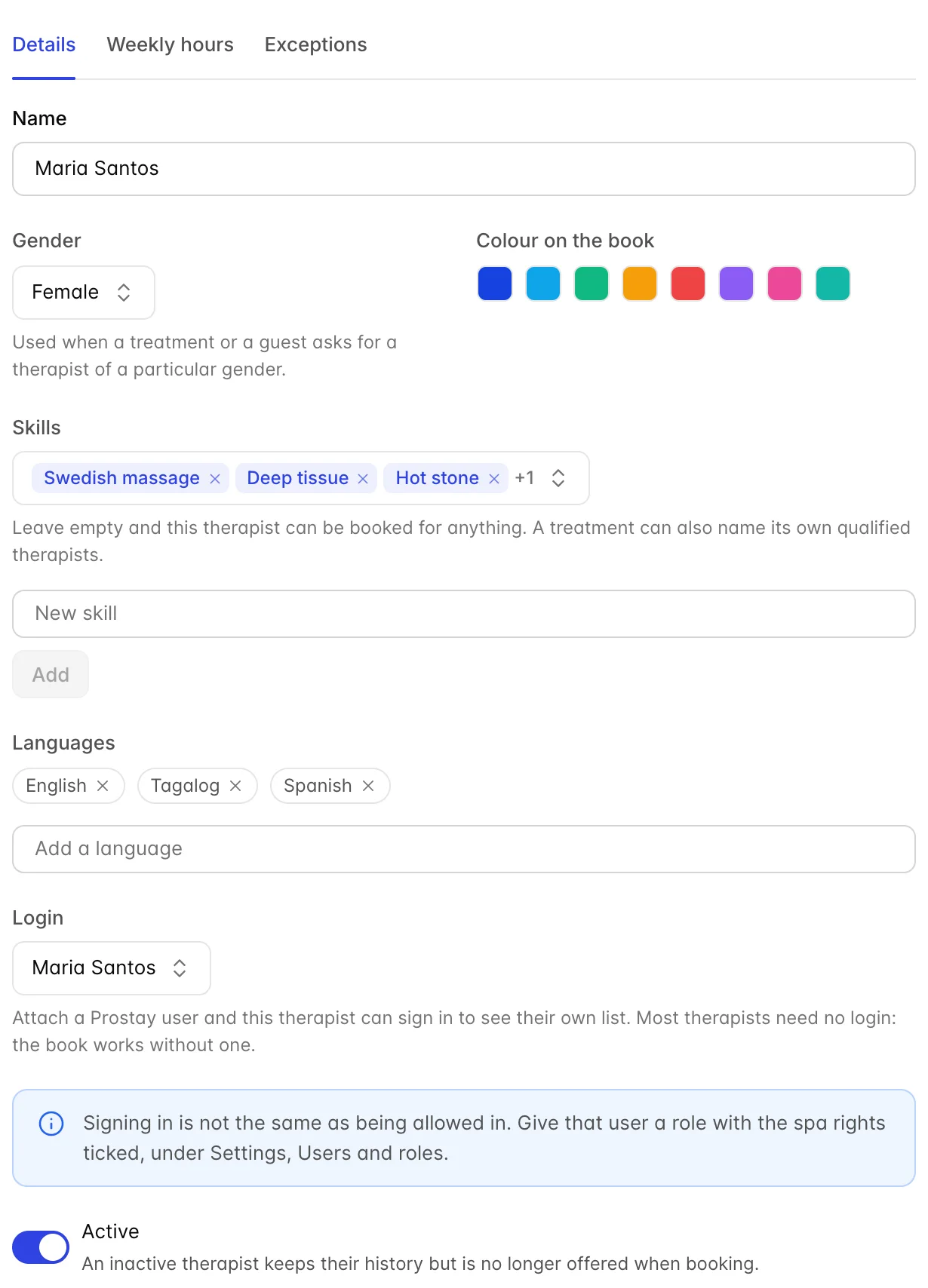
Name is what appears at the top of their column on the appointment book, so use the name a guest would recognise rather than a payroll one.
Gender is used only for matching. A treatment can be restricted to female or male therapists, and that restriction reads this field. Leave it as Not specified and this person is never offered for a treatment that names a gender, which is a quiet way to lose bookings for them. There is no way for a guest to request a gender on a treatment that does not already restrict it; that conversation happens at the desk and is handled by picking the therapist by hand.
Colour on the book is theirs on the calendar. It only shows in views that group by therapist, because a tile takes its colour from the treatment.
Active off keeps all their history and all their past appointments but takes them out of the roster and out of every new booking. Use it for a leaver. Removing a therapist outright is only possible while they have no appointments at all; after that the product refuses, and it is right to, because deleting them would orphan every treatment they ever gave.
Skills and languages
Skills are the qualifications the availability engine matches against. A treatment that requires the Hot stone skill will only ever be offered a therapist who holds it. There is no separate screen for skills: type a new one into the box under the field and press Add, and it is created and attached in one action.
Leaving skills empty makes that therapist bookable for anything at all, which is right for a new starter you want on the general roster and wrong for anyone whose qualifications matter. Two therapists both marked as able to do everything will produce a book that never refuses a booking and a spa that occasionally cannot deliver one.
Languages are recorded per therapist and are not used by the availability engine at all. They are there so that whoever is taking a booking can search for a therapist who speaks the guest's language, which at a resort is a real and frequent request. Type a language and press Enter to add it.
Giving a therapist a login
Login attaches an existing Prostay user account to this therapist. Search by name or email; the picker shows each user's role beside them so you do not attach the wrong Maria. Once attached, that person signs in as themselves and the spa knows which therapist they are, which is what makes their own list of appointments possible.
A user can only be attached to one therapist. Try to attach one who is already spoken for and the save is refused with the name of the therapist who has them, which is worth knowing because the alternative would be two therapists sharing one identity and a Today list that shows both people's work to each of them.
The weekly roster
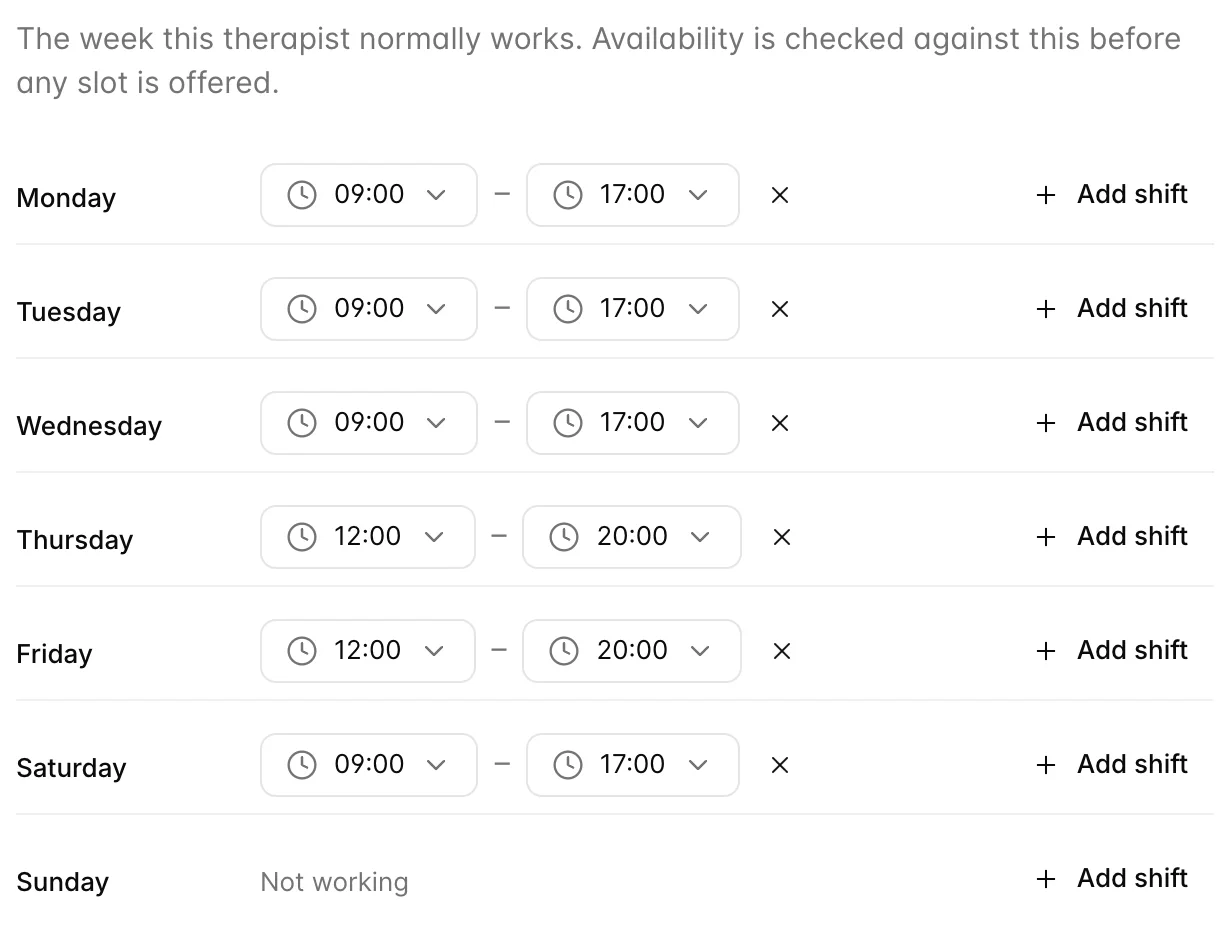
The Weekly hours tab is the pattern this person works in an ordinary week. Every slot the booking wizard offers is checked against it first, so a therapist with no hours at all can never be booked, however qualified they are and however empty the spa is.
Add shift puts a 09:00 to 17:00 range on that day, and the two time pickers adjust it. Changes save as you make them. Adding a second range to the same day is how you model a split shift: 09:00 to 13:00 and 16:00 to 20:00 leaves the middle of the day genuinely unbookable rather than merely discouraged.
These hours sit inside the spa's own opening hours, and both are checked. A therapist rostered until 20:00 in a spa that closes at 19:00 finishes at 19:00 as far as the book is concerned. It is the treatment's whole room window that has to fit, so a 90 minute massage with 15 minutes of turnaround cannot start at 18:00 in a spa closing at 19:00.
Holiday, sickness and extra shifts
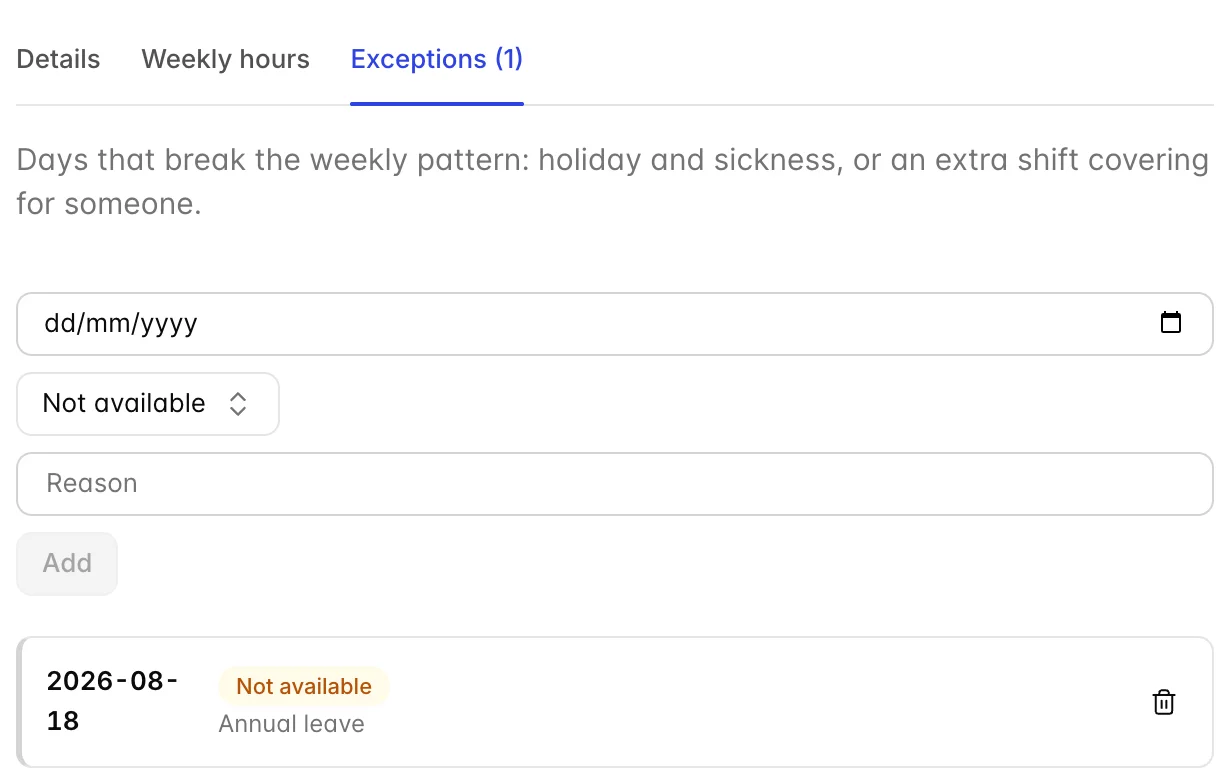
A weekly pattern is true most weeks. The Exceptions tab is for the days it is not, and it works in both directions.
- Not available takes the person off for that date whatever the pattern says. Holiday, sickness, training.
- Extra shift puts them on for a date the pattern has them off, which is how you cover for somebody without rewriting two rosters.
The reason is free text and is for your team rather than the software, but fill it in: "Annual leave" on a date in three weeks answers the question a manager is about to ask. The tab label carries the count, so a therapist with exceptions is visible from the list without opening anything.
There is one date per entry, so a fortnight's holiday is fourteen rows. That is tedious and it is honest: each day is separately overridable, and the person coming back early on the Thursday only needs one row removing.
Treatment rooms
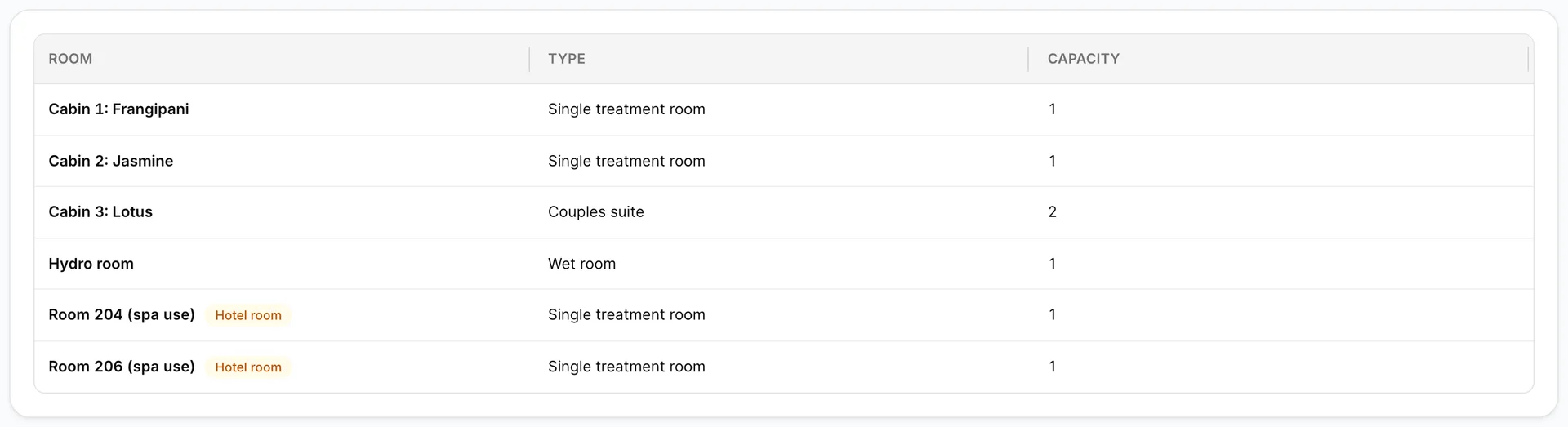
A treatment room is any place a treatment happens: a cabin, the hammam, a studio, a bedroom the spa has borrowed. Each has a name, a type and a capacity.
Capacity is how many guests the room takes at once. One for a cabin, two for a couples suite, twelve for a studio running classes. It is checked against the treatment's Guests at once, so a class for eight will not be placed in a room that holds four.
Name rooms the way your team says them out loud. "Cabin 3: Lotus" reads well on the appointment book and in a handover; "SR-3" does not, and somebody will eventually walk a guest to the wrong door.
Borrowing a bedroom
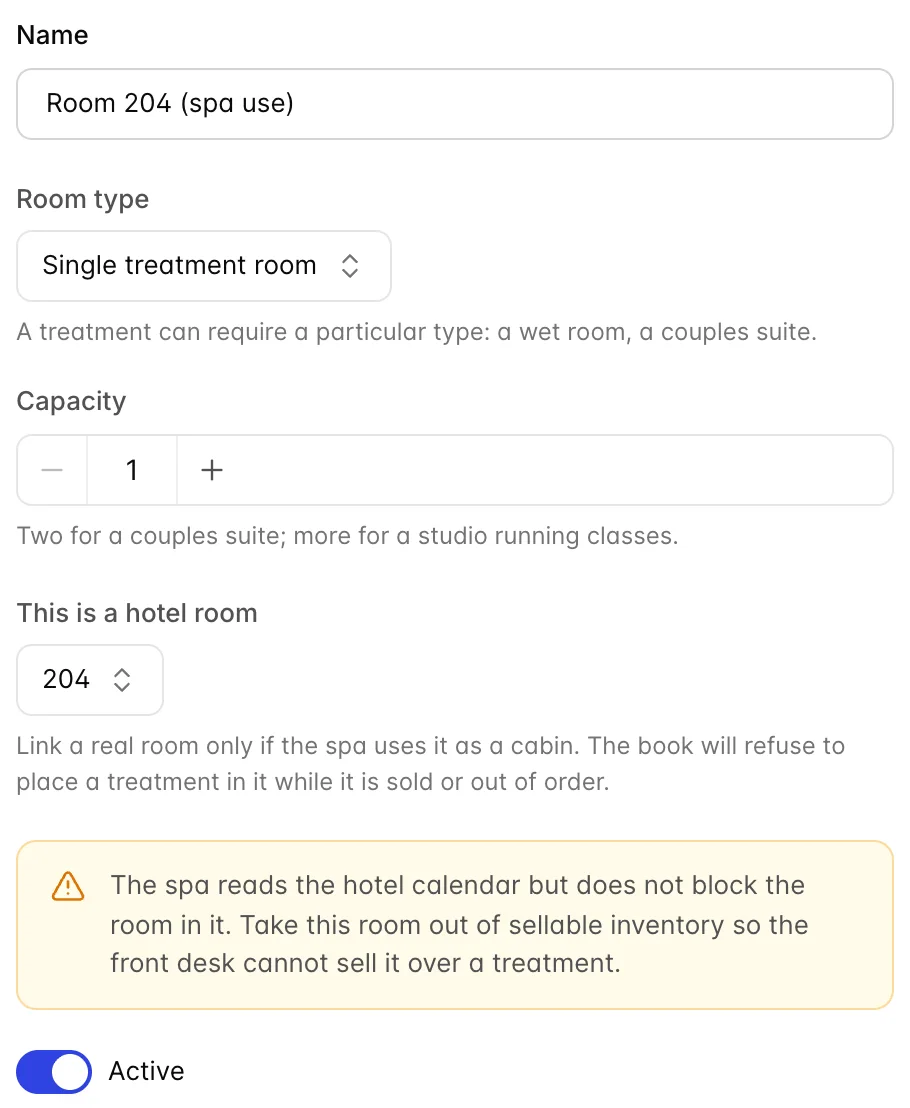
This is a hotel room links a treatment room to a real bedroom in your inventory. Small properties do this all the time: two cabins are not enough on a wet Tuesday, so 204 and 206 become treatment rooms when they are empty.
Once linked, the spa checks the hotel calendar before placing anything in that room. If 204 is sold, blocked or out of order that night, the room is not offered and the slot is refused. The rest of the availability logic is unchanged: it still has to be a room of the right type and it still has to be free of other treatments.
Room types
A room type is a category a treatment can require: single treatment room, couples suite, wet room. It exists so a treatment can say "any wet room" rather than naming one, which lets the book put a hydrotherapy bath wherever there is space instead of queueing everybody for the same cabin.
Keep the list short. Types are only useful when a treatment genuinely cannot happen in the other kinds of room. A type per cabin is the same as no types at all, with more clicking.
A type in use cannot be deleted. The product refuses and says something is using it, which is either a room or a treatment that requires it.
Equipment
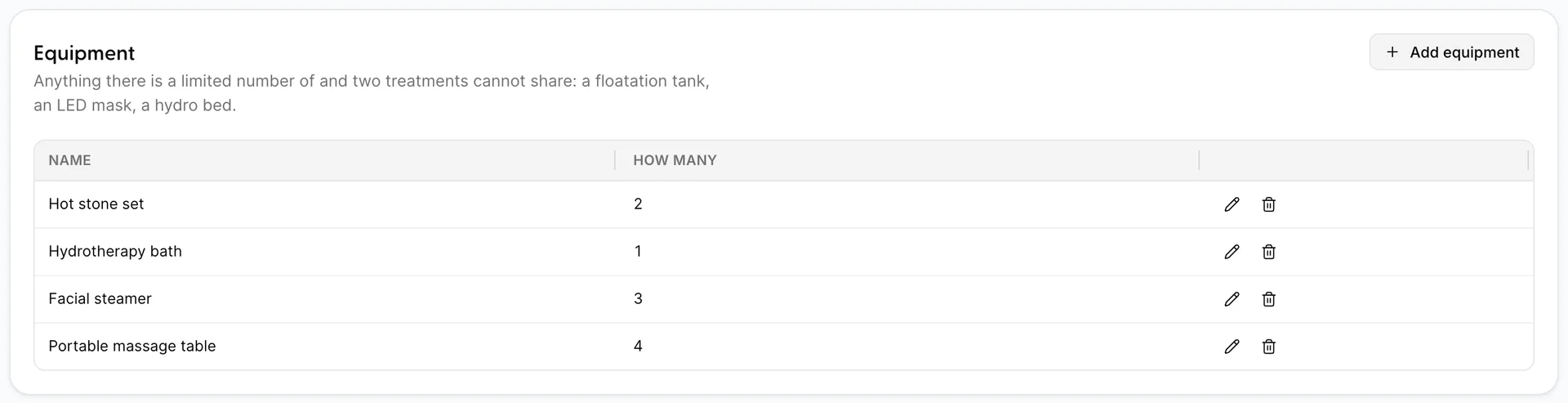
Equipment is anything there is a limited number of that two treatments cannot share: a hot stone set, a facial steamer, a portable massage table, a floatation tank.
How many is what makes this list worth keeping. With two hot stone sets, the spa will happily run two hot stone treatments at the same time in different cabins and will refuse the third. Get the count wrong upwards and you have promised a guest something you have to apologise for; get it wrong downwards and you are turning away money.
Equipment is held for the treatment itself rather than for the room window, so a stone set is free again the moment the massage ends, while the cabin is still being turned around. If a piece of kit genuinely needs time between guests, the honest way to model it today is to add the minutes to the treatment length rather than to the turnaround.
Portable equipment is what makes off-site and in-room treatments real. A massage in a guest's room needs no treatment room, but it does need one of the four portable tables, and the spa counts them.
What the availability check actually does
Putting it together, a slot is offered only when all of the following are true at once, for the treatment's whole room window rather than just its advertised length.
- The spa is open, and the date is not a closed date.
- A therapist is rostered, not excepted off, and has no other appointment overlapping.
- That therapist holds the required skill, or is on the treatment's named list.
- Their gender matches, if the treatment restricts it.
- A room of the required type is free and big enough for the treatment's group size, unless the treatment is happening in the guest's room or off-site.
- If that room is a borrowed bedroom, the bedroom is empty in the PMS that night.
- Every piece of required equipment has one unit spare for the length of the treatment.
When a booking finds nothing, that list is the order to check in. In practice the answer is almost always the second or third line: nobody with the skill is on shift.
With the menu and the resources in place, the spa is ready to sell something, which is taking a booking.