Where bookings start
New booking sits on the appointment book, on the Today list and on the appointments list, and it opens the same drawer from all three. Clicking an empty patch of the appointment book opens it too, with the therapist and the time already filled in, which is the fastest route when the guest is in front of you and you can see the gap.
However you open it, the drawer asks four questions in a fixed order, because each answer narrows the next. The guest decides what they are entitled to and who pays by default; the treatment decides how long it takes and therefore which times are free; the time decides which therapist and room are used.
Step one: who it is for
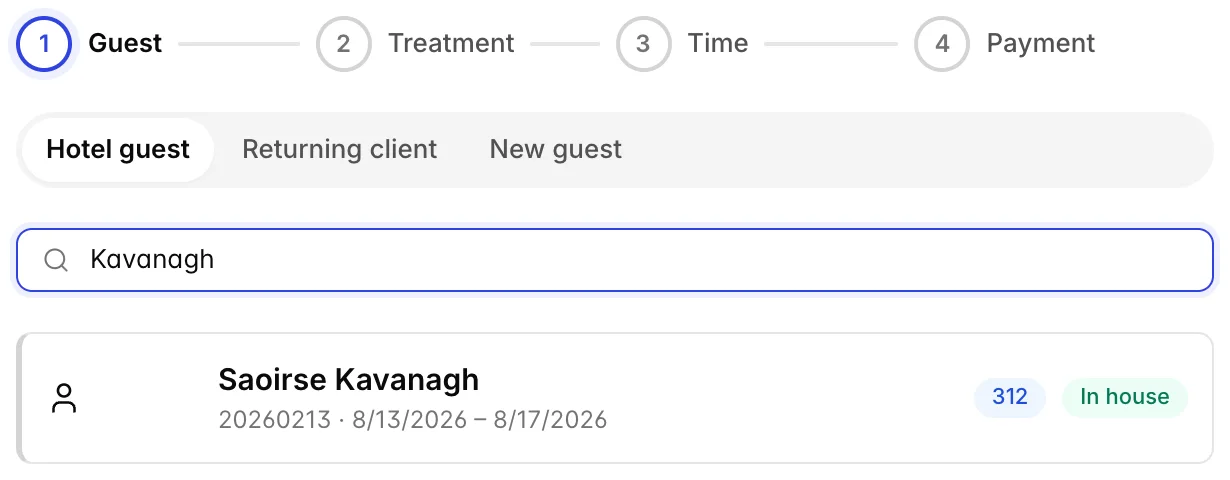
Three ways in, and they answer three different questions.
- Hotel guest searches current reservations by name, room number or confirmation number. This is the one to use whenever the guest is staying with you, because it attaches the reservation to the booking, which is what makes charging to the room possible later.
- Returning client searches the property's guest profiles by name, email or phone. Use it for a local member or a repeat day visitor who is not staying tonight.
- New guest creates a profile from a name, and optionally an email and phone. It is a real guest profile, the same kind the front desk creates, so the same person booking a room in November will be recognised.
Each hotel result shows the room number and the guest's state: In house, Arriving or Departed. That last one matters, because a departed guest has no folio to charge to and the payment step will say so.
When a reservation has more than one name on it, the extra names appear as chips under the row. Pick the person actually having the treatment rather than the lead guest: the charge follows the name you choose, and a facial billed to the wrong half of a couple is an awkward conversation at checkout.
Step two: what, and where
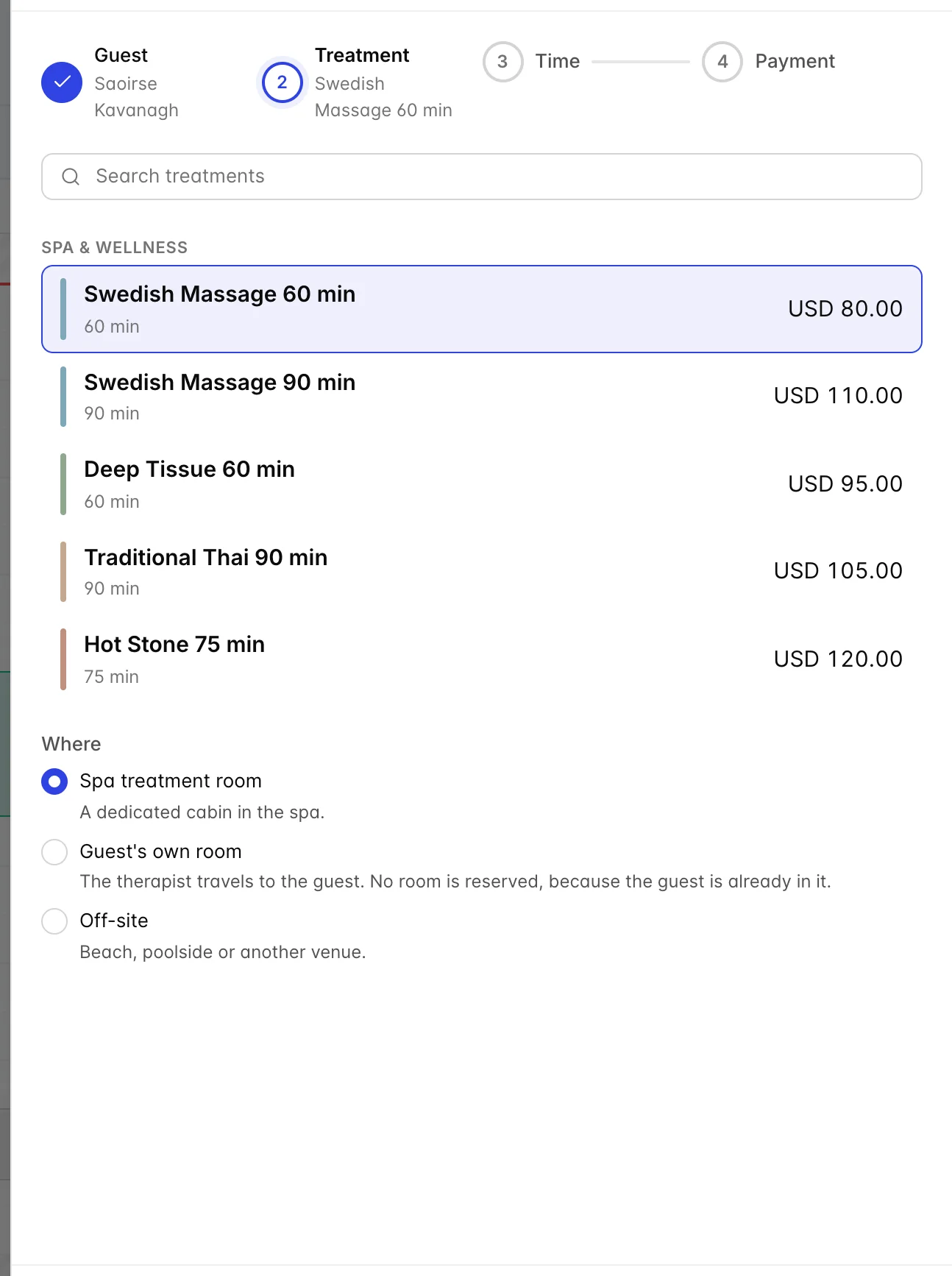
Treatments are grouped by catalogue category, with the length and the price on each one, and the search box matches both name and category. Only treatments that are set up and active appear here, which is covered in building your treatment menu.
Where appears once a treatment is chosen, and only offers the locations that treatment allows. Choosing the guest's own room or an off-site location asks for a note, which is what the therapist will read: "Beach cabana 4" or "guest asked for the balcony". Neither of those two locations holds a treatment room, so they are often the only thing free on a busy afternoon.
If the treatment takes more than one guest, a Guests stepper appears. A couples treatment booked for two is one appointment using one room and one slot, not two bookings.
This is also where membership benefits surface. A green banner means the treatment is already paid for, either from a prepaid course or from a plan's monthly allowance; a blue one means a percentage discount applies. A warning banner means the plan's benefits are blacked out at the time selected, which is worth reading out to the guest before they hear it as a surprise at settlement.
Step three: when
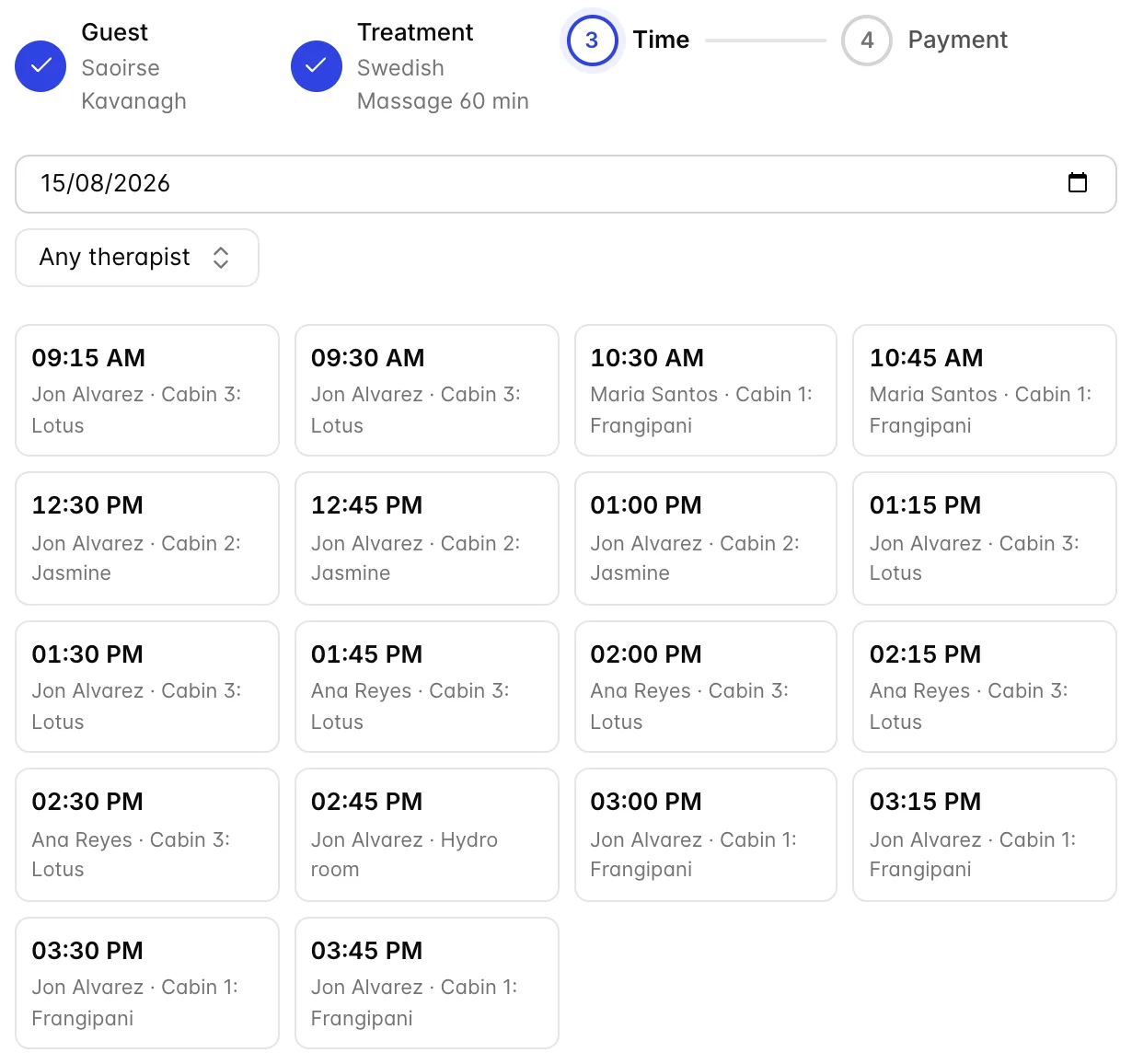
Every time shown here is a real, complete answer: a therapist who is qualified, rostered and free, a room of the right type that is free for the setup and turnaround as well as the treatment, and any equipment the treatment needs. Nothing is offered that cannot be delivered. The times come from the server rather than the browser, so two receptionists clicking the same 3 o'clock cannot both succeed.
The therapist dropdown filters to one person, which is how you honour "the same lady as last time". Leaving it on Any therapist offers more times and picks whoever is free.
Nothing free that day is not a fault. It means the spa is closed, everyone qualified is booked, or nobody qualified is on shift. Change the date first, then widen the therapist, then look at the treatment's location options: a massage that can also happen in the guest's room will often have times when the cabins do not.
Step four: who pays
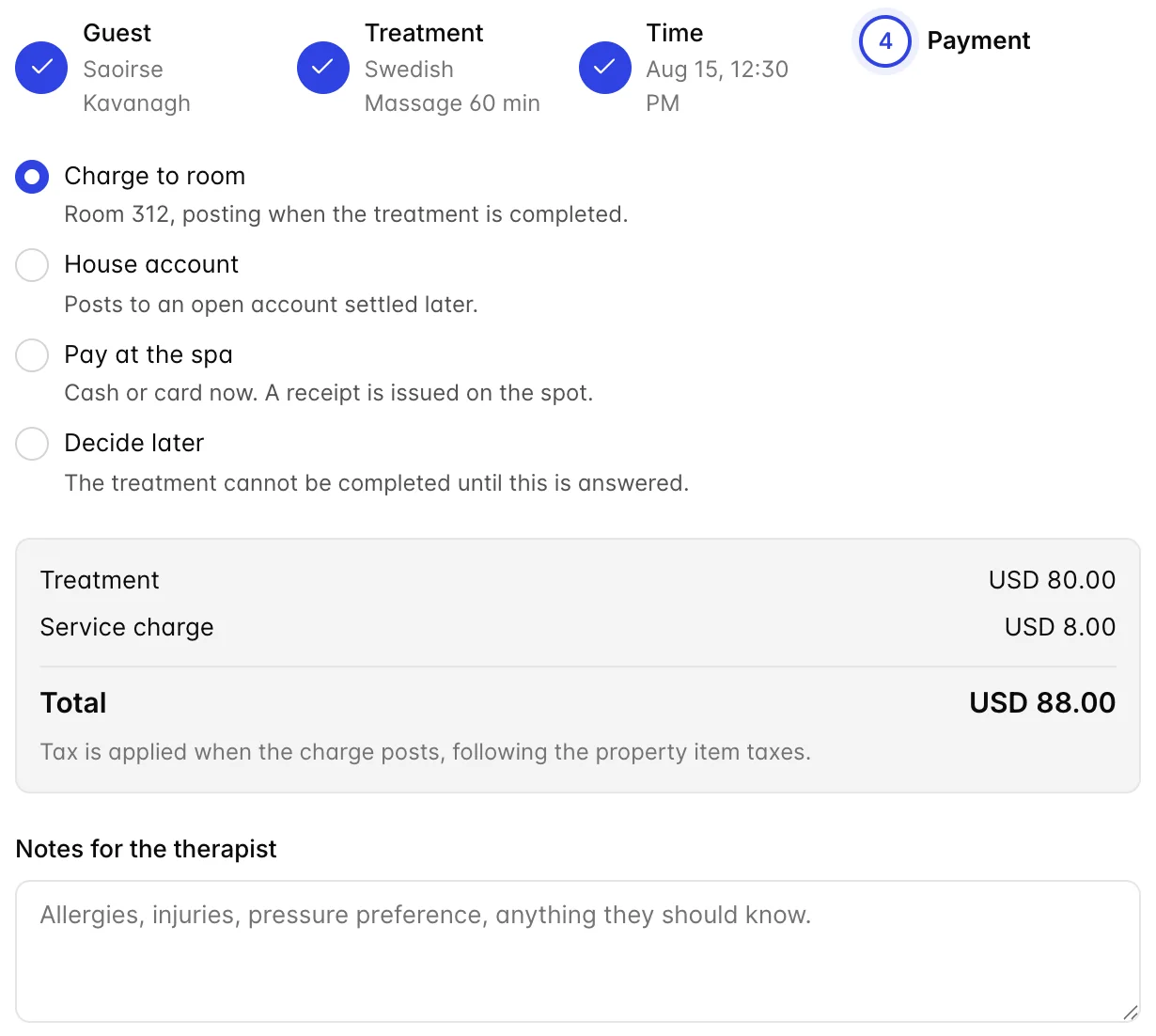
The answer is already chosen for you. An in-house or arriving guest with a reservation defaults to their room; anybody else defaults to paying at the spa; a guest whose treatment is already covered by a course or a plan is locked to Already paid and cannot be changed, because there is nothing to bill. The control is there to override, not to make you answer a question that has an obvious answer 90 per cent of the time.
| Option | What it means |
|---|---|
| Charge to room | Posts to the guest's folio when the treatment is completed, not now. Only offered when the booking has a reservation attached. |
| House account | Posts to an open account settled later: a corporate wellness client, a wedding party, an agency. You can open the account here without leaving the booking. |
| Pay at the spa | Cash or card at the desk when the treatment is done. A receipt is issued and the sale is invoiced, so nothing is left open. |
| Already paid | Sold with the room rate, or redeemed from a course or plan allowance. Nothing will post. |
| Decide later | The booking is fine but cannot be completed until somebody answers. Useful when the guest is on the phone and the company is paying, probably. |
The summary underneath is the whole price: the treatment, any membership discount, and the service charge if one applies. Tax is not in it, because tax is applied when the charge actually posts and follows the item's own tax treatment. The line under the total says exactly that, and it is worth reading to a guest who asks whether the number is final.
Notes for the therapist is the last field, and it is the most under-used one in the module. Allergies, injuries, pressure preference, a bad shoulder: it travels with the appointment to the Today list, where the therapist actually reads it.
Deposits
If the property asks outside guests for a deposit, and this booking is one an outside guest is paying at the spa, a deposit dialog opens the moment the booking is confirmed. That is deliberate: the only moment the guest is reliably still on the phone is the moment you tell them they are booked.
The amount is filled in from the percentage in your settings and can be typed over if you have agreed something else. Card and terminal payments go through the same capture screen the front desk uses, so they land in the same drawer as everything else. Taking a deposit is not the same as posting a charge: it is money held against the appointment, and it comes off the bill when the treatment is settled.
Not now leaves a real booking with the deposit outstanding, so nothing is lost by skipping it and taking the money when they arrive. The whole of that story, from the deposit to the receipt, is in who pays for a treatment.
When a booking will not go through
Four things stop the drawer, and each has a different fix.
- Next is greyed out. The current step is unanswered. On the last step this usually means House account is chosen and no account has been picked.
- A warning banner about a restriction. The guest's plan does not allow this booking, most often because they have used their allowance or the benefit is blacked out at that time. Change the time, or take the booking as a normal paid one.
- "That time was taken while you were booking." Somebody else took the slot in the seconds you spent on the payment step. You are put back on the times with everything else preserved; pick another and carry on.
- The guest has checked out. A departed guest cannot be charged to a room. Take payment at the spa or put it on a house account. The banner appears as soon as you reach the payment step.
Nothing you have typed is thrown away when a save fails, including the therapist's notes. The slowest part of taking a booking is the conversation with the guest, and making somebody repeat that is worse than any error message.
What a booking is and is not
A booking holds resources. It does not move money. No charge exists on anybody's folio until the treatment is marked completed, which is why a cancelled booking normally costs nothing and why the Today list, not the appointment book, is where the money actually happens.
The one exception is the deposit, which is a real payment taken at the time of booking and deducted later.
From here, the booking lives on the appointment book and the Today list. Working through the day, moving appointments and dealing with no-shows is in running the day.