Everything on this screen saves the moment you change it. There is no Save button and no confirmation: a spinner appears next to the section title while the change is in flight, and if it fails the field snaps back to its old value and a red banner explains why. Nothing here needs two fields changed together to stay valid, which is why it works that way.
Work down the page in order. The sections are arranged in the order somebody opening a spa would answer the questions: are we open, when, where does the money go, what do we add on top, and what happens when a guest does not turn up.
Turning the spa on
Enable Spa & Wellness is the master switch. With it off, every spa page shows “The spa module is switched off” and no appointment can be taken. Existing appointments, members and charges are untouched and reappear when you switch it back on.
Settings is the one spa page that stays reachable while the module is off, because otherwise there would be no way back. Anyone whose role can edit Spa settings sees an Open spa settings button on the empty state; anyone without them just sees the message.
Opening hours and closed dates
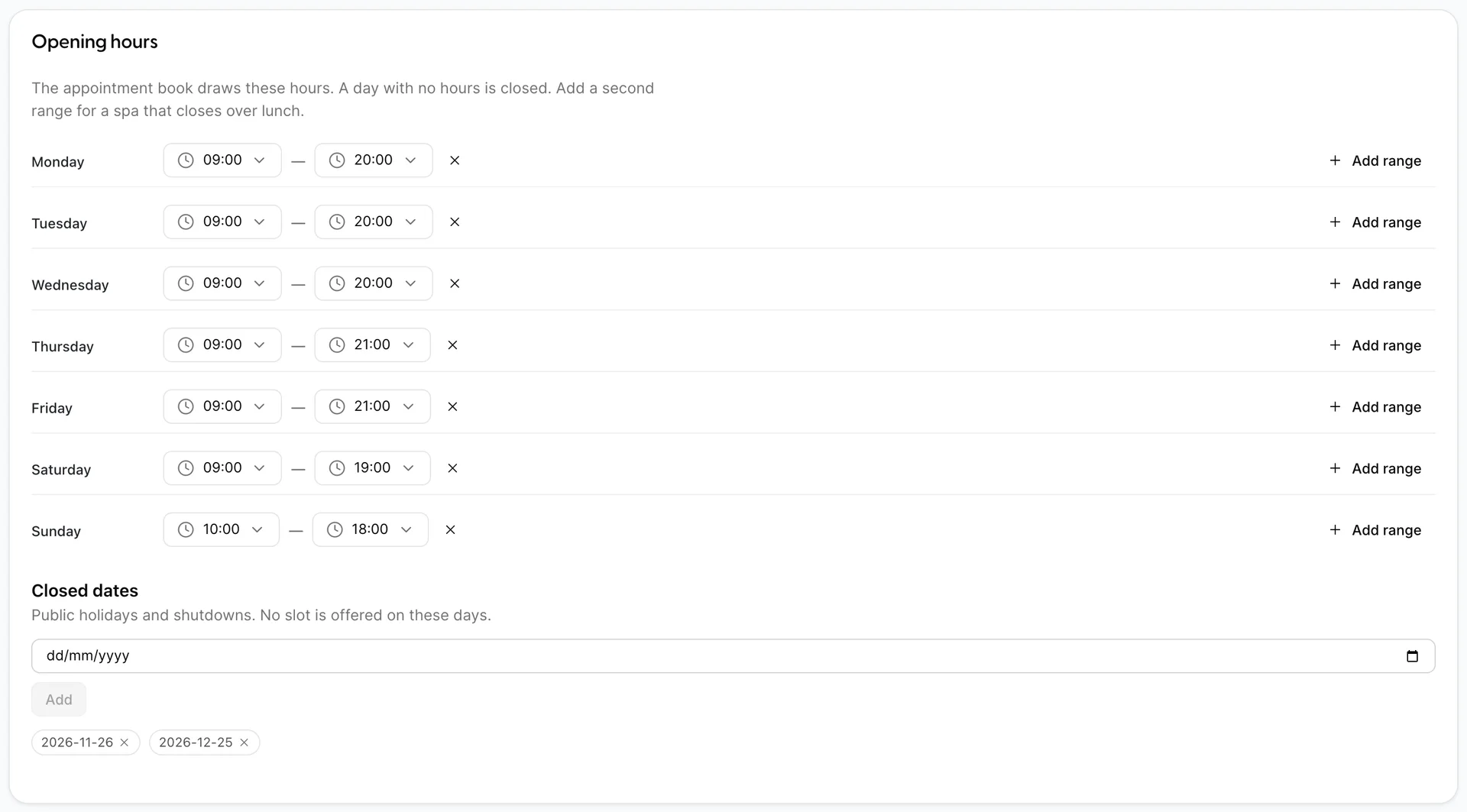
These hours draw the appointment book and bound every slot the booking wizard offers. A treatment cannot start early enough that its setup falls before opening, and cannot run so late that its turnaround falls after closing, so the last bookable start is earlier than the closing time by the length of the treatment plus its turnaround.
- Add range gives a day a second window. Use it for a spa that closes over lunch: two ranges, 09:00 to 13:00 and 14:00 to 19:00, leave an hour that cannot be booked.
- The × beside a range removes it. Remove every range from a day and the day reads Closed and offers nothing.
- Times move in fifteen-minute steps and are shown on a 24-hour clock here regardless of how the rest of your property displays time.
Closed dates are single days taken out: public holidays, a deep clean, a refit. Pick a date, press Add, and it appears as a chip. No slot is offered on that day even though the weekly pattern says you are open. Remove one with the × on the chip.
Setup, turnaround and slot granularity

This is the section that decides whether a busy Saturday finishes on time, and it is the one most often left at zero.
| Default setup (minutes) | Time the room needs before the treatment starts: laying out linen, heating stones, filling a bath. The room is blocked for it. The therapist is not, which means the same therapist can still be finishing somebody else next door. 0 to 120, in steps of 5. |
| Default turnaround (minutes) | Time the room needs after the treatment ends: stripping, cleaning, airing. The therapist is released the moment the treatment ends; the room is not. Set this to zero and the book will happily sell the same cabin back to back all afternoon, and the second guest will be waiting in reception while somebody changes the sheets. |
| Slot granularity | The interval start times are offered on: 5, 10, 15, 20 or 30 minutes. At 15, a 09:00 slot is followed by 09:15. Finer granularity finds more places to fit a treatment and produces a longer list to read; coarser granularity keeps the day tidy and turns away bookings that would have fitted. |
Both figures are defaults. Any treatment can override either of them on its own profile, which is where a hydrotherapy bath gets its twenty minutes of filling and draining without slowing down every massage.
Where spa charges go
Two settings, both about the moment money leaves the spa and becomes an entry on somebody's bill.
| Folio | Which folio a treatment charged to a room posts to. Leave it on Use the default folio unless your property splits bills by department. Choosing a folio here does not create anything; it selects one of the folio configurations you already have. |
| Post the charge when a treatment is completed | On is the normal setting: marking a treatment complete posts the charge in the same action. Switch it off and completing a treatment posts nothing, leaving somebody to post each charge by hand from the appointment. That is a supervisor-review workflow, not a safety net, and every charge left unposted is revenue you have delivered and not billed. |
Service charge and gratuity
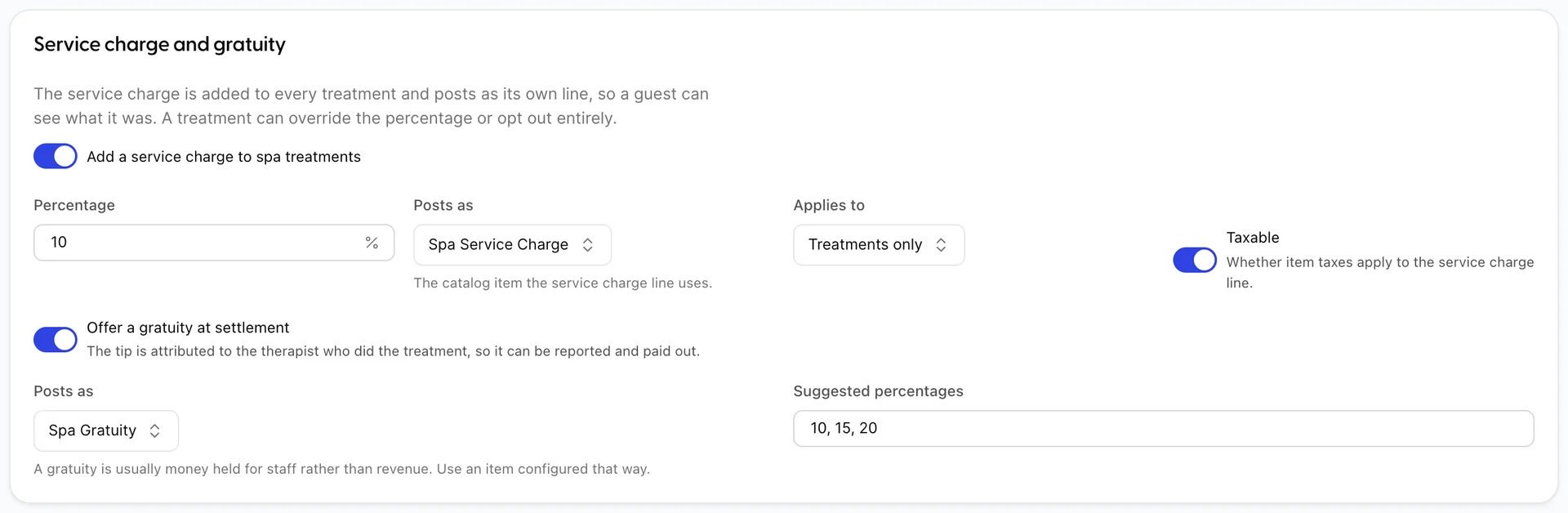
A service charge is money you add to every treatment and keep as revenue. A gratuity is money a guest chooses to add and that you hold for the therapist. They are configured together because they look alike on a bill and are completely different things in your accounts.
| Percentage | What is added to the treatment price. It is calculated on the price after any membership discount, not before, so a member's ten per cent off reduces the service charge too. |
| Posts as | The catalogue item the service charge line uses. This is what appears on the guest's folio and what your revenue reports group by, so use a dedicated item rather than a treatment. |
| Applies to | Treatments only or Treatments and retail. Retail means goods sold over the spa desk, which is not something the product can sell yet, so this setting changes nothing today. Leave it on treatments only. |
| Taxable | Whether the item's taxes apply to the service charge line. Which way this goes is a question for your accountant and differs by country; getting it wrong understates or overstates tax on every treatment you sell. |
| Offer a gratuity at settlement | Adds a tip step when a walk-in pays. The tip is attributed to the therapist who gave the treatment, which is what makes the gratuity column in the reports mean anything. |
| Suggested percentages | The buttons offered at settlement, entered as a comma-separated list such as 10, 15, 20. They are suggestions only; any amount can be typed. |
Cancellations and no-shows
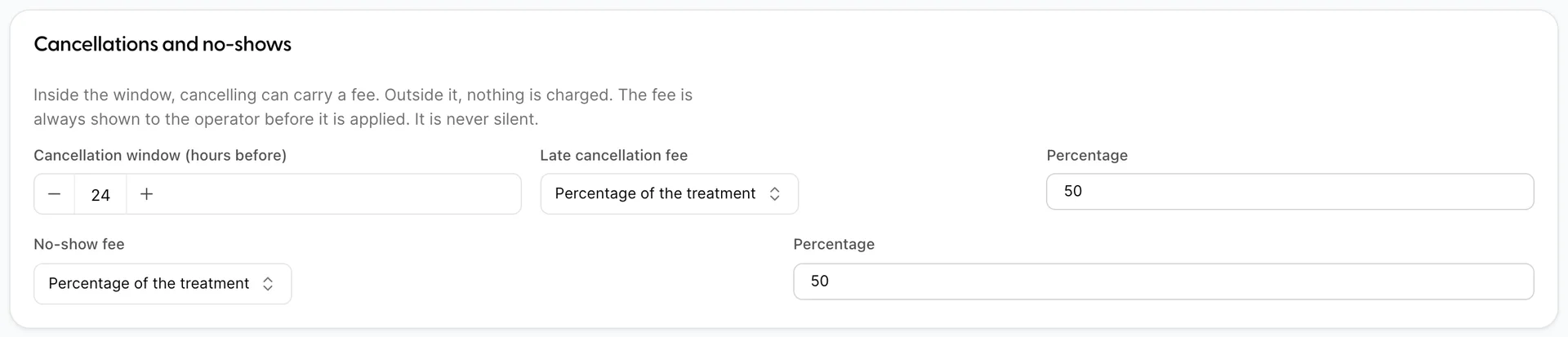
Cancellation window (hours before) is the point at which a cancellation becomes late. At 24, a guest who cancels the afternoon before is inside the window and a guest who cancels two days out is not. Set it to 0 and no cancellation is ever late.
The fee itself is one of four kinds:
| No fee | Nothing is charged, however late. |
| Percentage of the treatment | A share of the treatment price. It is worked out on the full price before any discount and before the service charge, so 50 per cent of a $95 deep tissue is $47.50 whatever the guest would have paid. |
| Fixed amount | The same figure regardless of the treatment. Simpler to explain at the desk, and unfair in both directions across a menu that runs from $55 to $210. |
| A named item from the catalog | Posts a catalogue item at its own price. Use this when your fee has to appear on the bill as a specific product with its own tax treatment. |
No-show fee works the same way and is separate, because most properties charge more for somebody who simply did not arrive than for somebody who telephoned late. It is applied when you mark the appointment as a no-show.
Outside guests and deposits
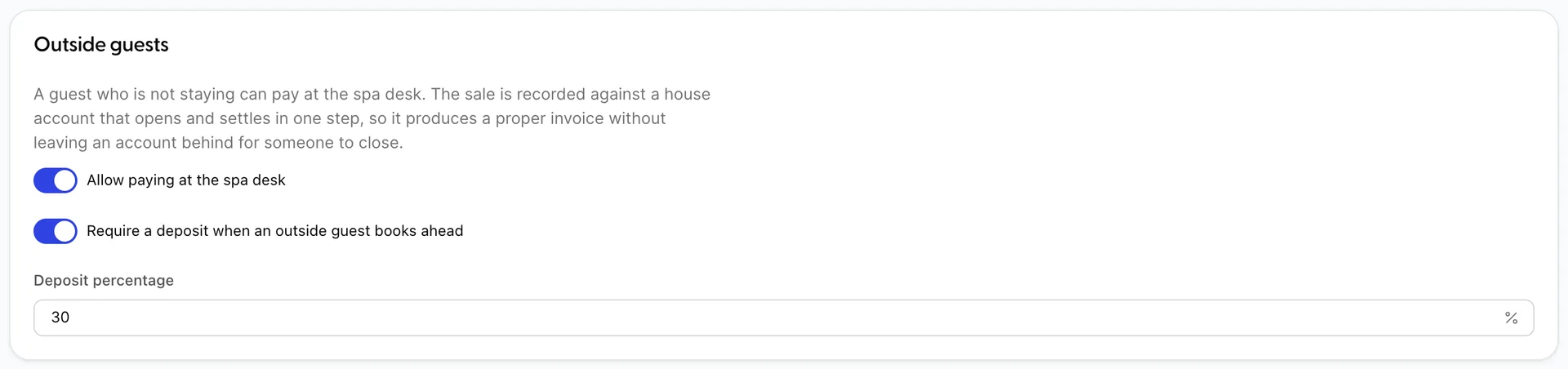
Allow paying at the spa desk is what makes the spa sellable to somebody who is not staying with you. The sale is recorded against a house account that opens and settles in one step, so it produces a proper invoice and does not leave an open account behind for somebody to chase. Switch it off and every treatment has to belong to a reservation.
Require a deposit when an outside guest books ahead turns on a deposit step at the end of the booking wizard for outside guests only. In-house guests never see it, because their treatment is already secured by a room bill. Deposit percentage is how much of the bill to take up front. It is a percentage of the tax-inclusive total including the service charge, not of the menu price, so 30 per cent of a $95 treatment is a little more than $30. The deposit is a real payment against a real invoice, and it is deducted at settlement, so the guest pays the balance and the account ends up carrying two payments against one bill.
What a deposit costs you in practice is a phone call: it has to be taken while the guest is on the line, and there is no link you can send them. Who pays for a treatment covers the deposit and settlement flow in full.
Reminders
Hours before is when a reminder email goes out, counted back from the appointment. 24 sends it the day before. Leave the field empty and nothing is sent.
Reminders ride on the property email schedule rather than on anything spa-specific, so setting a number here is not enough on its own: there must be a spa template on the schedule under System settings › Email schedule. The banner on the section says so, and it is worth checking rather than assuming, because a reminder that is configured and not sent looks identical to one that was never configured.
Giving your team access
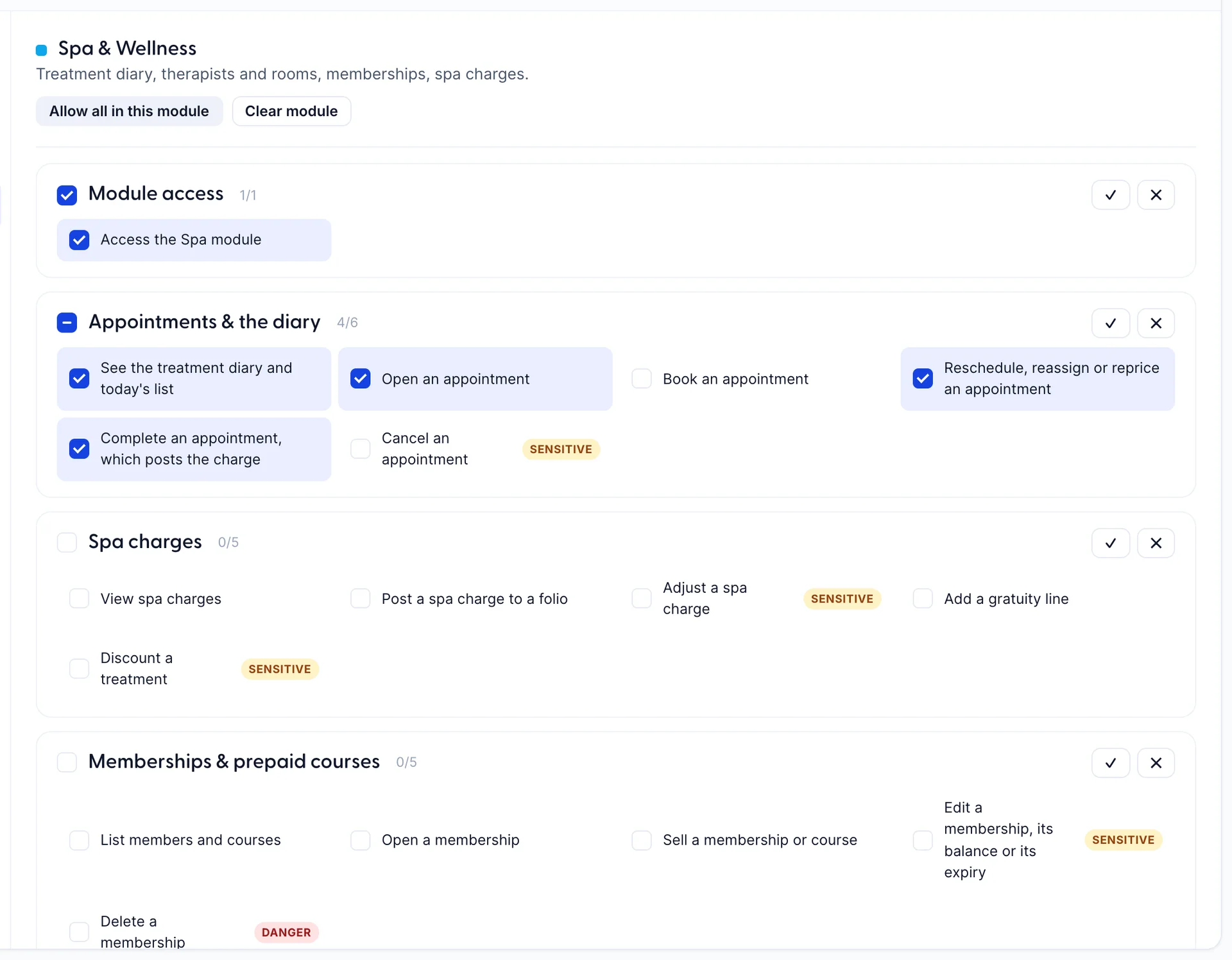
Spa rights are granted per role, under Users › Roles. Open a role, pick Spa & Wellness in the module list on the left, and tick the individual abilities the role needs. Each resource has a checkbox beside its name that grants or clears the whole group, and the count beside it, 4 of 6 in the picture above, tells you at a glance how much of it a role holds.
Two markers are worth knowing. An amber sensitive chip means the action moves money or overrides a control: adjusting a charge, discounting a treatment, cancelling an appointment. A red danger chip means it destroys something a report may later need, such as deleting a membership or a treatment. Neither chip stops you granting it; they exist so you notice what you are handing out.
Three combinations cover most properties:
- Spa manager. Everything in the module. They can configure the spa, run the diary, post and adjust charges and manage members.
- Spa receptionist. All of Appointments & the diary and Spa charges, plus Module access and List treatments. They can book, move, cancel and take money, and cannot change your prices, rosters or policies.
- Therapist. The role in the picture above. Module access, and in Appointments & the diary the four abilities to see the diary and today's list, open an appointment, reschedule or reprice one, and complete one, which posts the charge. They cannot book a new treatment, cannot cancel one, and hold nothing at all on charges or memberships.
If you have used this screen before, it has changed shape. Spa rights used to be one group of five rows with Create, Edit, View and Delete boxes on each, and the same four verbs had to cover every ability. Rescheduling a treatment and completing one were both Edit, so there was no way to let a therapist finish a treatment without also letting them reprice one. Each ability is now granted on its own.
A therapist also needs a login of their own before any of this applies to them. That is attached on the therapist record rather than here, and it is covered in therapists, rooms and equipment.