Three screens, one job
The spa gives you three ways to look at the same appointments, and they are not alternatives so much as three different questions.
- Appointment book answers "what does the day look like". It is the screen to have open when somebody rings up wanting a massage this afternoon.
- Today answers "what do I do next". It is a list in time order with one button on each row, and it is the screen the desk should leave open all day.
- Appointments answers "what happened". It searches everything the spa has ever booked, forwards and backwards.
All three open the same appointment when you click a row or a tile, and everything you can do to an appointment is done from there.
Reading the appointment book
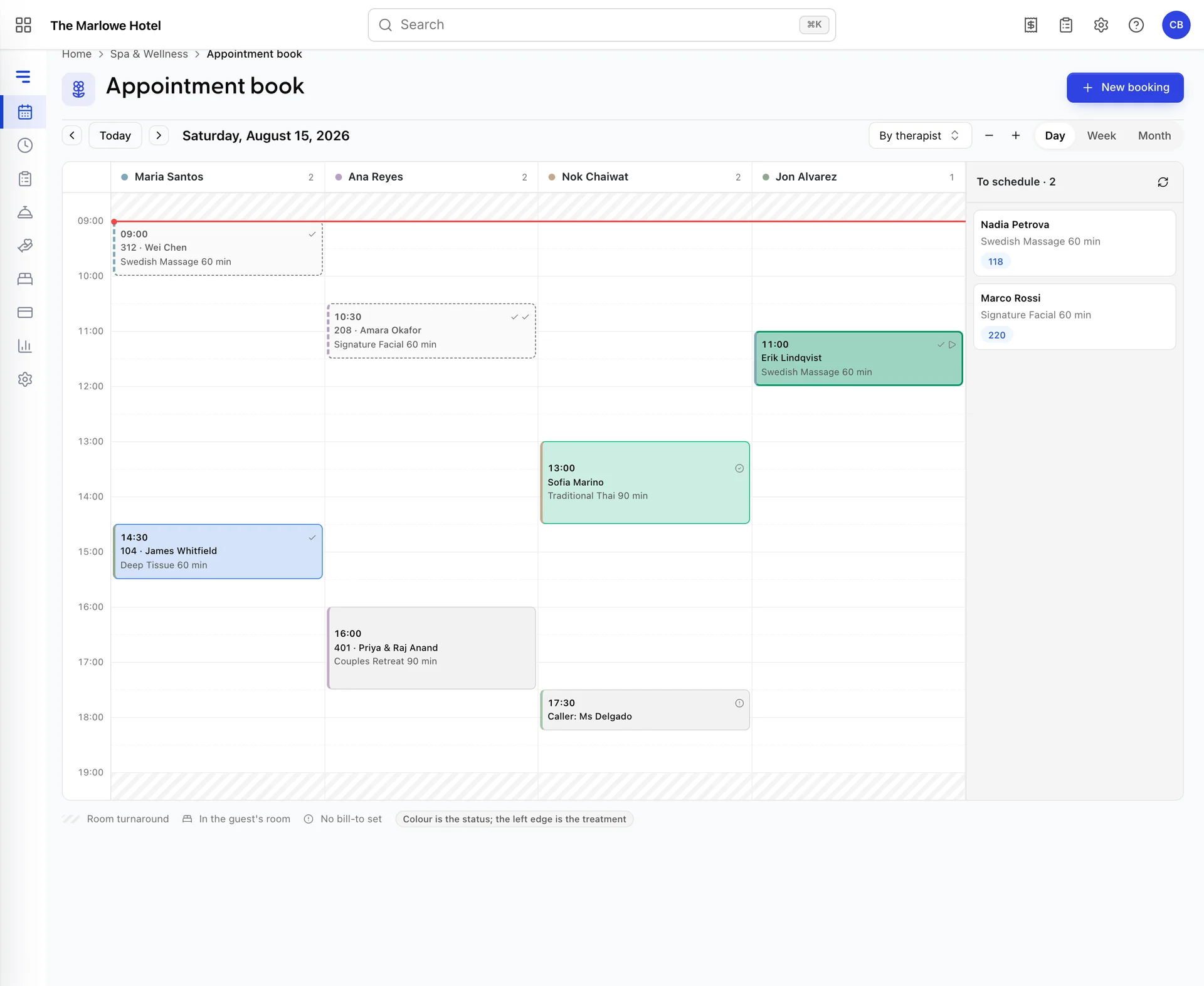
Time runs down the side, one column per therapist across the top, with the number of appointments each of them has beside their name. The red line is now. The hatched bands are hours the spa is shut, which come from your opening hours and your closed dates, so a Sunday that opens at noon shows a hatched morning rather than an empty one.
A grey Blocked band with a reason on it is a hold that is not an appointment: a lunch break, a filter service, training. Those come from the therapist's exceptions and from room maintenance, and the availability engine treats them exactly as it treats a booking.
Clicking any empty patch opens the booking drawer with that therapist and that time already filled in, which is the fastest way to take a booking when you can see the gap. The plus and minus buttons stretch and squash the hour rail: useful when the treatments are short and the tiles are too small to read, or when you want a whole long day on screen.
What a tile is telling you
Each tile carries four pieces of information before you read a word of it.
| What you see | What it means |
|---|---|
| The fill and border colour | Where the appointment is in its life. Booked is deliberately the quietest, because most of the day is booked; confirmed is blue, checked in and in progress are green, and in progress is the only one filled in solidly. Completed goes dashed and grey, cancelled fades and strikes the name through. |
| The coloured left edge | The treatment's own colour, set on the treatment. It is what lets you see at a glance that Tuesday afternoon is all facials. |
| The small icons | A tick for a treatment already paid for, a bed for one happening in the guest's own room, and a warning circle for one with no payer set. The last of those is the one to act on. |
| A hatched band above or below | Setup and turnaround. The room is held for it; the therapist is not. It only appears on the room axis. |
Tiles shrink with the treatment. A short one drops to the time and the guest's name, and a very short one to a single line. Hovering gives you the whole thing regardless.
By therapist or by room
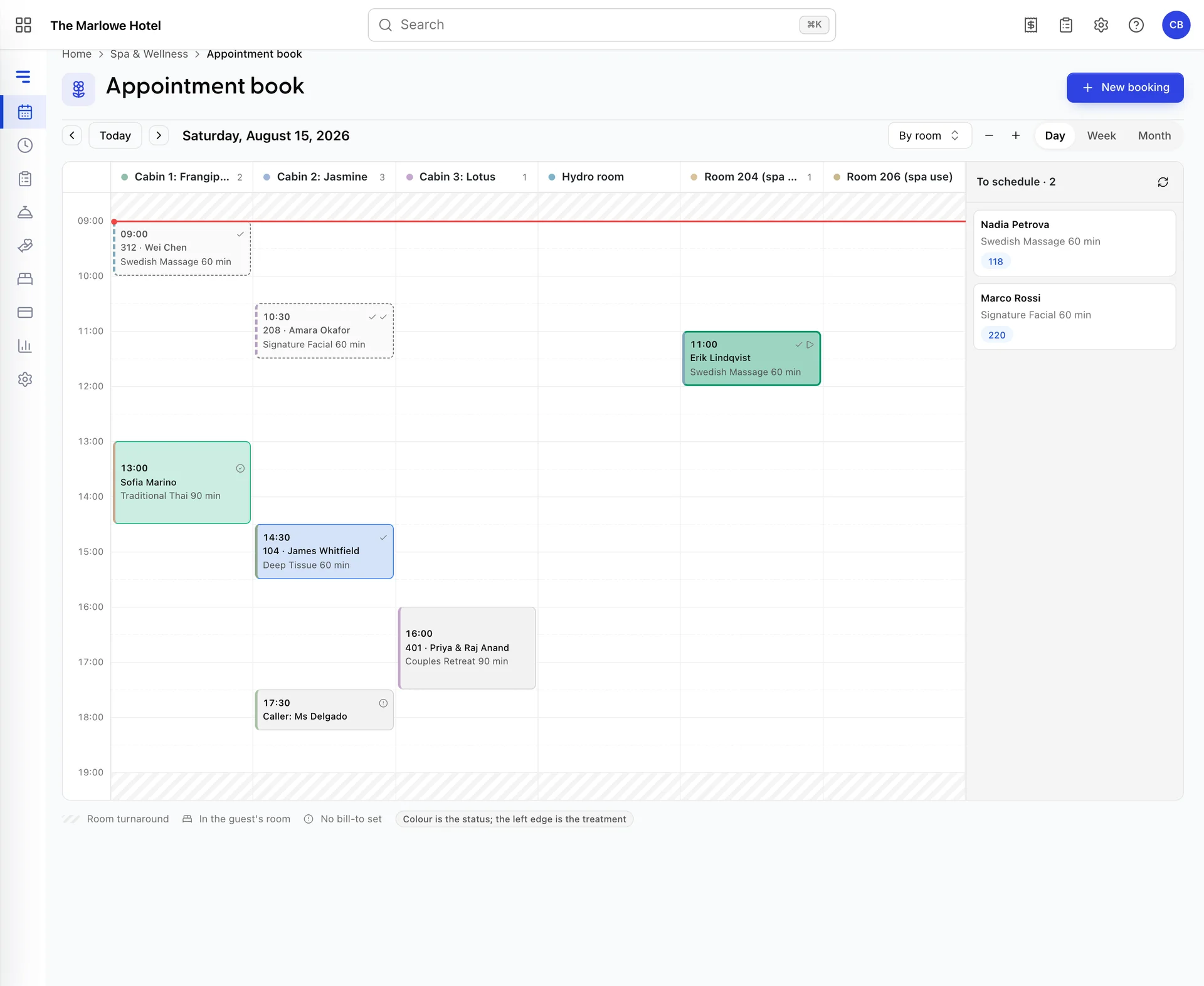
The same day, with the columns switched from people to places. "Is Maria free at three" and "is the couples suite free at three" are both real questions and neither axis answers both, which is why the switch exists.
The room axis is also the only place turnaround is visible. A treatment that holds its cabin for fifteen minutes afterwards shows a hatched band under the tile, and that band is why the four o'clock you thought was free is not. If you are ever puzzled by the availability the booking wizard offers, switch to the room axis and the answer is usually there.
Moving an appointment
Drag a tile to a new time, or to another therapist's column, and let go. What happens next is the important part: the tile does not move until the server agrees. Prostay re-runs the whole availability check inside the save, so a move that looks fine on your screen can still be refused because somebody else booked that slot four seconds ago.
A refusal names what clashed, which is the difference between fixing it and retrying blindly. You will see one of these.
| What it says | What to do |
|---|---|
| Maria Santos already has Wei Chen at 3:00 PM | Another time, or another therapist. |
| Cabin 1: Frangipani is taken at 3:00 PM | The therapist is free but the room is not. Switch to the room axis and find one that is. |
| The equipment that treatment needs is already booked then | Two hot stone treatments, one set of stones. Move one of them. |
| That hotel room is sold or out of order on this date | A bedroom being used as a treatment room has been sold to a guest. Use a real cabin. |
| Nobody qualified is on shift at that time | The roster, not the diary. Check the therapist's week. |
| The spa is closed then | Opening hours or a closed date. |
Completed and cancelled appointments cannot be dragged at all, which is deliberate: money has already moved on one and the slot has already been released on the other. They do not offer Edit appointment either. Somebody who has already been seen and wants to come back is a new booking, not a move.
For everything else, Edit appointment in the appointment's menu is the keyboard alternative to dragging, and the only way to move a treatment to another day. It opens the booking wizard on the time step with the guest and the treatment already answered, offers the free slots for whichever day you pick, and saves against the appointment you started from. The payment step is there too, which is where an appointment booked as Decide later finally gets a payer.
The treatments with no time yet
The panel down the right of the book, To schedule, holds appointments that are real, are often already paid for, and have no slot. A spa treatment sold as part of a room package arrives here: the guest has bought a massage, nobody has agreed when.
Drag a card from the tray onto the grid to give it a time and a therapist in one movement. It goes through the same availability check as any other booking, so a card that will not drop is telling you the slot is not really free.
Cards here show the guest, the treatment, the room number if they are staying, and a green Paid badge when the money has already been taken. That badge is worth respecting: it means the guest has paid for something they have not received yet, and the longer the card sits in the tray the more likely that becomes a complaint.
Week and month
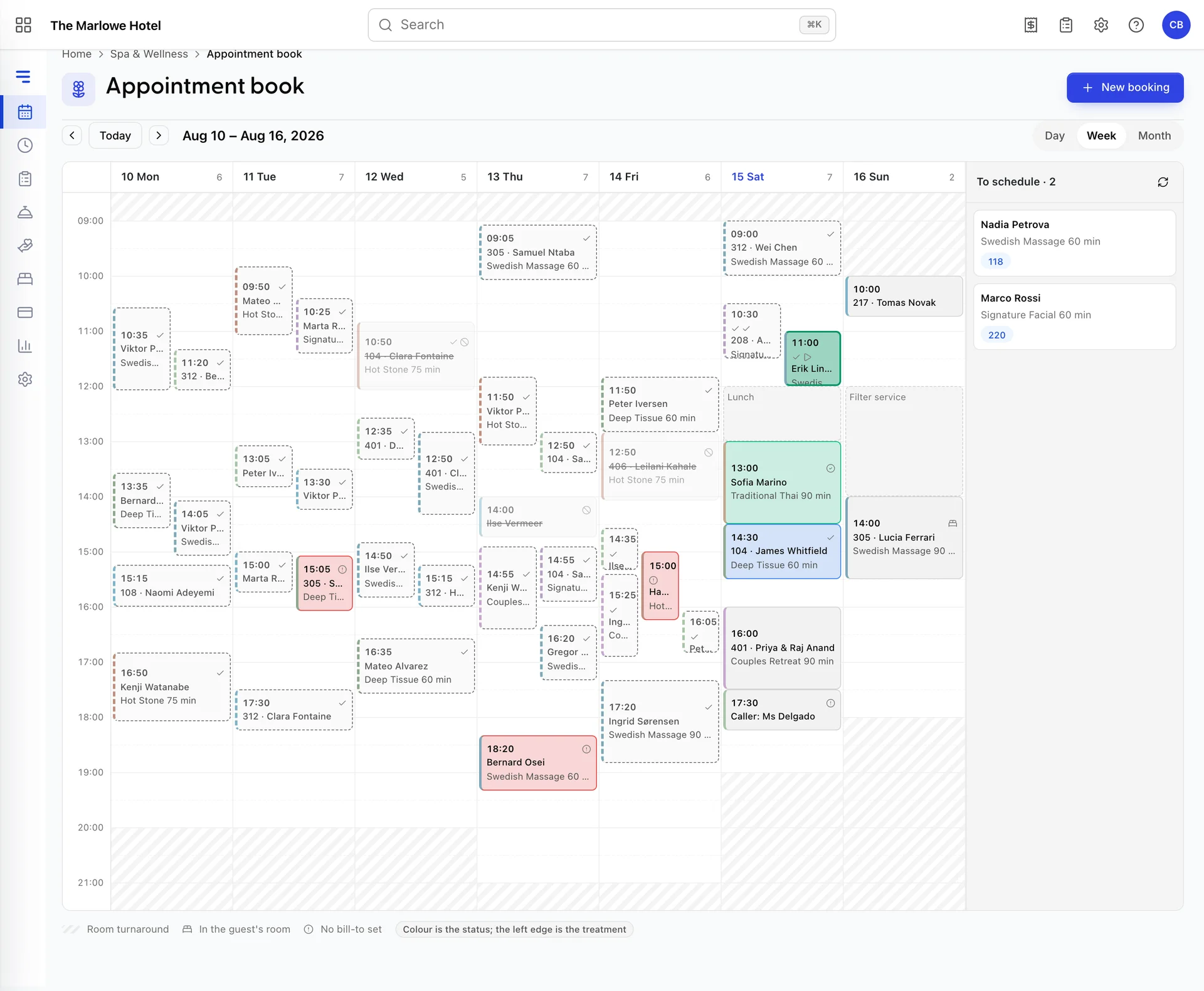
The week is seven day columns with every therapist merged together. It answers "how full is Thursday" rather than "who is doing what", and there is no therapist filter on it: for a single person's week, the Therapists screen shows their roster and the day view shows their column.
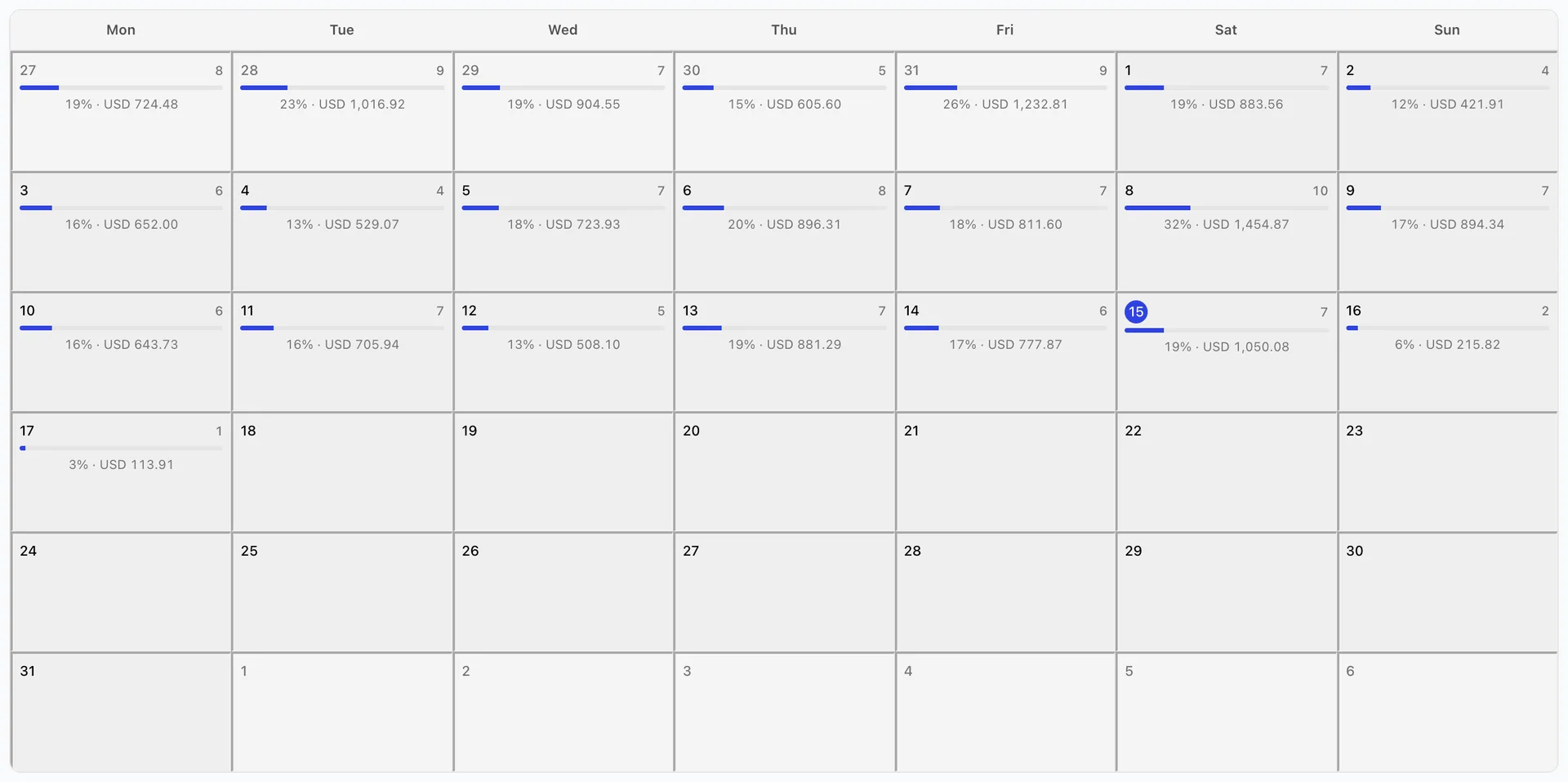
The month is density rather than detail. Each day shows how many appointments it holds, a bar for how much of your capacity they use, and the value booked. The bar is rough on purpose: treatment minutes against the therapists on shift multiplied by the hours you are open. It is there to rank days against each other, not to be reported to a board. Clicking a day drops you into the day view for it.
The value on each cell is what was booked, before tax, including treatments that were paid for in advance. It is not cash taken that day.
The Today list
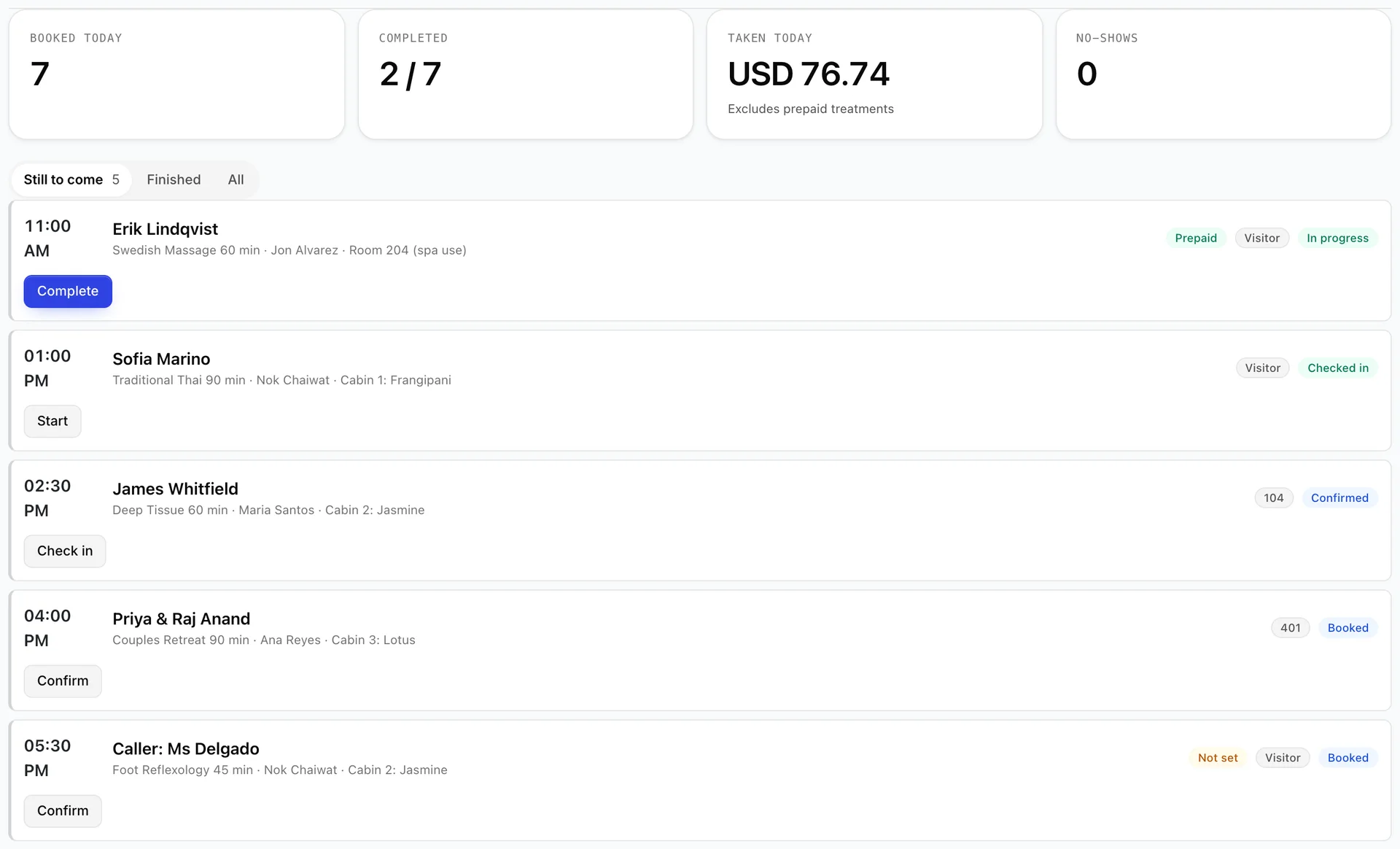
Today is the working screen. Everybody booked in today in time order, with the next action on each row, and it refreshes itself every minute so nobody has to remember to reload it to notice that a guest is standing in reception.
The four tiles across the top are the day at a glance: Booked today counts everything that has not been cancelled, Completed counts how far through it you are, Taken today adds up the completed treatments that were actually charged, deliberately leaving out prepaid ones so it matches the till rather than the diary, and No-shows is the number you want to be zero.
The filter starts on Still to come, which hides everything finished with. Finished shows the completed, cancelled and no-show rows, and All shows the lot.
Booked to completed, one button at a time
An appointment moves through five states, and the button on the row is always the next one.
| State | What it means | Button |
|---|---|---|
| Booked | Taken, not yet confirmed with the guest. | Confirm |
| Confirmed | The guest knows about it and it is holding its resources. | Check in |
| Checked in | The guest is here, in the robe, waiting. | Start |
| In progress | The treatment is happening. | Complete |
| Completed | Delivered and billed. Nothing further. | None |
You do not have to use every step. Checking in a guest who is already on the table is allowed, and the states before check-in are there for the properties that want them rather than as a compulsory ceremony.
Complete behaves differently from the others: instead of changing the row it opens the appointment, because completing is the moment money moves and nobody should do that from a list without seeing the total and the payer. Who pays for a treatment is the whole of that story.
No-shows, cancellations and lateness
A row turns amber with a Late badge fifteen minutes after a guest was due, and only while they are still merely booked or confirmed. The grace is deliberate: a therapist running five minutes over is normal, and a list that went red at one minute past would be entirely red by lunchtime.
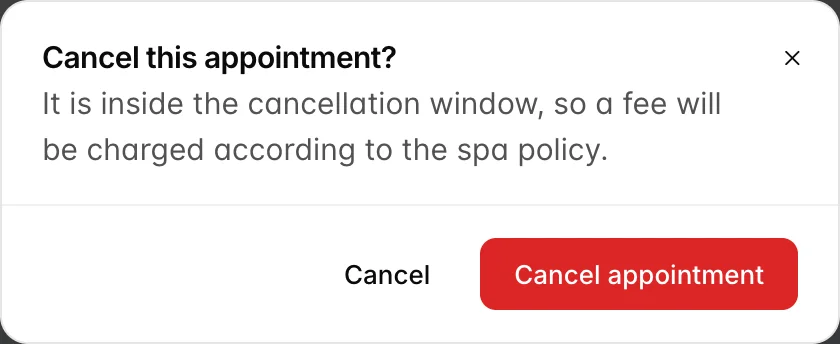
Cancelling and marking a no-show both live behind More on the appointment. Both tell you what they will cost before you commit: the cancellation dialog says whether this particular cancellation is inside your window and will therefore carry a fee, and the no-show dialog says whether your property charges for one at all. Both figures come from your spa settings, and setting them is covered in setting up your spa.
Cancelling releases the therapist, the room and any equipment immediately, so the slot is sellable again the moment you confirm.
Finding an appointment afterwards
The Appointments screen searches by guest, treatment, room or therapist across whatever period you choose, and filters by status and by therapist. It is where you go when a guest rings on Tuesday about a massage they had last month, or when you want every no-show this quarter.
Every appointment carries its own history at the bottom of the drawer: created, confirmed, checked in, completed, posted, voided, tipped, with who did it and when. When two people disagree about what happened, that list settles it.