Two different things happen on this screen and they are easy to confuse. A credit reduces what a guest owes: it is a line on a folio and no money moves. A refund gives money back that has already been taken, so money does move and it has to come from somewhere real. Credit types configure the first. Refund source types and refund accounts configure the second.
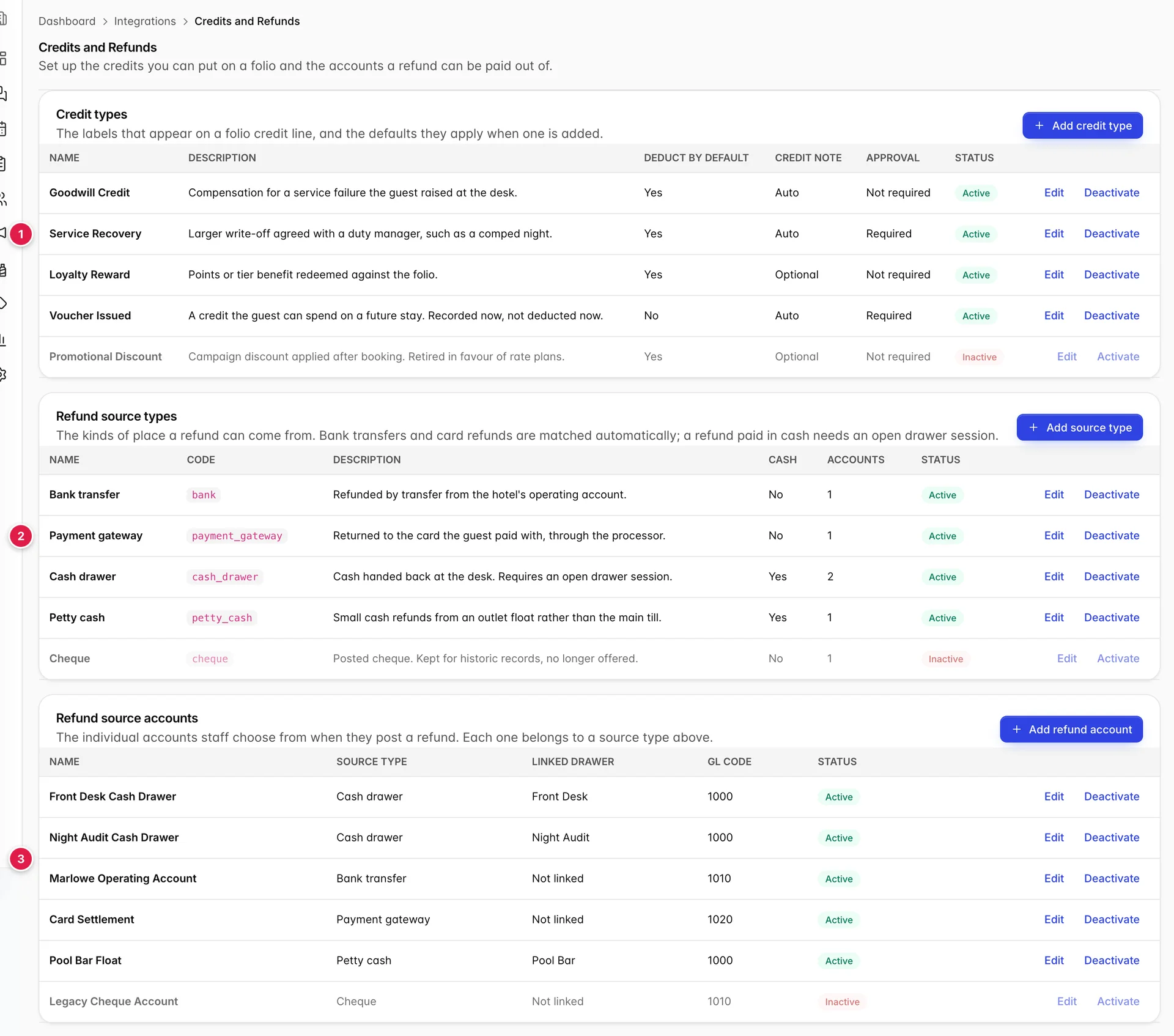
- Credit types: the labels a folio credit can carry.
- Refund source types: the kinds of place money can come back from.
- Refund source accounts: the actual accounts staff pick from.
Three tables, and how they fit together
The second and third tables are a pair, and the order matters. A refund source type is a category, such as bank transfer or cash drawer. A refund source account is a specific account inside that category, such as your operating account or the front desk till. Every account belongs to exactly one source type, so you cannot create an account until the type it belongs to exists.
Staff never choose a source type when they post a refund. They choose an account. The type is what decides how that account behaves.
Credit types
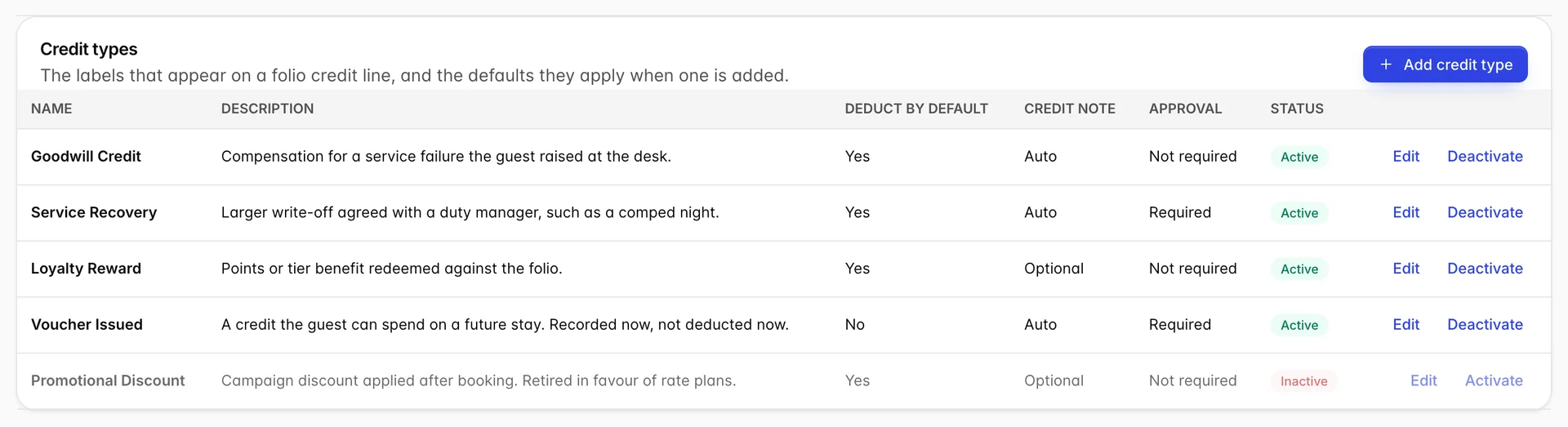
Each row is a label that will appear on a folio, plus three defaults that get applied when somebody adds it. Everything except the name is a default rather than a rule, so the person posting the credit can still change it on the folio.
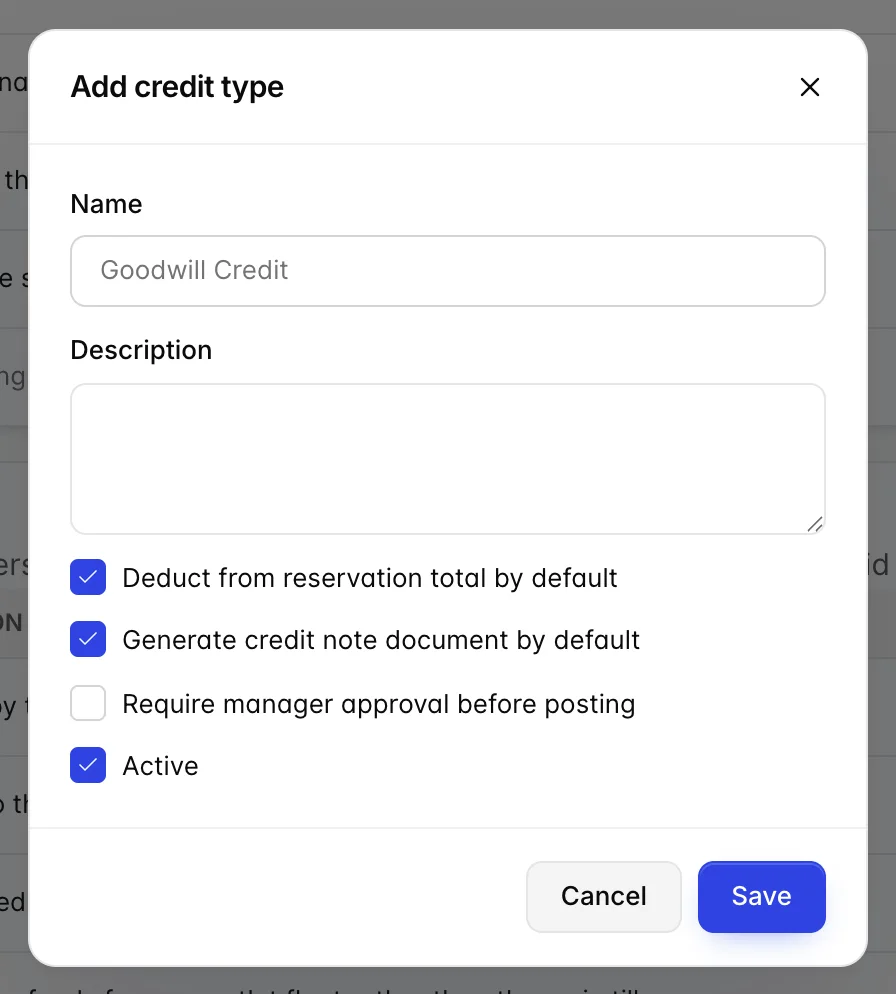
| Field | What it changes |
|---|---|
| Name | What appears on the folio line and in the credit picker. Guests see this on their invoice, so write it the way you would want it read back to you in a complaint. |
| Description | Internal only. It shows in this table and nowhere a guest can see, so it is the place to say when the credit should be used. |
| Deduct from reservation total by default | On, the credit comes off the balance immediately. Off, it is recorded against the folio without changing what is owed, which is what you want for a credit the guest spends on a future stay. |
| Generate credit note document by default | On, posting the credit produces a credit note. Turn it off only where your accountant does not need paperwork for that kind of adjustment. |
| Require manager approval before posting | On, a clerk can select the credit but cannot complete it alone. Use it on the types that cost real money, such as a comped night, and leave it off the small routine ones or you will train your managers to approve without reading. |
| Active | Off removes it from the picker without deleting it. See below. |
Refund source types
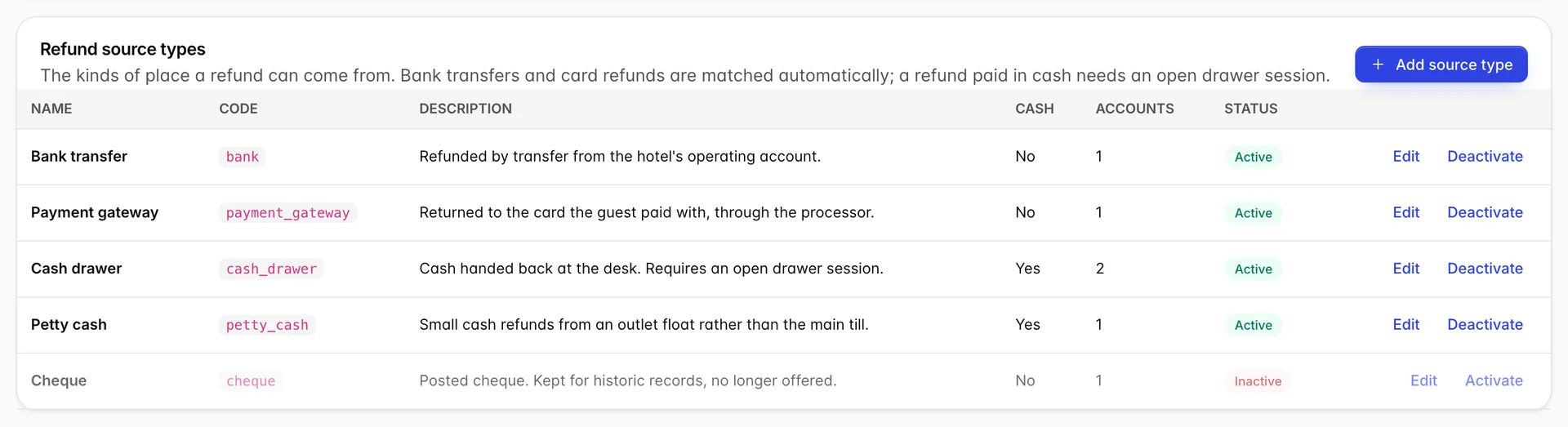
A source type answers one question: what kind of place does this money come out of. The Cash column is the one that changes what happens, because it is the difference between a refund that is a book entry and a refund where somebody opens a drawer and counts notes out of it.
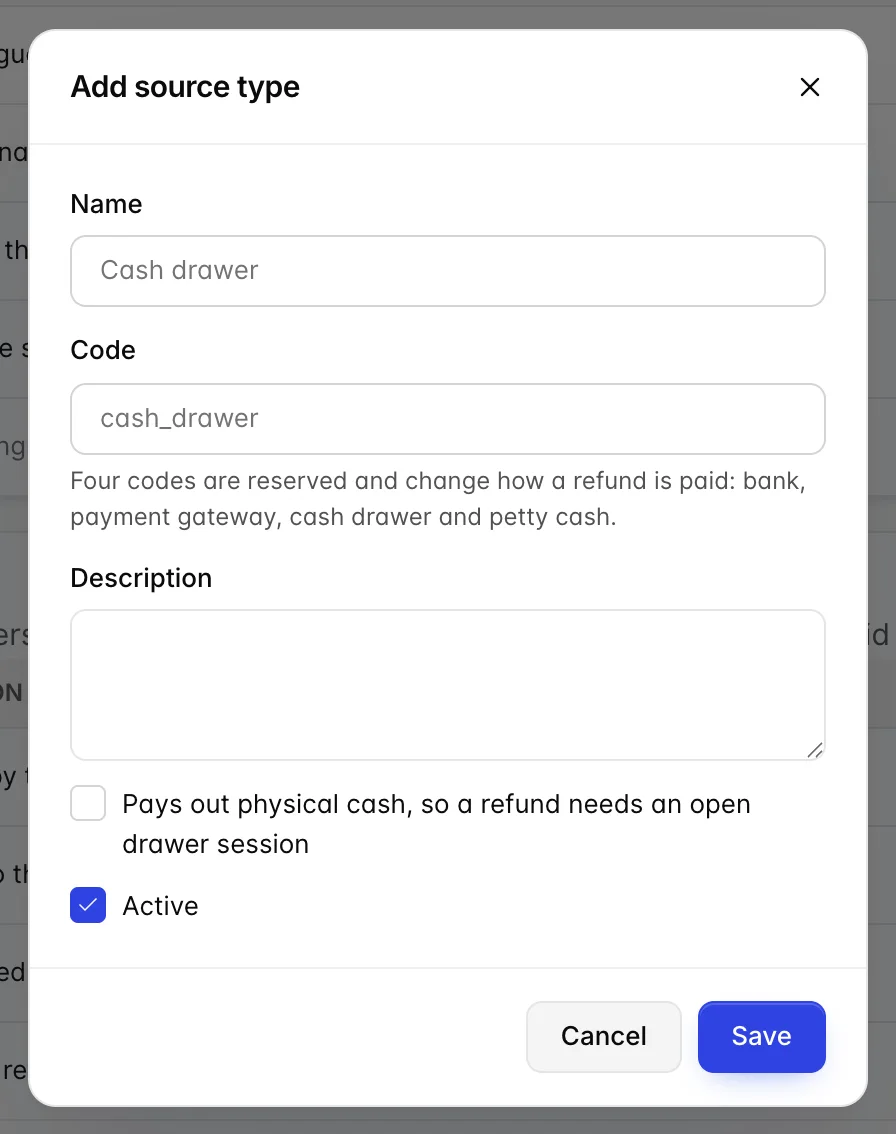
The checkbox marked Pays out physical cash is what sets that column. Tick it and every account under this type will demand an open drawer before a refund can be completed.
The four reserved codes
Code is normally just an identifier you choose. Four values are not: they are reserved, and typing one of them changes how the product treats refunds from that type.
| Code | What it makes the type do |
|---|---|
| bank | Refunds are matched automatically against your bank feed, so they reconcile without anybody touching them. |
| payment_gateway | Refunds go back through the processor to the card the guest paid with, and are matched against the gateway's own settlement. |
| cash_drawer | Refunds are recorded against an open drawer session and appear in that session's activity. |
| petty_cash | The same, for an outlet float rather than the main till. |
The codes are written exactly as shown, in lower case with an underscore. A type whose code is anything else is an ordinary type: it will work, it will just be reconciled by hand.
Refund source accounts
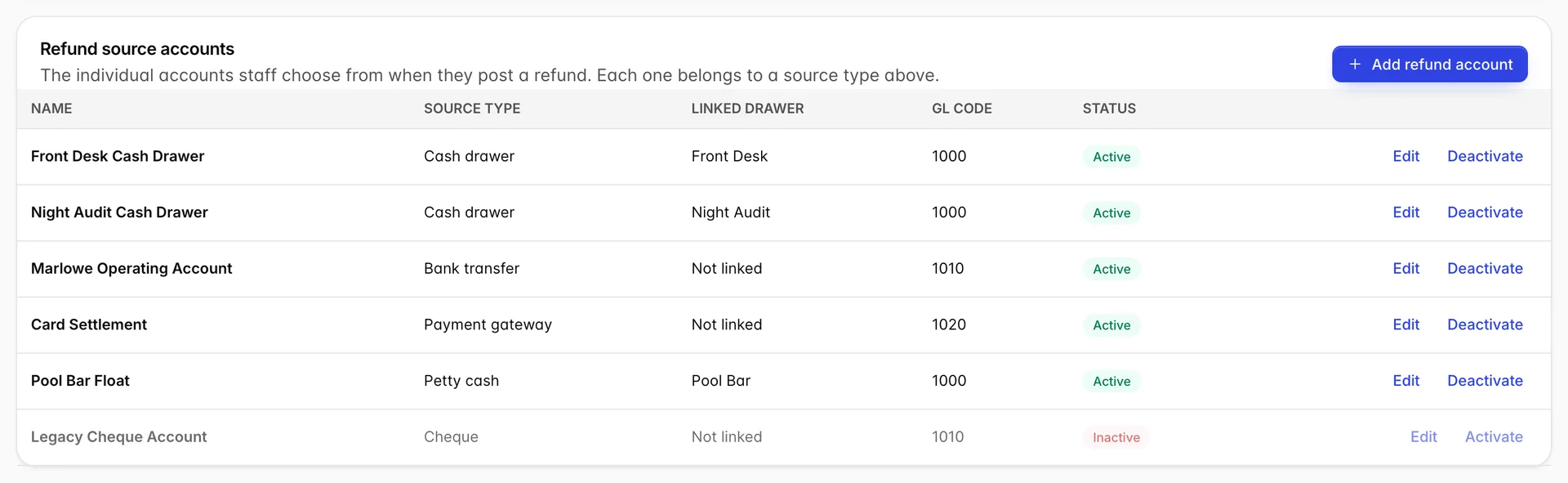
These are what staff actually choose from. Each one names a source type, an optional linked cash drawer and a GL account code.
| Field | What it changes |
|---|---|
| Name | What the person posting the refund sees. Name it after the thing, not the category: Pool Bar Float tells a clerk which one to pick, "Petty cash 2" does not. |
| Source type | Which category this account belongs to, and therefore how it behaves. Changing it on an existing account changes the behaviour of every future refund from it. |
| Linked cash drawer | Only appears when the source type pays out physical cash. It names which drawer the money leaves. |
| GL account code | Where the refund posts in your chart of accounts. Several accounts can share one code, which is normal: three cash accounts all posting to your cash on hand account is correct. |
Why a cash refund needs an open drawer
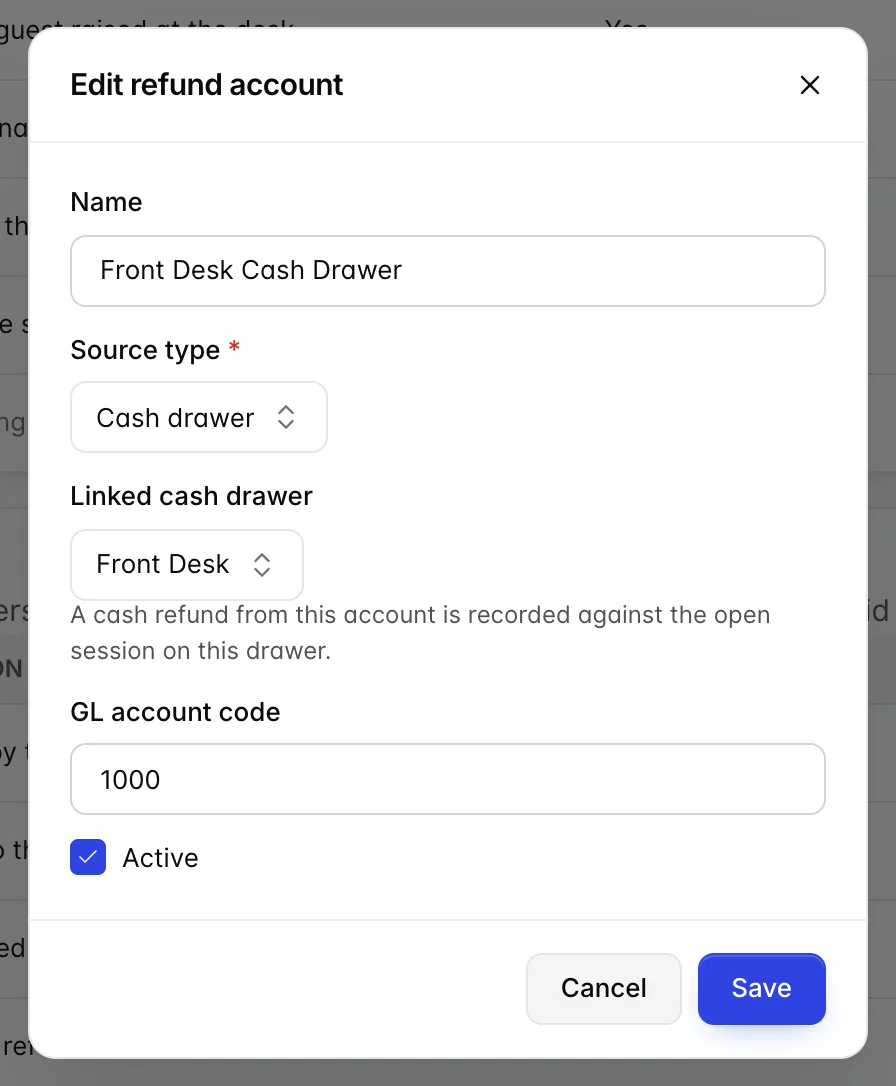
Linked cash drawer only appears once you have chosen a source type that pays out physical cash. An empty Add dialog will not show it, which is why the figure above is an existing account being edited.
A cash drawer holds a session: somebody opens it with a counted float, every payment and refund through it is recorded against that session, and at the end of the shift somebody counts it and the count is compared against what the session expected. A refund paid from a linked account is one of the movements in that arithmetic.
Which is why a cash refund cannot be posted with no session open. There would be nothing to record it against and the next person to count that drawer would find money missing with no explanation. If your staff report that they cannot complete a cash refund, the drawer is closed; that is the first thing to check, before anything on this screen.
Retiring something you no longer use
Nothing on this screen deletes. Deactivate greys the row and takes it out of the pickers, and Activate puts it back. That is deliberate: a folio from last year that carries a credit type you have stopped using still has to render correctly, and deleting the type would leave a line with no label on a document you may have to produce.
One consequence worth knowing. The account picker on the drawer form lists active accounts only, so deactivating an account that a drawer points at leaves that drawer pointing at something nobody can select. Deactivate the account first, then repoint the drawer, rather than the other way round.
Who can change this
Two separate permissions cover this screen, and neither is granted to front desk staff by default:
| Permission | What it allows |
|---|---|
| Credit types. | Opening this screen, and adding or editing a credit type. |
| Refund source types and refund accounts. | Adding or editing a source type or an account. |
A clerk who could add a credit type could invent a reason to take money off a bill, and a clerk who could edit a refund account could point a refund at a different pot. Both are held back on purpose. A user without either sees a page telling them which permission they are missing and to ask an administrator for it under Users, User Roles.
Once this is set up, the screens that use it are posting charges, payments and refunds, where a credit or a refund is actually put on a folio, and the transaction report in finance reports, which is where you check that a day's cash refunds and takings agree with what the drawer counted.