Where a treatment comes from
A treatment is not a spa object. It is an ordinary item from your property's catalogue, the same list the front desk posts breakfast and airport transfers from, with a scheduling profile attached to it by the spa. Price, tax, category and package contents belong to the item and are edited under Items & Services. Duration, the room it needs and who is qualified to give it belong to the profile and are edited here.
The practical consequence is worth being clear about, because it is the opposite of what most spa software does. Change the price of a massage in Items & Services and it changes for the spa, for room service and for the front desk at the same moment, because there is only one of it. There is no separate spa price list to keep in step, and no way to charge one thing at the spa desk and another on a folio.
Adding treatments to the spa
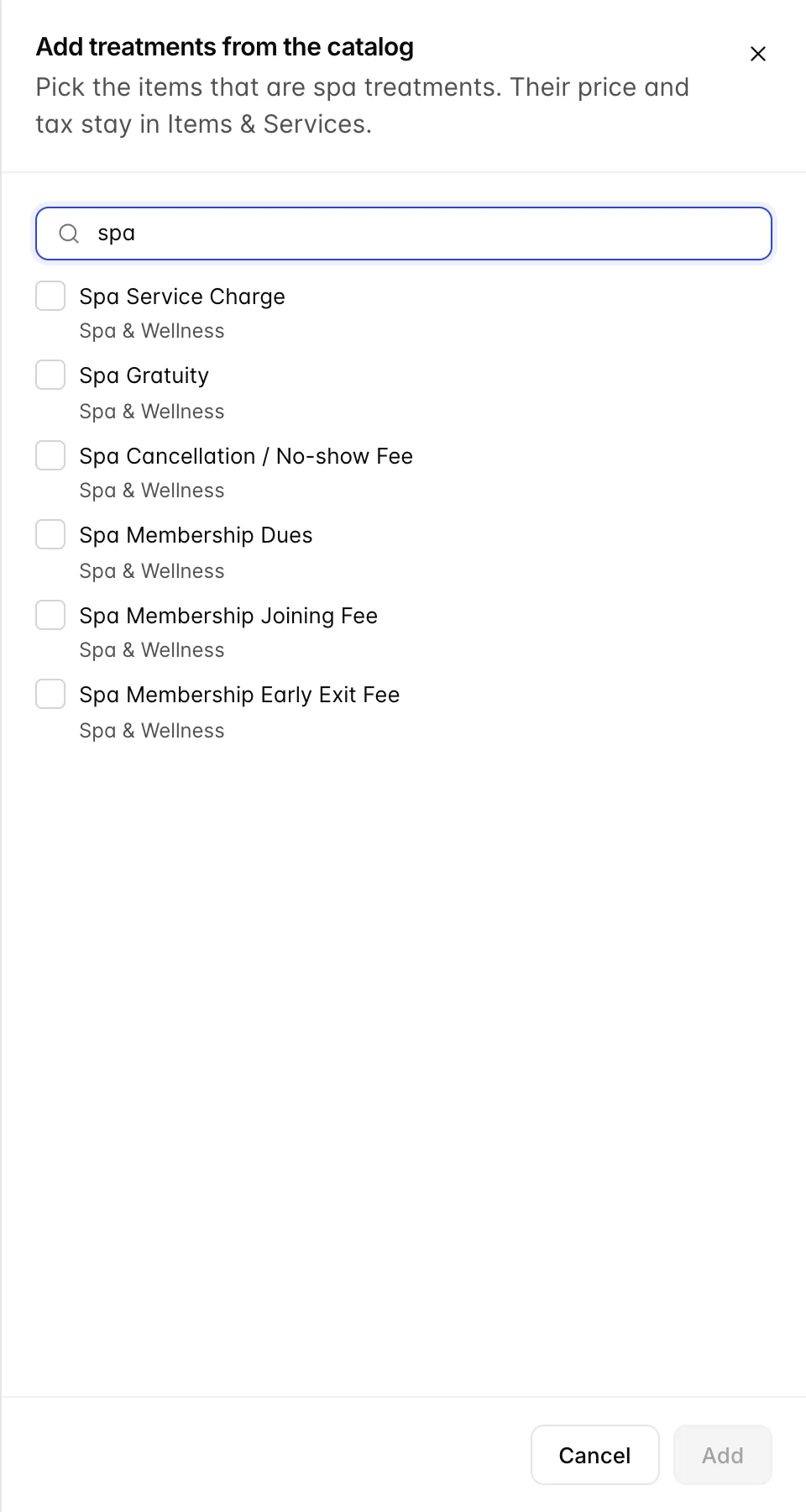
Add from catalog lists every item that is not already flagged as a treatment. Tick as many as you like and save, and each one gets a profile with a 60 minute duration and nothing else set. That is deliberate: getting the menu into the spa is one action, and the tuning is done afterwards, treatment by treatment.
Only tick things a guest books a slot for. The spa's own fee items are the trap here, because they sit in the same category and read like spa services. The service charge, the gratuity, the cancellation fee and the three membership items are all catalogue items in Spa & Wellness, and none of them is a treatment. Flag one by mistake and it appears in the booking wizard as something a guest can be booked in for.
If the item does not exist yet, create it in Items & Services first with its price and tax, then come back and flag it. There is no way to create a catalogue item from this screen, which is the correct restriction: an item invented at the spa desk with no tax treatment would end up on somebody's invoice.
Reading the list
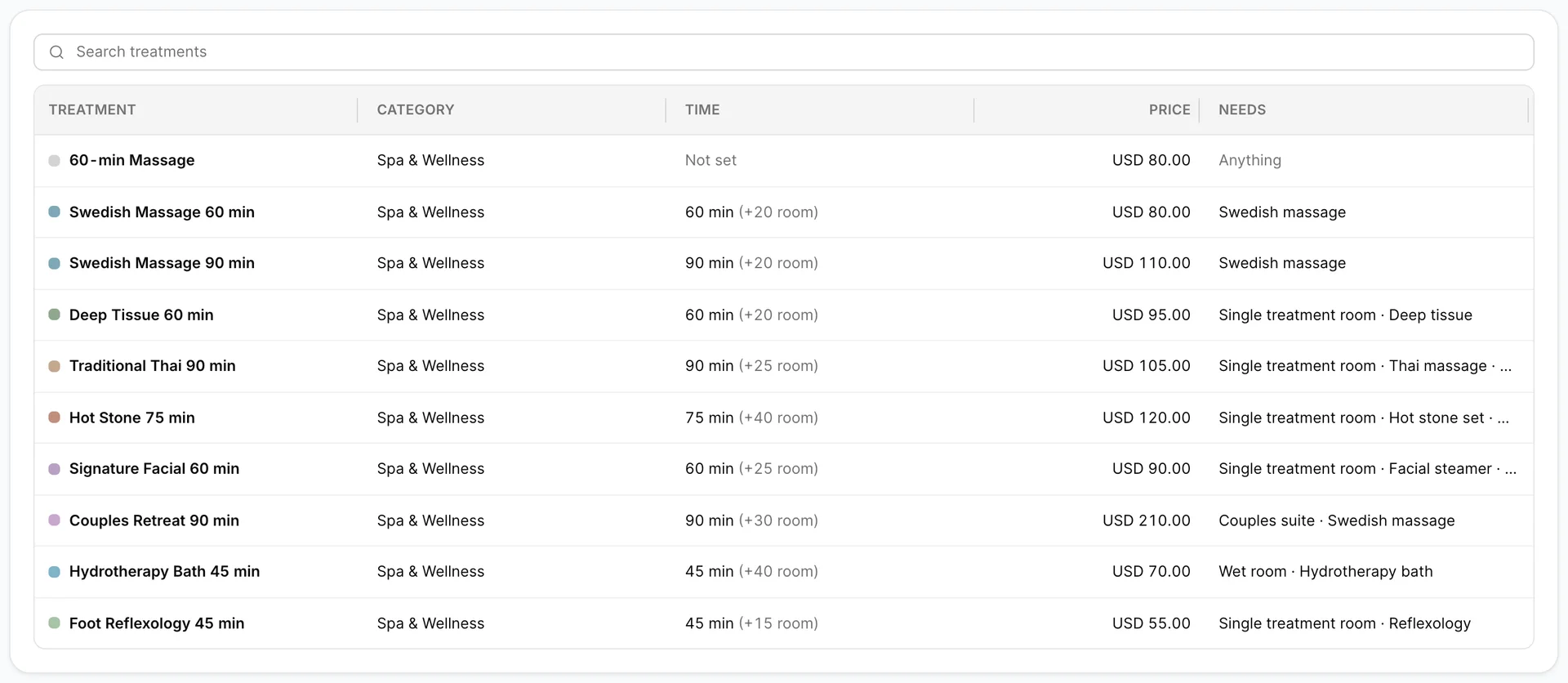
Five columns, and two of them repay a careful read.
| Column | What it tells you |
|---|---|
| Treatment | The catalogue name, with the colour it takes on the appointment book. A Package badge marks a bundled item; an Inactive badge marks one that can no longer be booked. |
| Category | The catalogue category, not a spa one. Useful mainly for spotting an item that has been flagged by mistake. |
| Time | The treatment length, then the extra minutes the room is held in brackets. 75 min (+40 room) means the guest is booked for 75 minutes and the cabin is unavailable for 115. |
| Price | The catalogue price, or Open for an item priced at the time of sale. |
| Needs | Everything besides a therapist's time that has to be free before this can be sold: a room type, a named piece of equipment, a skill, or named therapists. Anything means it can be given by anyone on shift in any room. |
The three durations
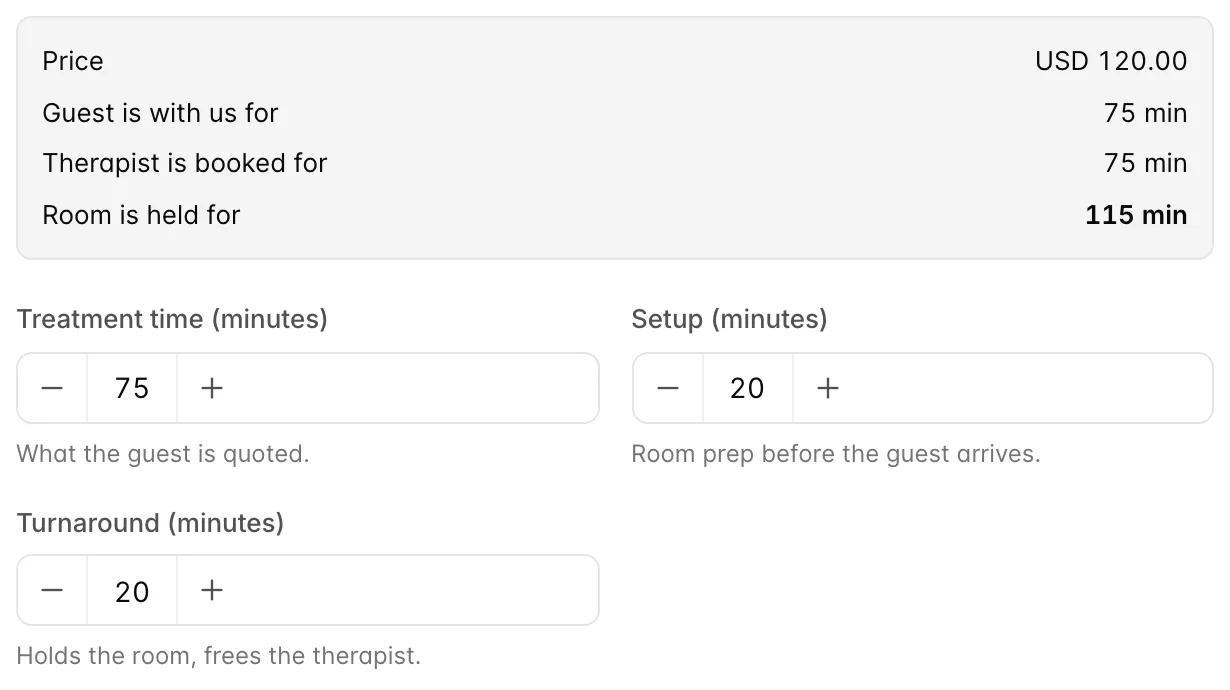
Clicking a row opens the profile, and the panel at the top of it exists to make one point: a treatment occupies three things for three different lengths of time.
- Treatment time is what the guest is quoted and what they experience. It is the only one of the three a guest ever sees.
- Setup is the room preparation before the guest walks in: heating stones, drawing a bath, laying out linen. The room is unavailable for this time; the therapist is not.
- Turnaround is what the room needs afterwards: stripping, cleaning, drying, airing. Again the room, not the therapist, who is free the moment the treatment ends and can start their next one in a different cabin.
So the Hot Stone above holds a therapist for 75 minutes and a cabin for 115. Book it back to back with itself and you have sold the same room twice; a system that stores one duration per treatment will let you, and the day will start slipping at about eleven o'clock and be forty minutes behind by five. Getting these two numbers honest is the single most useful thing on this screen.
Both default to the property figures set in Spa settings when a treatment is first added, and what you type here overrides them permanently for this treatment. A hydrotherapy bath needing 25 minutes of turnaround does not have to drag every massage up with it.
Where a treatment can happen
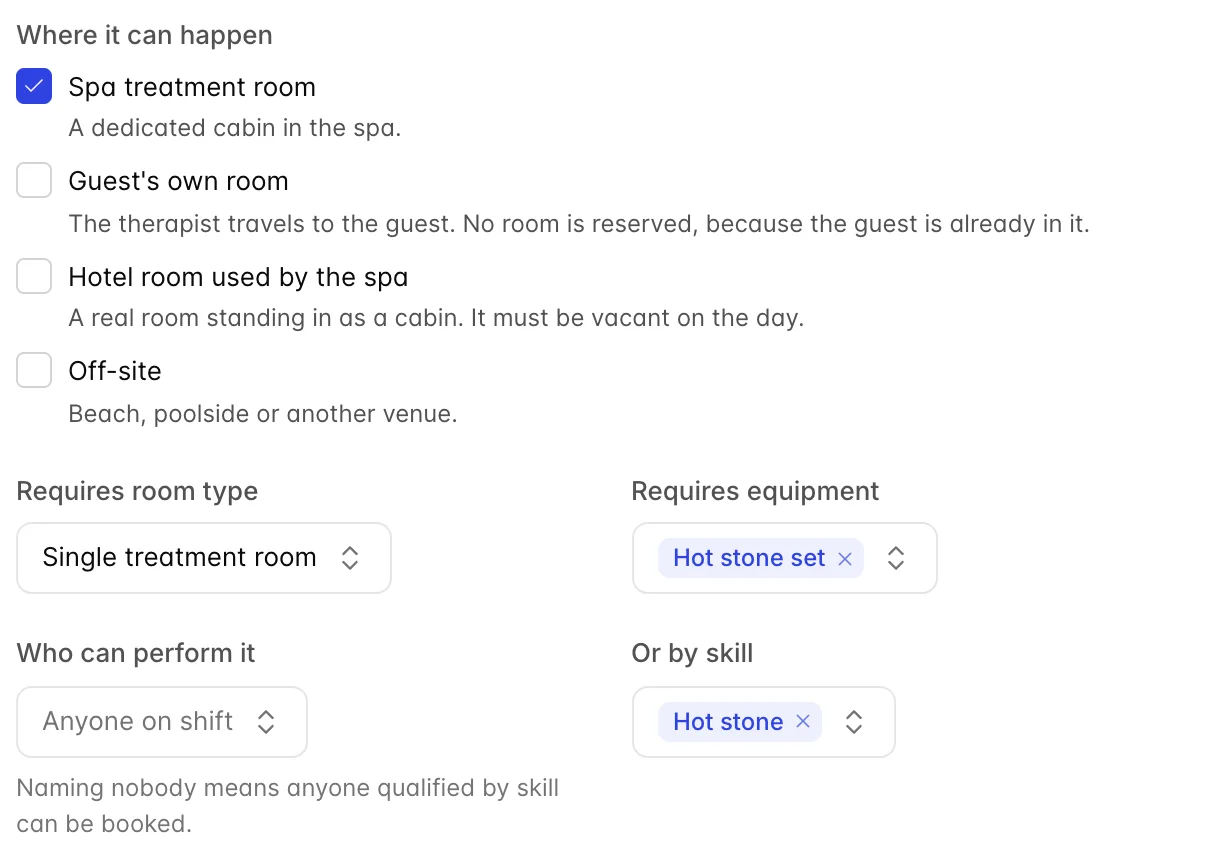
Four locations, ticked in any combination, and at least one is required. They decide which resources the availability check has to find, so they are not cosmetic.
| Location | What it means for availability |
|---|---|
| Spa treatment room | A cabin in the spa. Needs a free treatment room of the right type, for the whole setup and turnaround window. |
| Guest's own room | The therapist travels to the guest. No room is reserved, because the guest is already in one, so only the therapist has to be free. In-house guests only, in practice. |
| Hotel room used by the spa | A real bedroom standing in as a cabin. Needs a treatment room that has been linked to that bedroom, and the bedroom has to be vacant on the day. |
| Off-site | The beach, the pool deck, a villa down the road. No room is reserved, exactly like the guest's own room. |
Ticking more than one is normal and useful. A Swedish massage that can be given in a cabin, in the guest's room or on the beach can be sold at three in the afternoon on a full Saturday, when the cabins are gone but the therapist is not.
What it needs to go ahead
Four fields, and the difference between the last two is the one people get wrong.
- Requires room type narrows the cabins that count. A hydrotherapy bath needs a wet room; a couples retreat needs a couples suite. Left as Any treatment room, the book will use whatever is free.
- Requires equipment reserves a piece of kit for the same window as the room. Equipment has a quantity, so two treatments can share a stock of three hot stone sets and the third booking is the one that is refused.
- Who can perform it names individual therapists. Only those people are ever offered. Use it when the constraint really is a person, not a qualification: the one therapist trained on your proprietary facial.
- Or by skill requires a qualification instead, and anybody who holds that skill can be booked. This is the one to reach for almost every time, because it keeps working when you hire.
Naming nobody and requiring no skill means anyone on shift can be booked, which is right for a sauna session and wrong for a Thai massage. Leaving both empty on everything is the quiet reason a spa ends up double-booking its only qualified therapist by hand.
Gender, group size and colour
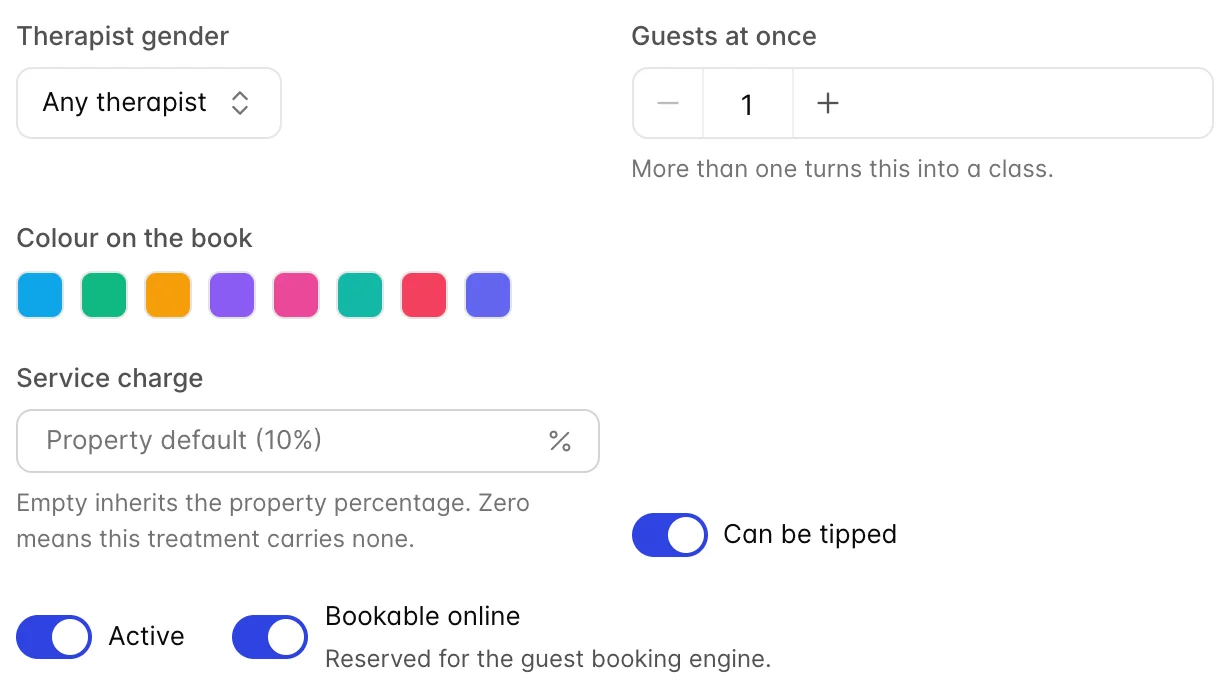
Therapist gender restricts the treatment to female or male therapists. This is a property of the treatment, for the cases where it is a rule rather than a preference. A guest asking for a female therapist on a treatment that has no such rule is handled at booking time instead, so leave this on Any therapist unless the restriction genuinely applies to everybody who books it.
Guests at once is 1 for an ordinary treatment. Set it above 1 and the treatment becomes a class: one therapist, one room, that many guests booked into the same slot. A yoga session for twelve is one booking of capacity twelve rather than twelve bookings. The room's own capacity still applies, so a studio holding eight will not take the ninth.
Colour on the book is how the treatment is drawn on the appointment book. Colour by kind rather than by name and a manager can read the day at a glance: massages blue, facials pink, wet treatments teal. Therapists have their own colours too, and the treatment colour is what the tile uses.
Service charge and tips
These two fields only appear when a service charge is switched on for the property.
Service charge left empty inherits the property percentage, and the placeholder tells you what that is. Typing a number overrides it for this treatment. Typing 0 is not the same as leaving it empty: zero means this treatment carries no service charge at all, which is what you want for a consultation, a fee or anything you do not want to look like you are marking up.
Can be tipped decides whether the gratuity step is offered at settlement for this treatment. On for anything a therapist performs; off for a room hire or a product.
Active, online and removing
Active off keeps every past appointment and every report intact but stops the treatment being offered for new bookings: it disappears from the booking wizard and carries an Inactive badge here. It is the right way to retire something seasonal, and the right way to pull a treatment while your only qualified therapist is on leave.
Bookable online marks a treatment as one guests may book for themselves. The spa is not yet exposed through the guest booking engine, so today this flag records an intention and changes nothing. It is safe to set it now.
Remove from spa, at the bottom left, deletes the scheduling profile and nothing else. The catalogue item survives, with its price and its history; it simply stops being something the spa can book. Use it when an item was flagged by mistake. To retire a real treatment, switch it inactive instead, so the reason it stopped being sold is still visible next year.
Packages
A catalogue item can be a package: a half-day retreat made of a massage, a facial and lunch. The spa handles it as one appointment. One slot, one therapist, one room, for the total duration you set here, and each component posts as its own line on the guest's bill so the invoice still itemises what they had.
That is right for three things happening in a row with the same therapist in the same cabin, and wrong for a day package where the facial is at eleven and lunch is at one. For those, sell the components as separate treatments and book them individually. The drawer says as much in a banner whenever the item is a package.
With the menu built, the next thing the availability check needs is the people and rooms to match it against, which is therapists, rooms and equipment.