An assistant with no learning material can tell a guest whether you have a room free and nothing else. It does not know when breakfast is served, whether you take dogs, or how far the beach is. Learning Material is where you tell it, and an hour spent here is worth more than every other screen in the module put together.
Three ways to teach it, in order of value
The screen offers three, and they are not equally useful:
- Questions and answers. You write the question and the answer you want given to it. The most direct and by far the most reliable.
- Documents. You upload a file and it reads it. Good for the things already written down, like a guest directory.
- Nexus history. It reads back through the guest email you have already sent and received. Broad, free, and the least predictable.
If you only do one, do the first. Twelve good answers to the twelve questions your front desk actually gets asked will change more than a hundred pages of uploaded PDF.
Questions and answers
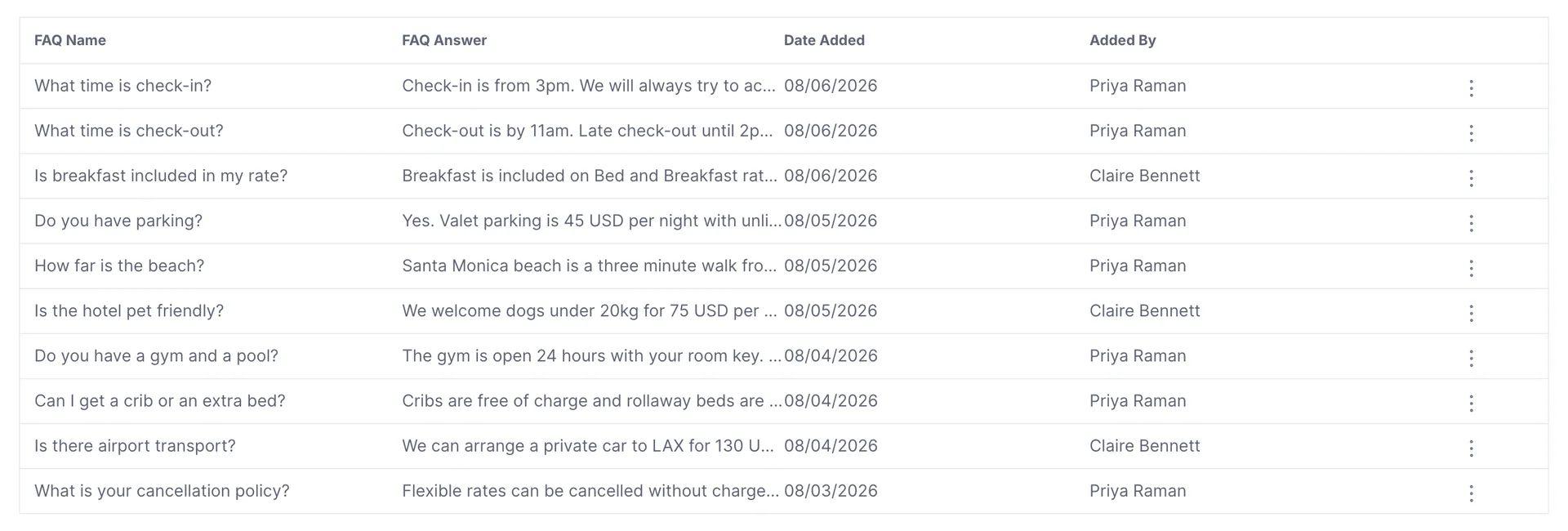
Add New opens a two field form: the question, and the answer. Both are free text and neither has to match how a guest will phrase it, so write the question the way you would say it out loud.
The grid pages at ten. The answers are cut off where they run past the column, so the list is for finding an entry rather than reading one; the row menu at the end opens the whole thing for editing. Date Added and Added By are there so that six months from now you can tell who wrote an answer that has gone out of date.
Writing an answer worth keeping
The answers that work are specific, complete, and written as though a guest will read them, because one will. Some patterns worth copying:
| Instead of | Write |
|---|---|
| Late check-out is available. | Check-out is by 11am. Late check-out until 2pm is 40 USD when availability allows, and the front desk will confirm it on the day. |
| Yes, we have parking. | Valet parking is 45 USD per night with unlimited in and out. There is also a self-park garage two minutes away at 28 USD. |
| Pets are welcome. | We welcome dogs under 20kg for 75 USD per stay. Please tell us in advance so we can put you in a suitable room. |
Two habits are worth adopting from the start. Put the number in: a price, a time, a weight. And name the limit: when availability allows or please tell us in advance is the difference between an answer that helps and an answer that commits you to something you cannot deliver.
Uploading documents

If the UPLOAD DOCUMENT block is not on your screen, your role does not include the permission for it, and you can read what the assistant has been taught without adding to it. An administrator can add it from Users in System Settings, under Prostay AI › Learning material.

Everything you have uploaded is listed under ACTIVE AI DOCUMENT with the description you gave it. Write that description for a person: Room service, spa, laundry and pet policy tells you what is in the file, where directory tells you nothing and will not help you decide what to replace next year.
Documents are best for material that already exists in a settled form, and worst for anything with a price in it that changes. A rate sheet uploaded in January is a confident source of wrong answers in June, so prefer a written answer for anything seasonal and keep documents for the durable things.
Reading back through Nexus

Nexus is Prostay's own mail engine, the inbox your guest email already arrives in. Turning on Enable learn from Nexus history lets the assistant read back through that correspondence, on the reasonable theory that the answers your team has already typed a hundred times are the answers a guest wants.
Nexus history one time crawl chooses how far back to go, from one to four months. Last time crawled underneath tells you when it last ran, or never if it has not.
What Save Changes actually saves
This screen is account-wide
Where to go next
Once it has something to say, the next question is how it says it. That is two screens, and they are covered together.
- How it writes, for tone, length, banned phrases and house vocabulary.
- The guest chat, for the address to hand a guest and what they see when they open it.
- What the assistant may see, if you have not set the permissions yet.