WhatsApp, Booking.com and Expedia messages are conversations. Email is a ticket: it has a state, an owner and a place to go when it is finished. That is the whole difference between the two halves of this module, and it exists because email is the channel where a guest waits, does not chase, and quietly books somewhere else.
Why email is different
A WhatsApp message that nobody answers is obvious: it sits at the top of the list looking unread. An email that nobody answers looks exactly like an email somebody answered yesterday, because both are read. Status, priority and assignee exist to make the difference visible, and the folders exist to get finished conversations out of the way so the ones that are not finished stand out.
None of this reaches the guest. Every control in this article is internal. A guest never sees a status, never knows they were assigned to anyone, and is not told when you close their ticket.
The six folders
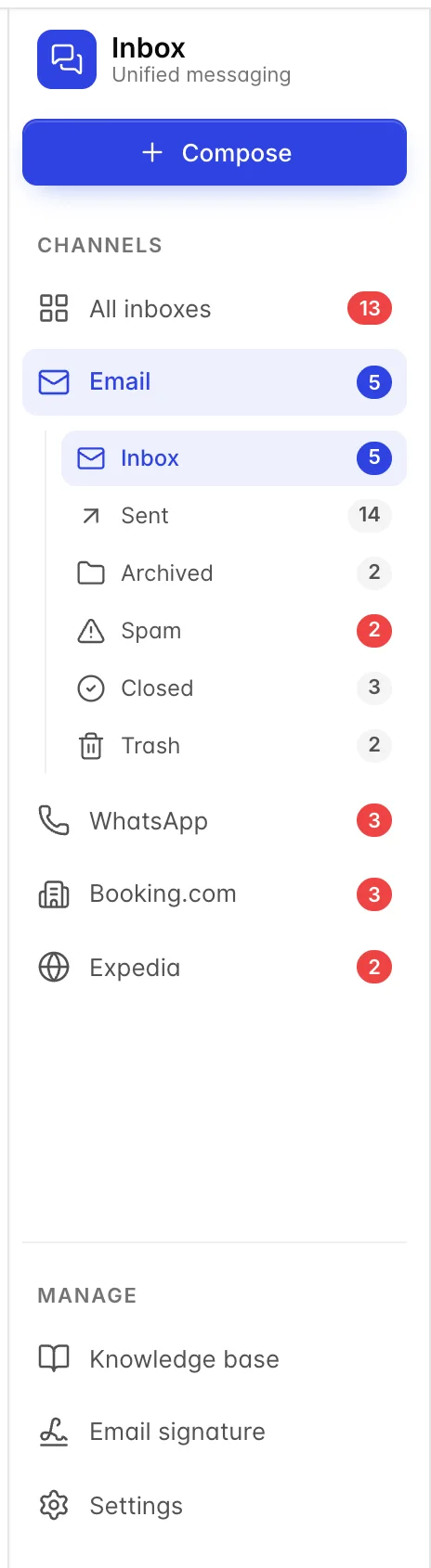
| Folder | What is in it, and how things get there |
|---|---|
| Inbox | Everything live: new mail and anything you are still working on. This is the only folder that matters day to day, and the only one with a status filter above it. |
| Sent | Every conversation anyone from the hotel has replied to, including ones still sitting in the Inbox. It overlaps the Inbox rather than replacing it, so a ticket can be in both. Read it as "things we have answered", not as an outbox. |
| Archived | Conversations put aside without closing. Nothing on this screen puts anything here: there is no archive button in the inbox, so the folder only ever holds what arrived archived from elsewhere. Treat it as a place to look, not a place to file. |
| Spam | Mail filtered out before it reached the Inbox. Worth a glance once a week: a guest writing from an unusual address is the classic false positive, and a booking enquiry that lands here is a booking you do not get. |
| Closed | Conversations somebody marked finished. Setting a ticket's status to Closed puts it here. |
| Trash | Deleted conversations. They are hidden rather than destroyed, so a delete can be undone by someone with database access, but not from this screen. |
The count beside a folder is unread when it is coloured and a total when it is grey. Inbox and Spam are the two that can carry unread mail, so those are the two that go red.
The status filter
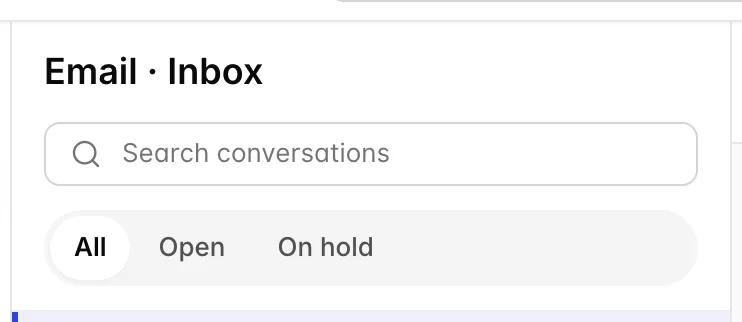
All shows everything in the folder. Open narrows it to tickets that are New or In Progress, which is to say everything somebody still owes a guest an answer on. On hold shows the ones parked deliberately.
Open is the useful one. It is the closest thing this screen has to a to-do list, and a front desk that starts its shift there rather than on All will not lose an email.
The ticket panel
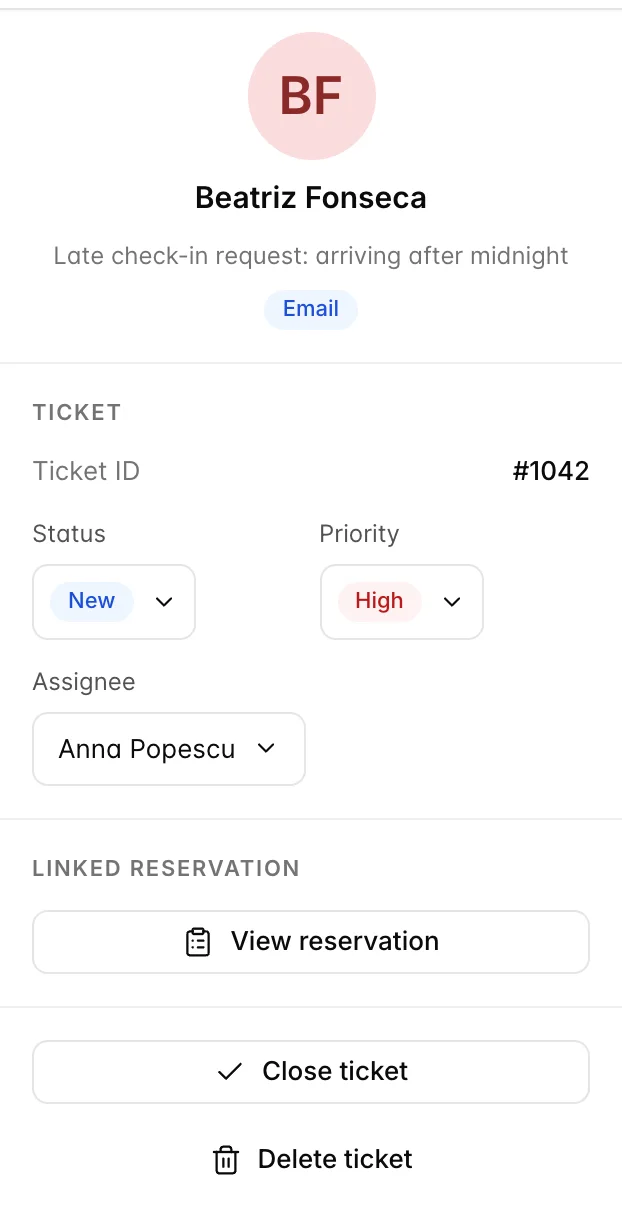
The panel on the right of an open email holds the ticket. Every control on it saves the moment you use it: there is no save button and no confirmation. Ticket ID at the top is the reference to quote when you ask a colleague to look at something.
Status
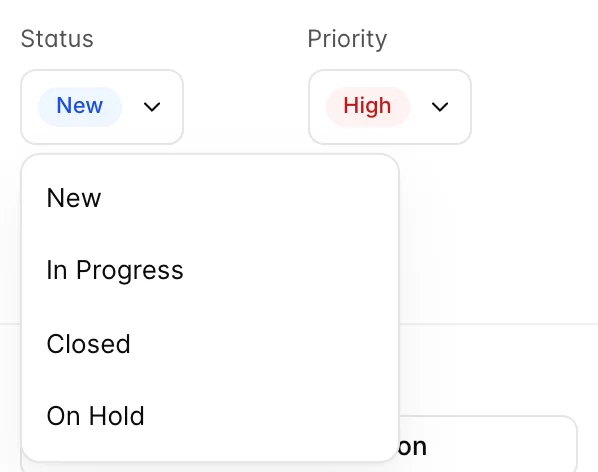
| Status | What it means, and when to use it |
|---|---|
| New | Nobody has touched it. Every email arrives here. A ticket still sitting on New an hour into the shift is the one to worry about. |
| In Progress | Somebody is dealing with it. Set this when you reply but the matter is not settled, so the next person can see it is in hand rather than reply again. |
| On Hold | Waiting on something outside the conversation: the guest, a supplier, a manager's decision. Use it honestly, because it is the one status that takes a ticket off the Open list without anybody having finished it. |
| Closed | Finished. This moves the conversation out of the Inbox and into the Closed folder. |
Priority
Three levels: Low, Normal and High. Priority sorts nothing and alerts nobody. Its entire effect is the badge on the row in the list, which is enough, because the list is where somebody decides what to pick up next.
Reserve High for things that go wrong if they wait until tomorrow: an arrival today, a payment that failed, a complaint from someone still in the building. A list where a third of the rows are High is a list with no priorities at all.
Assignee
The list holds every user on the property plus Unassigned. Assigning is a note to your colleagues, nothing more: the person you pick is not emailed, is not notified in the app, and will not see the ticket anywhere except in this same shared list.
That makes it worth doing anyway, because it answers the question two people ask before they both reply. On a property with one person on the desk at a time it is not worth the clicks; on a property where reception and reservations share the inbox it is the whole point.
The linked reservation
When the email came in against a known reservation, this section appears and the button opens that booking in the PMS. When it does not, the section is not drawn at all, and there is no way to attach a reservation to a ticket from this screen.
So a guest emailing from an address that does not match their booking gives you a ticket with no link, and the only way to see their stay is to search for them in the PMS yourself. That is worth knowing before you promise a colleague that the link will be there.
Closing and deleting
Close ticket is the same action as setting the status to Closed: the conversation leaves the Inbox and appears in Closed. Once closed, the button reads Ticket closed and stops working, so reopening means setting the status back to something else.
Delete ticket moves the conversation to Trash, out of every list and out of search. Use it for spam and for genuine mistakes. Do not use it to tidy up, because a deleted ticket is the one thing on this screen you cannot get back yourself.
A routine that works
- Start on Email, Inbox, filtered to Open. That is the list of guests waiting on you.
- Work down it. Reply, then set the status: In Progress if it is not finished, Closed if it is.
- Set High on anything that goes wrong if it waits, and assign it if somebody specific has to do it.
- Use On Hold only when you are genuinely waiting on somebody else, and check that filter once a day.
- Look in Spam once a week.
The point of all of it is the second step. A property that replies and files gets an Open list that means something. A property that only replies gets a list of forty New tickets, all of them answered, none of them distinguishable from the one that was not.
For the screen itself, and for how replying differs between email, WhatsApp, Booking.com and Expedia, see reading and replying in the unified inbox.