Getting to the screen
You get here by typing the address. It is your property's name followed by /communication/whatsapp/deleted, so if your inbox is at /marlowe-hotel/communication, this screen is at /marlowe-hotel/communication/whatsapp/deleted. There is no menu entry, no button and no rail entry that will take you there.
That is worth saying plainly rather than hiding, because you will otherwise spend a while looking for a link that does not exist. The screen works, it is protected by its own permission, and somebody clearly meant it to be used, but nothing in the product points at it. If you expect to need it, bookmark it now.
What deleting actually did
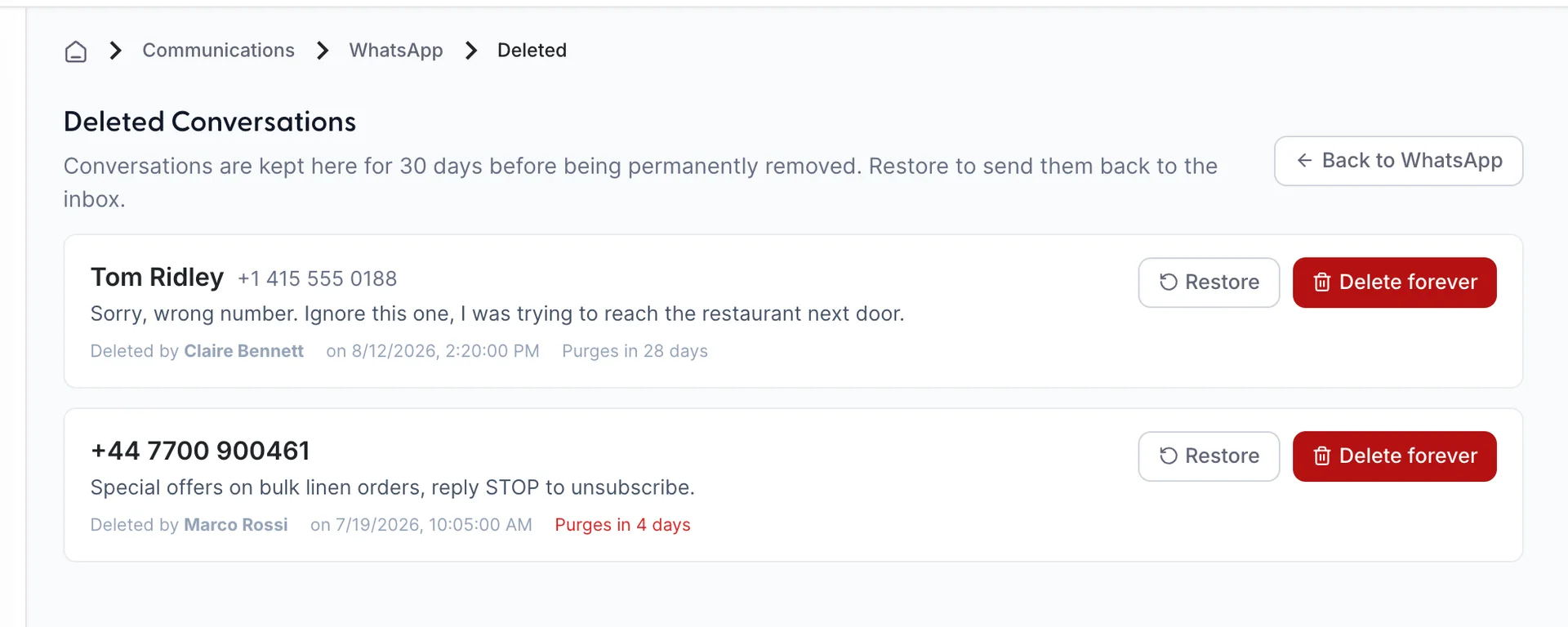
When somebody deletes a WhatsApp conversation from the inbox, it is not destroyed. It is moved here and a thirty day clock starts. At the end of the thirty days it is deleted properly, by the system, without asking anybody.
So there are three states a conversation can be in, and the difference between the second and the third is the whole point of this screen:
| State | What it means |
|---|---|
| In the inbox | Normal. Visible in the WhatsApp channel, searchable, repliable. |
| Deleted | Here. Out of the inbox and out of search, but intact and recoverable for thirty days. |
| Purged | Gone. Either the thirty days ran out or somebody used Delete forever. There is nothing to recover. |
Reading a deleted conversation

Each card carries the contact's name where the guest is known and their number where they are not, the last message in the conversation, and a footer line with three facts on it: who deleted it, when they deleted it, and how long is left before it purges itself. The countdown turns red at five days or fewer.
You cannot open a deleted conversation and read the whole thread. The preview is all you get, which is usually enough to recognise the one you are looking for and occasionally not. If you need the thread itself, restore it, read it in the inbox, and delete it again.
Restoring one
Restore puts the conversation back in the WhatsApp channel of the inbox, where it behaves as it did before, and takes it off this list. There is no confirmation step, because there is nothing to lose: restoring a conversation you did not mean to restore is undone by deleting it again, which brings it back here with a fresh thirty days.
It arrives back in the list in its own place by date rather than at the top, so a conversation from three weeks ago will not be sitting where you are looking. Search for the guest or the number instead of scrolling.
Deleting one forever
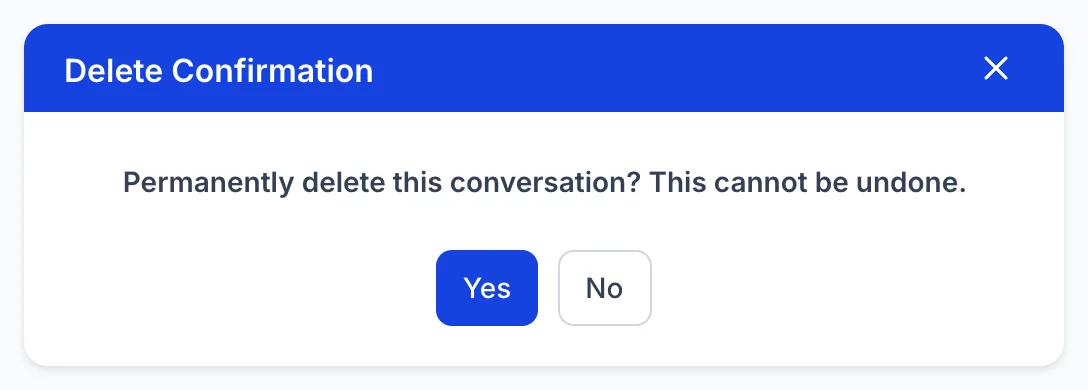
Delete forever does what the countdown was going to do anyway, immediately. The conversation and its messages are destroyed. There is no second copy, no archive behind it, and no request you can make to Prostay support to get it back.
The dialog asks once and the confirming button is labelled Yes. Read the sentence rather than the button, because the same dialog is used across Prostay for ordinary deletions that can be undone, and this is not one of them.
Who can see this
Seeing this screen needs See deleted WhatsApp messages, which is a separate permission from viewing the WhatsApp inbox and is marked as sensitive in roles and permissions. Granting it is a real decision rather than a formality, and the reason is that it is one permission covering three things. There is no separate permission for restoring and none for deleting forever, so anyone who can see this screen can also read a conversation a colleague deliberately removed, put it back in the shared inbox, and destroy it ahead of schedule. Grant it to the people you would trust with the last of those, not the first.
The screen is per WhatsApp account. On a property with one number there is nothing to choose and the list is simply that number's deleted conversations; on a property with more than one, an Account: selector appears above the list and each account keeps its own. A conversation deleted on one number will not appear under another.
What this is not
It is not the email Trash folder. Email has six folders of its own, Trash among them, and they are described in working email as tickets. Trash and this screen have nothing to do with each other: a deleted email is not here, a deleted WhatsApp conversation is not in Trash, and the thirty day purge described above applies only to WhatsApp.
It is also not a record of deleted messages. The inbox deletes whole conversations and not individual messages, on every channel, so the unit that arrives here is one guest's entire WhatsApp thread.
And it is not an audit log. It shows what is currently deleted and not yet purged, so a conversation that has already been destroyed leaves no trace on this screen. If you need to know what happened to something that is no longer listed here, the answer is that it purged or somebody deleted it forever, and this screen cannot tell you which.