Read this first
Everything in this article changes what your hotel pays or whether it keeps its account. Three of the four actions cannot be undone from inside Prostay, and one of them eventually deletes every reservation you have.
Three facts hold across all of them, and knowing them makes the rest of this article straightforward.
Nothing takes effect today. Every one of these actions lands on your renewal date, which is the date shown as Next invoice on the Subscriptions screen. Until that date arrives, your hotel works exactly as it did.
You keep what you have paid for. Prostay does not take away access you have already bought. Cancelling in the middle of a period does not end your access that afternoon, and it does not refund the remainder either.
Cancelling is a request to Prostay, not a switch you throw. The cancellation dialog sends your request to Prostay's team, who action it. The one control on these screens that ends a subscription on its own is the recurring billing switch, which is why it appears before cancelling below rather than after it.
Where the controls are

They live on a single product's detail page, reached with View Details on any row of the Subscriptions table. There is no account-wide version of any of them, which has one consequence people miss: these actions apply to the product you opened, not to your whole account. Cancelling the Channel Manager leaves the Property Management System running and billing.
What you cannot do here is change plan. Moving between Prostay's tiers, or adding a product you do not already have, is a conversation with Prostay rather than a button. This screen only changes the terms of something you already own.
Switching between monthly and yearly
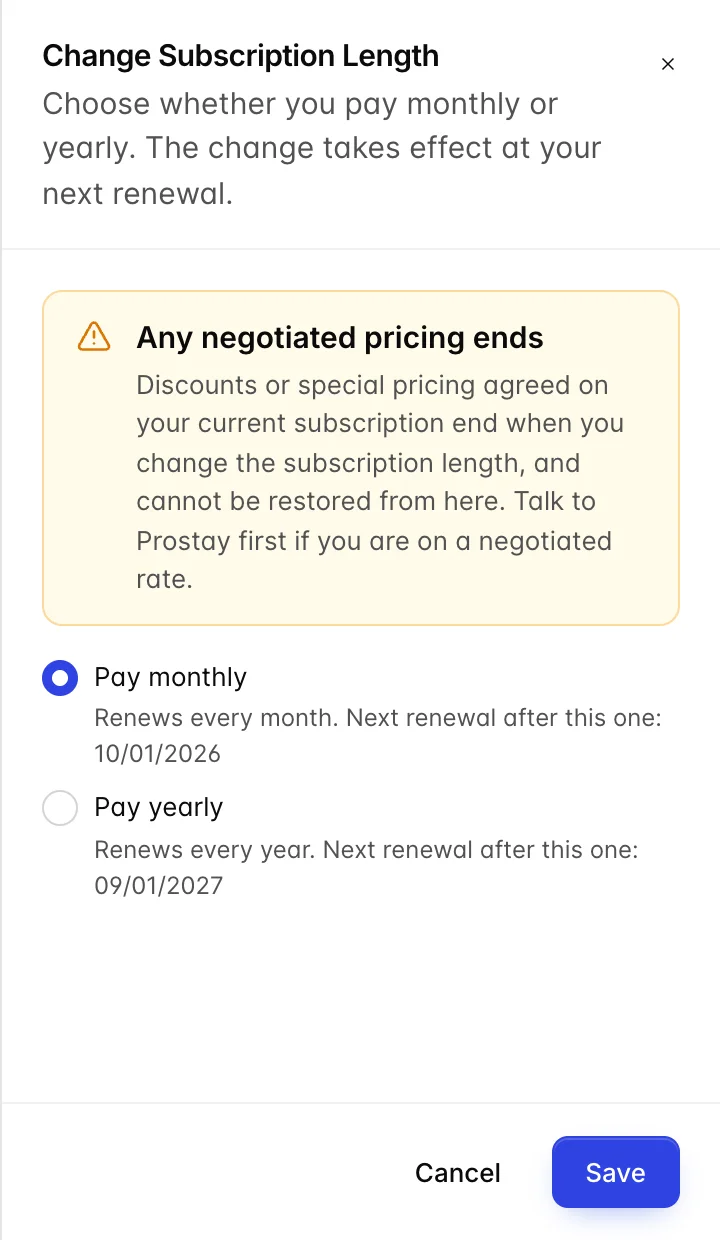
Change subscription length is about renewing every month or every year. The option you are on now is selected when the drawer opens, and the hint under each option names the renewal date that would follow your current one, so you can see what you are choosing before you choose it.
It sends a request rather than making the change. The button at the foot says so, and the drawer confirms afterwards that your request has gone to Prostay's team. Your billing frequency is whatever it was until somebody there actions it, which is the same arrangement as cancelling, below. Plan around it if a renewal is close: the change will not beat the invoice on its own.
Read the warning panel before you touch the options. If Prostay has agreed a discount or any special pricing with you, changing the subscription length ends it, permanently, and nothing on this screen can put it back. That is a phone call to Prostay, not a button. If you are on a negotiated rate, make the call before you make the change.
If you are on standard pricing, this is the mildest action in the article. Yearly billing usually costs less over twelve months and means one invoice instead of twelve; monthly costs more in total and keeps your commitment short. Whichever way you go, it takes effect from a renewal rather than part-way through the period you have paid for.
Turning recurring billing off
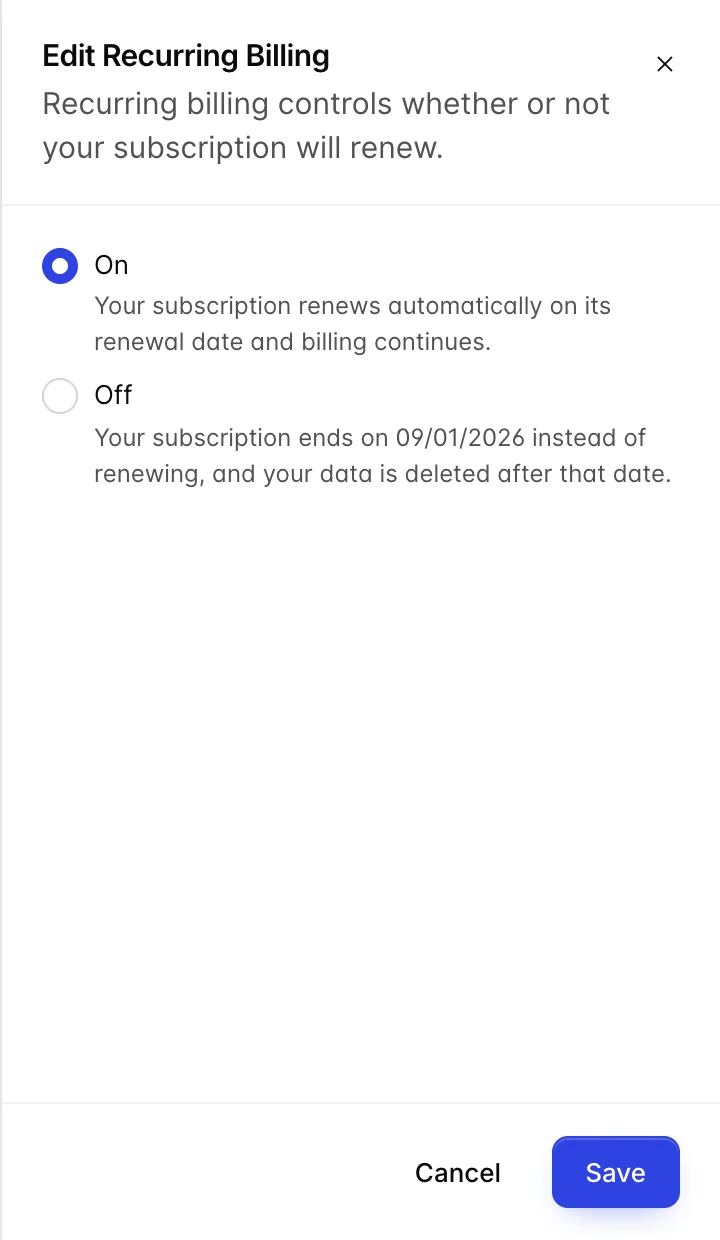
The Recurring billing switch looks like a preference and is not one. On means the card on file is charged on your renewal date and the subscription continues. Off means it is not charged, the subscription is not renewed, and it lapses on that date.
Off ends the subscription and, after the renewal date, deletes the data. The outcome is the same as cancelling, and the route is better: it takes effect on its own, where a cancellation request waits on somebody at Prostay. Read the hint under Off before you save it, because it is the one place on this screen that says the subscription is being ended rather than paused.
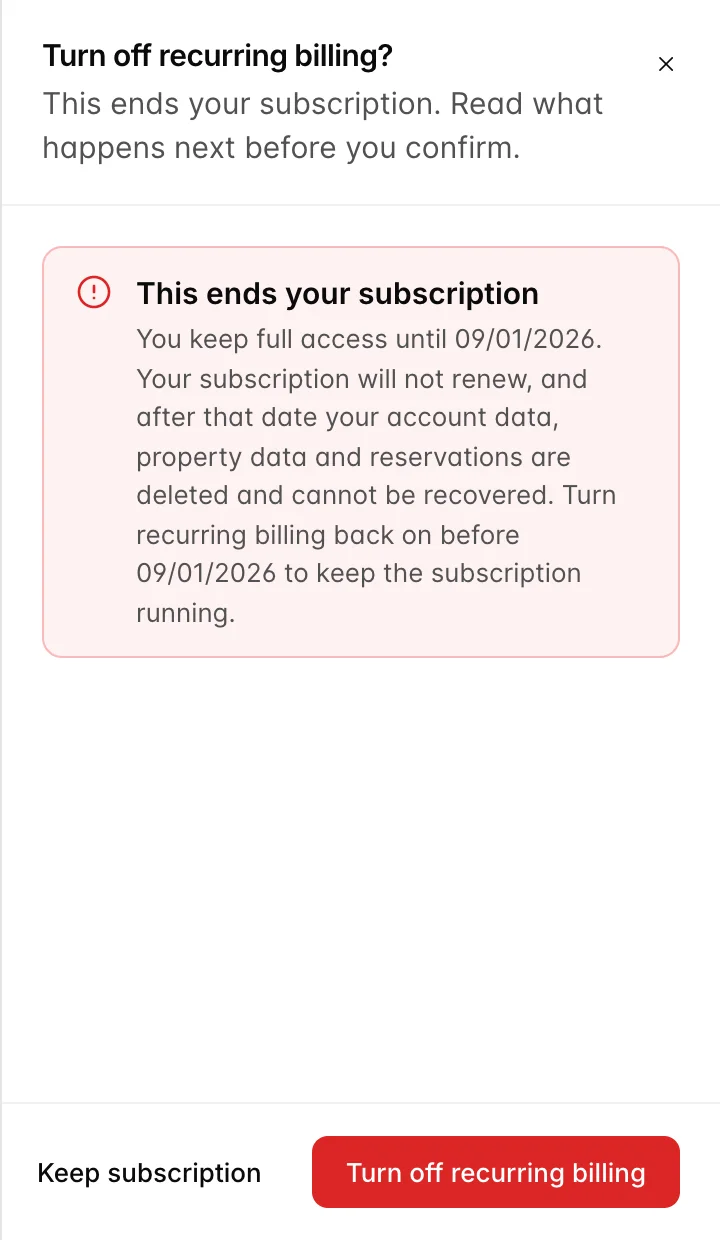
It is also reversible right up to the renewal date. Switch it back on before that date and nothing happens at all. If you are unsure whether you are leaving, turning recurring billing off buys you until the renewal date to decide, without submitting a cancellation.
Turning it off does not pause your subscription, reduce your bill, or stop the invoice for the period you are already in. There is no pause on this screen. If what you want is to stop paying for a quiet season and come back, ring Prostay rather than using this switch.
Removing your last card
This one is not on this page and catches people anyway. Removing the only card from your billing profile leaves Prostay nothing to charge, so your renewal fails and your invoices go unpaid, and unpaid invoices eventually suspend your products.
It is not a way to cancel, and it is a bad way to try: you end up with an overdue account and suspended modules rather than a clean ending. If you want to stop paying, use one of the two routes above. If you are changing cards, add the new one first.
Cancelling
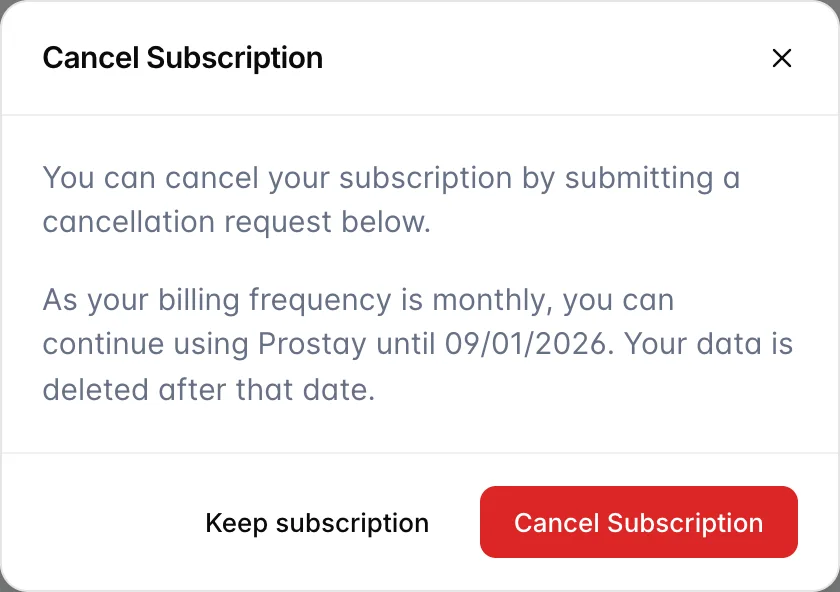
Cancel subscription opens a dialog in two steps, and neither step ends the subscription by itself. Step one is information: it names the date your access runs to, worked out from your billing frequency. Nothing has been submitted at this point, Keep subscription leaves without doing anything, and Request cancellation moves you to step two.
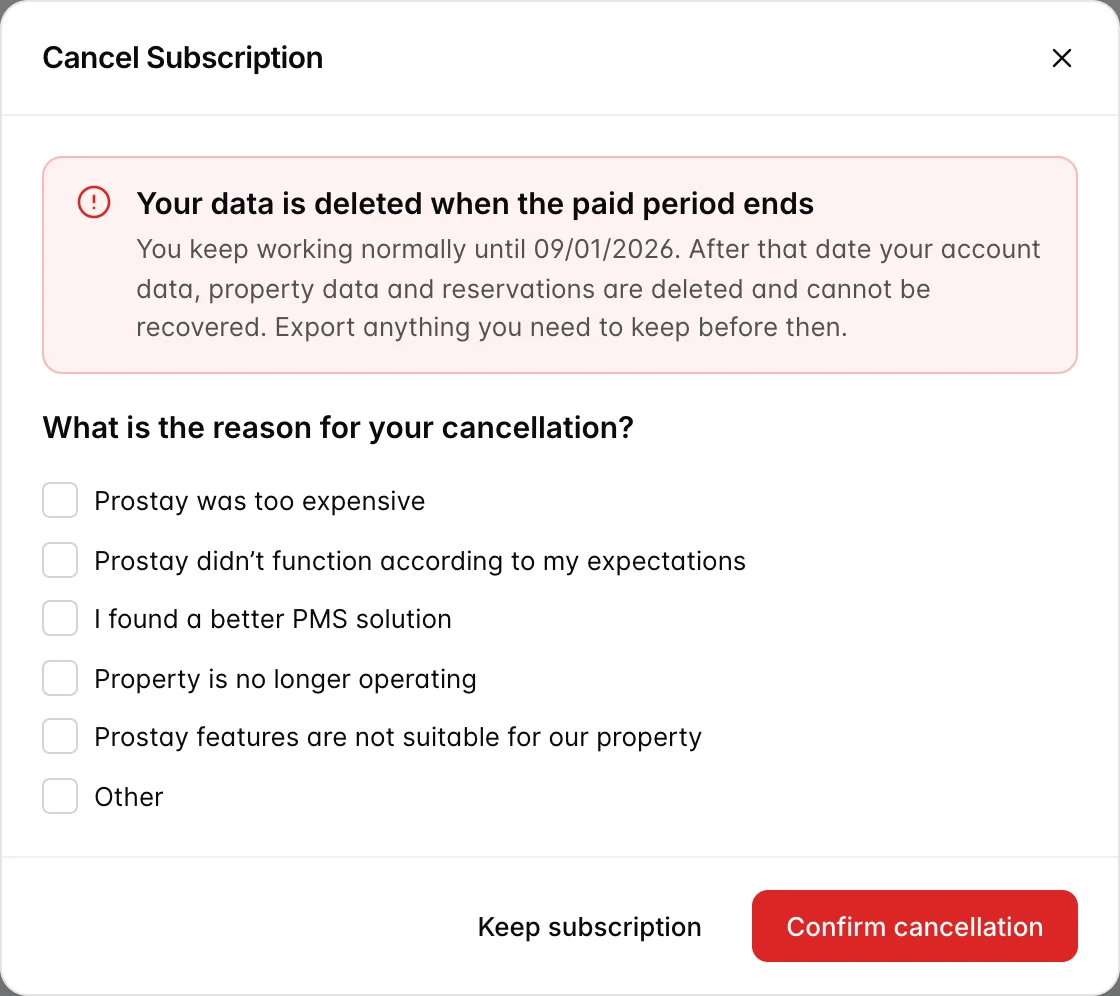
Step two asks why you are leaving and states plainly what happens. The reasons are checkboxes and you can tick more than one, with a free-text box under Other. They are feedback to Prostay and change nothing about the cancellation, so tick as many or as few as you like.
Send request submits it. The dialog then confirms that your cancellation request has been sent to Prostay's team and that they will be in touch to process it. That is a request, not the cancellation. Nobody can end a subscription from this screen: it reaches a person at Prostay, who actions it, so your subscription is live at the moment the dialog thanks you and stays live until they have dealt with it.
After you cancel
Three things happen, in this order, once the cancellation is actually in place: after Prostay has actioned your request, or from the moment you turn recurring billing off.
- Immediately. The product stops being set to renew. Nothing else changes. Every user can still sign in, every screen still works, and your reservations, guests and reports are all where you left them.
- Until your renewal date. You keep full access to everything you have paid for. This is the window to get your data out, and it is the reason the warning tells you to export anything you need to keep.
- After your renewal date. The subscription ends and your account data, property data and reservations are deleted. This cannot be recovered, by you or by Prostay support.
Use the window rather than the last day of it. Reports export from the reporting screens, guest and reservation data can be exported from their lists, and invoices download individually from the Invoices tab. A hotel with a year of history should allow an afternoon for this, and should do it in the first week rather than the last.
If your property has legal or tax obligations to keep booking records for a number of years, those obligations do not end when your subscription does. Exporting before the deletion date is the only thing that satisfies them.
If you change your mind
Before your renewal date, contact Prostay. The account still exists and all of its data is still there, so reversing a cancellation is a conversation rather than a rebuild. Do not wait: the difference between the day before that date and the day after is the difference between a phone call and starting again from nothing.
If you turned recurring billing off rather than cancelling, you can reverse it yourself by turning it back on before the renewal date.
Who should be able to do any of this
These actions are governed by two permissions under Billing & Subscription in a role's permissions: Change subscription billing terms covers the subscription length and the recurring billing switch, and Cancel the Prostay subscription covers the cancel dialog. The controls do not appear at all for somebody without them.
Cancelling ends the hotel's account and deletes its data. Grant that permission to whoever would sign the contract, and to nobody else. A receptionist does not need it, a duty manager does not need it, and neither does anybody who only came here to download an invoice.