Why the Fixed Terminal Is the Bottleneck
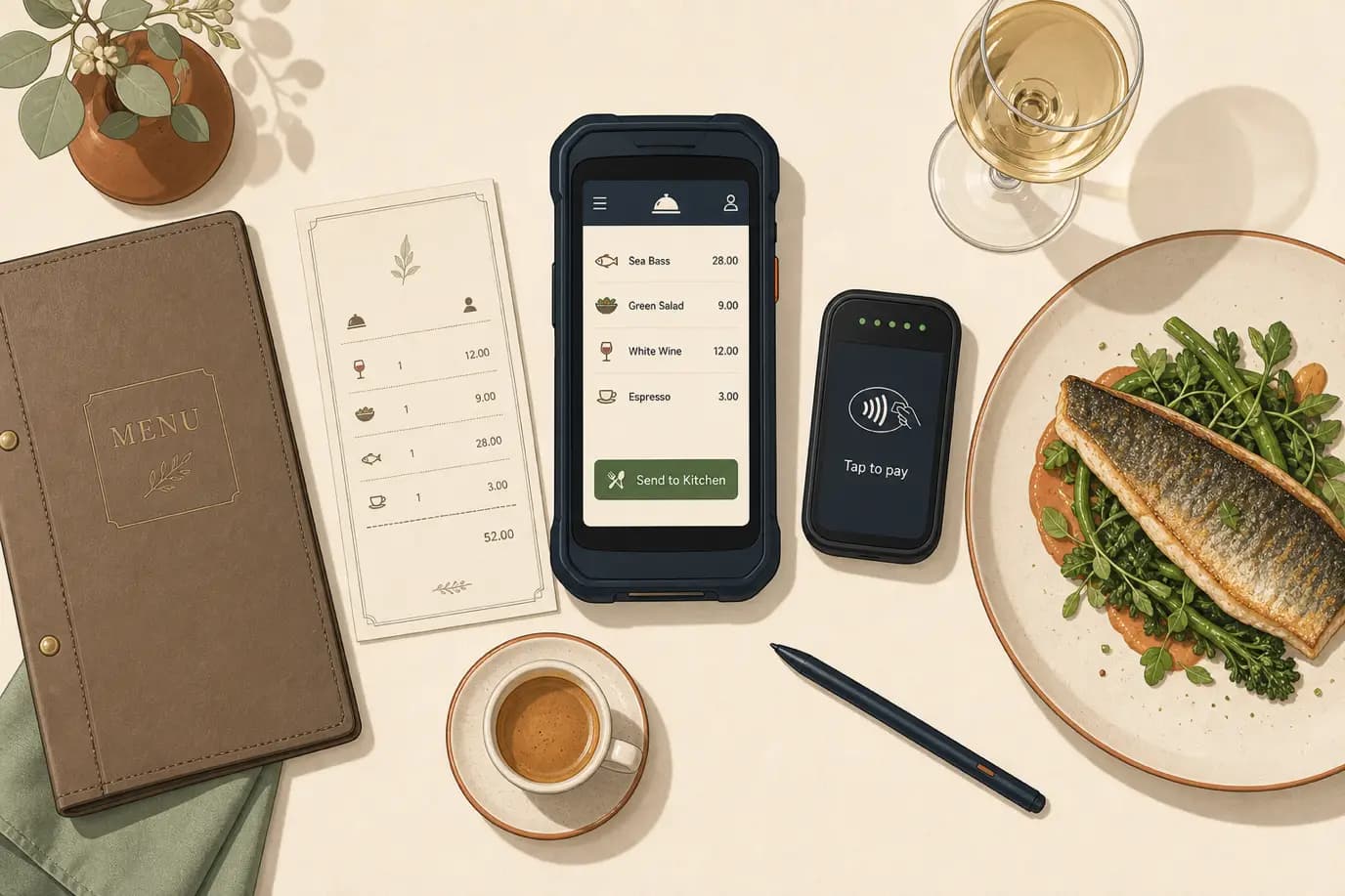
Watch your restaurant during a full Friday service and you will see the same pattern repeat at every table. The server greets, takes the order on a pad or in their head, then turns and walks to the one or two fixed terminals bolted near the kitchen door. There is usually a small queue. They wait, key in the order, and only then does the kitchen learn that table nine wants the sea bass. That round trip, repeated hundreds of times a night, is dead time, and it is the quiet reason your covers-per-night ceiling is lower than your dining room actually allows. A modern hotel point of sale system moves the order entry to the table itself, on a handheld device, so the kitchen starts cooking the moment the guest stops talking.
This is not a gadget story. It is an operations and revenue story that happens to involve a device. Handheld ordering compresses the time between "I'll have the sea bass" and the kitchen firing it, which pulls the entire meal earlier, which lets the table free up sooner, which means another seating on a busy night. It also kills the transcription errors that come from a server holding six tables of orders in their head, and it lets the same server post the bill straight to the guest's room through your property management system without a separate trip to the front desk. For a hotel restaurant, where a large share of guests are staying upstairs, that charge-to-room link is the difference between a POS built for restaurants and a POS built for hotels.
I write for Prostay, and our team builds the Tableview point-of-sale product that does exactly this, so treat the vendor-neutral parts of this article as the genuinely useful core and the one honest section near the end as the disclosure it is. The arguments below come from watching real hotel restaurants run handhelds well and badly: the table-turn math, the order-accuracy gains, the end-to-end order flow, pay-at-table, charge-to-room, multi-outlet operation, the offline question that makes or breaks adoption, hardware that survives a wet pool deck, and a 30-day rollout plan. The goal is to expand what you can do with the floor and the team you already have, not to sell you a screen for its own sake.
What Tableside Ordering and Handheld POS Actually Mean
The terms get used loosely, so let us be precise. Handheld POS is a mobile point-of-sale device, a ruggedised handheld or a phone-sized terminal, that runs the same point-of-sale software your fixed terminals run, carried by the server. Tableside ordering is the practice of taking the order directly into that device at the table, rather than writing it down and re-entering it later. Pay-at-table is settling the bill at the table on the same device, including card and contactless, without the guest's card leaving their sight. These three usually arrive together, but they are distinct capabilities, and a vendor may do one well and another badly.
There is a related but separate model worth naming so you do not confuse it: guest-facing QR ordering, where the diner scans a code and orders from their own phone. That has a place in casual and poolside settings, but it is a different product decision with different trade-offs (it removes the server from the interaction, which is wrong for most hotel restaurant service). This article is about staff-operated handhelds, where the server keeps the relationship and the technology removes the walking, not the human.
The reason handhelds matter more in a hotel than in a standalone restaurant comes down to context. A hotel F&B operation is rarely one room. It is a restaurant, a bar, often a lobby lounge, room service, a pool or rooftop in season, and banquet or event service. Guests expect to charge any of it to their room. Staff move between outlets. A handheld that works across all of that, posting to one folio and reporting into one system, solves a coordination problem a single-restaurant operator never has. The device is the visible part; the integration underneath it is the part that actually pays off.
The Revenue Case: Table Turns, Check Size, and Labor
Before any feature list, the question an owner should ask is simple: what does this do to the numbers? Handheld ordering moves three levers, and it is worth seeing them with real arithmetic rather than vague promises of efficiency.
More Table Turns Without More Tables
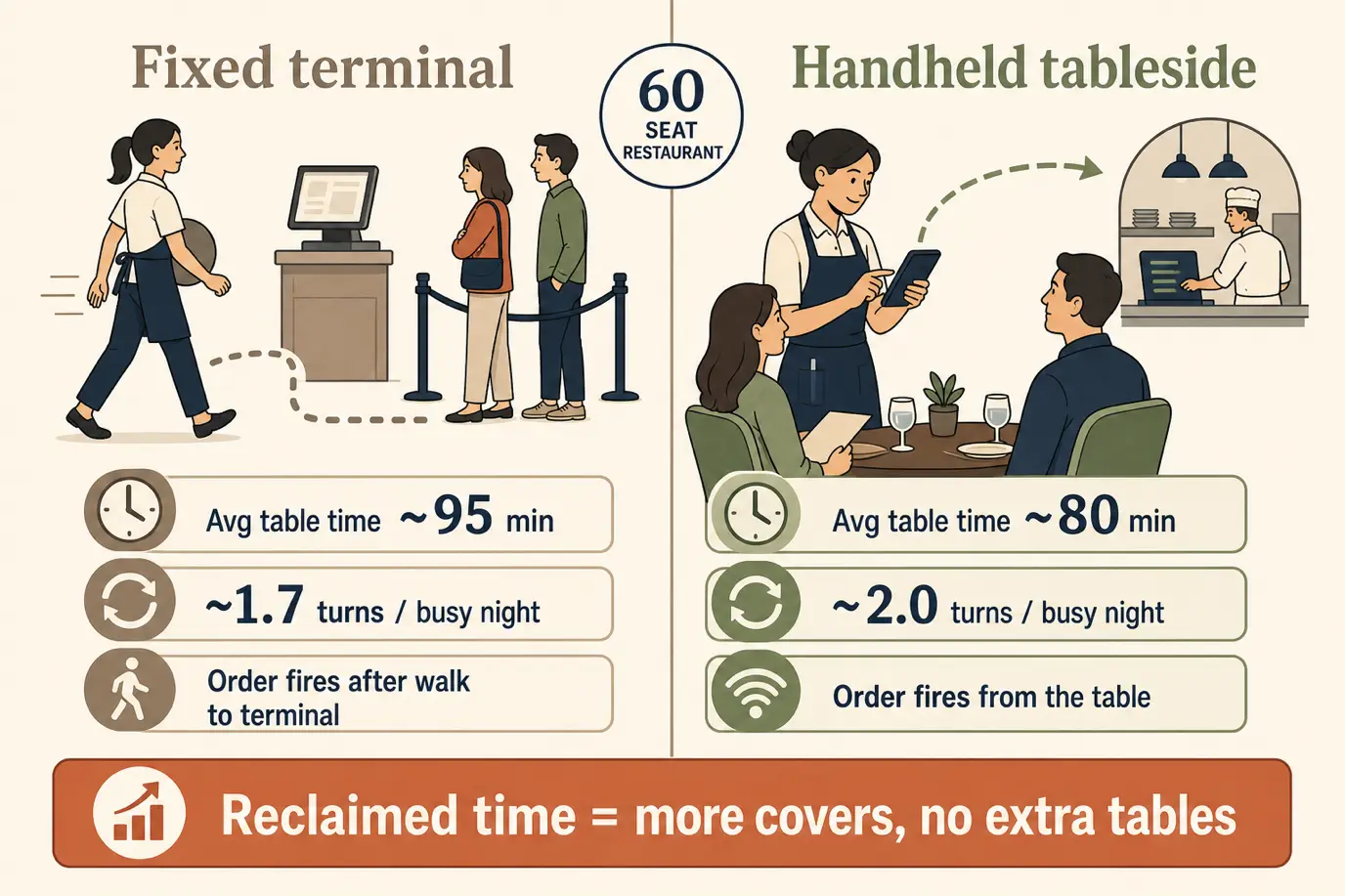
Take a 60-seat restaurant doing two dinner seatings on a busy night. Suppose the average table currently occupies its seats for 95 minutes, of which a meaningful slice is dead time: waiting for the server to reach a terminal to fire the order, then two more trips at the end to print and settle the check. Shave 12 to 15 minutes off that cycle by firing orders instantly and paying at the table, and the average table drops toward 80 minutes. On a packed evening that is the difference between turning a section 1.7 times and turning it 2.0 times. Across the room that can be a dozen or more extra covers a night, with no extra tables, no extra rent, and the same kitchen. Multiply by your average check and your busy nights per month, and the device pays for itself faster than most operators expect. The honest caveat: this only works where you are actually constrained. A half-empty room has no queue to remove.
Bigger Checks From Prompted Upsells
The second lever is check size. A handheld with a good menu screen prompts the server at the right moment: a modifier the guest might want, a wine pairing suggested next to the dish, a side that goes with the main, a dessert prompt when the entrees clear. These are not aggressive upsells; they are the suggestions a great server makes anyway, made consistently by every server because the system surfaces them. Even a small lift in attachment, an extra side here, a second glass of wine there, compounds across a full service. Combined with the fact that orders are entered accurately the first time, so nothing is comped away for being wrong, the average check tends to drift up rather than down once handhelds are in real use.
The third lever is labor. This one is subtler and easy to oversell. Handhelds do not let you cut servers; service quality in a hotel restaurant still depends on attentive people. What they do is let the same team cover more tables competently during a rush and move between outlets without re-learning a different system, which is where the labor value actually sits. Frame it as capacity per server on a busy night, not as a headcount cut, and you will set expectations your floor managers can actually deliver against.
Order Accuracy and the Cost of the Re-Fire
The cost of a wrong order is larger than it looks, and accuracy is where handhelds quietly earn their place even in restaurants that are not volume-constrained. When a server takes six tables of orders on a notepad and keys them in later from memory and shorthand, mistakes happen: the wrong cooking temperature, a missed allergy note, the modifier that did not make it to the kitchen. Each error costs you twice. You eat the food cost of the wrong dish, and you eat the time: the kitchen re-fires, the table waits, the rest of that table's food sits under the pass going cold, and a server who could be turning other tables is instead apologising and chasing a remake.
Taking the order at the table, into a structured screen that forces the modifier and the allergy flag to be entered explicitly, removes most of that. The guest can even confirm the order as the server enters it. For allergens this is not just efficiency; it is safety and liability. A system that records that a coeliac guest at table four flagged gluten, and carries that flag to the kitchen display, is a materially safer operation than one relying on a server's memory and a scribbled note. In a hotel, where a serious allergic incident is both a human tragedy and a reputational and legal disaster, the accuracy argument alone justifies the move for many properties, before you even count the reclaimed table turns.
The Order Flow, End to End
To judge a handheld setup you have to see the whole path an order travels, because the value is in the links, not the device. Here is what good looks like, step by step.
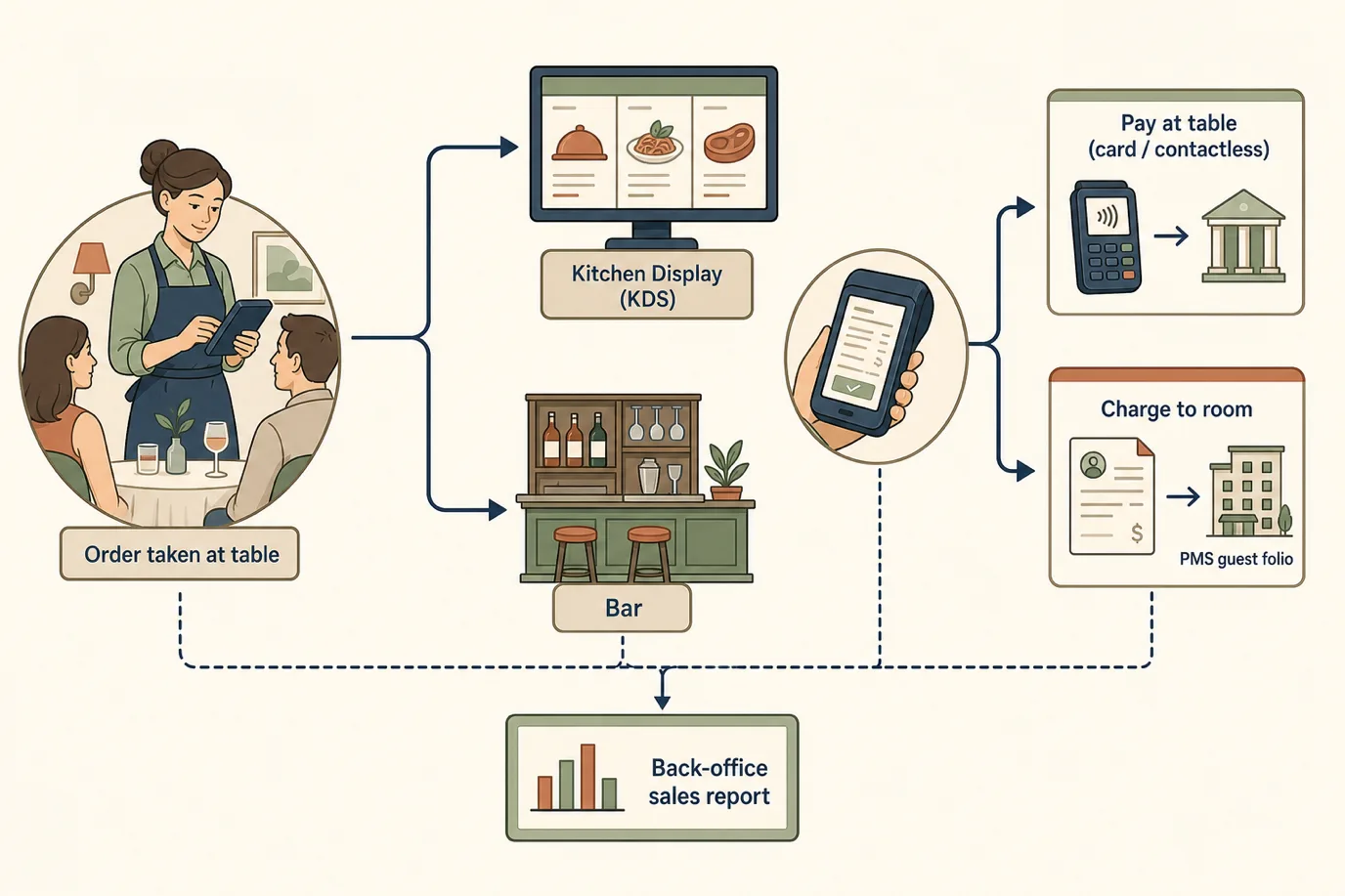
The server enters the order at the table. It fires immediately, and ideally it routes intelligently: food items to the relevant kitchen display or printer, drinks to the bar, a starter held back from the mains if the server sequences the courses. The kitchen display (the KDS) shows the order with its timing, modifiers, and allergy flags, and the expeditor works from a live, legible screen instead of a smudged ticket rail. As courses go out, the server fires the next ones from the floor without returning to a terminal. When the meal ends, the same device either takes payment at the table or posts the charge to the room. Behind all of it, every item lands in one sales record that feeds your reporting and your night audit.
The test of a real system, as opposed to a handheld bolted onto a legacy POS, is whether each of those links is live and two-way. Does the order reach the kitchen instantly, or batch? Does the KDS reflect a voided item in real time? Does a charge-to-room check against the PMS the moment the server posts it, or get reconciled at 2 a.m.? The gaps in that flow are where covers, accuracy, and revenue leak, and they are exactly what you should probe in a demo.
Pay-at-Table and the Walk-Out Problem
Settling the bill at the table does two useful things. It shortens the close, removing the two trips a server otherwise makes to print the check and then run the card, which matters for table turns and for the guest who is ready to leave and hates waiting to pay. And it improves payment security and trust: the card never leaves the guest's sight, contactless and digital wallets are a tap away, and you avoid the awkward choreography of carrying cards back and forth to a terminal.
It also addresses the walk-out, the table that leaves without paying during a chaotic rush. When paying is quick and happens at the table while the server is right there, the window for an unpaid departure shrinks. For a hotel restaurant the pay-at-table flow should also cleanly offer the room-charge option alongside card and contactless, so the in-house guest taps one button to put it on their folio and the external diner pays by card, all from the same screen, without the server guessing or walking away. Done well, the close becomes a 30-second interaction at the table instead of a five-minute relay to the terminal and back.
Charge-to-Room From the Handheld
Charge-to-room is the capability that separates a hotel POS from a generic restaurant one, and on a handheld it becomes genuinely frictionless: the server looks up the guest by room or name at the table, confirms they are authorised to charge, and posts the check to the folio in seconds. The charge appears on the bill at checkout and flows through the night audit like any other posting, with no slip of paper to lose and no front-desk retyping.
The mechanics of that posting, how the F&B charge moves from the POS into the PMS folio, where it can silently go wrong, and how the night audit reconciles it, are a deep topic in their own right, and we wrote a dedicated piece on exactly that: the hotel POS-to-PMS charge posting guide, including the seven errors that hide in a daily sales report. For this article the point is narrower: the handheld is what brings that posting to the table, so the guest never has to be walked to the desk and the charge is captured the moment the meal ends rather than reconstructed later. If your current setup makes a server leave the floor to post a room charge, you are paying for that walk in covers every night.
One Handheld Across Restaurant, Bar, Pool, and Room Service
This is where hotels capture value a standalone restaurant never can, and where the biggest operational saving usually hides. A hotel does not have one food-and-beverage outlet; it has several, and they share guests, staff, and a kitchen. Run them on one POS platform with separate outlet profiles, and a single fleet of handhelds works everywhere: the restaurant at dinner, the lobby bar later, the pool or rooftop in summer, room service around the clock, and banquet or event billing when the function room is busy.
The payoff is fourfold. Reporting consolidates, so you see total F&B performance in one view rather than stitching together exports from three systems. Menus and pricing are managed once and pushed to every outlet, so a price change or an 86'd item updates everywhere at once. Staff become portable: a server trained on the system can pick up a pool shift or cover room service without learning a different tool. And there is one charge-to-room integration to the PMS, not three fragile ones that each fail differently at the night audit. Compare that with the common reality of a restaurant POS from one vendor, a bar till from another, and room service run off a paper docket, and the consolidation case often outweighs the table-turn case on its own.
Seasonality sharpens the point. A property that opens a pool bar for four months does not want to buy and integrate a separate seasonal POS; it wants to hand the pool team three handhelds from the existing fleet, switch them to the pool outlet profile, and go. The same is true for a one-off large event: extra devices, same system, same training, charges flowing to the same folios and the same reports.
What Happens When the Wi-Fi Drops
Ask any operator who has run handhelds badly what killed adoption, and the answer is usually the network. Hotel Wi-Fi has dead spots. The far corner of the terrace, the private dining room behind the thick wall, the pool deck: somewhere on your property the signal is unreliable, and if the handheld stops working when the signal does, the staff will quietly go back to paper within a week and your investment is dead.
The capability that prevents this is local resilience. A well-built handheld POS caches orders on the device and communicates with the kitchen over the local network, so even if the internet connection to the outside world drops, the server can still take orders and fire them to the kitchen, with everything syncing to the central system once the link returns. Card payments are the exception, because authorising a card needs a live connection to the processor, so pay-at-table may pause in a true outage; but order-taking and kitchen firing, the core of service, should keep working. When you evaluate a system, do not take this on faith. During the trial, deliberately disable an access point and watch what the handheld does. A system that degrades gracefully is one your staff will trust; one that freezes is one they will abandon.
Choosing Hardware That Survives a Hotel Floor
The software matters most, but the hardware is what gets dropped, splashed, and run flat, so it deserves real thought. A hotel floor is a hostile environment for a delicate consumer device. Spilled drinks, greasy hands, a poolside in the sun, a busy server setting the device down on a wet bar: the hardware has to take it.
A few practical criteria separate devices that last from ones that end up in a drawer. Durability and a water-resistant rating matter for any outlet near a pool or a bar. Battery life has to cover a full service without a mid-shift recharge, or you need a charging routine that staff will actually follow. The device should be light enough to carry comfortably for hours and small enough to hold while plating a check. If you take card payments at the table, decide whether you want an all-in-one device with an integrated card reader, which is one less thing to carry, or a separate reader. And weigh the trade-off between purpose-built ruggedised hardware, which costs more but survives, and a consumer tablet in a protective case, which is cheaper up front but tends to fail faster in this environment. The right answer depends on your outlets, but the mistake to avoid is choosing on sticker price alone and replacing cracked screens every quarter.
Getting Staff to Actually Use It
The best handheld system fails if the floor does not adopt it, and adoption is a management problem more than a technology one. Experienced servers often have a fast, comfortable paper-and-memory routine, and a new device can feel like a step backward in week one. The properties that succeed treat the rollout as a change to manage, not a tool to install.
What works is concrete. Involve a respected senior server early and let them help shape how the menu is laid out on the screen, because a screen organised the way servers actually think speeds everyone up and turns your best server into an advocate rather than a sceptic. Train in short, hands-on sessions on the real menu, not a generic demo, and let people practise during a quiet shift before a rush. Expect week one to be slower and staff it accordingly, so the learning curve does not collide with a full Saturday. And listen to the friction: if servers complain that posting a room charge takes too many taps or the wine list is buried three screens deep, those are fixable configuration problems, and fixing them fast is what converts grudging users into fluent ones. Adoption is won in the first two weeks; plan them deliberately.
A 30-Day Tableside Rollout Plan
A month is enough to take a hotel restaurant from fixed terminals to confident tableside service, if you sequence it sensibly rather than switching everything on a Friday night and hoping.
Days 1 to 5: map and decide. List your outlets (restaurant, bar, room service, pool, banquet) and your busiest services, the ones where table turns actually cost you. Confirm the two integrations that matter most: the kitchen display or printer routing, and charge-to-room to your PMS. Decide how many devices each outlet needs.
Days 6 to 12: build the menu and the flow. Set up the menu, modifiers, allergy flags, and course sequencing on the system, with a senior server in the room. Configure outlet profiles, kitchen routing, and the room-charge lookup. Get the screen layout to match how servers think before anyone touches a guest.
Days 13 to 18: test the hard cases. Run the offline test by disabling an access point and confirming order-taking survives. Run a charge-to-room end to end and confirm it lands on the right folio. Run a void and a comp and confirm the kitchen display reflects them. Fix what breaks before guests are involved.
Days 19 to 24: train and rehearse. Short hands-on sessions on the real menu, then a soft launch during quieter shifts so staff build fluency without the pressure of a full room. Capture the friction points and fix the configuration.
Days 25 to 30: go live and measure. Roll the handhelds into your busy services, with extra floor support for the first weekend. Then measure: average table time, covers on comparable nights, void and re-fire rates, and average check, against your pre-rollout baseline. The numbers tell you whether to extend the fleet to the next outlet. At the end of the month you should have a working tableside operation in your main restaurant and a clear, evidence-based case for rolling it to the bar and beyond.
Where Tableview Fits, Briefly and Honestly
I write for Prostay, and Tableview is our point-of-sale product, so here is the straight disclosure. Tableview is built as a hotel POS rather than a restaurant POS that happens to be in a hotel, which means handheld tableside ordering, pay-at-table, multi-outlet profiles for restaurant, bar, pool, and room service, kitchen display routing, and offline resilience are designed in, and charge-to-room posts straight to the Prostay PMS folio in real time rather than being reconciled overnight. That single-platform path, one menu engine, one fleet of handhelds across every outlet, one integration to the folio, is the consolidation case from the multi-outlet section above, delivered by one vendor who tests the pieces together.
None of that makes Tableview the only reasonable choice. Lightspeed, Toast, and several hotel-focused POS vendors offer strong handheld and pay-at-table products, and the right pick depends on your outlets, your existing PMS, and your hardware preferences. The honest test is the order flow in this article: take any vendor, including us, and check whether the order fires to the kitchen instantly, whether charge-to-room is live and two-way against your PMS, and whether the handheld keeps working when the Wi-Fi drops. If you want to see how the Tableview POS handles tableside ordering and charge-to-room on your floor specifically, book a demo and we will run your real menu and your real outlets rather than a canned script. Buy on the workflow, not the brochure.
Frequently Asked Questions
Five questions hotel operators ask most about tableside ordering and handheld POS, answered from how these systems behave on a real floor rather than from a spec sheet.