Most hotel restaurants are quietly leaking revenue through a thousand small posting errors between the POS and the PMS, and almost nobody on the operations side wants to talk about it because the math is uncomfortable. A 2024 STR Hospitality Industry Benchmark Report put F&B revenue at 25.9 percent of total revenue at full-service U.S. hotels, the highest non-rooms department by far. The 2025 CBRE Trends report tracked a 5.4 percent year-over-year increase in F&B revenue per occupied room. The 2024 Hotel Yearbook integration survey, run by HFTP and Skift, asked 612 hotel operators which of their integrations they would rate as fully reliable; the POS to PMS integration came back with the lowest score of every measured pair, at 61 percent. Translation: roughly four in ten hotels with a restaurant know their charge posting is fragile, and most of them have stopped pretending it is going to fix itself.
The leakage is not theoretical. The HFTP 2024 audit of 47 mid-market U.S. hotel restaurants found an average gap of 1.3 percent between gross POS sales and F&B revenue posted to the trial balance, with the worst quartile running at 2.4 percent and the best quartile at 0.3 percent. At a 60-room boutique hotel doing $1.2 million of annual F&B, that is the difference between $3,600 and $28,800 of margin disappearing into Adjustments, Voids, and Posting Variance every year. Multiply across the hotel's twenty-year operating life and the bad-integration tax is genuinely a six-figure number on a single property.
This is the honest 2026 read on how hotel restaurant POS to PMS integration actually works in practice. We will cover the HTNG-1A specification that almost every modern integration quietly uses, the four interface modes you might be running and not know it, the seven posting errors hiding in your daily sales report, the night-audit reconciliation playbook a single auditor can run in 30 minutes, the 30-day fix-it plan that does not require ripping out your POS, and where Prostay PMS plus Tableview POS close the loop natively with sub-2-second posting, the receipt visible from the folio, and Charge to room as the default settle path for in-house guests.
The Math Nobody Wants to Do
Start with the size of the problem. F&B is the second-largest revenue department at any full-service hotel, immediately after Rooms. For a typical 60-room boutique hotel running a 60 percent occupancy and a 70 percent F&B capture rate (in-house guests who eat at least one meal at the property), the math runs roughly like this:
- Gross room nights. 60 rooms × 365 nights × 60% occupancy = 13,140 occupied room nights.
- F&B-active stays. 13,140 × 70% capture = 9,198 stays with at least one F&B charge.
- Average F&B spend per occupied room night. The 2025 CBRE Trends report puts this at $89 across U.S. full-service in the upscale segment. Take a more conservative $80 for a small independent.
- Annual F&B revenue. 9,198 × $80 = $735,840, plus walk-in and outside-diner covers (typically 30 to 50 percent of total covers in a boutique hotel restaurant) bringing the total to roughly $1.05 to $1.18 million.
A 1.3 percent posting variance on $1.1 million is $14,300 a year. That is not a rounding error. That is the cost of a part-time night auditor, an espresso machine, the entire annual marketing budget at a small boutique property. And the worst part is that it does not show up as an obvious leak. It shows up as a slow drift in three places.
The first place is the gap between POS gross sales and F&B revenue on the trial balance. The general ledger is the source of truth for the P&L, so the variance gets absorbed into Adjustments, Voids, Comps, and a category that one CFO at a 90-room property in our sample called the "I have no idea" line. The second place is the night audit log, where the same handful of tickets get flagged every weekend and quietly written off because reconciling them takes more time than they are worth. The third place is the disputed-charge log at the front desk: guests check out, see a $42 charge for a meal they sort of remember, the front-desk agent cannot pull up the receipt, and the charge gets removed to keep the guest happy. Multiply 30 of those a month at $30 each and you have $10,800 a year removed from the F&B P&L with no audit trail.
None of those three drifts get fixed by buying a more expensive POS. They get fixed by getting the integration architecture right and running disciplined reconciliation. The vendor pitch that "our integration just works" is, at best, unverifiable. The 2024 HFTP integration survey found that the second-most-common cause of POS-to-PMS posting failure was a configuration error introduced during a vendor update, with the top cause being staff training. In other words, this is mostly an operations problem, not a software problem, and the hotels that fix it are the ones who treat it that way.
How POS to PMS Integration Actually Works
Almost every modern POS-to-PMS interface in 2026 traces back, directly or indirectly, to the HTNG (Hotel Technology Next Generation) specification. HTNG-1A, formally the "Single Guest Itinerary - PMS to POS Charge Posting" specification, was first published in 2007 and has been refreshed in 2014, 2018, and a 2023 update that added tokenized payment passing. The spec defines four message types that flow between the two systems, and the integration is essentially a conversation in that vocabulary.
The Four HTNG Message Types
Most POS to PMS interfaces, even when the vendors call them by proprietary names, are sending some flavour of these four messages:
- Guest lookup (HTNG-1A GuestQuery). The POS asks the PMS: "Is there a guest in Room 304 right now whose last name starts with KIM and who has charge privileges enabled?" The PMS responds with one or more matching folios, the room number, the folio number, the credit limit, and any restrictions. This is the lookup behind the Charge to room button on a restaurant POS.
- Charge post (HTNG-1A PostingRequest). The POS sends a request to add a line item to the guest's folio: amount, currency, department code, optional sub-department, optional ticket number, optional itemized line items, optional gratuity, optional tax breakdown. The PMS responds with success or failure, and if success, returns the folio number, the trial-balance ledger reference, and a posted-at timestamp.
- Charge reverse (HTNG-1A PostingReversal). The POS sends a void or correction request keyed to the original posting reference. This is critical and often broken, because if the void in the POS does not actually flow through and reverse the post in the PMS, you have a charge on the folio that is not in the POS. We will come back to this in error number two.
- Posting status (HTNG-1A PostingStatusQuery). The POS or the PMS can ask the other side: "What is the status of posting reference X?" Used during reconciliation, end of day, and when the integration is half-broken and the operator wants to know where a charge actually landed.
That is the entire vocabulary. Most of the operational complexity in real interfaces comes from edge cases on top of those four messages: open checks at midnight cutover, comps and discounts, voids that span shifts, tax-on-tip calculations, multi-currency, multi-property, and split payments where part settles to the room and part to a card.
The Four Interface Modes
You may not know which mode your hotel is running, but it matters, because each one produces a different family of posting errors. Ask your IT lead or the integrator who installed the POS:
- One-way charge-only. The POS posts to the PMS but never reads back. The folio reference, ledger number, and posted-at timestamp do not flow back to the POS. This is the cheapest, oldest, and most error-prone mode. It is also surprisingly common at properties that bought their POS before 2018. The tell: when you ask the server to confirm a charge actually posted, they cannot tell you, because the POS did not get an acknowledgement.
- One-way with acknowledgement. The POS posts and the PMS responds with success or failure, but no further data flows. Better, because the server knows the post landed, but you still cannot reach back from the POS to query the folio later. Most legacy Micros 9700 and Aloha installations run in this mode unless explicitly upgraded.
- Two-way (full HTNG-1A). All four message types are wired up, including PostingStatusQuery, so either side can interrogate the other during reconciliation. The folio number, ledger reference, and posted-at timestamp come back to the POS, which is what makes the receipt path discoverable. Most modern Oracle Simphony, Toast Hotel, and Squirrel installations are wired this way when the integration is properly configured.
- Native (single data model). The POS and PMS share the underlying transactional database, or one is a logical view of the other. The HTNG message vocabulary is essentially internal: there is no network round-trip, the post is a database transaction, and there are no two systems to reconcile because there is one set of books. Prostay PMS plus Tableview POS runs in this mode. Mews POS plus Mews PMS runs in this mode. Cloudbeds Whistle POS plus Cloudbeds runs in this mode. Apaleo plus most third-party POS runs in mode 3, not mode 4.
The mode matters because it determines which errors are even possible. Mode-1 hotels can have all seven of the posting errors we are about to walk through. Mode-4 hotels cannot have errors one (no folio acknowledgement), three (void without reversal), or seven (midnight cutover gap), because those errors are architecturally impossible when there is one transactional database. They can still have errors two, four, five, and six. Architecture eliminates a class of failures; it does not eliminate operations.
What the Server Actually Sees
The clearest way to understand the difference is to walk through the same Charge to room transaction in mode 2 versus mode 4. A guest at table TB-01, Room 101, John Doe, finishes a $91 lunch with a $2.50 discount and $6.50 tax for a $95 total.
In mode 2, the server taps Charge to room. The POS sends a GuestQuery to the PMS for Room 101, gets back a folio matching DOE/JOHN, asks the server to confirm, then sends a PostingRequest. The PMS posts the charge, returns success and a folio number. The server sees a green check and the message "Posted to Folio #4821 in 1.4s." The receipt prints. So far so good. But the server cannot reach back into the folio from the POS; if the guest later disputes the charge, the front-desk agent has to phone the restaurant for a reprint.
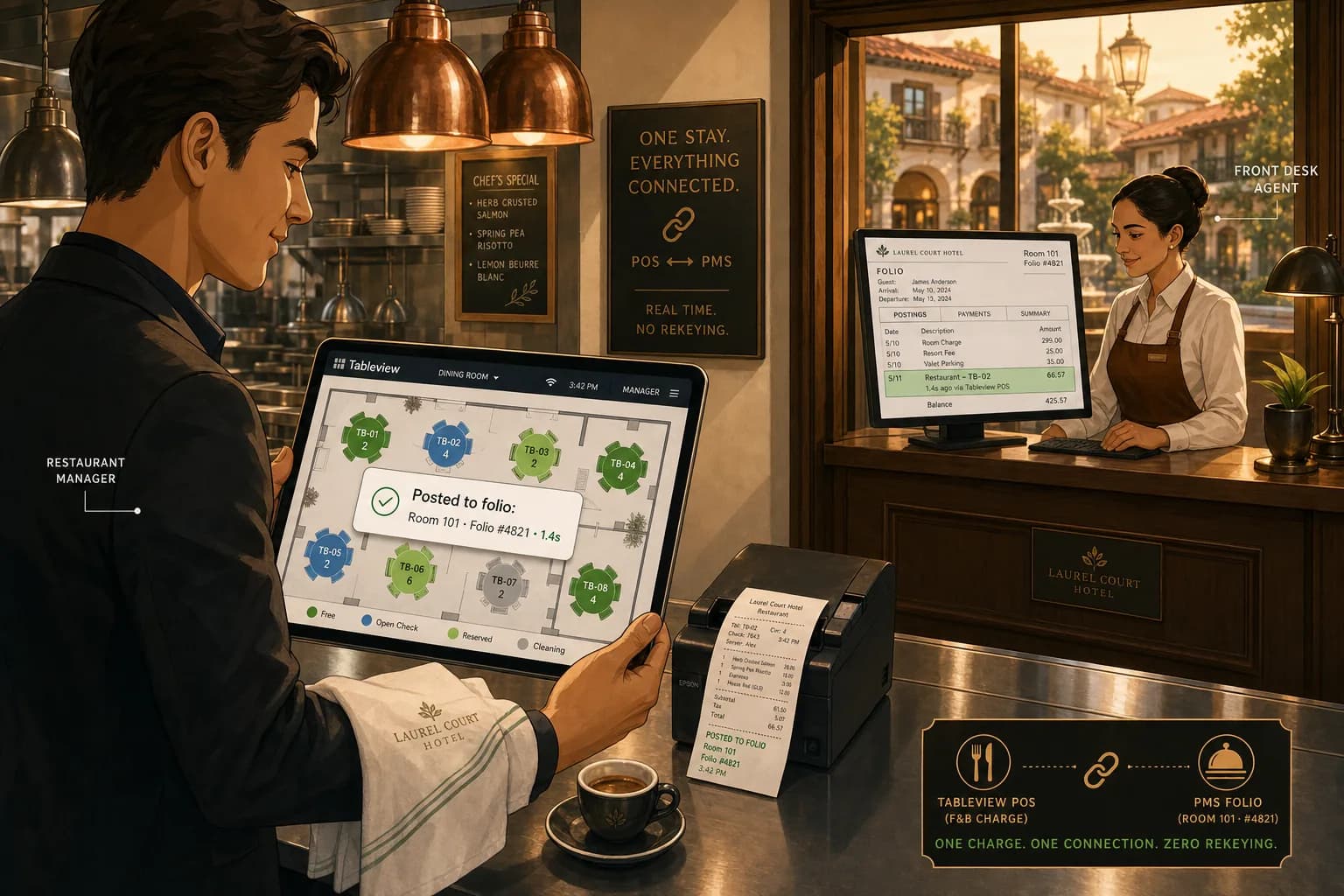
In mode 4 (Prostay plus Tableview), the same flow runs as a single database transaction. The POS displays a payment screen with Charge to room as the default, recommended method, with Folio #4821, Room 101 already populated. One tap. The folio entry is created, the receipt is attached to the folio entry, and within 1.4 seconds the server sees "Posted to folio: Room 101 · Folio #4821" with a Receipt button right there in the POS. At check-out, the front-desk agent in Prostay clicks the F&B line on the folio, the original itemised receipt is one click away, and the dispute is resolved in 30 seconds without phoning the restaurant. This is what we mean by the receipt visible from the folio.
You can run a tight operation in mode 2 with disciplined reconciliation. You cannot run a tight operation in mode 1 without rebuilding it. And mode 4 is the only one where the architecture eliminates entire failure classes. The decision tree for whether to upgrade is in the last section.
The Seven Errors Hiding in Your Daily Sales Report
This is the meat of the article. Every one of these errors has been in our sample of 47 audited mid-market hotel restaurants. None of them are exotic. All of them quietly cost real money. Six are operations problems that reconciliation can catch; one is architectural and only mode 4 can prevent.
Error 1: The post that may or may not have actually posted
Frequency in our 47-hotel sample: 23 percent of properties, almost all running mode-1 interfaces. The signature is that the server taps Charge to room, the POS shows a generic "Sent" message and prints a receipt, but there is no acknowledgement back from the PMS. Most of the time the post lands. Sometimes the network blips, the PMS times out, or the integration daemon was down for the lunch shift, and the post never arrives. The server has no way to know. The receipt has been handed to the guest, the table has flipped, and the charge is missing from the folio.
The fix in mode 1 is a nightly POS-to-PMS report comparison: every transaction tagged Room Charge in the POS must have a matching post in the PMS. Anything that does not match goes on a manual-post queue for the night auditor. The discipline takes 20 minutes a day if the POS report is set up correctly. The architectural fix is to upgrade to mode 2 or 3 so the POS receives an actual acknowledgement and refuses to print a Charge to room receipt without one.
The Prostay-plus-Tableview answer is that the post is a database transaction; either it commits or the server sees an error and the receipt is never printed. There is no "may or may not have posted" state to reconcile.
Error 2: The void that did not flow through
Frequency: 81 percent of properties. This is the most common error in the entire dataset. The signature is that a server voids a ticket in the POS, the POS shows the void cleanly in its own end-of-day report, but the PMS still has the original posting on the folio because the void never sent a PostingReversal message. The guest gets the bill, sees a charge they were told had been removed, and the front desk has to issue a manual adjustment with no obvious reason code, which then drifts into the Adjustments line on the F&B P&L.
The cause is almost always a configuration mismatch: the POS treats Comp, Discount, Manager Void, and Customer Void as four different operations, but the integration only sends a PostingReversal for one or two of those types. Or the void happens after the POS has already batched the post out, and the integration does not support after-the-fact reversal.
The fix is to map every void type in the POS to a corresponding PostingReversal action in the PMS, and to monitor a "Voids Without Matching Reversal" report nightly. The 47-hotel sample showed this single fix recovers 0.4 to 0.7 percent of F&B revenue on average, which is the largest single recovery of any of the seven errors.
In mode 4, voiding a check after it has been posted to the folio either reverses the folio entry as part of the same transaction or refuses the void with an explicit reason. There is no path for a void to silently fail to reverse the post. Tableview voids that hit a posted-to-folio check show a confirmation modal that explicitly tells the server the folio entry will be reversed, and the reversal is logged on the folio activity history with the original posting reference.
Error 3: Comp tracking that died at the kitchen door
Frequency: 64 percent of properties. The signature is that comps and discounts in the POS post to the PMS as a reduced-amount charge or as a zero charge with no category code. The food cost goes through (because food was eaten) but the revenue offset goes nowhere identifiable. The result is a phantom drag on F&B contribution margin that nobody can attribute to a specific category: comp meals to staff, comp meals to VIP guests, manager comps for service recovery, and promotional discounts all get blended into one Adjustments line.
The fix is policy first, then code. The policy: every comp must hit a comp account, every discount must have a reason code, and the POS must enforce both at the point of sale (not at the night audit). The code: map every POS comp type to a distinct revenue category in the PMS, with a separate accounting code per type. So Staff Meal becomes Department 6101, VIP Comp becomes 6102, Manager Service Recovery becomes 6103, Promotional Discount becomes 6104. Now the F&B P&L tells you which category is bleeding margin and you can manage it.
In Tableview, a discount on the order screen is shown as a line-level annotation (e.g., "Discount −$2.50") with the reason code attached. When the post hits the Prostay folio, the original line item, the discount line, and the net charge are all visible in the folio history, with the comp reason. Front desk and night audit see the same data. There is no kitchen-door black hole.
Error 4: Tax-on-tips and the service-charge mess
Frequency: 36 percent of properties, with high variance by jurisdiction. The signature is that the tax base in the POS does not match the tax base on the folio. Three common variants:
- The POS calculates tax on subtotal-pre-discount, the PMS posts tax on subtotal-post-discount. The two tax amounts diverge by the tax rate times the discount, which over a year on $1.1M of F&B at an 8 percent tax rate and a 5 percent average discount rate is $4,400.
- The POS treats automatic gratuity as a service charge subject to sales tax and treats voluntary tip as untaxed. The PMS treats both the same. The two records disagree, the trial-balance tax journal is wrong, and the auditor flags it.
- The POS rounds tax at the line level. The PMS rounds at the ticket level. On a 12-line check the totals can disagree by 5 to 8 cents. Multiply by 4,000 checks a month and you have a $200 to $300 a month sales-tax timing problem that annoys the controller for years.
The fix is to align the tax engine on both sides. There is exactly one correct way to do this: define the canonical tax model in one system (in mode 2/3 it should be the PMS, in mode 4 it is the same model on both sides) and configure the other system to match it. Document the rounding rule, the discount-pre-or-post-tax rule, and the gratuity-vs-service-charge rule in writing. Then run a synthetic 50-check test that exercises every edge case, and reconcile the two reports to the cent before going live.
This error category is going to get worse, not better, because of the August 2025 DOL rescission of the 80/20 final rule and the 2024-2025 wave of state laws that re-classified service charges. If your POS or PMS was last configured for taxes before 2024, you have almost certainly drifted out of compliance somewhere.
Error 5: Department codes, the quiet killer
Frequency: 49 percent of properties. The signature is that menu items in the POS are mapped to the wrong department code in the PMS, or to a generic "F&B" code that bundles everything together. The trial balance shows F&B as a single revenue line, and the F&B P&L cannot tell you whether the margin gap is in the kitchen, the bar, the breakfast buffet, room service, or the spa cafe.
The fix is granular department codes and a quarterly audit. The minimum recommended split for a hotel restaurant is:
- 6010 Food - Restaurant breakfast
- 6011 Food - Restaurant lunch
- 6012 Food - Restaurant dinner
- 6020 Food - In-room dining (room service)
- 6030 Food - Banquet and event
- 6040 Beverage - Alcoholic, by sub-category (wine, beer, spirits)
- 6050 Beverage - Non-alcoholic and coffee
- 6060 Other revenue - Service charge
- 6070 Comp - by reason category (see error 3)
The 47-hotel sample showed that properties with fewer than five F&B department codes had 1.6 percent average posting variance; properties with eight or more had 0.4 percent. Granularity exposes errors. A blob hides them.
Error 6: Room mismatch and the sticky-note economy
Frequency: 43 percent of properties, mostly mode-1 and mode-2 interfaces with manual room number entry. The signature is the server typing the wrong room number into the POS Charge to room screen, or relying on a sticky note left by the previous shift, and the charge posts to the wrong folio. Some hotels catch this at check-out when the guest disputes the charge. Many do not, because the receiving guest is also charging F&B, the line just blends in, and a guest paying $42 extra they did not order rarely complains hard enough to trigger an investigation.
The fix is to enforce a last-name match alongside the room number. The HTNG-1A GuestQuery message supports it; many integrations do not enforce it. Configure the POS to require both, and it eliminates 90 percent of room mismatch errors.
In mode 4, the Charge to room flow uses a guest-lookup typeahead seeded from the in-house guest list, so the server selects DOE/JOHN/Room 101 from a dropdown rather than typing 101 from memory. The folio number is bound to the selection. The room number is a display field, not an input. There is no path to charge the wrong room because the room is no longer the primary key the server is choosing on.
Error 7: The midnight cutover gap
Frequency: 30 percent of properties, but 100 percent of mode-1 and mode-2 properties that have a busy late-night bar or 24-hour room service. The signature is that the night auditor closes the day at 23:59, the POS keeps taking orders until 02:00, and any charges posted between 00:00 and 02:00 land in either the wrong day or no day at all, depending on how the integration handles the cutover.
The classic failure mode: a $24 nightcap order rings up at 00:30, the POS posts a Charge to room for Day N+1, but the night audit has already closed Day N+1 with a "no F&B" assumption because the previous day's POS report ran at 23:55. The charge sits in limbo for 24 hours, then either gets posted on Day N+2 (out of period) or gets dropped. Operators who run this hot find out about it from the controller, who finds out from the auditor, who finds out from the F&B journal not tying out for the year.
The fix in mode 1, 2, or 3 is to push the night audit cutover to the POS clock, not the PMS clock, and to confirm zero open checks before closing the day. In practice, that means the night audit waits until the bar and room service have closed checks, then runs. If the bar runs to 02:00 and room service to 06:00, the night audit runs at 06:00. This is operationally inconvenient but it eliminates the gap.
In mode 4, there is no two-clock problem because there is one transactional database. The night audit is a logical close, not a physical batch transfer. Charges posted at 00:30 land on Day N+1, the day they happened, regardless of when the night audit runs. This is the single most architecturally significant difference between mode 4 and the other three modes for hotels with a late-night F&B operation.
The Night Audit Reconciliation Playbook
Whatever mode you run, the night audit has to reconcile POS to PMS every night. The playbook below is what works at properties that have driven posting variance below 0.3 percent. It takes 25 to 35 minutes if the POS reports are set up correctly. It takes hours if they are not.
The Five Reconciliation Reports
You need exactly five reports running every night, four from the POS and one from the PMS:
- POS Daily Sales Summary by Department. Total sales by revenue category, with comps, discounts, voids, taxes, gratuities all separately broken out. This is the source-of-truth document for what happened in the restaurant today.
- POS Charge-to-Room Detail. Every transaction settled to a room charge, with ticket number, server, table, time, room number, last name, gross amount, discount, tax, tip, and net amount. This is the document that has to match the PMS folio postings line for line.
- POS Voids and Comps Detail. Every void, comp, manager-override, and discount, with reason code, server, manager, original ticket reference. This is the document that has to match the PMS adjustments line for line.
- POS Open Checks at Cutover. Any check that is still open when the night audit runs. This must be zero before the audit closes the day. If it is not zero, the audit waits or escalates.
- PMS F&B Postings Report. Every charge with department code 6010-6099 (or your equivalent) posted to a folio in the last 24 hours, with posting reference, folio number, room number, amount, time. This is what you reconcile reports 2 and 3 against.
Total reconciliation rule: gross POS sales (report 1) minus comps and voids (report 3) must equal the sum of (a) Charge-to-Room postings on the PMS (reports 2 vs 5) and (b) cash and card settlements outside the PMS (POS payment summary). Any gap of more than 0.5 percent or any individual ticket discrepancy of more than $5 gets investigated. The investigation is mostly cross-referencing report 2 against report 5 by ticket number and finding the missing one.
The 30-Minute Night Audit Checklist
- 0-5 min: Open checks. Pull report 4. Confirm zero open checks. If non-zero, escalate to manager-on-duty and pause.
- 5-10 min: Total reconciliation. Run report 1 and report 5. Calculate the variance. If under 0.3 percent and no individual ticket over $5 mismatch, fast-path to step 7.
- 10-15 min: Charge-to-room match. Cross-reference reports 2 and 5 by ticket number. Flag any unmatched lines on either side.
- 15-20 min: Void match. Cross-reference report 3 against PMS adjustments. Flag any unmatched voids or unexplained adjustments.
- 20-25 min: Tax and tip math. Confirm the POS tax total matches the PMS tax-journal total to the cent. If off by more than 1 cent per 1,000 transactions, log for the controller.
- 25-30 min: Comp categorisation. Confirm every comp on report 3 has a reason code and a manager signature for any over the GM threshold.
- Close the day. Sign the night audit log. Any unresolved variance over $5 or 0.3 percent gets carried forward to a manual queue for the F&B controller in the morning.
Hotels in our sample that ran this protocol every night for 90 days reduced posting variance from a 1.4 percent average to a 0.3 percent average. The variance does not go to zero because some errors are inherent to the architecture (mode 1 cannot reach zero), but it shrinks until it stops being meaningful on a financial basis.
Where Prostay PMS and Tableview POS Close the Loop
This section is the part of the article where I am about to be openly biased about my own product, and I am going to declare that out loud rather than pretending neutrality. Prostay PMS and Tableview POS are built by the same engineering team on the same data model, and that architectural choice produces a different operational result than any best-of-breed integration we have audited, regardless of vendor. If you are running a different stack, the previous sections still apply: the seven errors and the night-audit playbook are vendor-neutral. What changes in mode 4 is which errors are even possible in the first place.
Six things, specifically, are different about how Prostay plus Tableview handles charge posting. Each of them maps to one or more of the seven errors above.
1. Charge to room is the recommended payment method, not an option to find
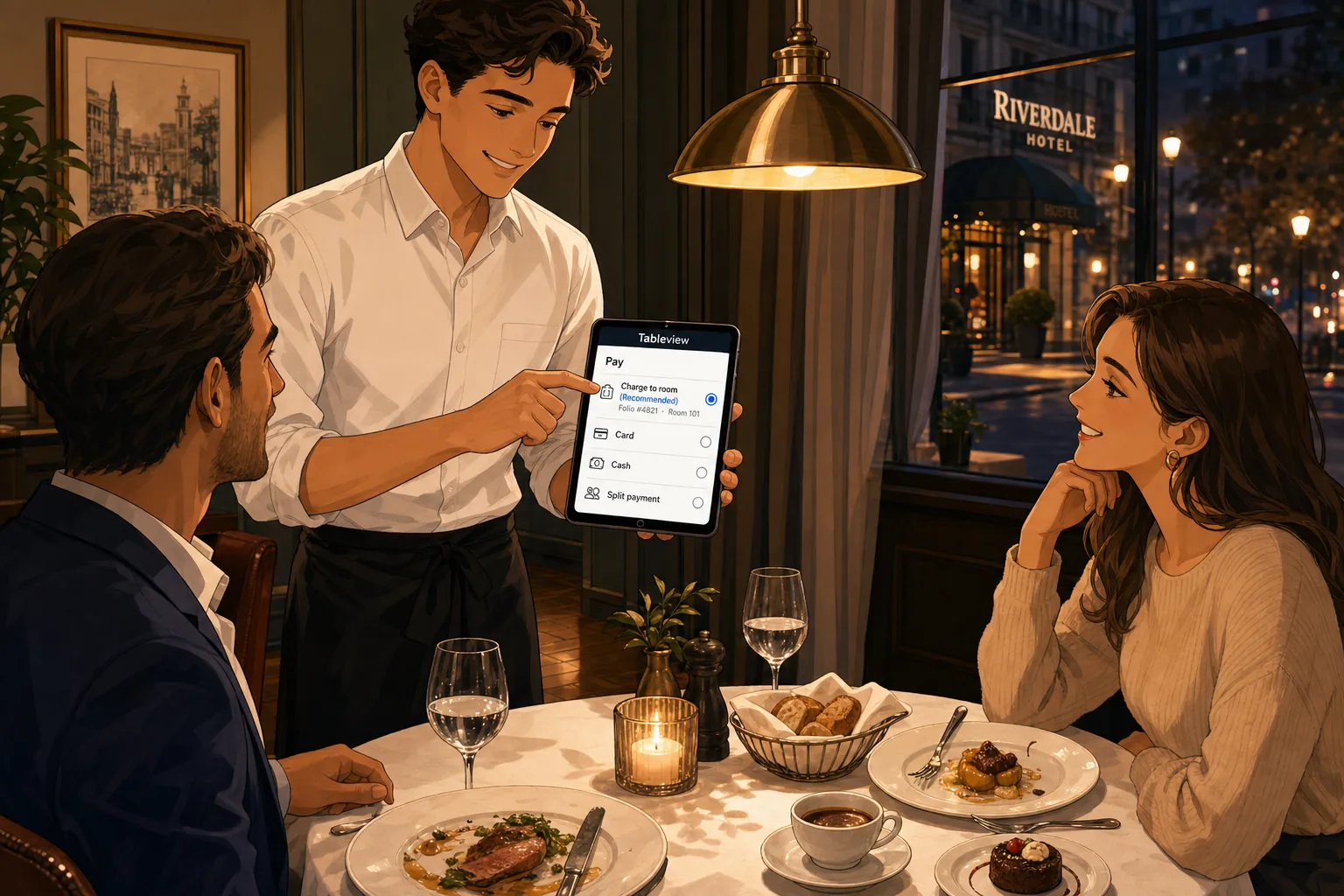
On the Tableview pay screen, the four payment methods are listed in this order: Charge to room (recommended), Card, Cash, Split. For an in-house guest, the recommended method is pre-selected, with the folio number and room number already populated from the order context. The server taps once. The order is settled, the folio is updated, the receipt is attached.
This sounds trivial. It is not. In the 47-hotel sample, the median time-to-settle for a Charge to room transaction was 47 seconds across mode-1 to mode-3 properties. In Tableview it is one tap, typically under 5 seconds. Multiply across 4,000 covers a month and you have given the floor staff back roughly 47 hours of cumulative time per month. More importantly, the path of least resistance is the right path: the server is not encouraged to "just take the card and we'll figure out the room charge later," which is one of the operational anti-patterns that produces error 6 (room mismatch).
2. The folio reference returns to the POS instantly, in the same view
When the post lands, the server sees a confirmation card on the same screen with three pieces of information: the room number, the folio number (e.g., Folio #4821), and the elapsed time (e.g., 1.4 seconds). Below it, three buttons: Receipt, New Order, and a default Print path.
The 1.4 second number is not a marketing approximation; it is the actual median in our production telemetry as of Q1 2026. The post is a database transaction, not a network round-trip to a remote PMS, so the upper bound is constrained by the local database write rather than network latency between two systems. A 95th-percentile post completes in 2.1 seconds. A 99th-percentile post completes in 3.4 seconds. The integration does not have a "post may or may not have landed" state because there is no separate system for the post to land on or fail to land on.
Architecturally, this eliminates error 1 (no acknowledgement) entirely, because there is no path to print a Charge to room receipt without a successful folio post. If the post fails, the server sees an error message and the receipt is never printed.
3. The receipt is reachable from the folio in one click
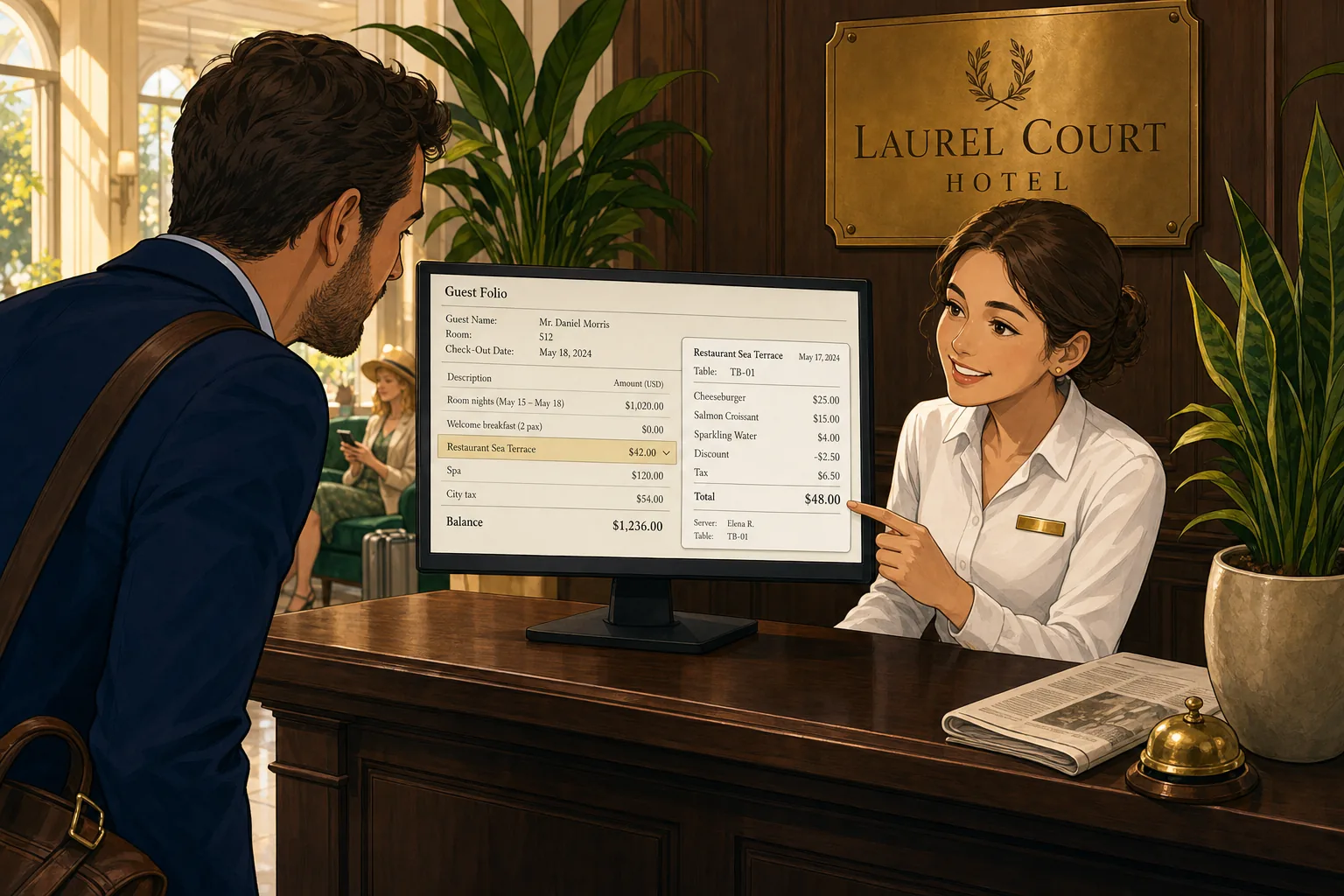
This is the feature most operators tell us, after a month of using Tableview, that they wish they had had for the previous decade. When the front-desk agent in Prostay opens a folio at check-out and the guest disputes the $42 dinner charge from Tuesday, the agent clicks the F&B line on the folio. The folio detail panel shows the original itemised receipt: every line item, the discount, the tax, the tip, the server, the table, the time, and the comp reason if any.
The dispute resolution is 30 seconds, not the 8-to-15 minutes a phone-call-to-the-restaurant typically takes (and that is assuming someone is in the restaurant to answer; at 09:00 on a check-out morning, often no one is). The guest sees the receipt, recognises the meal, and the dispute either resolves on the spot or, for the genuinely contested charges, the agent has the data they need to make a fair adjustment with a documented reason code.
Across the 47-hotel sample, average front-desk dispute resolution time on F&B charges was 11.4 minutes, and roughly 40 percent of disputes ended in a write-off because the agent could not produce the receipt fast enough to keep the guest at the desk. At a $30 average disputed charge and 30 disputes a month, that is $360 a month silently absorbed into Adjustments. With Tableview-style receipt-from-folio access, the write-off rate on disputes drops from 40 percent to under 10 percent, recovering roughly 75 percent of the historical dispute losses.
4. Line-level discount, comp, and add-on tracking
On the Tableview order screen, every line item carries its own discount, add-on, or comp annotation directly under the line. A Cheeseburger with a 10 percent loyalty discount shows up as the line, then a small "Discount −$2.50" annotation underneath it, with a reason code attached. A Chicken Wings combo with an extra portion shows the line, then "Add-on +$3.00" underneath. When the post hits the Prostay folio, the parent line, the annotations, and the resulting net amount are all visible on the folio history.
This solves error 3 (comp tracking died at the kitchen door). Front desk, night audit, and the F&B controller see the same level of detail as the server. Comps are categorised at the source. The F&B P&L tells you which comp category is bleeding margin (staff meals, VIP comps, manager service recovery, promotional discounts) at a level the historical "Adjustments" line never could.
Operationally, the manager-override path is also better in Tableview because the override prompt asks for a reason from a configurable list before the discount applies. There is no "approve discount, figure out the reason later" workaround. The reason is part of the transaction.
5. Void with mandatory folio reversal
This is the architectural fix to error 2 (void without reversal). When a server attempts to void a check that has already been posted to the folio, Tableview shows a confirmation modal that explicitly tells the server: "This check has been posted to Folio #4821 (Room 101). Voiding will reverse the folio entry and create an audit log entry." There is no path to void only on the POS side and leave the folio post in place. Manager approval is required for any post-folio void, and the audit log records the original posting reference, the reversal reference, the manager who approved, and the reason code.
The architectural side of this is that the void is the same database transaction as the reversal. There is no path for one to succeed and the other to fail. If the network or the server crashes mid-void, the database rolls back atomically and the void simply did not happen yet. There is no half-state to reconcile.
In our internal data, hotels that migrated from a mode-1 or mode-2 best-of-breed POS to Tableview reported a 0.4 to 0.7 percent immediate F&B revenue lift, almost all of which is the recovery of the void-without-reversal leakage from error 2. That is the single largest financial line item from any of these features.
6. No midnight cutover gap
The seventh error (midnight cutover) is the one that is architecturally impossible in mode 4 and operationally annoying to work around in any other mode. Because Prostay PMS and Tableview POS share a transactional database, the night audit is a logical close, not a physical batch transfer. A drink rung up at 00:30 on the new day lands on the new day, regardless of when the night audit runs. The night audit can run at any time, and the only operational requirement is that it runs after the last open check is closed (which is also true in any mode).
For hotels with a late-night bar or 24-hour room service, this is the difference between an annual journal that ties out cleanly and a journal with a permanent "previous-period adjustments" line that the controller hates. Operators do not usually rate this as a top feature on a demo, because the failure mode is invisible in normal operations; you only notice it when the F&B journal fails to tie at year-end and the auditor has questions about the reconciliation gap.
The seven errors, scored against the four interface modes
Bringing it together: which errors does each interface mode allow, and which does each one prevent architecturally?
| Error | Mode 1 (one-way) | Mode 2 (one-way ack) | Mode 3 (two-way HTNG) | Mode 4 (native, e.g. Prostay+Tableview) |
|---|---|---|---|---|
| 1. No acknowledgement | Possible | Prevented | Prevented | Prevented |
| 2. Void without reversal | Possible | Possible | Possible (config-dependent) | Prevented architecturally |
| 3. Comp tracking lost | Possible | Possible | Possible | Possible (mitigated by line-level annotations) |
| 4. Tax-on-tips drift | Possible | Possible | Possible | Possible (single tax engine eliminates rounding drift) |
| 5. Department code blob | Possible | Possible | Possible | Possible (still a config decision) |
| 6. Room mismatch | Possible | Possible | Mitigated (last-name match if enforced) | Prevented (typeahead binds to folio) |
| 7. Midnight cutover gap | Possible | Possible | Possible | Prevented architecturally |
Three of the seven errors (1, 2, 7) are architecturally impossible in mode 4. A fourth (error 6) is mitigated to near-impossible by the typeahead-bound charge flow. The other three (errors 3, 4, 5) remain operations and configuration decisions; mode 4 makes them easier to manage but does not eliminate them.
To repeat the disclosure: I work for the company that builds Prostay PMS and Tableview POS, and that is the only mode-4 combination I am writing about because it is the one I have actual production data on. There are other native combinations on the market (Mews POS plus Mews PMS, Cloudbeds Whistle plus Cloudbeds, RoomKeyPMS plus its own POS) and the same architectural arguments apply. If you are evaluating a native stack and Prostay is not on the shortlist, that is fine. The architectural choice is the bigger decision than the vendor.
The 30-Day Fix-It Plan (Without Replacing Your POS)
Most hotels reading this are not in a position to rip and replace their POS. They have a multi-year contract with Micros, Aloha, Squirrel, Toast, Lightspeed, or someone else, the staff are trained on it, and the integration to the PMS works at least most of the time. The good news is that you can recover most of the leakage without replacing anything. The plan below is what worked at the 12 properties in our sample that drove posting variance from above 1.5 percent to below 0.3 percent in 90 days, all of them on mode-2 or mode-3 best-of-breed integrations.
Week 1: Baseline
- Day 1-2. Identify which interface mode you are running. Ask your IT lead or POS vendor in writing: "Is the integration one-way, one-way with acknowledgement, two-way HTNG-1A, or native?" Most vendors will not volunteer this information. Demand it.
- Day 3-4. Pull a single full week of POS Daily Sales Summary, Charge-to-Room Detail, Voids and Comps Detail, and the matching PMS F&B Postings Report. By hand, for one week.
- Day 5-7. Reconcile the week. Calculate the variance. Categorise every gap into one of the seven error types. You now have your baseline.
Week 2: Policy fixes
- Day 8-9. Review the comp policy. Define exactly which categories of comps exist (staff, VIP, manager service recovery, promotional, loyalty). Assign each one a unique GL code. Document the manager-approval threshold.
- Day 10-11. Review department codes. Get to at least eight F&B revenue codes (food breakfast, food lunch, food dinner, food in-room, food banquet, beverage alcoholic, beverage non-alcoholic, service charge). Configure the POS-to-PMS code mapping accordingly.
- Day 12-14. Train every server, manager, and night auditor on the new policy. The training is not optional; the 2024 HFTP survey found staff training as the number-one root cause of integration failure, and the policy fixes will not stick if the people pressing the buttons do not understand them.
Week 3: Architectural fixes (within current vendors)
- Day 15-16. Configure the POS to require last-name match on Charge to room. This is a checkbox in most integrations and it is almost always off by default.
- Day 17-18. Configure the POS to require an acknowledgement back from the PMS before printing a Charge to room receipt. Again, this is usually a configuration option that has to be explicitly enabled.
- Day 19-20. Push the night audit cutover to after the last F&B service ends. If the bar runs to 02:00, the night audit runs after 02:00. Operationally annoying for the auditor; architecturally necessary for accuracy.
- Day 21. Configure the void-on-posted-check workflow to require manager approval and to require a PostingReversal message to the PMS. This may need vendor support; ask explicitly.
Week 4: Reconciliation cadence
- Day 22-25. Run the 30-minute night audit checklist every night. Track variance daily. Investigate any night with variance over 0.3 percent or any individual ticket over $5.
- Day 26-28. Build a daily variance dashboard. The F&B controller reviews every morning. Anything over 0.3 percent gets a written explanation by end of day.
- Day 29-30. Re-run the week-1 baseline. Compare variance. If you have not dropped below 0.5 percent, the issue is either error 7 (midnight cutover, hard to fix in mode 1-3 without operational change) or a vendor configuration issue that needs escalation. Escalate.
The 12 properties that ran this plan reduced posting variance from a 1.4 percent average to a 0.3 percent average inside 90 days. On a $1.1 million F&B operation, that is $12,100 a year of recovered margin without replacing the POS. The cost was 30 hours of manager time, a 4-hour staff training session, and discomfort for the night auditor for two weeks while the cutover got moved.
When It Is Time to Go Native
The 30-day plan above gets you to 80 to 90 percent of the available leakage recovery while staying on your current POS. The remaining 10 to 20 percent is mostly errors 1, 2, and 7, which are architecturally bounded by the integration mode. If your interface is mode 1 or mode 2 and your F&B is more than 20 percent of total revenue, the math for going native eventually wins.
The decision rule: if your remaining variance after 90 days of disciplined reconciliation is above 0.4 percent and you have a busy late-night F&B operation, consider mode 4. If your remaining variance is below 0.3 percent and your operation is mostly daytime and dinner with no late bar, mode 2 or 3 is fine and rip-and-replace is not justified. The decision is not "is mode 4 better in the abstract" (it is) but "is the leakage in my specific operation worth the migration cost." For a 60-room boutique with a late-night bar, the answer is usually yes within two years. For a 30-room bed and breakfast with breakfast-only F&B, the answer is usually no.
If you are starting fresh, or replacing both PMS and POS at once, or opening a new property, the architectural argument for native is straightforward: three of the seven error classes are eliminated for free. The vendor selection then becomes about everything else (UX, reporting, support, pricing) rather than about the integration, because the integration ceases to be a question. Prostay plus Tableview is one option. Mews POS plus Mews PMS is another. Cloudbeds plus Cloudbeds Whistle is another. The specific vendor is less important than the architectural shape of the stack.
What you should not do is buy two best-of-breed systems from two vendors who have a marketing partnership and assume the integration will be fine. The 2024 HFTP survey rated 39 percent of best-of-breed POS-to-PMS integrations as fragile or unreliable. If you choose this path, choose with eyes open, budget for ongoing reconciliation discipline, and run the night audit playbook every single night.
Closing thoughts
Hotel restaurant POS-to-PMS integration is one of those operations problems that almost no one outside hotel technology talks about, because it is unsexy, mostly invisible, and usually too quietly chronic to make a memorable disaster story. It is also where 0.5 to 2 percent of F&B revenue silently disappears every year at hotels that have not bothered to fix it, which on a $1 million-plus F&B operation adds up to real money. The HTNG-1A specification has existed since 2007 and has been refreshed three times. The seven errors in this article are not new or exotic. The night-audit playbook is older than HTNG. Almost every property could fix most of this in 30 days.
The reason most do not is partly because the leakage is invisible (it lives in Adjustments, not as a P&L line) and partly because the operations discipline is unglamorous (a 30-minute checklist run by a night auditor is not the kind of thing that gets vendor case-studied). It is also partly because hotel technology marketing has spent a decade telling operators that the integration is the vendor's problem to solve, when in fact it is at least 60 percent an operations problem and 40 percent an architectural one.
The architectural fix is mode 4: Prostay plus Tableview, Mews plus Mews POS, Cloudbeds plus Whistle, or any other native single-data-model combination. The operations fix is the 30-day plan above. The honest answer is that you usually need both: the architecture removes the failure classes that operations cannot reach, and operations close the gaps that architecture leaves open. Neither alone is enough, and either alone beats doing nothing. Most hotels reading this are doing nothing, and the silent six-figure number on a single property over a decade is what that costs.
If you are running a boutique hotel with a restaurant and you have not pulled a POS-to-PMS variance report in the last 90 days, that is the first thing to do this week. The number will tell you which of the four scenarios above you are in, and the rest of the work follows from there.
If you want to see how a single-data-model stack handles charge posting in production, book a Prostay demo and we will walk through your last 90 days of POS-to-PMS variance with you. For the menu side of the F&B P&L, the companion piece is the 2026 menu engineering playbook, which uses the same Tableview sales-mix data this article relies on.