The Law That Turned Your Booking Engine Into Regulated Software
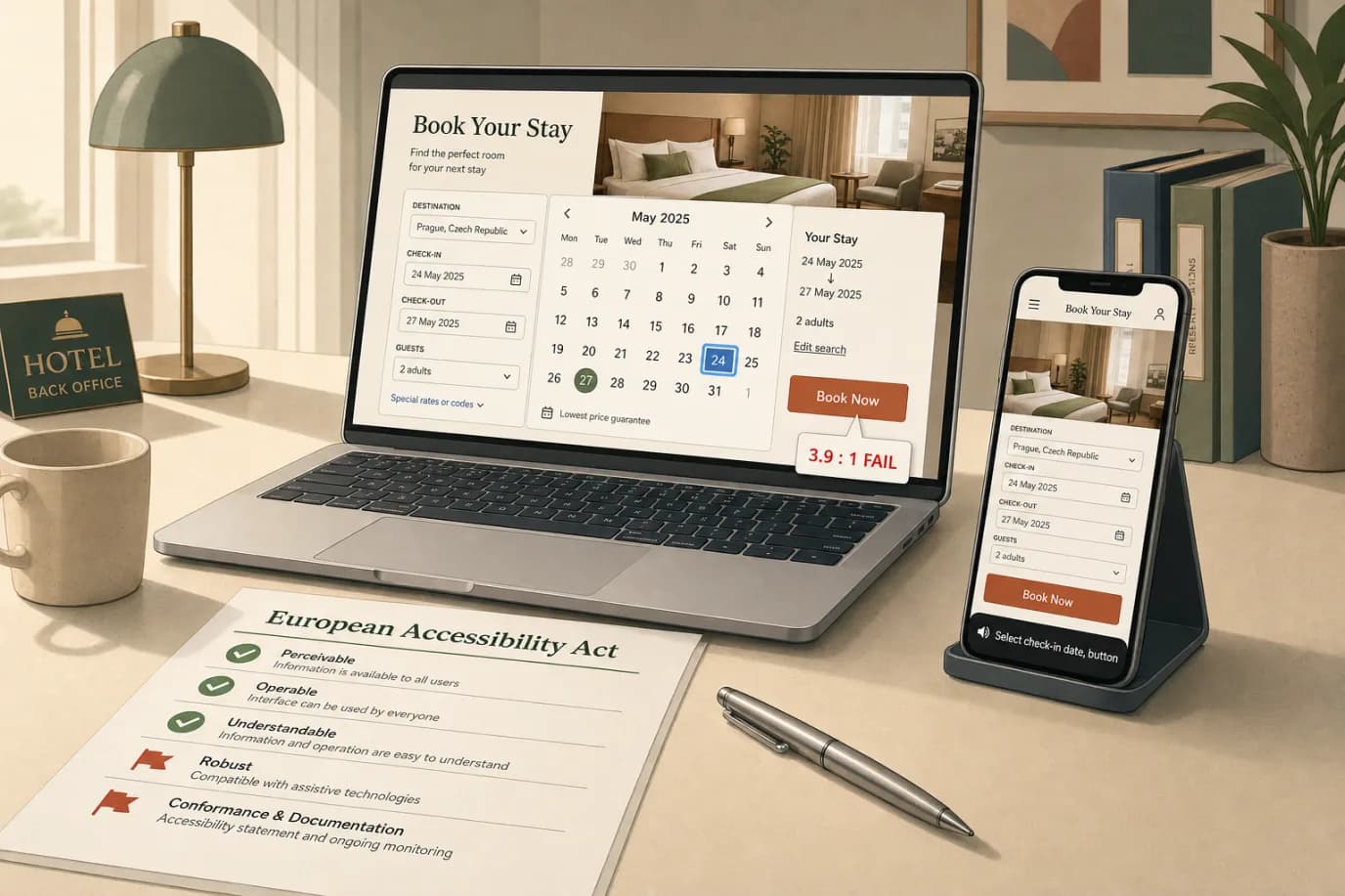
On 28 June 2025 a piece of software you probably did not write became regulated under EU law: your booking engine. The European Accessibility Act, formally Directive (EU) 2019/882, reached its application date that day, and one of the service categories it covers is e-commerce. Selling a room to a consumer through a website or an app is e-commerce. That means the widget where a guest picks dates, chooses a room, enters a card, and taps pay now has to work for someone who navigates with a keyboard, listens with a screen reader, or needs larger text and higher contrast to read the price. Most independent hotels have never tested for any of that. The booking flow that converts your direct revenue, the part of the stack most operators are proudest of, is also the part most likely to fail on the first keyboard tab. A modern hotel booking engine has to clear that bar now, not as a nice-to-have but as a legal condition of selling online to EU residents.
The law does not stop at the booking widget. It reaches the whole digital service around the sale: the website pages that lead to the booking, the confirmation email, the account area where a guest manages a reservation, the mobile app if you run one, and the documents you send after the stay. The guest journey your property management system orchestrates, from the booking confirmation through the pre-arrival message to the folio you email at checkout, is now in scope as part of the e-commerce service. This article is the honest 2026 picture for an independent operator: what the EAA requires, who is actually in scope once the microenterprise exemption is applied properly, the technical standard underneath the law, the eleven failures that fail an audit, how enforcement and fines work in five major markets, and a 30-day plan one manager can run without hiring a specialist agency.
I write for Prostay, and our team ships the booking engine, the website templates, and the guest-messaging rail that a large number of these flows run on, so we have spent two years making this stack pass accessibility audits across five languages and a dozen national transpositions. The deadlines, thresholds, and failure modes below come from the published directive and standards, our own remediation work on live customer sites, and the first wave of complaints and guidance that national enforcement bodies issued through 2025 and into 2026. There is no grace period left to wait out. The application date has passed. The only question worth asking is whether your site is defensible today, and for most independents the honest answer is not yet.
What the European Accessibility Act Actually Requires
The EAA is a single market directive. Its purpose is to stop twenty-seven countries from writing twenty-seven incompatible accessibility rules, by setting one baseline for a defined list of products and services sold across the EU. The products list includes computers, smartphones, payment terminals, ticketing machines, and e-readers. The services list is the part that catches hotels: it covers consumer banking, electronic communications, access to audiovisual media, elements of passenger transport, and e-commerce. The directive defines e-commerce as the sale of products or services to a consumer through a website or mobile application. A hotel selling rooms direct, online, to a member of the public is squarely inside that definition.
What the directive requires, in plain terms, is that the service is perceivable, operable, understandable, and robust for people with disabilities. It does not print a checklist in the legal text. Instead it sets functional outcomes (information must be available through more than one sensory channel, content must be navigable without a mouse, text must be resizable and legible, time limits must be adjustable) and points to a harmonised technical standard for the testable detail. For the web, that detail is WCAG, which I unpack in a later section. The practical reading for an operator is this: your booking and the journey around it must be completable by a guest who cannot see the screen, cannot use a mouse, cannot hear an audio prompt, or cannot read small low-contrast text.
Three obligations sit alongside the technical one and are easy to forget. First, you must publish an accessibility statement that explains how the service meets the requirements and gives a contact route for problems. Second, you have to keep evidence of conformity, because if a regulator or a guest challenges you, the burden of showing the service is accessible (or that you qualify for an exemption) sits with you. Third, if you claim that a specific fix would impose a disproportionate burden, you have to document that assessment in advance; you cannot invent the excuse after a complaint lands. None of these three is technically hard. All three are routinely missing.
Who Is In Scope, and the Microenterprise Exemption Everyone Misreads
The most repeated sentence in hotel trade coverage of the EAA is "small hotels are exempt." It is half true and the half that is wrong gets properties into trouble. The directive carves out microenterprises that provide services, and a microenterprise is defined as a business with fewer than 10 people and an annual turnover or balance sheet total not exceeding EUR 2 million. If your hotel is a standalone legal entity under both of those figures, your obligations as a service provider fall away. That is a real and useful relief for a genuinely small property.
Here is where operators misread it. The threshold is measured at the level of the legal entity that provides the service, and hotels are structured in ways that quietly push them over the line. A property with eight front-of-house staff but a management company, an owning company, and a shared central-reservations team can easily exceed ten employees once the right headcount is counted. A boutique with modest room revenue can still cross EUR 2 million once food and beverage, events, and spa are added to turnover. A single hotel inside a small group is rarely a microenterprise even if each individual site feels small. The exemption is entity-level, not vibe-level, and the burden of proving you qualify sits with you. If you intend to rely on it, write down the headcount and the turnover or balance-sheet figure for the relevant entity and the financial year, and keep that note with your other compliance records.
Two more cautions. The microenterprise relief applies to the service obligations; it does not exempt the products you sell or the vendors you buy from. Your booking-engine provider, your channel manager, and the OTAs that resell your rooms are almost all well above the threshold and have to ship accessible software regardless of your size, which means the tools are improving under you whether or not you are personally in scope. And the exemption is a moving target: the day you hire your eleventh employee or cross EUR 2 million, the clock starts, and there is no multi-year transition left to lean on because the directive's transition windows have already closed. Treating accessibility as a permanent feature of how you build the site is cheaper than treating it as a threshold you dodge until you cannot.
One more group is firmly in scope and often forgotten: anyone who is not a microenterprise. A 60-room hotel with a restaurant, a 120-room city property, a four-property group, a serviced-apartment operator with a regional footprint. These are ordinary independents by hospitality standards and they are squarely regulated. If that describes you, the exemption conversation is moot and the only useful question is how fast you can get the site defensible.
The Standard Underneath the Law: EN 301 549 and WCAG 2.1 AA
The directive sets outcomes; the standard sets the tests. EN 301 549 is the European harmonised standard for accessibility of ICT products and services, and it is the document a regulator or an auditor reaches for when they want to know whether your site actually conforms. Meeting the relevant parts of EN 301 549 gives you a presumption of conformity with the EAA, which in plain language means: pass the standard and you are presumed to have met the law unless someone proves otherwise.
For web content, EN 301 549 does not invent its own rules. It adopts WCAG, the Web Content Accessibility Guidelines published by the W3C, at conformance level AA. WCAG 2.1 AA is the operative target in 2025 and 2026; WCAG 2.2 adds a handful of further criteria and is where the standard is heading, so building to 2.2 is the forward-looking choice, but 2.1 AA is the floor the law currently rests on. This is the same target that EU public-sector websites have had to meet since the Web Accessibility Directive of 2016, so the standard is mature, the tooling is good, and your developer has no excuse for treating it as exotic.
WCAG organises its success criteria under four principles that are worth knowing by name because they map cleanly onto how hotels fail. Perceivable: can the guest take in the information? This is text alternatives for images, captions, and colour contrast. Operable: can the guest drive the interface? This is keyboard access, enough time to complete a form, and no content that flashes in a way that triggers seizures. Understandable: is the content and the behaviour predictable? This is clear labels, readable language, and helpful error messages. Robust: will it work with assistive technology now and later? This is clean, standards-based markup that a screen reader can parse. Almost every hotel failure I describe below is a specific, testable breach of one of these four, and the fixes are correspondingly concrete.
The practical instruction for an operator who does not write code is short. Tell whoever builds and maintains your site that the target is WCAG 2.1 level AA, ask them to confirm in writing that the site and the booking flow meet it, and ask for the audit or test report that backs the claim. If they cannot produce one, you have found your first gap. If they can, keep it with your accessibility statement and your microenterprise note, because together those documents are your defence the day a complaint arrives.
Eleven Accessibility Failures That Fail an Audit
Across the hotel sites our team has remediated and the complaint patterns national bodies published in the first year, the same eleven failures account for most of the risk. They are listed roughly in order of how often they appear and how badly they block a real guest, each with the fix and the WCAG criterion it maps to.
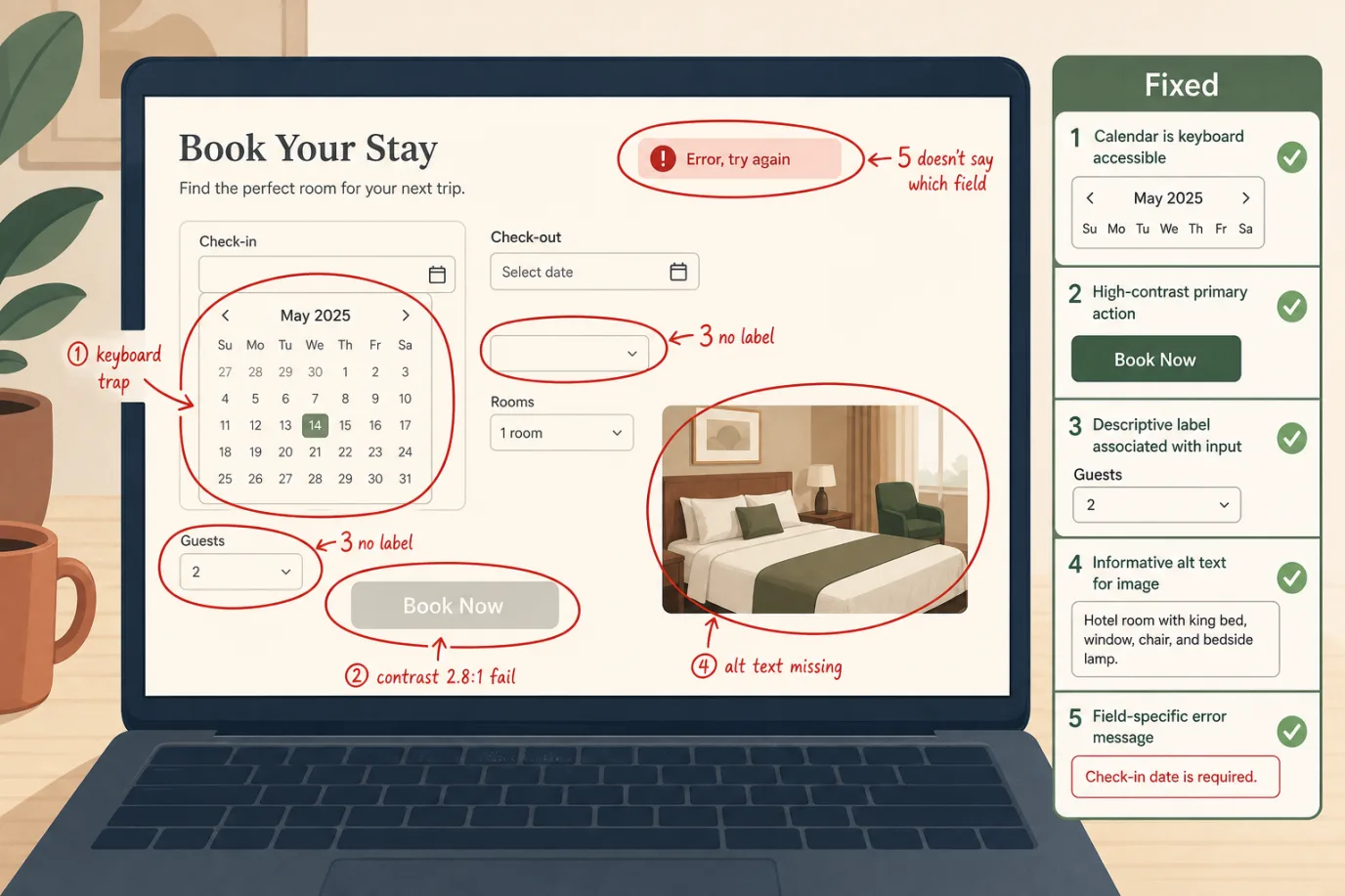
- Keyboard cannot complete the booking. The single worst failure. A date picker that only responds to a mouse click, a room card you cannot select with the Enter key, a calendar you can open but cannot escape (a keyboard trap). If a guest cannot select dates, choose a room, and reach the pay button using only the Tab, arrow, and Enter keys, the booking is impossible for keyboard and screen-reader users. This is a WCAG level-A failure (2.1.1 Keyboard, 2.1.2 No Keyboard Trap) and a single instance fails the whole assessment. Fix: native HTML controls where possible, and tested keyboard handlers on any custom widget.
- Colour contrast below the threshold. The pale grey on white that designers love. Normal text needs a contrast ratio of at least 4.5 to 1 against its background; large text and interactive components such as buttons and form borders need at least 3 to 1 (WCAG 1.4.3 and 1.4.11). The most common offender is the primary Book Now button in a soft brand colour that scores 2.8 to 1. Fix: darken the button or the text until a contrast checker passes, and bake the passing values into the brand palette so it does not regress.
- Form fields with no programmatic label. A field that shows "Guests" as grey placeholder text but has no real label is empty to a screen reader; the user hears "edit text, blank." Placeholders are not labels (WCAG 1.3.1, 4.1.2). Fix: a proper label element tied to each input, visible, not just a placeholder that vanishes on focus.
- Images that carry meaning with no text alternative. A room photo, a map, a floor plan, or an offer banner with a price baked into the image and no alt text. The screen-reader user gets nothing (WCAG 1.1.1). Fix: descriptive alt text for meaningful images, empty alt for purely decorative ones, and never put a price or a deadline only inside an image.
- Error messages that do not say what is wrong or where. A red border and "Error, please try again" with no indication of which field failed or why. A guest who cannot see the red border has no path forward (WCAG 3.3.1, 3.3.3). Fix: error text that names the field and the problem ("Check-out date must be after check-in date"), tied to the field so assistive tech announces it.
- Headings used for looks, not structure. Screen-reader users navigate by heading the way sighted users skim. A page that styles text to look like a heading without using a real heading element, or that jumps from H1 to H4, is hard to navigate (WCAG 1.3.1). Fix: a logical heading outline, one H1 per page, no skipped levels for visual effect.
- Focus you cannot see. When you Tab through the page, the element in focus must show a visible outline. Many themes remove the focus ring for aesthetics, leaving keyboard users lost (WCAG 2.4.7). Fix: a clear, high-contrast focus indicator on every interactive element, and stop deleting the default outline without replacing it.
- Content that only works one way to orient or interact. A booking step that only works in landscape, or instructions that rely on shape or position ("click the round green icon on the right"). This trips users on different devices and assistive setups (WCAG 1.3.4, 1.3.3). Fix: support both orientations and describe controls by name, not only by colour or position.
- Time limits with no way to extend. A booking session that expires and dumps the cart after a few minutes, with no warning and no extend option, punishes anyone who takes longer to type, read, or use a switch device (WCAG 2.2.1). Fix: warn before timeout and offer a one-click extension, or remove the hard limit.
- Inaccessible third-party embeds. The chat widget, the reviews carousel, the map, the cookie banner. A cookie banner that traps focus and blocks the page until dismissed by mouse is a surprisingly common total blocker (WCAG 2.1.1, 2.4.3). Fix: choose accessible third-party components and test them in place, because their failures become yours.
- No accessibility statement and no contact route. Not a code failure but a legal one. The EAA expects a published statement and a way for a user to report an accessibility problem. Its absence is the easiest thing for a regulator to spot and the easiest for you to fix. Fix: publish the statement (covered below) and monitor the contact channel.
The Booking Engine: Where Most Hotels Fail First
If you only harden one surface, harden the booking engine, because it concentrates the legal risk and the revenue at the same point. It carries the transaction the law cares most about, it is the most interactive part of the site, and it is usually a third-party widget the hotel controls least. That combination is why it fails first and fails worst.
The recurring problems in booking widgets are predictable. Custom date pickers built in JavaScript that ignore the keyboard. Room-selection cards that are clickable divs rather than real buttons, invisible to assistive tech. Multi-step flows that move the user to a new step without telling a screen reader the page changed, so the user does not know anything happened. Payment fields inside an iframe that has not been labelled. A "continue" button that is enabled only after a mouse hover event a keyboard user cannot trigger. Each of these is fixable, and none of them is your code if you use a hosted engine, which is exactly why the vendor relationship matters.
Treat your booking-engine and channel-manager vendors as economic operators with their own EAA obligations, and make them prove it. Ask, in writing, for their WCAG 2.1 AA or EN 301 549 conformance documentation. Ask which version of the standard they tested against and when. Ask whether the test covered the embedded widget as it renders on a customer domain, not just their demo site, because a widget can pass in isolation and fail once your theme's CSS strips the focus outline. Keep the answers on file. If a vendor cannot or will not produce conformance evidence in 2026, that is a procurement signal worth acting on, and it is increasingly a reason hotels give for switching engines.
Then test it yourself, because the contract protects you legally but the guest experiences the live site. Put the mouse away and book a room on your own domain using only the keyboard. Turn on the screen reader built into your laptop (VoiceOver on a Mac, Narrator on Windows) and try the same thing with your eyes closed for the final step. You will learn more in fifteen minutes of that than in a week of reading vendor PDFs, and you will find the exact points where a real guest gives up and books on an OTA instead.
The Website and the Guest Journey Beyond the Booking
The booking engine is the sharp end, but the EAA covers the service, and the service is the whole journey a consumer takes to buy and use the room. That pulls the rest of the site into scope in ways hotels underestimate.
Start with the pages that lead to the booking, because a guest who cannot read your room descriptions or compare your rates never reaches the widget. Room pages with photo galleries that have no alt text, rate tables that rely on colour alone to mark the cheapest option, and "from EUR 149" prices rendered inside an image are common and each one blocks a different user. The navigation matters too: a mega-menu that only opens on hover, a mobile menu that traps focus, or a language switcher you cannot reach by keyboard all sit on the critical path to a sale. None of this is glamorous work, but a well-built site treats these as the same discipline that produces a fast, high-converting hotel website in the first place, because accessibility and conversion pull in the same direction.
Then look past the sale. The account or manage-booking area, where a guest changes dates or cancels, is part of the e-commerce service. So is any guest-facing portal you use for upsells, pre-arrival forms, or digital check-in. If a guest can book accessibly but cannot then modify or cancel the reservation without sight or a mouse, you have moved the failure rather than fixed it. Map the entire journey once (search, room page, booking, confirmation, manage booking, pre-arrival, check-in, checkout) and check each stage, not just the headline flow.
Two quieter offenders deserve a mention. Video without captions on a homepage hero or a property tour fails for deaf and hard-of-hearing guests (WCAG 1.2.2), and "autoplay with sound" compounds it. And any content that moves, carousels that rotate on a timer, or animations that cannot be paused both distract and, for some users, cause real difficulty (WCAG 2.2.2). The fix in both cases is restraint: caption the video, and let the user pause or stop anything that moves.
PDFs, Confirmation Emails, and the Documents Nobody Tests
The documents a hotel sends are the most-overlooked surface, because nobody thinks of an email or a PDF as part of a regulated digital service. They are, when they are part of the e-commerce transaction.
The booking confirmation email is the obvious one. If it is built as a single flattened image (still surprisingly common from older email tools), a screen reader reads nothing useful and the guest has no accessible record of what they booked. The fix is to send real HTML email with a logical structure, readable contrast, descriptive link text, and a plain-text alternative. The same applies to the pre-arrival message, the payment receipt, and the folio you email at checkout. These flow out of the PMS and the messaging layer, so the fix is usually a template change rather than a per-guest effort.
PDFs are worse because they hide. A terms-and-conditions PDF, an invoice, an event proposal, a group contract, or a downloadable menu generated by exporting a designed document is typically an untagged PDF, which is to a screen reader roughly what a photo of a page would be: visible, unreadable. Tagged PDFs with a proper reading order, real text rather than scanned images, and alt text on images are the accessible form. The pragmatic approach for a hotel is to move as much as possible to accessible HTML pages (a terms page beats a terms PDF) and to tag the PDFs you genuinely must send. If you produce contracts or proposals at volume, build accessibility into the template once rather than fixing each document by hand.
One practical note on scope and proportionality: the directive recognises that fixing the entire historical archive of every document can be a disproportionate burden, and there are nuances about content created before the application date. That is not a licence to ignore the documents in your live transaction flow. The confirmation a guest receives this week is current, in scope, and easy to fix at the template level. Spend your effort there first.
The Accessibility Statement You Are Required to Publish
This is the cheapest compliance step and the one most often missing. The EAA expects a service provider to publish, in its general terms or on the site, information on how the service meets the accessibility requirements. In practice that means a clear, findable accessibility statement, and producing one is an afternoon of work, not a project.
A useful statement covers a short list of points. A plain commitment to accessibility and the standard you target (WCAG 2.1 level AA via EN 301 549). The scope it applies to (the website, the booking engine, the guest emails). The known limitations you are honest about, including any third-party component you do not fully control and what you are doing about it. A contact route, an email or a form, for a guest to report an accessibility problem and request information in an accessible format. And the date the statement was last reviewed, because a statement dated three years ago reads as abandoned. If you are relying on the microenterprise exemption, say so plainly and keep the figures that support it on file rather than in the public statement.
Two warnings. Do not copy a public-sector accessibility statement template wholesale; those are written for a different legal regime (the Web Accessibility Directive) and reference reporting mechanisms that do not map onto a private hotel. And do not publish a statement that claims full conformance you cannot evidence, because an overclaiming statement is worse than a modest accurate one: it converts a good-faith gap into a misrepresentation the moment a guest finds a failure you said did not exist. Write what is true, commit to a review date, and keep the contact channel monitored.
How Enforcement and Fines Work, Country by Country
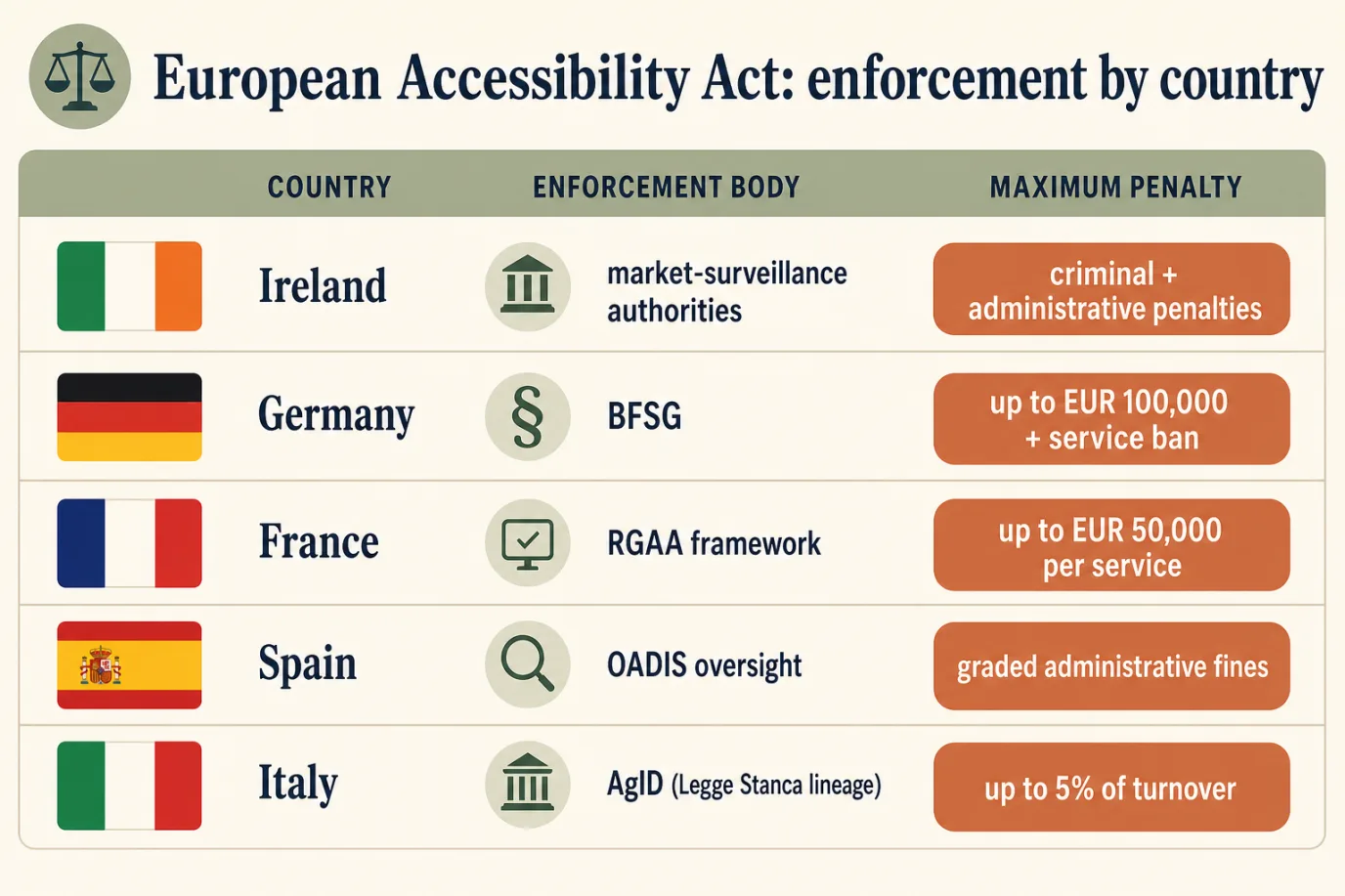
The EAA is a directive, so it does not fine anyone directly. Each member state transposed it into national law and set its own enforcement body, complaint process, and penalty ceiling. That means the practical risk depends heavily on where your guests are and where you operate, and the numbers vary by an order of magnitude. The pattern in the first year has been consistent across markets: authorities publish guidance, act on complaints and market-surveillance spot checks, and order fixes within a deadline before they reach for the maximum penalty. The real-world trigger for a hotel is usually a complaint from a guest or a disability advocacy organisation, not a regulator crawling the web at random.
Ireland
Ireland transposed the EAA through national regulations that designate market-surveillance and enforcement authorities and provide for both administrative and criminal penalties for persistent non-compliance. Enforcement is split across bodies depending on the product or service. For an English-language hotel selling into the Irish and wider EU market, Ireland is a relevant jurisdiction because language and reach make Irish consumers a natural audience. The operative posture is the same as elsewhere: a complaint or a spot check leads to an engagement and an order to remediate, with penalties escalating for operators who ignore the order. Keep your statement, your conformance evidence, and your remediation log ready to produce.
Germany: the BFSG
Germany's transposition is the Barrierefreiheitsstärkungsgesetz (BFSG), which took effect on 28 June 2025. It is one of the more clearly specified regimes and one of the more cited because of its teeth. The BFSG provides for administrative fines up to EUR 100,000 and gives the market-surveillance authority the power to prohibit a non-compliant service from being offered, which for an online hotel means an order that bites directly on the channel that sells rooms. Germany also runs a designated surveillance structure across the Länder. For any hotel with meaningful German demand, and that is a large share of European city and alpine properties, the BFSG is the regime to plan against because it combines a real fine ceiling with the power to stop the service.
France: the RGAA and the Large-Company Fine
France layered the EAA on top of an existing accessibility regime. The RGAA (Référentiel général d'amélioration de l'accessibilité) is the French reference framework that operationalises WCAG, and France already fined large companies for failing to publish accessibility information and meet requirements, with administrative penalties that reach EUR 50,000 per non-compliant service and a recurring penalty if the failure is not corrected within the set period. The EAA transposition extends the reach of the obligations and the supervisory apparatus. France also has an active culture of consumer and advocacy complaints, so the practical likelihood of a challenge is higher than the bare statute suggests. If you sell into France, expect the RGAA to be the yardstick an auditor uses.
Spain
Spain transposed the EAA into national law with administrative penalties graded by severity, in the familiar Spanish structure of leves, graves, and muy graves infractions, each with its own fine band. Oversight of accessibility for people with disabilities sits with established bodies including OADIS (the Oficina de Atención a la Discapacidad), and sector authorities handle market surveillance. For a Spanish property or any hotel with strong Spanish-market demand, the graded-penalty structure means the cost of a failure scales with how serious and how persistent it is, which rewards early voluntary remediation and punishes operators who are warned and do nothing.
Italy: the Legge Stanca Lineage
Italy has the longest accessibility-law lineage in this group. The Legge Stanca dates to 2004, and Italy's EAA transposition (built on the framework around D.Lgs. 82/2022 and the related decrees) extends private-sector obligations and supervisory powers, with AgID (the Agenzia per l'Italia Digitale) central to the oversight architecture. Italian law in this lineage allows penalties that, for the most serious cases, reach up to 5 percent of turnover, which is the highest proportional exposure of the five markets here. For an Italian hotel, the combination of a mature legal tradition and a turnover-linked ceiling makes a documented, defensible posture especially worthwhile.
The cross-market lesson is not to memorise five fine schedules. It is that the same EN 301 549 and WCAG 2.1 AA target satisfies all of them at once, so the efficient strategy is to build to the standard once, publish an honest statement, keep your evidence, and respond promptly to any complaint. A property that does those four things is defensible in every one of these jurisdictions regardless of which guest complains first.
How to Audit Your Own Site in an Afternoon
You do not need an agency to find your biggest problems. A property manager with no coding background can surface most of the high-risk failures in a single afternoon using free tools and the equipment already on the desk. A specialist audit is worth buying once you have done this and want a complete, signed assessment, but the self-audit tells you how bad the situation is and what to fix first.
Run these five passes in order. The keyboard pass: unplug or ignore the mouse and complete a full booking with Tab, Shift-Tab, arrow keys, and Enter. Note every point where you get stuck, cannot see what is focused, or cannot escape a control. This pass alone finds the level-A failures that matter most. The screen-reader pass: turn on VoiceOver (Mac, Cmd-F5) or Narrator (Windows, Ctrl-Win-Enter), close your eyes for the key steps, and try to understand each page and complete the booking. Listen for fields that read as "blank," images that read as filenames, and steps that change silently. The contrast pass: run your main text, your buttons, and your form borders through a free contrast checker (WebAIM's is the standard) and flag anything under 4.5 to 1 for text or 3 to 1 for large text and components. The automated pass: run a free scanner such as the WAVE browser extension or axe DevTools on your homepage, a room page, and each booking step; these catch missing labels, alt text, and heading problems quickly, though they find perhaps a third of issues, which is why the manual passes come first. The zoom pass: set browser zoom to 200 percent and reflow the page to a narrow window; content that disappears, overlaps, or forces horizontal scrolling fails reflow and resize criteria.
Write down what each pass finds in one shared list, tagged by where it sits (booking engine, room pages, navigation, emails, documents) and by severity (blocks a booking, degrades a booking, cosmetic). That list is the input to the cleanup plan. Most independents finish the afternoon with somewhere between fifteen and forty findings and a clear sense that three or four of them are the ones actually costing bookings.
The 30-Day Accessibility Cleanup Playbook
A 30-day plan to take a typical independent site from "we have never tested" to "defensible and improving." One operations-minded person can run it, pulling in the web developer or the booking-engine vendor for the build work. Expect a few hours a week from the manager and a concentrated block from whoever maintains the site.
Days 1 to 4: audit and triage. Run the five-pass self-audit above on the live site across desktop and mobile. Collect every finding into one list, tag by surface and severity, and identify the three or four failures that block or seriously degrade a booking. Those are the priorities; resist the urge to start with the cosmetic long tail.
Days 5 to 7: pin down the vendors. Email the booking-engine and channel-manager providers and ask, in writing, for their WCAG 2.1 AA or EN 301 549 conformance documentation, the version tested, and the date. Ask how they handle the embedded widget on a customer domain. File the responses. Where a vendor cannot answer, log it as a risk and a possible procurement decision rather than a fix you can make yourself.
Days 8 to 16: fix the booking flow. This is the heaviest block. Make the entire booking operable by keyboard, restore a visible focus indicator, give every form field a real label, fix error messages so they name the field and the problem, and bring the primary button and body text to passing contrast. Re-run the keyboard and screen-reader passes after each change until a full booking is completable without a mouse and with the screen reader on.
Days 17 to 22: fix the surrounding pages. Add alt text to meaningful images and empty alt to decorative ones, correct the heading structure, fix the navigation and language switcher for keyboard use, caption hero or tour video, and let any moving content be paused. Confirm the site reflows cleanly at 200 percent zoom.
Days 23 to 26: fix the documents and emails. Convert the confirmation, pre-arrival, receipt, and folio emails to structured HTML with readable contrast and a plain-text alternative. Move the documents you can to accessible HTML pages, and tag the PDFs you must keep. Test one of each with the screen reader.
Days 27 to 28: publish the statement. Write and publish an honest accessibility statement covering your target standard, scope, known limitations, a contact route for problems, and a review date. Set the contact channel to reach a real inbox someone monitors.
Days 29 to 30: document and schedule. Assemble the evidence pack: the audit findings and what you fixed, the vendor conformance documents, the published statement, and, if you are relying on the microenterprise exemption, the headcount and turnover figures that support it. Put a recurring quarterly re-test on the calendar, because sites regress every time the theme or the booking engine updates. Brief whoever edits the site that new images need alt text and new components need a keyboard check, so the discipline survives after the project ends.
Total effort over the 30 days: roughly 25 to 40 hours for the manager and a focused block from the developer or vendor, mostly concentrated in the booking-flow week. Properties that run this clean remove the failures that block real guests, publish a defensible posture, and usually see a small lift in direct-booking completion as a side effect, because the same fixes that help a screen-reader user also help a tired guest on a phone in bad light.
Where Prostay Fits, Briefly and Honestly
I write for Prostay, so this section is unavoidable; let me be straight about it. Prostay ships the booking engine, the website templates, and the guest-messaging rail with accessibility built into the components rather than bolted on after, which means the booking flow is built to operate by keyboard, the form fields carry real labels, the focus indicator is preserved, and the default brand palette is tuned to pass contrast. The confirmation, pre-arrival, and folio emails that the property management system sends use structured, screen-reader-friendly templates rather than flattened images. None of that is unique to Prostay; Mews, Cloudbeds, and several other vendors have done serious accessibility work on their own stacks, and any of them can give you a conformant base.
The argument for Prostay specifically is that the booking engine, the website, the PMS, and the messaging come from one team that tests them together against WCAG 2.1 AA across all five site languages, so you are not stitching an accessible widget into an inaccessible theme and hoping the seams hold. We can also hand you the vendor conformance documentation your evidence pack needs, which removes one of the slower steps in the 30-day plan. If you want the detail on the guest-facing surface, the Prostay booking engine overview walks through it, and if you would rather have our team run the self-audit and the cleanup against your live site, book a demo and we will work through your actual booking flow rather than sell you a separate accessibility retainer.
Frequently Asked Questions
Five questions independent hoteliers ask most often about the European Accessibility Act, answered against the directive and the harmonised standard rather than the trade-press summary.