Introducing Prostay Accounting Software for Hotels
 Mika Takahashi
Last updated Jan 19, 2026
Mika TakahashiProstay officially unveiled Prostay Accounting, a fully integrated hotel accounting software module built directly into the Prostay platform. This marks a substantial expansion of the Prostay ecosystem, giving hotels, resorts, hostels, and vacation rentals a purpose-built financial management solution that replaces generic programs like QuickBooks or Xero for day-to-day hotel operations.
Prostay Accounting follows hotel industry standards, including USALI-style departmental structures, and links natively with the whole Prostay stack: Prostay Property Management System, Prostay Channel Manager, Prostay Booking Engine, Prostay Nexus guest communications, and Tableview POS. This isn’t a bolt-on integration—it’s a single, unified platform where your financial data flows automatically from operations to the general ledger.
What does this mean for your property? Automated journal uploading following night audit. Multi-department and multi property reporting without spreadsheets. Real-time data sync that eliminates manual reconciliation. Fewer mistakes. Faster month-end closing. And financial teams that can now focus on analysis instead of data entry.
Request a personalized demo of Prostay Accounting. Schedule a consultation with the Prostay team.
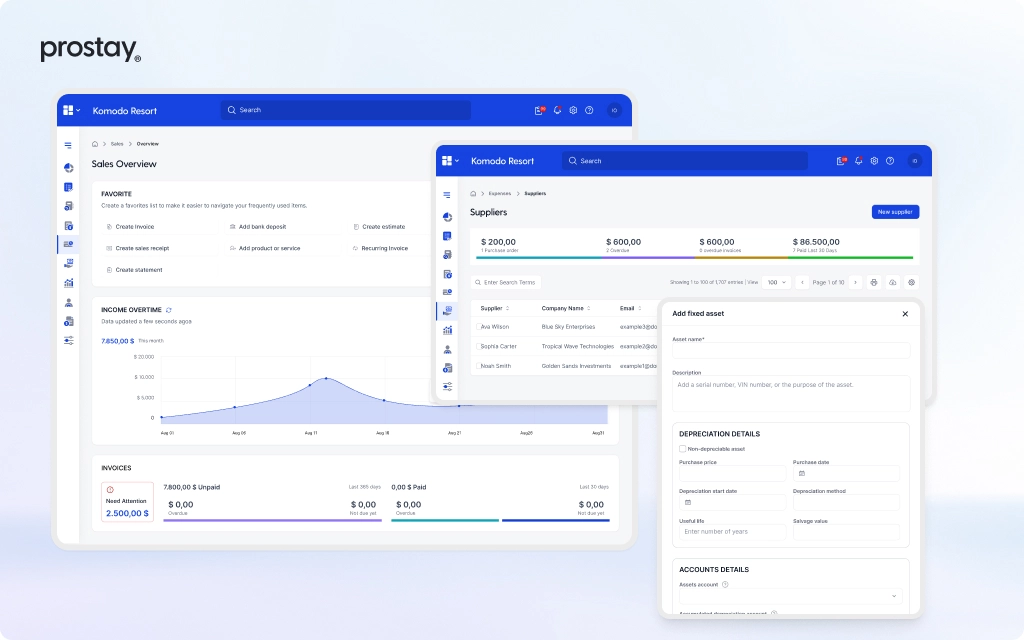
Prostay Accounting is an accounting module made just for hotels that is part of the Prostay ecosystem instead than being a separate, general ledger. It was made just for hotels and restaurants, not adapted from software made for stores or factories.
The system is set up around the hospitality workflows and departments that you really utilize, like Rooms, Food and Beverage, Spa, Events, Parking, Housekeeping, and Ancillary Services. This is in line with USALI-style segmentation, but it is still flexible enough to work with local charts of accounts and unique settings. Your hotel's profit and loss accounts show how it really works.
This is what sets it apart from other SME accounting systems:
Prostay Accounting is a cloud-based program that can be accessed from any browser. It is made for individual properties, small groups, and increasing portfolios that want enterprise-level controls without the hassle of enterprise-level complexity.
You know what the problems are if you've tried to run a hotel with QuickBooks, Xero, or Sage. Most of the time, these tools only have one "Sales" line that doesn't break down room revenue, restaurant sales, or spa services. You have to export them by hand from your property management system and point of sale. And they don't know what a department structure or several properties are.
Prostay Accounting was made just for the hotel revenue model:
| Generic Accounting Tools | Prostay Accounting |
|---|---|
| Single “Sales” category | Departmental revenue breakdown (Rooms, F&B, Spa, etc.) |
| Manual CSV exports from PMS/POS | Native integration with Prostay PMS and Tableview POS |
| No multi-property consolidation | Built-in portfolio dashboards and roll-up reporting |
| Manual tax calculations | Automated tax posting by jurisdiction and service type |
| Spreadsheet reconciliation | Automated bank and payment matching |
You just have to set up the mapping of hotel income codes to GL accounts once when you sign up. After that, every room night, restaurant check, spa treatment, and room service bill goes to the right accounts on its own. No more importing CSV files over and again, calculating taxes by hand, or re-keying data between platforms.
Prostay Accounting comes with built-in support for departmental P&L, segment reporting (corporate vs. OTA vs. direct bookings), and owner-level summaries. The business results are clear: fewer mistakes in the journal, faster closing cycles, better cash management, and full traceability for auditors and lenders that look at your financial reports.
Prostay started in 2025 as a single platform for all types of hospitality, and Prostay Accounting adds a native accounting layer to complete the operating loop. This isn't an integration with a third party; it's the same unified data model that runs all of the other Prostay modules.
The data flow works like this:
This native connection does away with middleware, unreliable file exports, and the nightly manual tasks that used to be needed to connect different vendors. You may manage both your hotel and your finances from the same place.
The Prostay Property Management System PMS takes care of all the important things you need to do every day, such making reservations, checking in and out, keeping track of guest folios, assigning rooms, moving rooms, no-shows, and cancellations in real time. It works for holiday rentals, serviced flats, hotels, hostels, and resorts.
Every item in a folio, whether a room night, an upgrade, a late checkout fee, a discount, or a tax, is linked to a revenue code that has been set up. Prostay Accounting automatically turns these into journal entries without the need for manual posting.
Night audit data from Prostay PMS flows directly into accounting:
Audit trails from the front desk to finance keep track of corrections like free stays, rate changes, or early departures. This keeps hotel operations and your books in sync.
Tableview is Prostay's built-in point of sale system for all of your property's restaurants, bars, pool bars, rooftop lounges, and other outlets. Every sale, including the item sold, the location of the outlet, the server, the payment method, and the room price, is tagged with revenue and tax codes that Prostay Accounting can read automatically.
The "post to room" feature works perfectly. In Prostay PMS, the meal and drink check for a visitor who charges their dinner to their room is added to their folio. But Prostay Accounting still sees the detailed breakdown:
The general ledger automatically gets daily POS summaries, tip liabilities, and cash drops. This helps with accurate F&B P&L, recording tips correctly, and keeping cash safe without having to enter or re-key data by hand.
This integration is especially useful for properties with more than one outlet, like a city hotel with a lobby restaurant, a rooftop bar, and room service 24 hours a day. Every source of income publishes accurately without your finance teams having to touch a spreadsheet.
Prostay Channel Manager and Booking Engine handle distribution to OTAs like Booking.com, Expedia, and Airbnb, as well as direct bookings made through your hotel's website. The idea is to get as many people as possible to stay in your hotel while also getting more direct bookings.
Prostay PMS gets reservations, rate plans, room rates, cancellation rules, and commissions, and then Prostay Accounting handles them in the proper way. The system can tell the difference between:
This means that you can look at your financial reports and see how much money each channel makes and how much money it costs to run. Your precise financial reports show you exactly where your income comes from and how much each channel costs you.
Prostay Accounting is the financial "brain" that sits below the operational layer and automatically turns operational events into debits and credits. Imagine it as the accounting software that finally gets how hotels work.
Configuration options include:
Every day, revenue journals, tax entries, deposit movements, and clearing account balances are made and posted automatically. The system keeps records that can be checked and supports approval workflows as needed. This gives your finance staff control without adding extra labor.
A hotel that uses Prostay Accounting has a typical day like this:
During the day, everything works regularly in Prostay PMS and Tableview POS. Guests check in, order food from the restaurant, pay for spa services in their rooms, then check out. Prostay Accounting posts and checks all of this data overnight. In the morning, finance looks at exceptions and analyzes performance, not data entry.
Prostay's automation takes care of 80–90% of routine postings once your mappings are set up during the first setup. Instead than moving data between systems, your team focuses on validation, variance analysis, and strategic planning.
This routine works all the time, no matter if you own one hotel or manage many. You can keep an eye on your portfolio with property tags and consolidation rules that provide you property-level detail.
Every night, Prostay takes information from Prostay PMS (rooms, packages, fees, taxes, deposits) and Tableview POS (outlet revenue, tips, discounts) and turns it into journal entries.
The system uses pre-set mapping criteria for each payment method and revenue code to make sure that the entries are balanced and point back to the original financial transactions. This is the order:
Corrections made in PMS or POS for a given date automatically create adjusting entries rather than requiring manual rework by finance.
During implementation, Prostay’s onboarding team works with your controller or accountant to map:
If your property needs that level of detail in daily revenue reports, mappings can include sectors like corporate, leisure, or OTA.
The system will use these mappings for every transaction automatically after they are set up. Are you adding a new outlet or revenue code? You may restrict changes with permissions, and they are logged for audit purposes, so you always know who made what changes and when.
Prostay Accounting imports bank statements and automatically matches them to PMS/POS payment data using rules and reference IDs:
Instead of being hidden in spreadsheets, unmatched items and anomalies like chargebacks, missed deposits, and timing differences are highlighted for inspection. This includes several bank accounts, such as operating, payroll, trust/escrow, and deposit accounts.
For properties that want to keep an eye on cash flow in real time, reconciliation happens all the time instead of just at the end of the month. This cuts the work time from hours to minutes, which makes it easier on your back office operations personnel.
Prostay uses AI-driven logic to flag unusual patterns before they become problems:
Alerts show up in dashboards or are sent by email, allowing finance and GMs time to look into problems before the end of the month. The technology learns normal patterns per outlet and property over time, which makes alerts more useful and cuts down on noise.
This isn't a mystery box. You may look into and fix problems with confidence because every warning comes with the source data and audit trails. Auditors and hotel owners may see how money goes through the system.
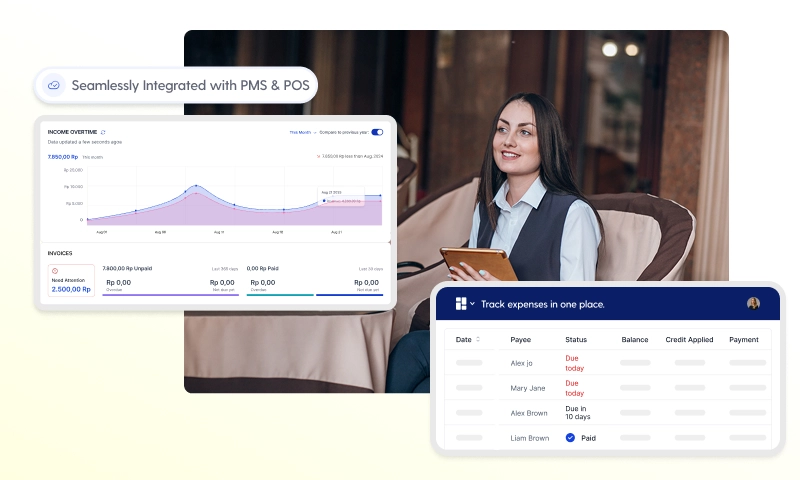
This part talks about what Prostay Accounting will have when it first comes out and what difficulties each feature will answer. Not just for big hotel chains, but also for independent hotels and small to medium-sized portfolios.
When getting ready for a demo or making your internal business case, use this list.
Prostay Accounting supports USALI-style departmental profit and loss statements:
| Department | Example Line Items |
|---|---|
| Rooms | Room revenue, packages, upgrades, cancellation fees |
| Food and Beverage | Restaurant, bar, room service, banquet |
| Spa & Wellness | Treatments, retail, memberships |
| Other Operated | Parking, laundry, activities, rentals |
| Undistributed Expenses | Admin, marketing, IT, utilities |
Multi-property organizations can see their aggregated P&L by portfolio, compare properties side by side, and dive down to see individual properties and outlets.
Costs that are centralized, like marketing, IT, or regional management fees, might be spread out across locations based on things like rooms, revenue, or bespoke drivers. Monthly P&L reports for each property, portfolio roll-up reports, and owner-specific statements that may be exported or shared with limited-access logins are some of the most common outputs.
Visual dashboards display metrics that matter for hotel management:
Prostay Accounting keeps full records of all postings, changes, and approvals, including the user, the time, and a link to the source transactions. This openness is important for making smart choices and makes auditors, lenders, and owners happy because they can check how figures are made.
You can filter reports by property, department, time period, and channel, and then save them as PDF or Excel files. Role-based access makes sure that GMs can see property-level metrics, owners can see consolidated reports, and finance can see the whole GL while keeping payroll data private.
Hospitality businesses deal with complex tax structures that generic accounting systems handle poorly. Prostay Accounting supports:
PMS and POS set up tax codes on a line-item basis. The accounting module automatically puts them into the right responsibility accounts, which cuts down on the need for manual computations and mistakes.
Prostay Accounting helps you stay compliant by giving you exportable data for local tax filings, standardized templates for auditors, and options for setting up different jurisdictions. Cross-border portfolios can use different currencies, and conversion is done in consolidation reports.
The system includes granular roles tailored to hospitality industry workflows:
| Role | Access Level |
|---|---|
| Finance Admin | Full GL access, mapping changes, period close |
| Property Accountant | Property-level journals, reporting, reconciliation |
| Property GM | Dashboards, departmental P&L, variance analysis |
| Night Auditor | Daily close, front desk reconciliation |
| Outlet Manager | Outlet-specific revenue and labor management data |
| Owner | Consolidated reports, owner statements |
You need permission to do sensitive things like modifying GL mappings, posting manual journals, or editing closed periods. These actions are always logged. Access can be broken down by property, so consumers only view financial information that is relevant to their area.
This security structure gives auditors, investors, and brand franchisors peace of mind that financial data is safe and can be tracked.
Independent hotels and small groups are dealing with growing labor costs, tiny finance teams, and more pressure to send owner reports on time and with reliable information. Many properties still close their books 10 to 15 days after the end of the month since they have to reconcile things by hand and their accounting systems aren't connected.
Prostay Accounting goes right after this. Automation can save night audit and finance teams dozens of hours each month, cut down on mistakes that need to be looked into, and speed up decision-making with real-time business analytics.
The strategic benefits are big: controllers and GMs have more time to work on pricing, cost control, and forecasting instead of moving data between systems. Management businesses can give hotel owners greater service by reporting more quickly and accurately.
Scenario 1: 70-Room Boutique Hotel
A small hotel with two restaurants and bars is switching from spreadsheets and a basic accounting solution to Prostay Accounting. Before, it took 12 days to close the month because of manual PMS exports, spreadsheet reconciliation, and processing vendor bills.
After implementing Prostay Accounting:
Scenario 2: 3-Property Regional Group
A hotel firm used to utilize Excel to manually combine their financials for hotels in the city, luxury resorts, and airports. The controller had to put together numbers from three distinct sources, which delayed owner calls.
With Prostay Accounting:
These scenarios represent typical outcomes for properties that commit to the right hotel accounting software and integrated stack.
You can add Prostay Accounting to your existing Prostay PMS and Tableview clients, or you can get it all at once as a whole stack for new customers. Properties moving from old systems can do so in stages.
Instead of just letting users set up their own accounts, Prostay offers guided onboarding. This hands-on method lowers risk and speeds up the time it takes to get value because proper mappings and tax setting are so important.
For a single hotel that is already using Prostay PMS, the typical implementation time is a few weeks. For multi-property groups moving from older systems, the implementation time is longer. The timeline relies on how complicated things are, not just how many properties there are.
Key onboarding steps include:
When it comes to data migration support, opening balances and historical summary data are included when they are needed. There is a clear division of responsibility between the Prostay team and your hotel's finance team.
Before going live, your hotel's own data is used to train finance personnel, GMs, and night auditors in a test environment. Helpdesk access, a dedicated success manager, and a knowledge base are all part of ongoing assistance. As your business expands or you add new locations and ways to make money, your configuration can change.
Prepare these items before implementation:
Identify internal champions:
Write down your current close process, including the processes, timeframes, any problems you have, so you can easily see how much better it is when you go live. This makes it simple to show hotel owners and management businesses that they are getting a good return on their investment.
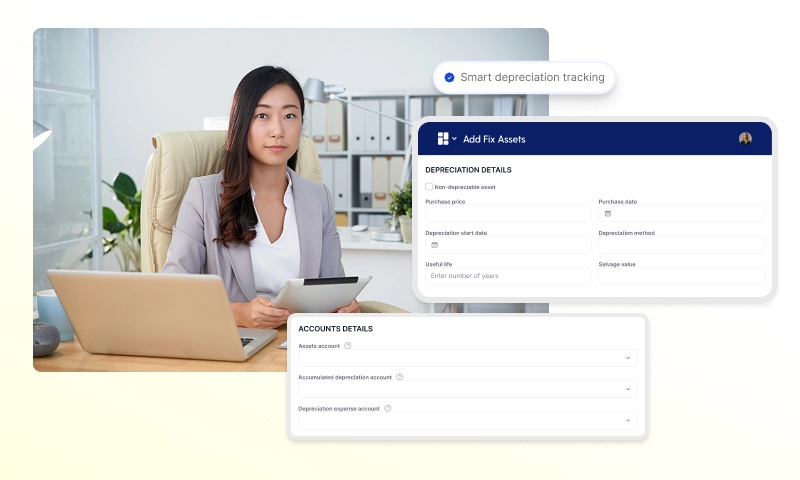
Very tiny properties with few outlets may be able to get by with just a few simple tools. But technology that gets rid of manual work will help most independent hotels and groups with more than one property or outlet a lot.
Prostay Accounting is great for properties who already use or want to use Prostay PMS and Tableview POS, or for groups that want a single platform for both operations and finances. The importance of the right hotel accounting software goes up when things get more complicated, such when there are more transactions, more outlets, more properties, or strict reporting requirements from the owner.
With Prostay's modular licensing, you can start with PMS, Channel Manager, and Booking Engine and add Accounting when you're ready. You don't have to replace everything at once. First, take care of reservations, guest messaging, and delivery. Then, if your needs change, add in financial management.
Check the signals that apply to your property:
If you answered “yes” to several items, you’re a strong candidate for Prostay Accounting. Book a demo focused on your specific workflows and pain points, and bring examples of your current reports to compare.
Prostay Accounting closes the loop between hotel operations and finance, integrating Prostay PMS, Tableview POS, Channel Manager, Booking Engine, and accounting in one cloud platform.
Core benefits worth repeating:
Ready to see how it works? Request a personalized demo of Prostay Accounting. Schedule a consultation with the Prostay team. Or contact sales for pricing based on your property size and module mix.
Bring your current PMS/POS reports and month-end bundle with you to the demo. We'll show you exactly how Prostay Accounting automates those operations. No more success stories from other hotels, just a clear image of what will change for your business.
The hospitality sector is going toward unified platforms that get rid of broken accounting processes and systems that don't talk to each other. In a competitive market, the difference between closing books in 5 days and 15 days is the difference between fixing problems and stopping them from happening in the first place.
Prostay Accounting is a newer option than old hotel stacks. It's time to bring your financial operations up to date.